
Introduction
This manual provides instructions for the Nitemode LED Light Kit, designed to enhance your Lego Ideas Twilight The Cullen House 21354 model. This kit adds adjustable lighting to bring your model to life. Please note: This product includes the light kit ONLY. The Lego building blocks are NOT included.

Image: Packaging clearly stating "ONLY LED LIGHTING, NO BUILDING BLOCK MODEL".
Safety Information
- Keep out of reach of small children due to small parts.
- Do not expose the light kit to water or extreme temperatures.
- Use only the specified power source (USB-powered).
- Avoid direct eye exposure to LED lights for prolonged periods.
- This product is intended for ages 14 and up (Manufacturer Minimum Age: 168 months).
Package Contents
Verify that all components are present before beginning installation.
- LED Light Strips and Wires
- Connection Cables
- USB Power Cable
- Touch Dimmer Switch
- Accessory Pieces (e.g., small bricks for attachment)
Note: The exact number and type of pieces may vary slightly. Refer to the online instructions for a detailed list.
Setup and Installation
This light kit is designed for integration with the Lego Ideas Twilight The Cullen House 21354 model. Detailed step-by-step instructions are provided electronically to ensure a smooth installation process.
Accessing Electronic Instructions:
- Receive Product: After receiving your light kit, locate the instruction QR code.
- Scan QR Code: Use a smartphone or tablet to scan the QR code provided on the packaging or a small card inside the box.
- Online Portal: Alternatively, visit the official support website: http://support.nitemodetoy.com
- Input Model Query: On the website, enter "21354" or "Twilight The Cullen House" to find the specific instructions for your model.
- Preview PDF: The instructions will be available in PDF format for viewing and download.

Image: Steps for accessing the electronic instruction manual.
General Installation Tips:
- Follow the electronic guide carefully, step by step.
- Ensure all wires are neatly tucked away to avoid damage and maintain the model's aesthetic.
- Connect the USB power cable to a compatible USB power source (e.g., power bank, USB wall adapter).

Image: Detailed view of installed lighting fixtures within the model.

Image: The illuminated Lego model from different perspectives.
Operating Instructions
The Nitemode LED Light Kit features a touch dimmer switch for easy control.
- Power On/Off: A single, quick tap on the touch switch will turn the lights on or off.
- Adjust Brightness: Press and hold the touch switch to smoothly adjust the brightness level. Release the switch when the desired brightness is reached.

Image: Visual guide for operating the touch dimmer switch.
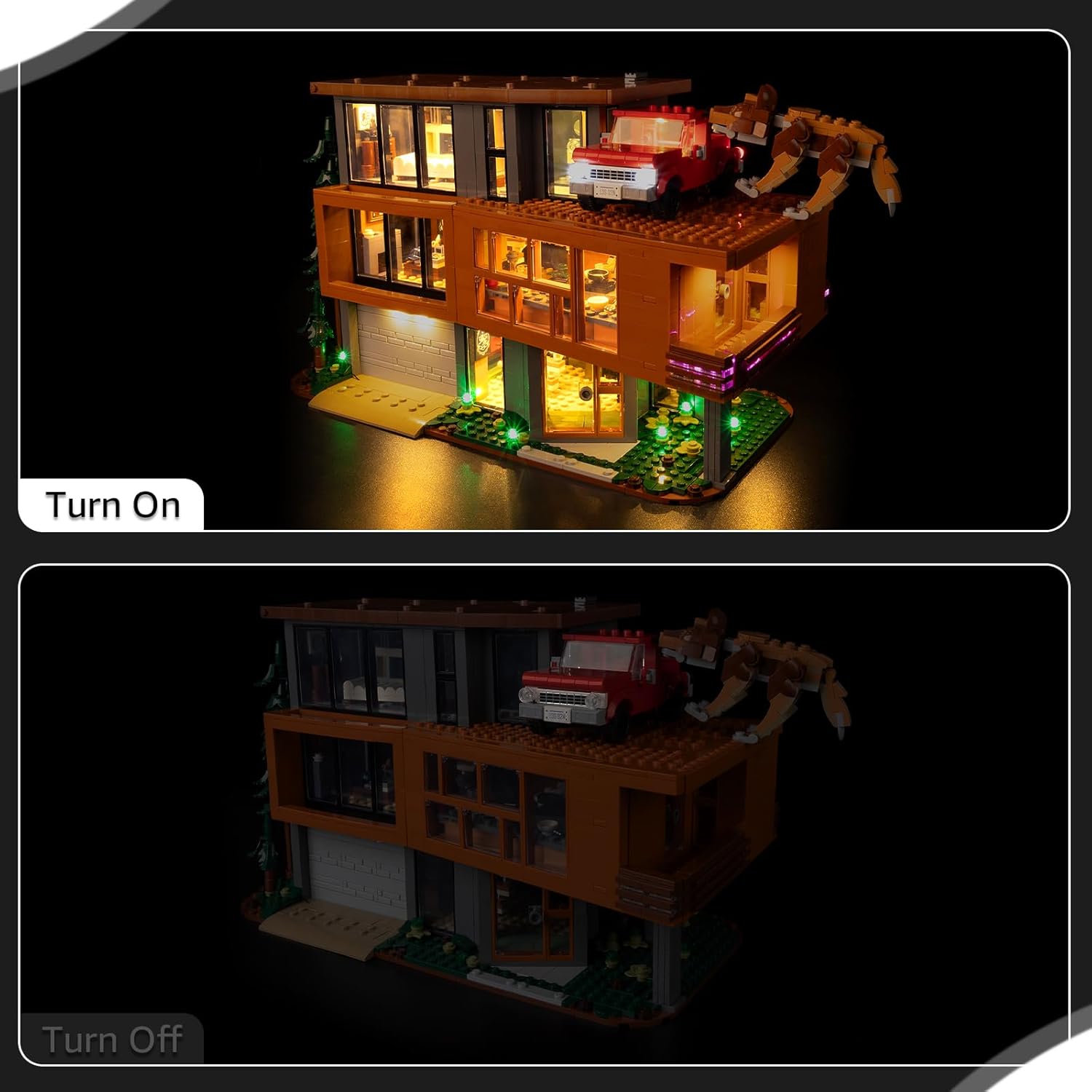
Image: Demonstration of the light kit in "Turn On" and "Turn Off" states.
Video: A demonstration of the Nitemode LED light kit installed in the Lego Twilight The Cullen House model, showcasing various illuminated sections including interior rooms, exterior lighting, and the illuminated truck and wolf figure.
Maintenance
- Cleaning: Gently wipe the LED components and wires with a dry, soft cloth. Do not use liquid cleaners.
- Storage: When not in use for extended periods, disconnect the power and store the model in a cool, dry place away from direct sunlight.
- Wire Management: Periodically check that all wires are securely connected and not pinched or damaged.
Troubleshooting
| Problem | Possible Cause | Solution |
|---|---|---|
| Lights do not turn on. | No power, loose connection, faulty switch. |
|
| Lights are dim or flickering. | Insufficient power, loose connection, brightness setting. |
|
| Some lights are not working. | Damaged LED, loose connection to specific light strip. |
|
Specifications
- Brand: Nitemode
- Model Compatibility: Lego Ideas Twilight The Cullen House 21354
- Operation Mode: Manual (Touch Dimmer)
- Power Source: Rechargeable battery (USB-powered)
- Material: Plastic
- Item Weight: Approximately 4.16 ounces
- Assembly Required: Yes
- Manufacturer Minimum Age: 168 months (14 years)
Warranty and Support
Nitemode is committed to providing high-quality products and excellent customer service. If you encounter any issues or have questions regarding your LED light kit, please do not hesitate to contact us.
Contact Information:
- Through your Amazon "Your Orders" page, select "Ask Product Question".
- For electronic instructions and further support, visit: http://support.nitemodetoy.com
We aim to respond promptly to all inquiries.