
1. Introduction
Thank you for choosing the GPEESTRAC P8-21-15 Bluetooth Wireless Earbuds. These earbuds feature advanced Bluetooth 5.3+EDR technology, delivering high-fidelity audio with powerful bass and clear vocals. Designed for comfort and durability, they offer IPX5 water resistance and intuitive touch controls for a seamless audio experience in various daily scenarios.

Image 1.1: GPEESTRAC P8-21-15 Wireless Earbuds and key features.
2. Package Contents
Please check the package for the following items:
- GPEESTRAC P8-21-15 Wireless Earbuds (Left and Right)
- Charging Case
- USB Type-C Charging Cable
- User Manual
- Multiple sizes of Eartips (S, M, L)
3. Product Overview
Familiarize yourself with the components and controls of your earbuds.
3.1 Earbud Components

Image 3.1: Earbuds in charging case, highlighting Bluetooth technology.
3.2 Touch Control Area

Image 3.2: Earbud in ear, illustrating touch control functions.
4. Setup
4.1 Charging the Earbuds and Case
Before first use, fully charge the earbuds and charging case. The charging case features an LED display to indicate battery levels.
- Place the earbuds into the charging case.
- Connect the USB Type-C charging cable to the charging port on the case and a power source.
- The LED display on the case will show charging progress. A full charge provides up to 20 hours of total playback time with the case. A 10-minute charge can provide approximately 2 hours of use.
4.2 Initial Pairing
The earbuds support automatic pairing for convenience.
- Open the charging case. The earbuds will automatically power on and enter pairing mode.
- On your device (smartphone, tablet, PC), enable Bluetooth and search for available devices.
- Select "P8-21-15" from the list of devices to connect.
- Once connected, you will hear a confirmation tone, and the earbuds will be ready for use.
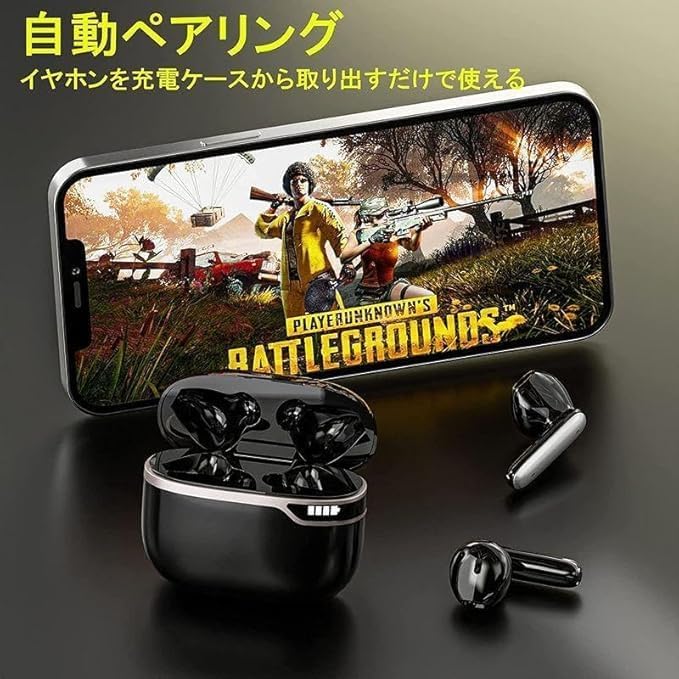
Image 4.1: Earbuds automatically pairing with a device.
4.3 Reconnecting
After initial pairing, the earbuds will automatically reconnect to the last paired device when removed from the charging case, provided Bluetooth is enabled on the device.
5. Operating Instructions
The P8-21-15 earbuds feature intuitive touch controls for various functions.
| Function | Action |
|---|---|
| Power On | Open charging case or long press touch area (if off) |
| Power Off | Place earbuds in charging case and close lid, or long press touch area (if not in use) |
| Play/Pause Music | Single tap on either earbud |
| Next Track | Double tap right earbud |
| Previous Track | Double tap left earbud |
| Volume Up | Triple tap right earbud |
| Volume Down | Triple tap left earbud |
| Answer/End Call | Single tap on either earbud |
| Reject Call | Long press on either earbud |
| Activate Voice Assistant (Siri) | Long press on either earbud (when not on a call) |
5.1 Single and Dual Earbud Use
The earbuds can be used individually or as a pair.
- Dual Earbud Mode: Remove both earbuds from the charging case. They will automatically connect to each other and then to your device.
- Single Earbud Mode: Remove only one earbud from the charging case. It will automatically connect to your device. The other earbud can remain in the case or be used later.

Image 5.1: Illustrating single or dual earbud usage.
6. Maintenance
6.1 Cleaning
- Regularly clean the earbuds and charging case with a soft, dry, lint-free cloth.
- Do not use harsh chemicals, cleaning solvents, or strong detergents.
- Clean the charging contacts on both the earbuds and the case to ensure proper charging.
6.2 Storage
- Store the earbuds in their charging case when not in use to protect them and keep them charged.
- Avoid storing in extreme temperatures (hot or cold) or in humid environments.
7. Troubleshooting
If you encounter any issues, please refer to the following common solutions:
- Earbuds not pairing: Ensure both earbuds are charged. Place them back in the case, close the lid, then open it again to re-initiate pairing mode. Delete "P8-21-15" from your device's Bluetooth list and try pairing again.
- No sound from one earbud: Try resetting the earbuds by placing them in the case and then taking them out. Ensure both earbuds are connected to your device.
- Charging issues: Check the USB Type-C cable and power adapter. Ensure the charging contacts on the earbuds and case are clean and free of debris.
- Poor sound quality/disconnections: Ensure your device is within the 10-15m Bluetooth range and there are no significant obstacles.
If the problem persists, please contact customer support.
8. Specifications
| Feature | Specification |
|---|---|
| Model | P8-21-15 |
| Bluetooth Version | 5.3 + EDR |
| Wireless Range | 10-15 meters (without obstacles) |
| Driver Size | 10mm Dynamic Driver |
| Audio Features | Hi-Fi Stereo Sound, Powerful Bass, ENC Noise Reduction for Calls |
| Battery Life (Earbuds) | Up to 6 hours (single charge) |
| Total Playback Time | Up to 20 hours (with charging case) |
| Charging Port | USB Type-C |
| Fast Charging | 10 minutes charge for approx. 2 hours playback |
| Water Resistance | IPX5 |
| Compatibility | iPhone, Android, PC, Tablets |
| Control Type | Touch Control |
9. Safety Information
- Do not disassemble or modify the product.
- Keep away from extreme temperatures, direct sunlight, and open flames.
- Avoid prolonged exposure to high volume levels to prevent hearing damage.
- Keep out of reach of children and pets.
- Dispose of the product responsibly according to local regulations.
10. Warranty and Support
GPEESTRAC products come with a standard 1-year limited warranty from the date of purchase. This warranty covers manufacturing defects but does not cover damage caused by misuse, accidents, or unauthorized modifications.
For technical support, warranty claims, or any questions regarding your GPEESTRAC P8-21-15 earbuds, please contact our customer support team via the retailer's platform or the contact information provided with your purchase.

Image 10.1: Earbuds suitable for various activities.