
Introduction
Thank you for choosing the TIMU A9 Bluetooth Earbuds. These earbuds are designed to provide a superior audio experience with advanced features such as Bluetooth 5.4 connectivity, Environmental Noise Cancellation (ENC) for clear calls, HiFi stereo sound, and a long-lasting battery. This manual will guide you through the setup, operation, and maintenance of your new earbuds.
What's in the Box
- TIMU A9 Bluetooth Earbuds (Left and Right)
- Charging Case
- User Manual
- USB Type-C Charging Cable (not explicitly listed but implied by TypeC interface)
Product Overview
The TIMU A9 earbuds feature an ergonomic in-ear design for comfort and stability. The charging case includes an LED display to show battery levels for both the case and individual earbuds.
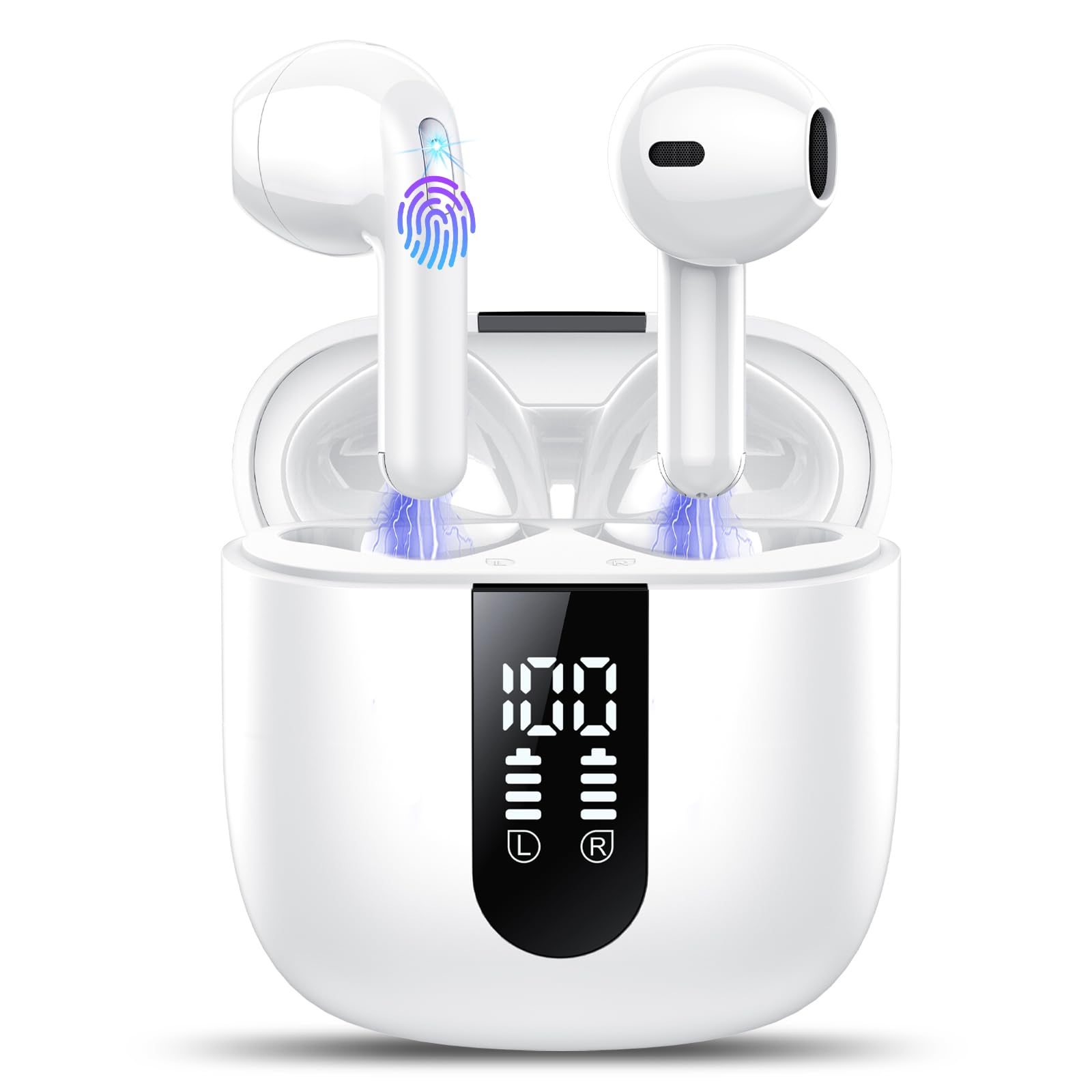
The TIMU A9 Bluetooth earbuds are shown in their open charging case, highlighting their compact design and the digital LED display on the case.

An overview of the TIMU A9 earbuds highlighting key features such as 50 hours playtime, IPX7 waterproof rating, Bluetooth 5.4, and 14.2mm large drivers.
Setup
1. Charging the Earbuds and Case
Before first use, fully charge the earbuds and the charging case. Connect the provided USB Type-C cable to the charging port on the case and a power source. The LED display on the case will indicate the charging status and battery level. The earbuds can provide up to 8 hours of playback on a single charge, and the charging case extends this to a total of 50 hours.

The charging case with earbuds inside, displaying LED indicators for battery levels and highlighting 8 hours of single charge playtime and 50 hours total with the case.
2. Pairing with Your Device
- Open the charging case. The earbuds will automatically power on and enter pairing mode.
- On your device (smartphone, tablet, computer), enable Bluetooth.
- Search for available Bluetooth devices and select "A9" from the list.
- Once connected, you will hear a confirmation prompt, and the earbuds will be ready for use.
After the initial pairing, the earbuds will automatically connect to your device when you open the charging case, provided Bluetooth is enabled on your device.

An image illustrating the Bluetooth 5.4 pairing process, showing the earbuds and charging case next to a smartphone displaying Bluetooth settings with the 'A9' device connected.
Operating Instructions
Wearing the Earbuds
The TIMU A9 earbuds are designed for a secure and comfortable fit. Insert the earbuds into your ears and gently rotate them to find the optimal angle (approximately 45°) that feels snug and stable. This ensures the best sound quality and prevents them from falling out during activity.

A person wearing the TIMU A9 earbuds, demonstrating their ergonomic design and comfortable fit for extended use.

A visual guide demonstrating how to achieve a secure and comfortable fit with the TIMU A9 earbuds, showing the 45-degree angle and lightweight design.
Touch Controls
Each earbud is equipped with a sensitive touch control area. The following gestures allow you to manage music, calls, and voice assistant functions:
- Double Tap (x2): Play/Pause music, Answer/End calls.
- Long Press (x2s): Next track (Right earbud), Previous track (Left earbud), Reject call.
- Single Tap (x1): Volume Up (Right earbud), Volume Down (Left earbud).
- Triple Tap (x3): Activate Voice Assistant (Siri, Google Assistant).

A visual guide detailing the touch control functions of the TIMU A9 earbuds, including gestures for music playback, call management, volume adjustment, and voice assistant activation.
Maintenance
To ensure the longevity and optimal performance of your TIMU A9 earbuds, follow these maintenance guidelines:
- Cleaning: Regularly clean the earbuds and charging case with a soft, dry, lint-free cloth. Avoid using abrasive materials or harsh chemicals.
- Water Resistance: The earbuds are IP7 waterproof, meaning they are protected against immersion in water up to 1 meter for up to 30 minutes. They are resistant to sweat and rain, making them suitable for workouts and outdoor activities. However, they are not designed for swimming or prolonged water immersion. Ensure the earbuds are dry before placing them back in the charging case.
- Storage: Store the earbuds in their charging case when not in use to protect them and keep them charged. Avoid exposing them to extreme temperatures or direct sunlight.

An image showcasing the IPX7 waterproof feature of the TIMU A9 earbuds, with water droplets on the earbuds, indicating resistance to sweat and rain.
Troubleshooting
If you encounter any issues with your TIMU A9 earbuds, please refer to the following common solutions:
- Earbuds not pairing: Ensure both earbuds are charged. Place them back in the case, close it, then open it again to re-enter pairing mode. Check your device's Bluetooth settings to ensure it's discoverable and try reconnecting.
- Only one earbud working: Try resetting the earbuds. Place both earbuds in the charging case, close the lid, wait a few seconds, then open it again. If the issue persists, try re-pairing them with your device.
- Poor sound quality: Ensure the earbuds are properly seated in your ears. Check the audio source and volume levels on both your device and the earbuds. Clean any debris from the earbud speakers.
- Charging issues: Ensure the charging cable is securely connected to both the case and the power source. Check if the charging port is clean and free of debris.
- No sound: Verify that the earbuds are connected to your device and that the volume is turned up. Ensure the audio is playing from the correct output device on your phone/computer.
If these steps do not resolve the issue, please contact customer support.
Specifications
| Model Name | A9 |
| Bluetooth Version | 5.4 |
| Wireless Range | Up to 15 meters |
| Playtime (Single Charge) | Up to 8 hours |
| Total Playtime (with Case) | Up to 50 hours |
| Charging Interface | Type-C |
| Noise Control | Environmental Noise Cancellation (ENC) |
| Driver Size | 14.2mm Dynamic Graphene Driver |
| Water Resistance Rating | IP7 |
| Earbud Weight | Approx. 3g |
| Frequency Range | 20Hz - 20,000Hz |
| Control Method | Touch |
| Compatible Devices | iOS/Android Smartphones, TV, Computers, Laptops |

A detailed illustration of the 14.2mm dynamic graphene driver inside the TIMU A9 earbuds, emphasizing its role in delivering enhanced bass and high-fidelity audio.

An image demonstrating the ENC (Environmental Noise Cancellation) feature of the TIMU A9 earbuds, showing a person making a clear call with reduced background noise.
Warranty and Support
The TIMU A9 Bluetooth Earbuds come with a 2-year manufacturer warranty from the date of purchase. This warranty covers manufacturing defects and ensures your product is free from material and workmanship flaws under normal use.
For warranty claims, technical support, or any questions regarding your product, please contact TIMU customer service through the retailer's platform or the official TIMU website. Please have your purchase receipt and product model number (A9) ready when contacting support.