
1. Introduction
This instruction manual provides essential information for the proper use and maintenance of your uehba replacement remote control. This remote is specifically designed to be compatible with various Twin Star Fireplace models, offering a convenient and reliable solution for controlling your fireplace functions.
The remote control is pre-programmed and requires no additional setup. Simply install the batteries, and it will be ready for immediate use with your compatible Twin Star Fireplace.
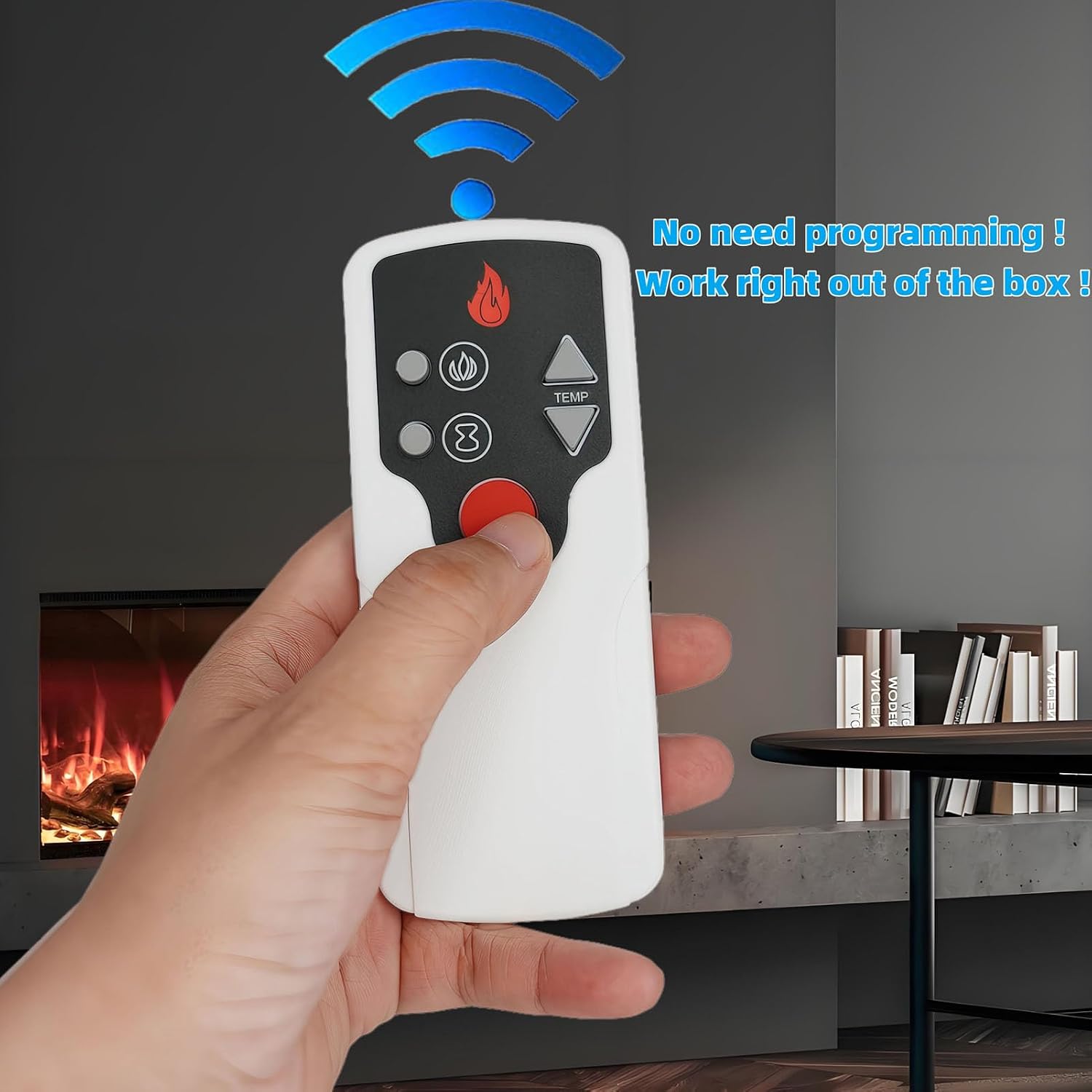
Figure 1.1: The uehba replacement remote control, highlighting its pre-programmed functionality.
2. Product Overview
The uehba replacement remote control is designed to function seamlessly with specific Twin Star Fireplace models. It provides direct access to essential fireplace controls, including power, flame effects, and temperature adjustments.
2.1. Compatibility
This remote control is compatible with the following Twin Star Fireplace remote control model P115 and fireplace models:
- Twin Star Fireplace Remote Control Model: P115
- Twin Star Fireplace Models: 23II033FGL, 23II332FGL, 23IRM7491

Figure 2.1: Visual representation of the replacement remote's compatibility with the original Twin Star remote design.
2.2. Remote Control Layout

Figure 2.2: Front view of the uehba replacement remote control.
The remote features clearly labeled buttons for intuitive operation:
- Power Button (Red Circle): Turns the fireplace on or off.
- Flame Effect Button (Flame Icon): Controls the flame effect settings.
- Brightness/Intensity Buttons (Two Circles): Typically adjust the brightness or intensity of the flame.
- Temperature Up Button (TEMP Up Arrow): Increases the desired temperature setting.
- Temperature Down Button (TEMP Down Arrow): Decreases the desired temperature setting.
- Timer Button (Infinity Symbol): May activate or adjust a timer function for the fireplace.
3. Setup
The uehba replacement remote control is designed for immediate use without any programming. The only setup required is the installation of batteries.
3.1. Battery Installation
- Locate the battery compartment cover on the back of the remote control.
- Slide the cover downwards or press the latch to open the compartment.
- Insert two (2) 1.5V AAA alkaline batteries, ensuring the correct polarity (+ and -) as indicated inside the compartment.
- Replace the battery compartment cover, ensuring it clicks securely into place.
Note: Batteries are not included with the remote control.

Figure 3.1: Battery compartment for two AAA batteries.
4. Operating Instructions
Once batteries are installed, the remote control is ready to operate your compatible Twin Star Fireplace. Ensure there is a clear line of sight between the remote and the fireplace's receiver.
4.1. Basic Operation
- Power On/Off: Press the red circular button to turn the fireplace on or off.
- Adjusting Temperature: Use the TEMP Up (▲) and TEMP Down (▼) buttons to increase or decrease the desired heat setting.
- Controlling Flame Effects: Press the Flame Icon button to cycle through different flame effect settings or to turn them on/off.
- Adjusting Brightness/Intensity: The two circular buttons below the flame icon typically adjust the brightness or intensity of the flame effects.
- Timer Function: Press the Infinity Symbol button to activate or adjust the fireplace's timer function, if available. Refer to your fireplace's manual for specific timer settings.
For detailed information on specific fireplace features and their operation, please consult the instruction manual provided with your Twin Star Fireplace unit.
5. Maintenance
5.1. Battery Replacement
Replace batteries when the remote's range decreases or if it becomes unresponsive. Always replace both AAA batteries simultaneously with new ones. Do not mix old and new batteries, or different types of batteries.
5.2. Cleaning
To clean the remote control, gently wipe the surface with a soft, dry cloth. Do not use abrasive cleaners, solvents, or wet cloths, as these can damage the remote's finish or internal components.
5.3. Storage
When not in use for extended periods, it is recommended to remove the batteries to prevent leakage and potential damage to the remote control.
6. Troubleshooting
| Problem | Possible Cause | Solution |
|---|---|---|
| Remote control is not working. |
|
|
| Fireplace does not respond to specific buttons. |
|
|
| Remote requires programming. | This remote is pre-programmed. If it's not working, it's likely a battery or compatibility issue, not a programming requirement. | Ensure your fireplace model is listed as compatible. Check batteries and line of sight. No programming steps are needed for this device. |
7. Specifications
| Brand | uehba |
| Model Number | P115 (CYCS-10B) |
| Compatible Fireplace Models | 23II033FGL, 23II332FGL, 23IRM7491 |
| Product Dimensions | 4.73 x 1.97 x 0.56 inches |
| Item Weight | 1.13 ounces |
| Batteries Required | 2 x 1.5V AAA Alkaline Batteries (not included) |
| Color | White |
| Special Feature | No Programming Required |
8. Warranty and Support
For any questions regarding the uehba replacement remote control, including compatibility or operational issues not covered in this manual, please contact the seller or manufacturer directly. Please retain your proof of purchase for any warranty claims.
As this is a replacement product, specific warranty terms may vary. Refer to the original product listing or contact the seller for detailed warranty information.