1. Introduction
The SEESII SG-003A is a versatile analog current-voltage signal generator designed for industrial and scientific applications. It functions as a simulator for 4-20mA current and 0-24V voltage signals, offering real-time curve monitoring, historical record storage, and programmable multi-signal functions. This manual provides detailed instructions for the proper setup, operation, and maintenance of your device.
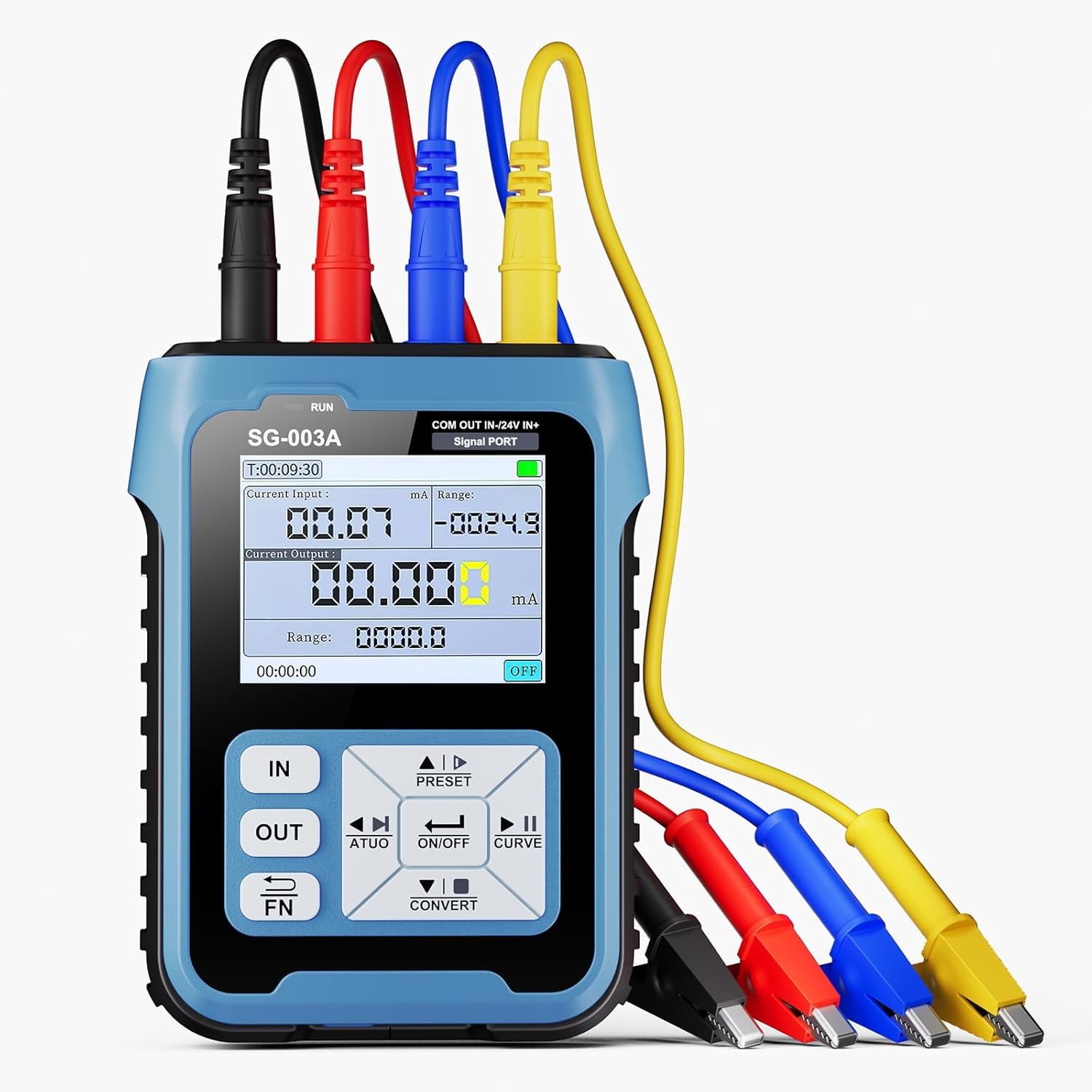
Figure 1.1: Overview of the SEESII SG-003A Multifunctional Signal Generator.
2. Product Features
- Live Curve Visualization: Monitor input and output signal patterns through a real-time curve. Users can set the curve's sampling interval, and the simulator automatically adjusts the displayed curve within the predefined range.
- Diverse Signal Capabilities: The signal generator offers a range of signal types, such as 0-24mA current, 0-24V voltage, XMT passive current, and Hz pulse. This broad spectrum ensures suitable signals for various professional uses.
- Rapid Preset Tuning: Equipped with 4 sets of preset signal values, it allows for quick adjustments. It also transforms input signals into different output formats, proving itself a highly functional and dependable tool for professionals in various sectors.
- Multiple Ports: Boasts 4 inner diameters and 4mm ports. The Blue (IN-) serves as an alternative function/input, which can be switched to a 24V test power source. The Red (OUT) and Black (COM) ports constitute the output interface, while the Yellow (IN+) and Blue (IN-) form the input interface. Color-coded design enables straightforward identification.
- Programmable Output: Output magnitude adjusts automatically according to configurations. Users can choose among three operating modes: steady ascent, steady descent, or cyclic operation.
- 2.4-inch TFT Display with Backlight: Provides clear visibility of readings and settings.
- Built-in 3000mAh Rechargeable Battery: Offers extended operation and portability.

Figure 2.1: The 2.4-inch TFT Display with Backlight for clear readings.
3. Package Contents
Verify that all items are present in your package:
- Signal Generator (1 unit)
- USB Type-C Cable (1 unit)
- USB Charger (1 unit)
- Alligator Clips (4 units: Blue, Yellow, Black, Red)

Figure 3.1: Complete Accessory Kit.
4. Specifications
| Parameter | Value |
|---|---|
| Model Number | SG003ca |
| Item Weight | 490 g |
| Parcel Dimensions | 15.6 x 14.6 x 9.3 cm |
| Battery Type | 1 Lithium Ion battery (included) |
| Measurement Accuracy | 0.01 |
| Manufacturer | SEESII |
5. Setup
5.1 Charging the Device
The SG-003A comes with a built-in 3000mAh Lithium Ion battery. Before first use, fully charge the device using the provided USB Type-C cable and USB charger. A full charge typically takes 4-6 hours and provides up to 8 hours of continuous use or 24 hours of standby time.

Figure 5.1: Charging the SG-003A via Type-C Port.
5.2 Port Identification and Wiring
The device features clearly labeled and color-coded ports for easy identification and connection. Refer to the diagram below for port layout:

Figure 5.2: Device Overview with Labeled Components.
The main ports are:
- Black (COM): Common port. In input mode, paired with Blue (IN-) or Yellow (IN+) for signal reception. In output mode, paired with Red (OUT) or Blue (IN-) (24V) for signal output or power.
- Red (OUT): Output port. Paired with Black (COM) for signal output.
- Blue (IN-): Dual-function port. Input negative, paired with Yellow (IN+) for signal reception. Can also be switched to a 24V test power source when paired with Black (COM).
- Yellow (IN+): Input port. Paired with Blue (IN-) for the external signal's positive terminal.

Figure 5.3: Port Layout and General Connection Diagram.
Wiring Examples:
Output Port Wiring: Connect the Red (OUT) and Black (COM) ports to your PLC or process instrument for signal output.

Figure 5.4: Output Port Wiring.
Dual-Function Port Wiring (24V Power): Use the Blue (IN-) and Black (COM) ports to supply 24V power and monitor feedback, for example, with pneumatic valves.

Figure 5.5: Dual-Function Port Wiring for 24V Power.
Input Port Wiring: Connect the Yellow (IN+) and Blue (IN-) ports to receive external signals, such as valve position feedback.

Figure 5.6: Input Port Wiring for Signal Reception.
6. Operating Instructions
6.1 Power On/Off
Press and hold the ON/OFF button to power the device on or off.
6.2 Signal Generation Modes
The SG-003A supports various output signal types:
- Active Current (0-24mA)
- Passive Current (0-24mA)
- Voltage (0-24V)
- Frequency/PWM (0-9999Hz)
- 24V Loop (0-24mA)
Use the navigation buttons (UP, DOWN, LEFT, RIGHT) and the ENTER button to navigate through the menu and select the desired output mode.
6.3 Adjusting Output Parameters
Once an output mode is selected, use the navigation buttons to adjust the specific parameters (e.g., current value, voltage value, frequency, duty cycle for PWM). The display will show the current settings and real-time output.
6.4 Real-Time Curve Monitoring
The device can display a real-time curve of the input or output signal. To access this feature, navigate to the curve monitoring option in the menu. You can adjust the sampling interval for the curve display.

Figure 6.1: Real-Time Curve Monitoring in action.
6.5 Using Preset Values
The SG-003A includes 4 sets of preset signal values for quick adjustments. Use the PRESET button to cycle through or select these stored configurations.
6.6 Programmable Output
For automated testing, configure the programmable output feature. You can set the output to operate in steady ascent, steady descent, or cyclic modes. Refer to the on-screen menu for detailed programming steps.
6.7 Demonstrative Video: Waveform Generation
Watch this video to see various waveforms generated by a similar function generator, demonstrating the capabilities of such devices in testing environments.
Video 6.1: Demonstration of various waveform outputs (Sine, Square, Triangle, Sawtooth, ECG, etc.) from a function generator, displayed on an oscilloscope.
7. Maintenance
7.1 Cleaning
Wipe the device with a soft, dry cloth. Do not use abrasive cleaners or solvents, as these may damage the casing or screen. Ensure no liquids enter the ports.
7.2 Storage
Store the SG-003A in a cool, dry place away from direct sunlight and extreme temperatures. If storing for extended periods, ensure the battery is partially charged (around 50%) to prolong its lifespan.
7.3 Silicone Protection
The device is designed with silicone protection on both sides and integrated non-slip silicone stripes for durability and grip. While this offers protection, avoid dropping the device from significant heights.

Figure 7.1: Silicone Protection on the SG-003A.
8. Troubleshooting
8.1 Device Not Powering On
- Ensure the battery is sufficiently charged. Connect the device to the charger and wait for at least 30 minutes before attempting to power on again.
- Verify that the power button is pressed and held correctly.
8.2 Incorrect Output Readings
- Check all wiring connections for proper polarity and secure contact.
- Ensure the correct output mode and parameters are selected in the device settings.
- Verify the external device or circuit being tested is functioning correctly.
8.3 Display Issues
- If the display is dim, adjust the backlight settings in the device menu.
- If the screen is unresponsive, try restarting the device.
For issues not covered here, please contact SEESII customer support.
9. Warranty and Support
The SEESII SG-003A Signal Generator comes with a manufacturer's warranty. Please refer to the warranty card included in your package for specific terms and conditions. For technical support, troubleshooting assistance, or warranty claims, please contact SEESII customer service through their official channels.


