1. Introduction
Thank you for choosing the MOUNTAINONE 30M Fishfinder. This device is designed to enhance your fishing experience by providing clear underwater visibility with its high-definition camera and IPS monitor. This manual provides essential information for the safe and effective use of your new fishfinder.

The MOUNTAINONE 30M Fishfinder features a 4.3-inch IPS color display, a 1200TVL HD underwater camera with 165-degree wide-angle view, and adjustable LED lighting for various conditions. Its robust design and long-lasting 8500mAh battery make it suitable for diverse fishing environments, including ice, lake, and sea fishing.
2. Package Contents
Please check the package for the following items:
- 4.3-inch IPS Monitor
- 1200TVL Underwater Camera with 30-meter Cable
- Power Adapter/Charger
- Float
- Sun Visor
- Mounting Accessories
- Protective Cover
- Securing Band
- User Manual

3. Safety Information
- Water Safety: Ensure all connections are secure before deploying the camera in water. Do not submerge the monitor.
- Electrical Safety: Use only the provided charger. Do not attempt to open or modify the battery pack or monitor. Keep charging ports dry.
- Battery Care: Avoid extreme temperatures. Do not puncture or damage the battery. Dispose of batteries according to local regulations.
- Cable Handling: Handle the camera cable with care to prevent kinks or damage. Avoid sharp objects.
- Children: Keep the device out of reach of children to prevent accidental damage or injury.
4. Product Features
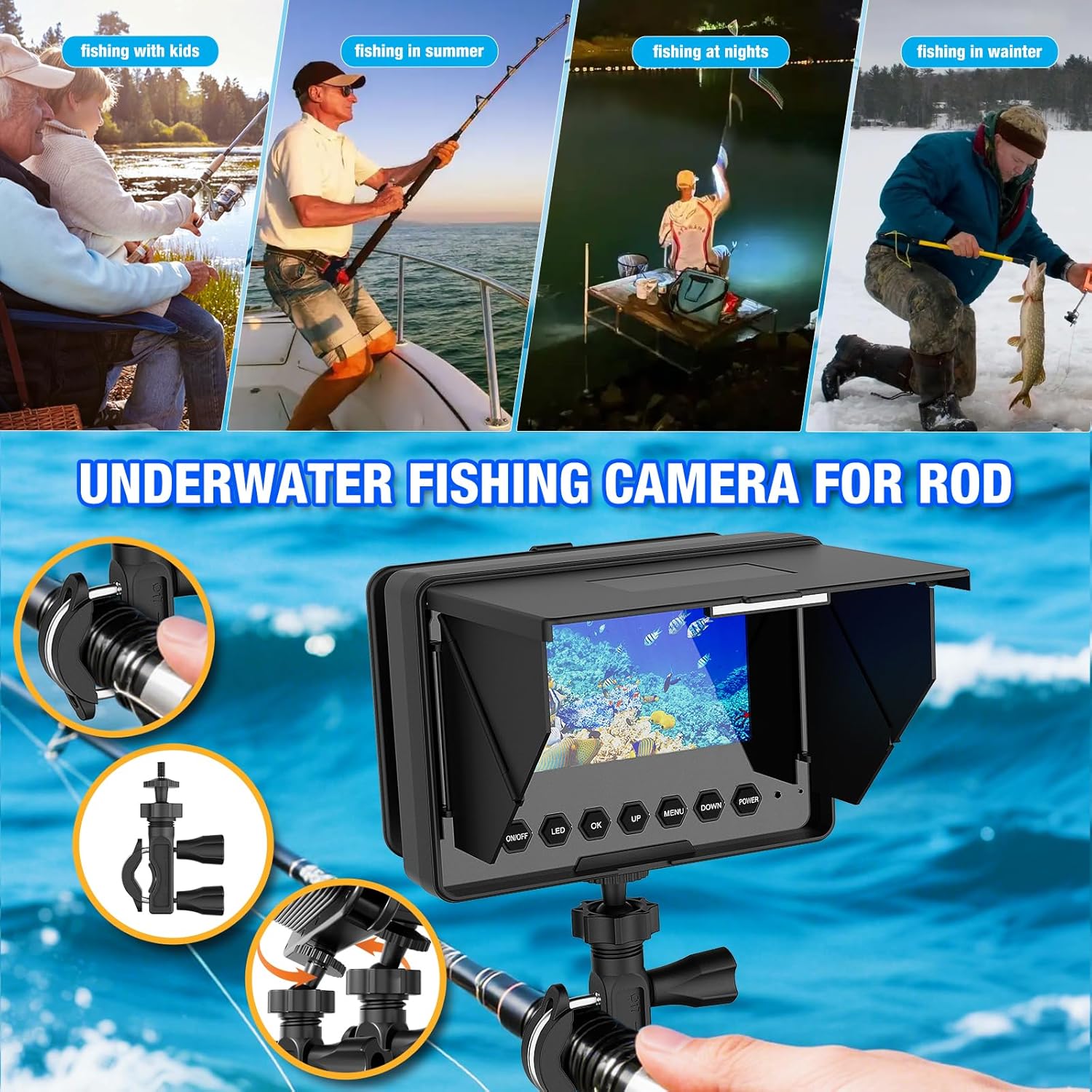
- 4.3-inch IPS Color Monitor: Provides clear, vivid underwater images in real-time with an integrated sun visor for outdoor use.
- HD 1200TVL Camera: Megapixel camera delivers sharp, detailed visuals of the underwater environment.
- IP68 Waterproof & 165° Wide Angle: The camera is fully waterproof and offers a broad field of view, supporting both vertical and horizontal perspectives.
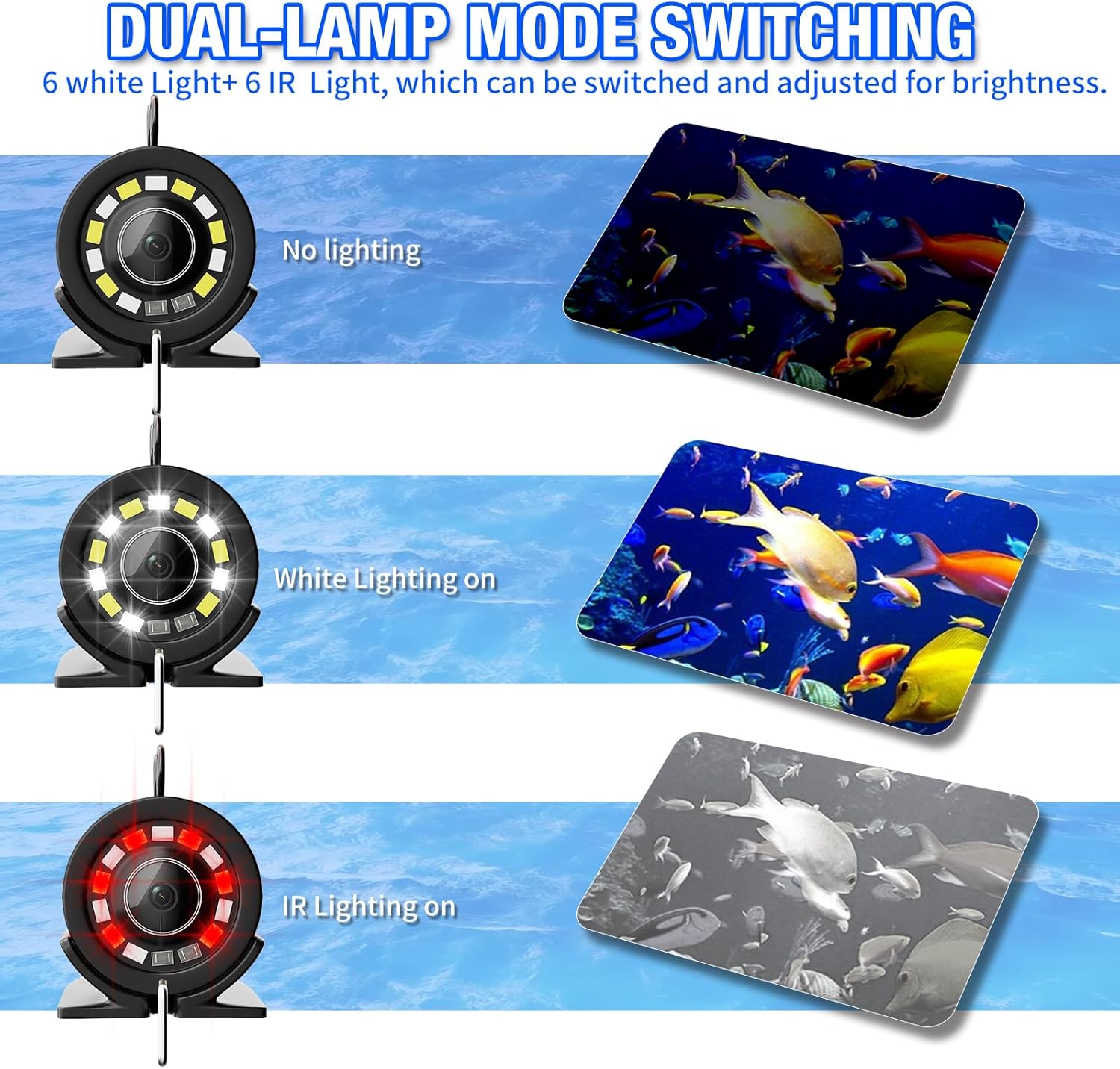
- Adjustable LED Lighting: Equipped with 12 LEDs (6 white and 6 infrared) for enhanced visibility in various light conditions, including night vision. Brightness is adjustable.
- 8500mAh Rechargeable Battery: Offers 6 to 10 hours of continuous operation on a single charge, ensuring extended fishing sessions.
- Durable Cable: The camera cable is designed to be cold-resistant, waterproof, and resistant to tension, suitable for diverse water conditions.
- Portable Design: Comes in a compact, portable case for easy storage and transport.
5. Setup
5.1 Initial Charging
Before first use, fully charge the monitor's built-in 8500mAh battery. Connect the provided charger to the USB Type-C charging port on the monitor and plug it into a power outlet. The charging indicator will show the charging status.
5.2 Connecting the Camera
Carefully connect the camera cable to the designated port on the monitor. Ensure the connection is firm and secure to prevent water ingress.
5.3 Mounting the Monitor and Camera
Use the provided mounting accessories to secure the monitor to your fishing rod or other stable surface. Attach the float to the camera cable at the desired depth to control the camera's position in the water.

6. Operating Instructions
6.1 Power On/Off
Press and hold the ON/OFF button on the monitor to power the device on or off.
6.2 Monitor Controls
The monitor features several buttons for control:
- ON/OFF: Powers the device on or off.
- LED: Toggles between LED lighting modes (Off, White LEDs, IR LEDs) and adjusts brightness.
- OK: Confirms selections in the menu.
- UP: Navigates up in menus or increases values.
- MENU: Accesses the main menu for settings adjustments.
- DOWN: Navigates down in menus or decreases values.
- POWER: (Often combined with ON/OFF or for quick power management) Refer to specific model for exact function if different from ON/OFF.
6.3 Adjusting LED Lights
Press the LED button to cycle through the lighting modes: no lighting, white lighting on, and infrared (IR) lighting on. Use the UP and DOWN buttons to adjust the brightness of the selected LED mode.
6.4 Deploying the Camera
Carefully lower the camera into the water to the desired depth. The 165-degree wide-angle lens provides a broad view. The camera supports both vertical and horizontal viewing angles.

7. Maintenance
7.1 Cleaning
- Monitor: Wipe the screen and body with a soft, dry cloth. For stubborn marks, use a slightly damp cloth and dry immediately. Avoid abrasive cleaners.
- Camera: After each use, rinse the camera and cable with fresh water to remove salt, dirt, or debris. Ensure the lens is clean for optimal image quality.
7.2 Battery Care and Storage
- Charging: Recharge the battery regularly, even if not in use, to maintain its lifespan. Avoid fully discharging the battery frequently.
- Storage: Store the device in a cool, dry place away from direct sunlight and extreme temperatures. For long-term storage, ensure the battery is charged to about 50-70%.
7.3 Cable Care
Avoid sharp bends or kinks in the camera cable. When winding the cable, do so loosely to prevent internal damage. Inspect the cable regularly for any signs of wear or damage.
8. Troubleshooting
- No Image on Screen:
- Ensure the monitor is powered on and fully charged.
- Check if the camera cable is securely connected to the monitor.
- Verify the camera is properly deployed in the water.
- Poor Image Quality:
- Clean the camera lens.
- Adjust the LED brightness or switch between white and IR LEDs based on water clarity and light conditions.
- Ensure the water is not excessively murky or turbulent.
- Battery Not Charging:
- Check the charger and power outlet.
- Ensure the charging cable is correctly inserted into the monitor's USB Type-C port.
- If the issue persists, contact customer support.
- LEDs Not Working:
- Press the LED button to cycle through modes and ensure they are activated.
- Check if the camera is properly connected and receiving power.
9. Specifications
| Component | Specification |
|---|---|
| Display Size | 4.3 inches |
| Display Type | IPS Color Screen |
| Display Resolution | 800 x 480 |
| Monitor Input Voltage | 5V DC |
| Image Sensor | CMOS Sensor |
| Camera Resolution | 1200 TVL |
| Waterproof Rating | IP68 (Camera) |
| Viewing Angle | 165 degrees |
| Night Vision | 6 White LEDs + 6 Infrared (IR) Lamps |
| Visible Distance (Clear Water) | 1-3 meters |
| Camera Material | Aluminum Alloy |
| Battery Capacity | 8500 mAh |
| Continuous Battery Life | Approx. 6-10 hours |
| Cable Length | 30 meters |
| Camera Dimensions | Diameter 30 x 58 mm |
| Product Weight | 1.1 Kilograms |
| Color | Black |
10. Warranty and Support
The MOUNTAINONE 30M Fishfinder is designed for durability and performance. For any questions, technical assistance, or warranty claims, please refer to the contact information provided with your purchase or visit the official MOUNTAINONE website. Please retain your proof of purchase for warranty purposes.


