
BLAVOR B007
BLAVOR B007 20000mAh Solar Power Bank with Hand Crank User Manual
Model: B007 | Brand: BLAVOR
1. Introduction
This manual provides essential information for the safe and efficient operation of your BLAVOR B007 Solar Power Bank. Designed for outdoor enthusiasts and emergency preparedness, this device combines multiple charging methods with essential survival tools. Please read this manual thoroughly before use and retain it for future reference.

Figure 1: Front and back view of the BLAVOR B007 Solar Power Bank, showcasing its robust design, solar panel, integrated cables, and survival features.
2. What's in the Box
- 1x BLAVOR Solar Power Bank with Hand Crank
- 1x USB-C to USB-C Cable
- 1x User Manual
- 1x Lanyard
3. Setup
3.1 Initial Charging
Before first use, fully charge the power bank using a wall adapter via the USB-C input port. This ensures optimal battery performance.
3.2 Power Indicators
The LED indicators on the device display the current battery level and charging status. Refer to the specific indicator patterns in the user manual for detailed information.
4. Operating Instructions
4.1 Charging the Power Bank
- Solar Charging: Place the power bank with the solar panel facing direct sunlight. The LED indicators will illuminate to show charging activity. Solar charging is ideal for maintaining charge or emergency situations, but it is slower than wall charging.
- Hand Crank Charging: Extend the hand crank from the side of the device. Rotate the crank clockwise at a steady pace to generate power. The LED indicators will show charging. One minute of cranking can provide approximately five minutes of emergency lighting.
- USB-C Input: Connect the provided USB-C to USB-C cable to a compatible wall adapter (not included) and the power bank's USB-C input port for fastest charging.
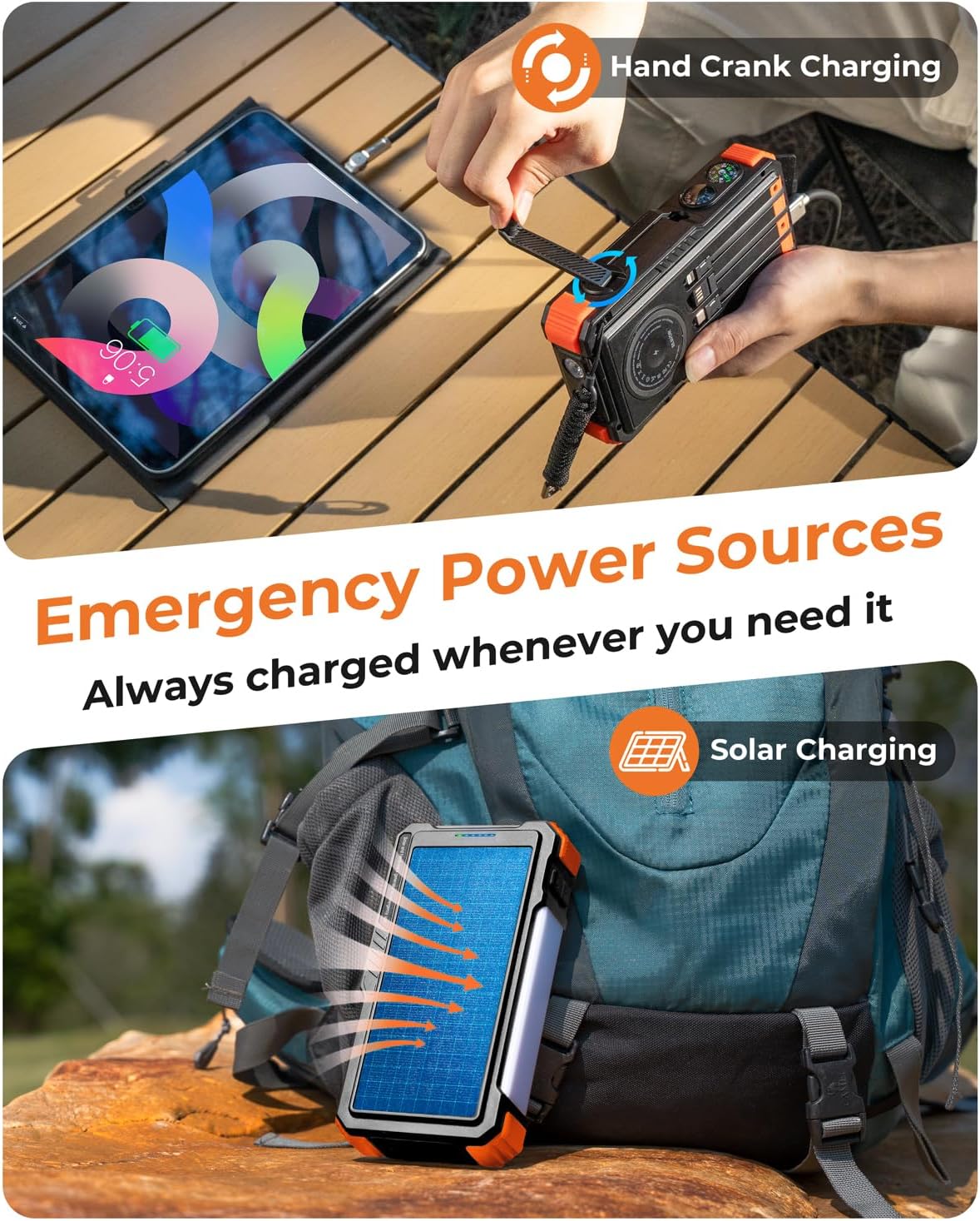
Figure 2: Illustration of hand crank and solar charging methods for the power bank.
4.2 Charging External Devices
The BLAVOR B007 can charge up to 7 devices simultaneously.
- Built-in Cables: Utilize the four integrated cables (2x USB-C, 1x iOS, 1x USB-A) to directly connect and charge your devices.
- Wireless Charging: Place your Qi-enabled device on the wireless charging pad located on the power bank. Ensure proper alignment for efficient charging. Supports 5W, 7.5W, 10W, and 15W Max wireless fast charging.
- USB-A/USB-C Outputs: Use your own charging cables with the two USB-A output ports and the USB-C output port (which also functions as an input) for additional device charging.

Figure 3: The power bank simultaneously charging multiple devices via its various outputs.
4.3 Using the Flashlight & Camping Light
The device features a dual flashlight and a camping lantern with multiple modes.
- Flashlight: Press and hold the flashlight button to activate. Cycle through modes (Steady, SOS, Strobe) with short presses.
- Camping Lantern: Double-press the camping light button to turn on the side lantern.

Figure 4: Demonstrating the dual flashlight and camping lantern features.
4.4 Integrated Survival Tools
The power bank includes a compass and thermometer for outdoor navigation and environmental monitoring.
5. Maintenance
- Keep the device clean and dry. Avoid exposure to extreme temperatures or direct sunlight for prolonged periods when not in use.
- Do not leave the power bank on surfaces like concrete or metal under strong sunlight, as surface temperatures can exceed 176°F (80°C), potentially damaging the battery.
- For solar charging, hang the power bank in a well-ventilated environment to prevent overheating.
6. Troubleshooting
- Device not charging: Ensure the power bank is adequately charged. Check all cable connections.
- Slow charging: Solar charging is slower than wall charging. Ensure direct sunlight for solar panels. For faster charging, use a wall adapter.
- Flashlight/Lantern not working: Ensure the power bank has sufficient charge. Refer to operating instructions for correct button presses.
7. Specifications
| Feature | Detail |
|---|---|
| Model Number | B007 |
| Battery Capacity | 20000 Milliamp Hours |
| Product Dimensions | 7.16 x 3.86 x 1.7 inches |
| Item Weight | 1.68 pounds |
| Special Features | Built-in Cables, Fast Charging, Flashlight, Hand Crank Charging, Wireless Charging, Compass, Thermometer |
| Wireless Charging Output | 5W, 7.5W, 10W, 15W Max |
| Fast Charging | 20W PD USB-C |
| Manufacturer | Shenzhen Pannizhe Technology Co.,Ltd |

Figure 5: Physical dimensions of the power bank for portability reference.
8. Official Product Video
Video 1: An overview of the BLAVOR Solar Power Bank's features, including its hand crank, solar charging, and multiple device charging capabilities.
9. Safety Information
All BLAVOR power banks are made with lithium-polymer batteries and have been extensively tested and certificated. Under normal use, the battery will not swell up, leak, or explode. Make sure you read the safety instructions of the user manual before usage.
- The suggested working/storage temperature is between -4°F and +140°F (-20°C to +60°C).
- Do not expose a power bank to fire or extreme high temperature. Exposure to fire or temperatures above 176°F (80°C) may cause battery swelling up or explosion.
- Do not leave the power bank on the car dashboard without supervision. Under hot weather, the temperature inside a parked car can reach above 176°F (80°C), where the battery may swell up or explode.
- Do not leave the power bank on flat surfaces of concrete, metal, and wooden floor to have the battery being solar charged. Under strong sunlight, the surface temperature can reach above 176°F (80°C), where the battery may swell up or explode.
- If you have any negative experience with the products, be sure to contact us at support@blavor.com.
- For solar charging, we recommend that you hang the power bank in a ventilated environment for solar charging to avoid swell up of the battery due to extreme high temperature.
10. Warranty & Support
For any inquiries or support needs, please contact BLAVOR customer service at support@blavor.com. Please refer to your purchase documentation for specific warranty details.
Related documentsB007


Ask a question about this manual
Ask about setup, troubleshooting, compatibility, parts, safety, or missing instructions. Manuals+ will review the question and use this page’s manual context to help answer it.