
YADEA G10
Yadea G10 Electric Scooter User Manual
Introduction
This manual provides essential information for the safe operation and maintenance of your Yadea G10 Electric Scooter. Please read it thoroughly before your first ride and keep it for future reference.

The Yadea G10 Electric Scooter, showcasing its design and compact folded form.
Safety Information
Your safety is paramount. Always wear a helmet and appropriate protective gear when riding. Adhere to local traffic laws and regulations.
- Braking System: The Yadea G10 is equipped with a dual-wheel braking system for effective stopping power. Familiarize yourself with its operation before riding at speed.
- Visibility: Utilize the integrated headlight, taillight, and turn indicators, especially during low-light conditions or at night, to ensure you are visible to others.
- Weight Limit: Do not exceed the maximum load capacity of 120 kg.
- Environmental Conditions: Avoid riding in heavy rain, snow, or on icy surfaces. The scooter has an IPX4 waterproof rating, meaning it is resistant to splashing water from any direction, but not fully waterproof.

Illustration of the Yadea G10's intelligent dual braking system and dual shock absorbers for enhanced safety and ride comfort.
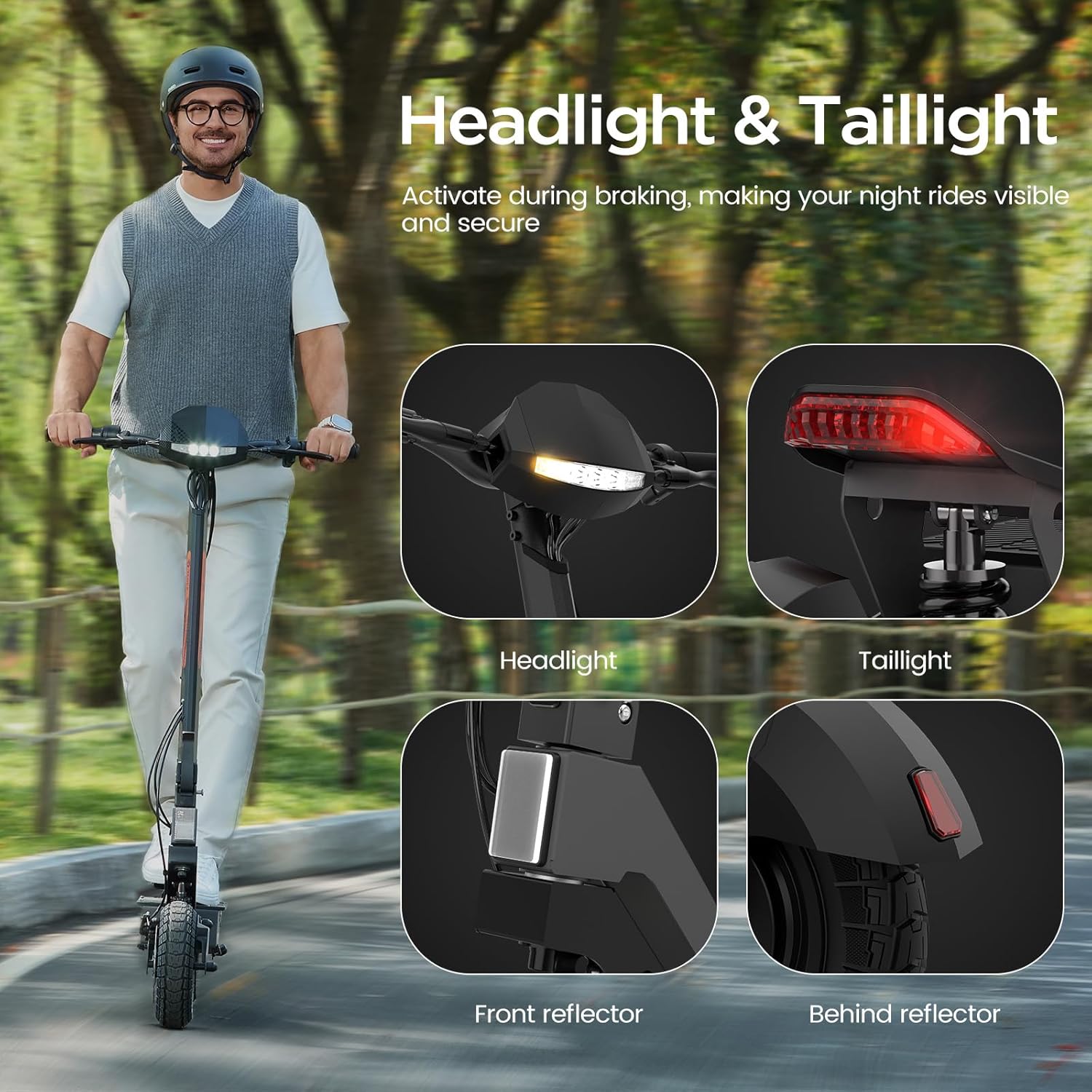
Detailed view of the Yadea G10's headlight, taillight, and reflectors, designed to enhance visibility during night rides and braking.
Package Contents
Verify that all items are present in the package:
- Yadea G10 Electric Scooter
- Charger
- Installation Tools
- User Manual
Setup and Assembly
The Yadea G10 Electric Scooter is designed for quick and convenient setup. Follow these steps to prepare your scooter for its first ride:
- Unfolding the Scooter: Carefully lift the handlebar stem until it locks into place. Ensure the locking mechanism is securely engaged.
- Handlebar Attachment: If the handlebars are detached, attach them securely according to the instructions provided with the installation tools.
- Initial Charge: Before your first ride, fully charge the scooter's battery. Connect the charger to the charging port and then to a power outlet. The charging indicator will show the charging status.
- Tire Check: Inspect the 10-inch tubeless tires for proper inflation and any signs of damage.
Operating Instructions
Familiarize yourself with the controls and functions of your Yadea G10 Electric Scooter.
Power On/Off
Press and hold the power button on the display to turn the scooter on or off.
Smart LED Display
The high-definition LCD display provides real-time information about your ride.
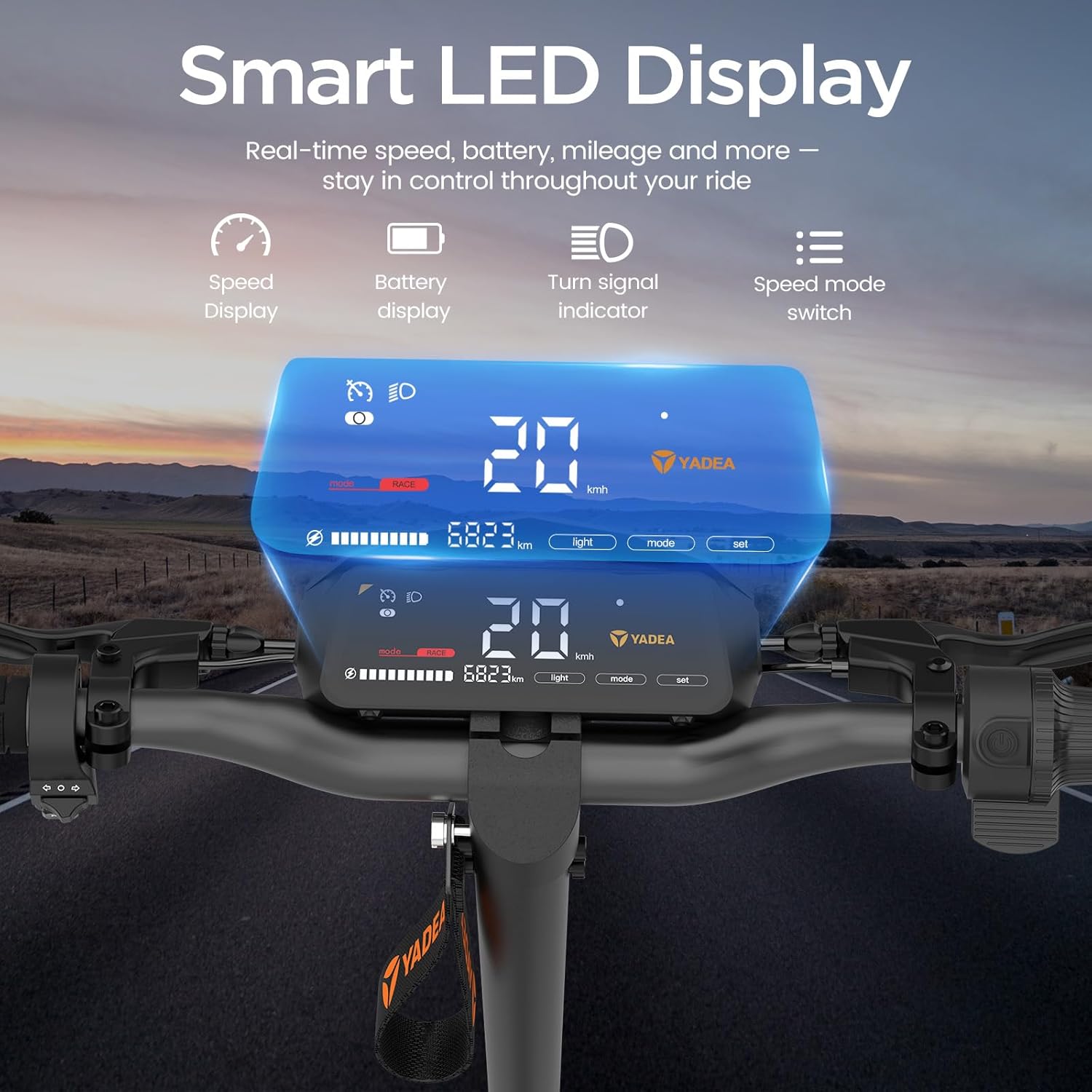
The Smart LED Display provides real-time speed, battery level, mileage, and turn signal indicators, allowing you to monitor your ride data.
- Speed Display: Shows current riding speed.
- Battery Display: Indicates remaining battery charge.
- Turn Signal Indicator: Lights up when turn signals are activated.
- Speed Mode Switch: Allows selection between four different speed modes.
Riding Modes
The scooter features four speed modes to adapt to various riding conditions and preferences. Use the speed mode switch on the display to cycle through them.
Braking
Engage the brake levers on the handlebars to activate the dual-wheel braking system. Apply brakes smoothly to avoid sudden stops.
Lights and Signals
Activate the headlight and taillight for improved visibility. Use the turn indicators when changing direction.
Maintenance
Regular maintenance ensures the longevity and safe operation of your Yadea G10 Electric Scooter.
- Cleaning: Wipe the scooter with a damp cloth. Avoid using high-pressure water jets directly on electronic components.
- Battery Care: Charge the battery regularly, even when not in use, to maintain its health. Avoid fully discharging the battery.
- Tire Pressure: Periodically check the pressure of the 10-inch tubeless tires. Refer to the tire sidewall for recommended pressure.
- Brake Inspection: Regularly inspect the brake system for wear and tear. Ensure brake levers operate smoothly and braking is effective.
- Fasteners: Check all screws and bolts for tightness before each ride.
Troubleshooting
This section addresses common issues you might encounter with your Yadea G10 Electric Scooter.
- Scooter Not Turning On:
- Check if the battery is charged.
- Ensure all connections are secure.
- Reduced Range:
- Battery may not be fully charged.
- Riding conditions (e.g., uphill, strong headwind, heavy load) can affect range.
- Tire pressure may be low.
- Brakes Not Responsive:
- Inspect brake cables and pads for wear.
- Consult a qualified technician if issues persist.
For issues not listed here, please contact customer support.
Specifications
Key technical specifications for the Yadea G10 Electric Scooter:
| Feature | Specification |
|---|---|
| Model | Yadea G10 |
| Motor Power | 800W-1200W Brushless Motor |
| Max Speed | 25 km/h |
| Battery | 48V/15.6Ah |
| Max Range | 50-70 km (depending on riding conditions) |
| Charging Time | 10-12 Hours |
| Max Load | 120 kg |
| Tires | 10-inch Tubeless Tires |
| Braking System | Dual-wheel braking (Front and Rear) |
| Suspension | Front and Rear Suspension |
| Waterproof Rating | IPX4 |
| Dimensions (Unfolded) | 65L x 56W x 125H cm |
| Weight | 25 kg |
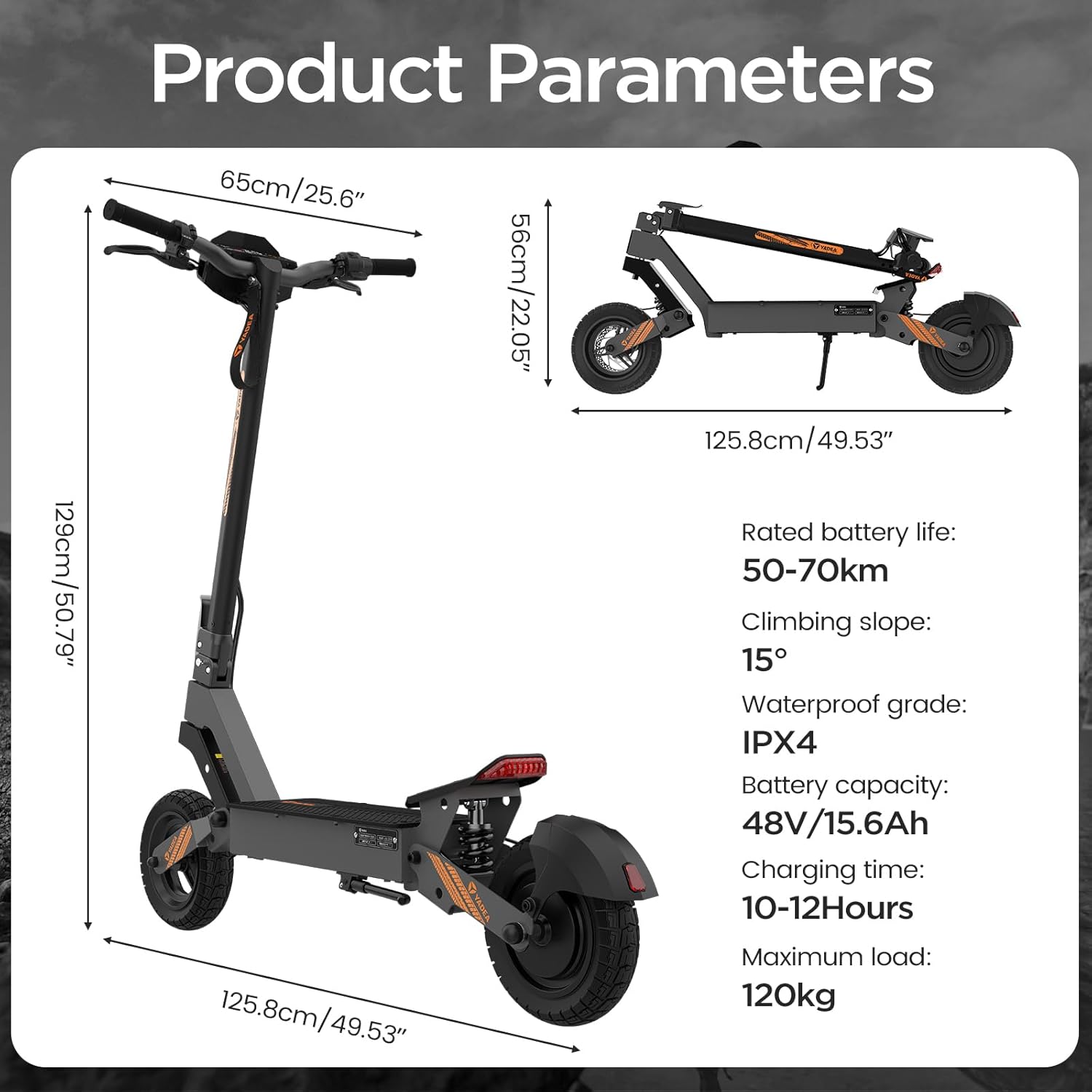
Visual representation of the Yadea G10 Electric Scooter's dimensions and key performance parameters.
Warranty and Support
For warranty information and customer support, please refer to the documentation included with your purchase or contact Yadea customer service directly. Keep your proof of purchase for warranty claims.
Related documentsG10


Ask a question about this manual
Ask about setup, troubleshooting, compatibility, parts, safety, or missing instructions. Manuals+ will review the question and use this page’s manual context to help answer it.