
1. Introduction
Thank you for choosing the SakerPlus CP97052 Handheld Pressurized Steam Cleaner. This device is designed to provide effective, chemical-free cleaning for various surfaces in your home and car using high-temperature steam. Please read this manual thoroughly before first use to ensure safe operation and optimal performance.

Image 1.1: SakerPlus CP97052 Handheld Pressurized Steam Cleaner with included accessories.
2. Important Safety Information
WARNING: Failure to follow these safety instructions may result in fire, electric shock, or other injury or damage.
- Always ensure the steam cleaner is unplugged from the power outlet before filling with water, cleaning, or performing any maintenance.
- Do not touch the steam directly or direct it towards people, pets, or electrical appliances. Steam is extremely hot (230°F / 110°C) and can cause severe burns.
- Only open the safety cap once the power is off and the steam cleaner has completely cooled down. If the cap cannot be opened immediately, wait a few more minutes and try again. This prevents burns from pressurized hot water.
- After each use, always press the steam button to release any internal pressure before storing the unit.
- Keep the device out of reach of children and pets. The steam cleaner features a child-safety cap to prevent accidental contact.
- Do not immerse the steam cleaner in water or other liquids.
- Use only pure water in the tank. Do not add cleaning solutions, perfumes, or other chemicals, as this can damage the unit and void the warranty.
- Ensure the power cord is not damaged, kinked, or placed near hot surfaces.
- The unit features an automatic shut-off when the tank runs dry to prevent overheating.

Image 2.1: The SakerPlus steam cleaner generates powerful 230°F (110°C) steam.
3. Package Contents
Verify that all items are present in your package:
- SakerPlus Handheld Pressurized Steam Cleaner Unit
- Nozzle Head
- Angled Nozzle Head
- Brush Head
- Extension Hose
- Cloth Cover (4 pieces, if applicable to your model)
- Window Wiper
- Steaming Iron (attachment)
- Funnel
- Measuring Cup
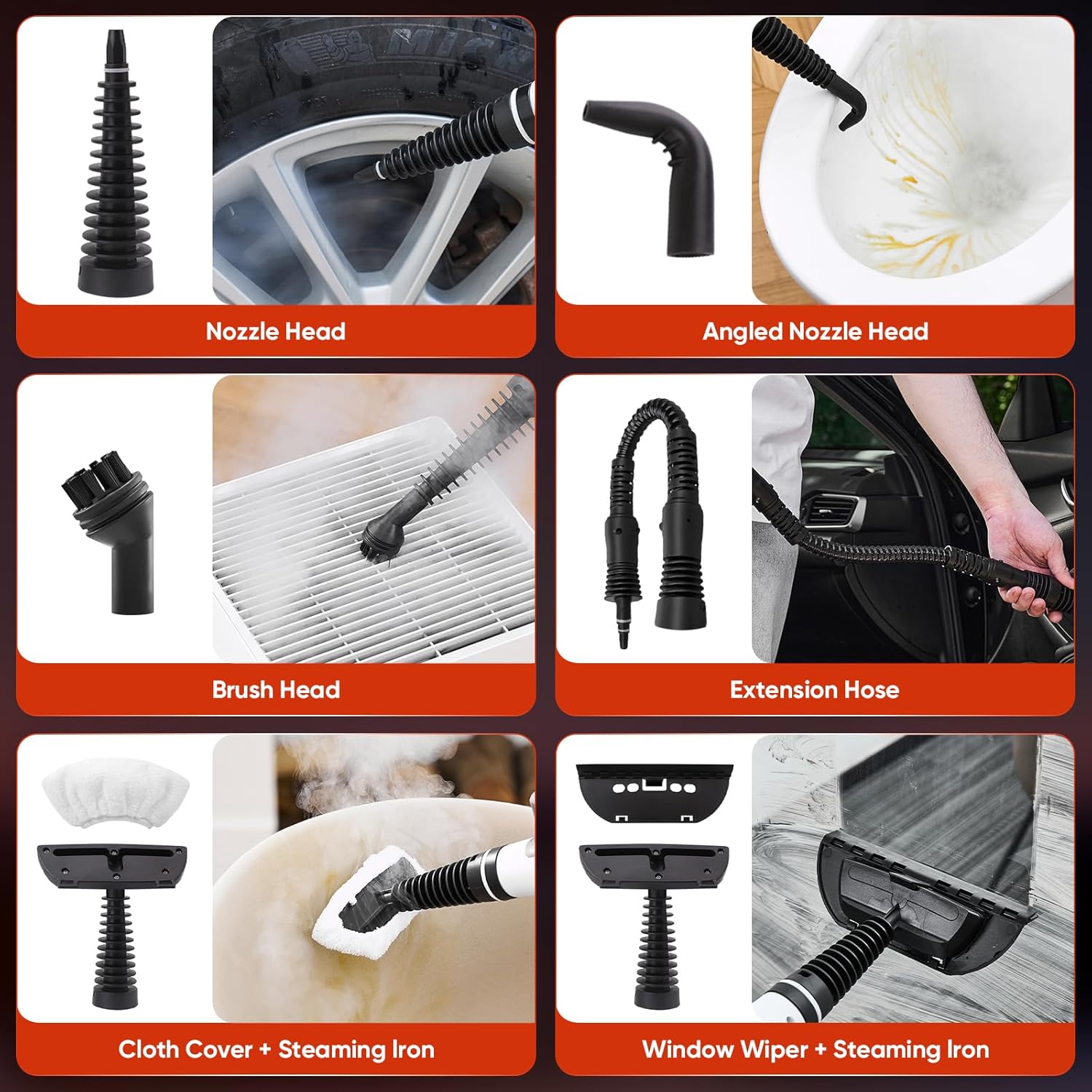
Image 3.1: The 9-piece multi-purpose accessory set.
4. Product Components
Familiarize yourself with the main parts of your SakerPlus steam cleaner:
- Steam Nozzle
- Safety Cap
- Hose Connection Thread
- Safety Steam Button
- Handle
- Power Indicator Light
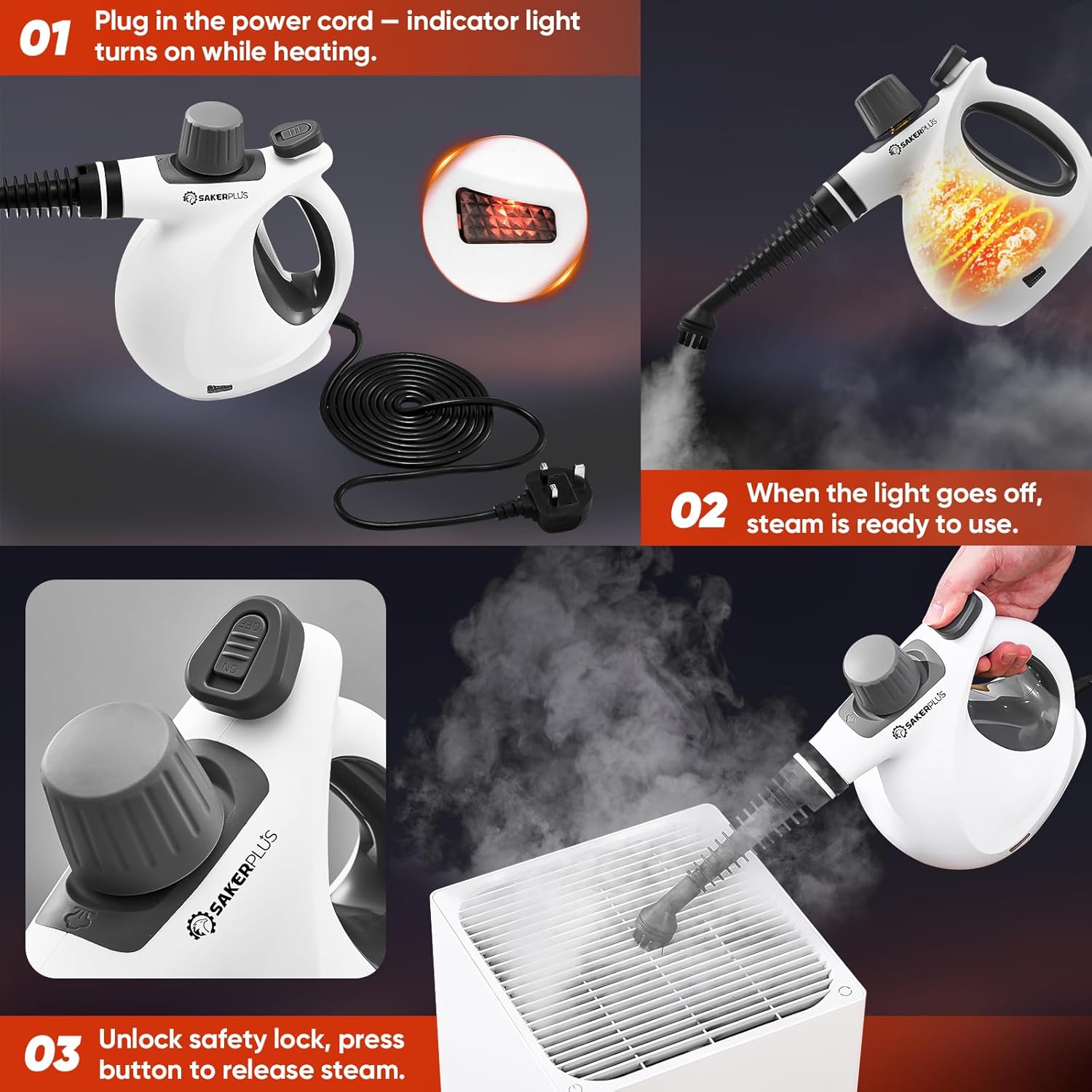
Image 4.1: Labeled diagram of the steam cleaner's main components.
5. Setup Instructions
- Prepare the Unit: Ensure the steam cleaner is unplugged and completely cool.
- Fill Water Tank: Unscrew the safety cap. Using the provided measuring cup and funnel, fill the water tank with no more than 280ml of pure water. Do not overfill to prevent leakage and ensure optimal performance. Screw the safety cap back on tightly.
- Attach Accessories: Select the appropriate accessory for your cleaning task (e.g., nozzle head, brush head, extension hose) and securely attach it to the steam nozzle.
- Power On: Plug the power cord into a grounded electrical outlet. The power indicator light will illuminate, indicating the unit is heating up.
- Wait for Heating: The steam cleaner will heat up in approximately 3 minutes. The indicator light will turn off when the steam is ready for use.

Image 5.1: Visual guide for plugging in, heating, and releasing steam.
6. Operating Instructions
Once the steam cleaner is ready (indicator light off), you can begin cleaning:
- Release Steam: Unlock the safety lock on the steam button, then press and hold the steam button to release steam. Release the button to stop the steam flow.
- Cleaning Surfaces: Direct the steam towards the surface you wish to clean. For stubborn dirt or grime, hold the nozzle closer to the surface for a few seconds to allow the hot steam to penetrate.
- Using Attachments:
- Nozzle Head/Angled Nozzle Head: Ideal for precise cleaning in tight corners, crevices, and around fixtures like toilets.
- Brush Head: Use with the brush attachment for scrubbing tough stains on grout, ovens, or grills.
- Extension Hose: Provides extended reach for cleaning floors, high surfaces, or car interiors.
- Cloth Cover + Steaming Iron: Attach the cloth cover to the steaming iron for refreshing upholstery, curtains, or steaming clothes.
- Window Wiper + Steaming Iron: Use the window wiper attachment for streak-free cleaning of windows, mirrors, and glass surfaces.
- Wipe Clean: After steaming, wipe the cleaned surface with a clean, dry cloth to remove loosened dirt and moisture.
- Refilling: If the steam output decreases or stops, the water tank may be empty. Unplug the unit, allow it to cool completely, release any remaining pressure, and then refill the tank as per setup instructions.


7. Maintenance
Regular maintenance ensures the longevity and optimal performance of your steam cleaner.
- After Each Use:
- Unplug the unit and allow it to cool completely.
- Press the steam button to release any residual pressure.
- Carefully unscrew the safety cap and empty any remaining water from the tank.
- Wipe the exterior of the unit with a damp cloth.
- Cleaning Accessories: Wash removable attachments (e.g., brush heads, cloth covers) with warm, soapy water and allow them to air dry completely before storage.
- Descaling (Optional): If you notice a decrease in steam output or mineral buildup, you may need to descale the unit. Consult the manufacturer's website or customer support for specific descaling instructions. Do not use harsh chemical descalers.
- Storage: Store the steam cleaner and its accessories in a cool, dry place, out of reach of children.
8. Troubleshooting
If you encounter issues with your SakerPlus steam cleaner, refer to the following common problems and solutions:
| Problem | Possible Cause | Solution |
|---|---|---|
| No steam or low steam output | Water tank is empty; Unit not heated sufficiently; Mineral buildup. | Refill water tank (max 280ml); Wait for indicator light to turn off; Perform descaling procedure. |
| Water leakage from safety cap | Safety cap not tightened properly; Water tank overfilled. | Ensure safety cap is securely tightened; Do not fill past 280ml mark. |
| Power indicator light not on | Unit not plugged in; Power outlet malfunction. | Check power connection; Try a different outlet. |
| Safety cap cannot be opened | Unit is still pressurized and hot. | Unplug the unit, press steam button to release pressure, and allow it to cool completely before attempting to open. |
If the problem persists after trying these solutions, please contact SakerPlus customer support.
9. Specifications
| Feature | Specification |
|---|---|
| Brand | SakerPlus |
| Model Name | CP97052 |
| Wattage | 1050 watts |
| Tank Volume | 380 Milliliters (Max fill 280ml recommended) |
| Heat Time | 3 Minutes |
| Maximum Temperature | 230 Degrees Fahrenheit (110 Degrees Celsius) |
| Item Weight | 3.85 pounds |
| Power Source | Electric |
| Special Feature | Portable |
| Surface Recommendation | Tile, Upholstery, Grout, Glass, Car Interiors |
10. Warranty and Support
SakerPlus products are designed for quality and reliability. For warranty information, product support, or to purchase replacement parts, please visit the official SakerPlus website or contact their customer service department. Keep your purchase receipt as proof of purchase for any warranty claims.