
Introduction
Thank you for choosing the EUQQ YYK-Q10 AI Translator Earbuds. These earbuds are designed to provide seamless real-time language translation, high-quality audio, and effective noise cancellation, making them ideal for communication across language barriers, business meetings, and everyday use. This manual will guide you through the setup, operation, and maintenance of your new device to ensure optimal performance and user experience. Please read this manual thoroughly before using the product.
Package Contents
Please check the package for the following items:
- EUQQ YYK-Q10 AI Translator Earbuds (L/R)
- Charging Case
- USB Charging Cable
- Multiple Sizes of Ear Tips
- User Manual
If any items are missing or damaged, please contact customer support.
Product Overview
The EUQQ YYK-Q10 features a compact design with intuitive controls and a smart charging case. Familiarize yourself with the components below.
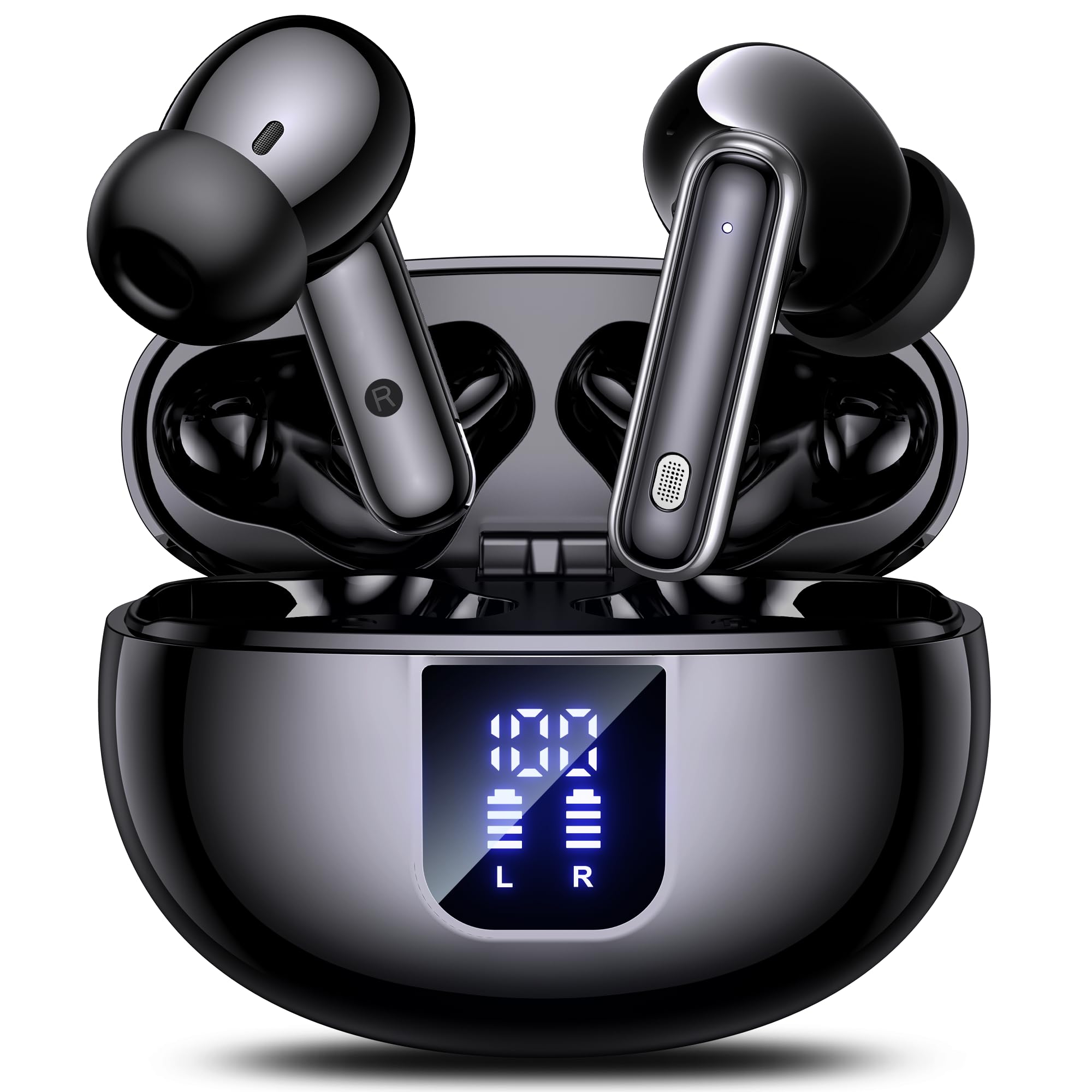
Image: The EUQQ YYK-Q10 AI Translator Earbuds are shown inside their open charging case. The case is black and features a digital display on the front, indicating battery levels for both the case and individual earbuds (L and R). The earbuds themselves are black with silver accents.
Key Components:
- Earbuds: Left (L) and Right (R) earbuds with touch control areas and microphones.
- Charging Case: Stores and charges the earbuds. Features a digital display for battery status.
- Charging Port: USB-C port on the charging case for power input.
- LED Indicators: On earbuds and case to show charging status and connection.
Setup
1. Initial Charging
- Place both earbuds into the charging case.
- Connect the USB charging cable to the charging port on the case and a power source.
- The digital display on the case will show the charging status. Ensure both earbuds and the case are fully charged before first use (approximately 1-2 hours).
2. Bluetooth Pairing
- Open the charging case. The earbuds will automatically enter pairing mode, indicated by flashing LED lights.
- On your smartphone or device, enable Bluetooth and search for available devices.
- Select "EUQQ YYK-Q10" from the list of devices.
- Once connected, the earbud LEDs will stop flashing, and a voice prompt will confirm the connection.
3. App Installation (for Translation Features)
To utilize the real-time translation features, download the dedicated EUQQ translation app from your device's app store (iOS App Store or Google Play Store). Follow the in-app instructions to connect your earbuds and configure language settings.
Operating Instructions
Power On/Off
- Power On: Open the charging case, or take the earbuds out of the case. They will power on automatically.
- Power Off: Place the earbuds back into the charging case and close the lid. They will power off automatically.
Music Playback Controls (Touch Controls)
- Play/Pause: Single tap on either earbud.
- Next Track: Double tap on the right earbud.
- Previous Track: Double tap on the left earbud.
- Volume Up: Triple tap on the right earbud.
- Volume Down: Triple tap on the left earbud.
Call Management (Touch Controls)
- Answer/End Call: Single tap on either earbud.
- Reject Call: Press and hold either earbud for 2 seconds.
Translation Mode
Activate translation mode through the dedicated EUQQ app. The app will guide you through selecting source and target languages. Depending on the app's features, you may use different modes:
- Conversation Mode: Speak into your earbud's microphone, and the translation will be played through the other person's earbud or your phone's speaker.
- Interpreter Mode: One person wears an earbud, the other speaks into the phone.
- Touch-to-Speak Mode: Tap an earbud to speak, release to translate.
Refer to the EUQQ app's help section for detailed instructions on specific translation modes and features.
Noise Cancellation
The earbuds feature dual-mic noise cancelling. This feature is typically active by default or can be toggled via the companion app. It helps reduce ambient noise during calls and translation sessions for clearer communication.
Maintenance
- Cleaning: Regularly clean the earbuds and charging case with a soft, dry, lint-free cloth. Do not use harsh chemicals or abrasive materials.
- Ear Tips: Remove and clean ear tips periodically with water and mild soap. Ensure they are completely dry before reattaching.
- Charging Contacts: Gently clean the charging contacts on both the earbuds and the case with a dry cotton swab to ensure proper charging.
- Storage: When not in use, store the earbuds in their charging case to protect them and keep them charged. Avoid extreme temperatures and humidity.
Troubleshooting
| Problem | Solution |
|---|---|
| Earbuds not pairing |
|
| No sound or low volume |
|
| Charging issues |
|
| Translation not working |
|
Specifications
| Feature | Detail |
|---|---|
| Brand | EUQQ |
| Model Name | YYK-Q10 |
| Connectivity Technology | Wireless |
| Headphone Form Factor | In-Ear |
| Color | Black |
| Included Components | Instruction Manual (and other standard accessories like earbuds, case, cable, ear tips) |
| Number of Items | 1 (product unit) |
| Batteries Required | No (built-in rechargeable) |
| Manufacturer Model Number | YYK-Q10 |
| Package Dimensions | 0.1 x 0.1 x 0.1 cm; 45.36 g |
| ASIN | B0FN3WC8LW |
Warranty Information
The EUQQ YYK-Q10 AI Translator Earbuds come with a standard manufacturer's warranty. For detailed information regarding warranty coverage, terms, and conditions, please refer to the warranty card included in your package or visit the official EUQQ website. Please retain your proof of purchase for warranty claims.
Customer Support
If you encounter any issues or have questions regarding your EUQQ YYK-Q10 AI Translator Earbuds, please do not hesitate to contact our customer support team. You can find contact information on the official EUQQ website or through the support section of the EUQQ translation app.
Online Resources:
- Official EUQQ Website: Visit EUQQ Store on Amazon
- EUQQ Translation App (for in-app support)