
1. Introduction
The ByteTecpeak M2 is a lightweight, folding transport wheelchair designed for ease of use and portability. Constructed with a high-quality aluminum alloy frame, it offers robust stability while remaining easy to transport. Its compact folding mechanism makes it suitable for travel, including placement in car trunks or for air travel. The M2 features double-row honeycomb tires for comfortable riding across various terrains and 360° swivel front wheels for precise maneuverability in confined spaces. User-friendly design elements such as padded, rotatable armrests and foldable footrests facilitate easy entry and exit.
This manual provides essential information for the safe assembly, operation, maintenance, and troubleshooting of your ByteTecpeak M2 wheelchair. Please read it thoroughly before first use and retain it for future reference.
2. Safety Instructions
Always prioritize safety when using the ByteTecpeak M2 wheelchair. Failure to follow these instructions may result in injury or damage to the product.
- Weight Capacity: Do not exceed the maximum weight capacity of 100 kg (220 lbs).
- Brakes: Always engage the parking brakes when the wheelchair is stationary, especially during transfers or on inclined surfaces.
- Transfers: Ensure the wheelchair is stable and brakes are locked before transferring a user in or out of the chair.
- Footrests: Ensure footrests are properly positioned and secured before use. Fold them up during transfers to prevent obstruction.
- Uneven Surfaces: Exercise caution on uneven terrain, inclines, or declines. Always have an attendant assist on challenging surfaces.
- Obstacles: Avoid sudden movements or impacts with obstacles.
- Maintenance: Regularly inspect the wheelchair for any signs of wear, damage, or loose components. Do not use if damaged.
- Attendant Use: This is a transport wheelchair designed for attendant propulsion. The user cannot propel themselves.
- Children: Keep children away from the wheelchair during assembly and operation unless supervised by an adult.
3. Package Contents
Verify that all components are present and undamaged upon unpacking.
- ByteTecpeak M2 Wheelchair Frame (pre-assembled)
- Footrests (2 units)
- User Manual (this document)
4. Product Components
Familiarize yourself with the different parts of your ByteTecpeak M2 wheelchair.
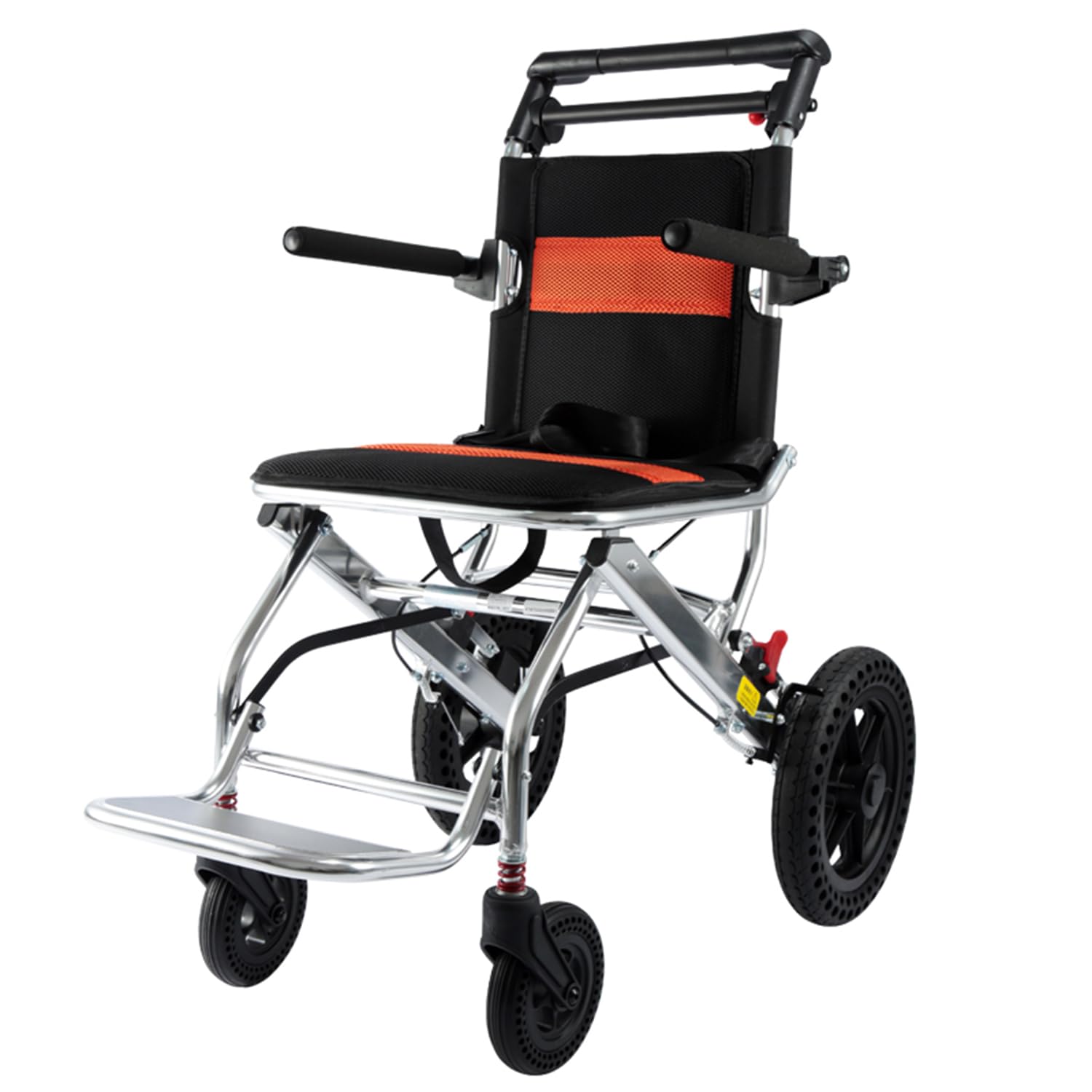
Image 4.1: Overview of the ByteTecpeak M2 Lightweight Folding Transport Wheelchair. This image displays the wheelchair in its unfolded state, highlighting the main frame, seat, backrest, armrests, footrests, and wheels.
- Push Handles: For attendant to push and steer the wheelchair.
- Backrest: Provides support for the user's back.
- Armrests: Padded for comfort, can be rotated up to 280° for easy side transfers.
- Seat: Main seating area for the user.
- Parking Brakes: Located on the push handles, used to lock the rear wheels.
- Rear Wheels: Double-row honeycomb tires for durability and comfort.
- Front Swivel Wheels: 360° rotating wheels for maneuverability.
- Footrests: Foldable pedals to support the user's feet.
- Folding Mechanism: Lever or button for collapsing the wheelchair frame.
5. Setup and Assembly
The ByteTecpeak M2 wheelchair comes largely pre-assembled. Follow these steps to unfold and prepare it for use.
5.1 Unfolding the Wheelchair
- Place the folded wheelchair on a flat, stable surface.
- Grasp the push handles and gently pull them apart. The frame will begin to expand.
- Push down firmly on the seat rails until the seat is fully flat and the frame is locked into its open position. You may hear a click.
- Ensure all locking mechanisms are engaged and the frame is rigid before proceeding.
5.2 Attaching/Adjusting Footrests
- Locate the footrests. They typically attach to the front frame of the wheelchair.
- Align the footrest pins with the corresponding holes on the wheelchair frame.
- Push down or inward until the footrests click securely into place.
- To adjust the footrest angle or height (if applicable), refer to the specific adjustment levers or buttons on the footrest assembly.
- To fold the footrests up for transfers, simply lift them upwards.
5.3 Checking Brakes
Before first use, test the parking brakes.
- Engage both parking brakes by pushing the levers down (or as indicated by the brake mechanism).
- Attempt to push the wheelchair. The wheels should be locked and the chair should not move.
- Disengage the brakes by pulling the levers up. The wheels should now roll freely.
- If the brakes do not function correctly, do not use the wheelchair and contact customer support.
6. Operating Instructions
The ByteTecpeak M2 is designed for attendant-assisted transport.
6.1 User Transfers
- Ensure the wheelchair is on a flat, stable surface.
- Engage both parking brakes.
- Fold up the footrests to clear the path for the user's feet.
- Rotate the armrests out of the way if necessary (up to 280° rotation).
- Assist the user in safely transferring into or out of the wheelchair.
- Once the user is seated, lower the footrests and ensure their feet are comfortably placed.
- Return armrests to their functional position if they were moved.
6.2 Propulsion and Steering
- Disengage the parking brakes.
- Grasp the push handles firmly.
- Push the wheelchair forward or backward as needed.
- To steer, apply gentle pressure to one handle while slightly releasing pressure on the other. The 360° swivel front wheels facilitate easy turning.
- When navigating obstacles or inclines, proceed slowly and with caution.
6.3 Using the Brakes
- Parking Brakes: Push the brake levers down to engage the parking brakes. This locks the rear wheels and prevents movement. Always use when stationary.
- Attendant Brakes: The same levers can be used for momentary speed control by gently squeezing them, similar to bicycle brakes. Avoid prolonged or harsh braking unless necessary.
7. Maintenance
Regular maintenance ensures the longevity and safe operation of your ByteTecpeak M2 wheelchair.
- Cleaning: Clean the frame and upholstery regularly with a damp cloth and mild soap. Avoid abrasive cleaners or solvents.
- Wheel Inspection: Check tires for wear and tear. Ensure all wheels spin freely and are securely attached.
- Brake Check: Periodically test the brakes for proper function. Ensure they engage and disengage smoothly and hold the wheelchair securely.
- Fasteners: Check all bolts, screws, and fasteners regularly. Tighten any that appear loose. Do not overtighten.
- Moving Parts: Lubricate moving parts (e.g., folding mechanisms, swivel points) with a silicone-based lubricant if they become stiff. Avoid oil-based lubricants that can attract dirt.
- Storage: Store the wheelchair in a dry, clean place away from direct sunlight and extreme temperatures.
8. Troubleshooting
This section addresses common issues you might encounter with your ByteTecpeak M2 wheelchair.
| Problem | Possible Cause | Solution |
|---|---|---|
| Wheelchair does not fold/unfold smoothly. | Mechanism is stiff or obstructed. | Check for obstructions. Apply a silicone-based lubricant to hinges and folding points. Ensure seat is fully pushed down/pulled up. |
| Brakes are not holding or are too loose/tight. | Brake cable adjustment needed or wear on brake pads. | Inspect brake cables for damage. If adjustable, tighten or loosen the cable tension. If wear is visible, contact customer support for replacement parts. |
| Wheels wobble or are noisy. | Loose axle bolts or worn bearings. | Check and tighten axle bolts. If noise persists or wheels are excessively wobbly, contact customer support. |
| Footrests are difficult to attach or detach. | Pins are misaligned or mechanism is stiff. | Ensure correct alignment. Apply a small amount of silicone lubricant to the pins and receiving holes. |
If you encounter a problem not listed here or if the suggested solutions do not resolve the issue, please contact ByteTecpeak customer support.
9. Specifications
| Feature | Detail |
|---|---|
| Model Number | M2 |
| Brand | ByteTecpeak |
| Frame Material | Aluminum Alloy |
| Item Weight | 13.05 kg (28.77 lbs) |
| Maximum Load Capacity | 100 kg (220 lbs) |
| Unfolded Dimensions (L x W x H) | 82 cm x 50 cm x 94 cm |
| Folded Dimensions (L x W x H) | 50 cm x 30 cm x 81 cm |
| Seat Height | 37 cm |
| Seat Depth | 40 cm |
| Wheel Size | 29 cm (Rear) |
| Special Features | Lightweight, foldable, 360° swivel front wheels, padded rotatable armrests, foldable footrests, new braking system with lock function, honeycomb tires. |
10. Warranty and Support
For information regarding warranty coverage, please refer to the documentation provided with your purchase or visit the official ByteTecpeak website.
If you require technical assistance, have questions about product operation, or need to order replacement parts, please contact ByteTecpeak customer support. Contact details can typically be found on the product packaging or the manufacturer's website.