
Introduction
Thank you for choosing the COMHOMA Vanity Desk. This product is designed to enhance your daily routine with its functional features, including a lighted mirror, ample storage, and a built-in power outlet. Please read this manual thoroughly before assembly and use to ensure proper installation and safe operation.

Image: The COMHOMA Vanity Desk, showcasing its lighted mirror, RGB LED lights, and various storage compartments.
Safety Information
WARNING: Failure to follow these safety instructions may result in injury or damage to the product.
- Always follow assembly instructions carefully.
- Keep sharp edges away from children.
- Do not overload electrical outlets.
- Consult a professional if you are unsure about any aspect of assembly or usage.
- Ensure the vanity is placed on a stable, level surface to prevent tipping.
- Keep all electrical components away from water or excessive moisture.
Package Contents
Before beginning assembly, please verify that all parts listed below are present and undamaged. If any parts are missing or damaged, please contact customer support.
- Wooden Panels (various sizes for desk, mirror frame, shelves, and drawers)
- Assembly Hardware (screws, dowels, cam locks, drawer slides, etc.)
- Lighted Mirror with 10 LED Bulbs
- RGB LED Light Strip
- Power Outlet Strip (2 AC outlets, 2 USB ports)
- Remote Control for RGB Lights
- Hair Dryer Holder
- Instruction Manual
Assembly Instructions
Follow these step-by-step instructions carefully. It is recommended to have a second person assist with assembly. All components are labeled with numbers or letters for easy identification.
Assembly Video Guide
Video: Detailed assembly guide for the COMHOMA Vanity Desk, demonstrating each step of the construction process.
Key Assembly Steps Overview:
- Construct the Base: Assemble the initial base panels and side supports for the desk structure using dowels and screws.
- Build the Central Shelf Structure: Connect the various panels that form the central shelving unit beneath the mirror.
- Install Drawer Slides: Securely attach the drawer slides to the main desk frame.
- Assemble Drawers: Construct the drawer boxes and attach the front panels and handles. Install the corresponding drawer slides onto the drawer boxes.
- Prepare Mirror Frame: Assemble the mirror frame with its integrated side shelves.
- Install LED Strip and Mirror: Attach the RGB LED light strip to the mirror frame and then secure the mirror itself.
- Mount Power Outlet: Install the built-in power outlet strip onto the main desk surface.
- Connect Main Components: Carefully attach the assembled mirror unit to the desk base.
- Final Touches: Install the hair dryer holder and insert the completed drawers into their tracks.
- Electrical Connections: Install the string lights (mirror bulbs) and connect all necessary cables for the lighting and power outlet.
For a cleaner look, cover exposed screws with the provided stickers after tightening.
Operating Instructions
Lighted Mirror
The mirror features 10 LED bulbs with three adjustable color modes: cool white, natural light, and warm yellow. The brightness of each color mode can also be adjusted to suit your preference. Use the touch sensor on the mirror to cycle through modes and adjust brightness.

Image: The vanity mirror lights can be adjusted to warm yellow, warm white, or cool white settings with variable brightness.
RGB LED Lights
The built-in LED light in the tabletop offers multiple colors and dynamic modes, controlled via the provided remote. This allows you to create various ambient lighting effects to match your mood or decor.

Image: RGB LED lights under the tabletop can be controlled with a remote for various colors and dynamic modes.
Built-in Charging Station
The modern makeup desk is equipped with 2 standard plug sockets and 2 USB ports, allowing convenient use of styling tools (like hair dryers or curling irons) and charging of electronic devices (such as cell phones or tablets) directly from your vanity.
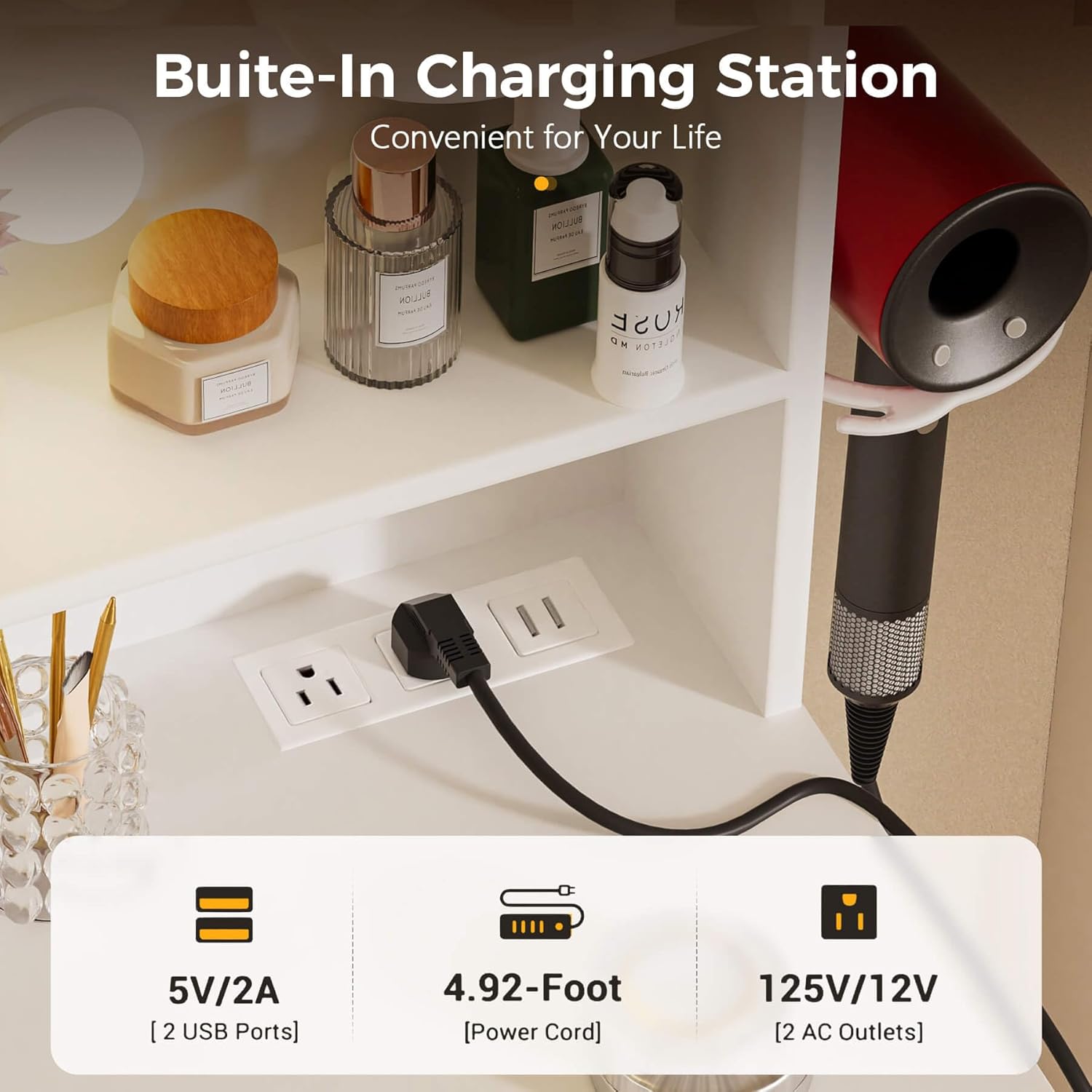
Image: The vanity desk includes a built-in charging station with two AC outlets and two USB ports for convenience.
Maintenance
- Cleaning Surfaces: Wipe all wooden surfaces with a soft, damp cloth. Avoid using harsh chemicals or abrasive cleaners that could damage the finish.
- Mirror Care: Use a standard glass cleaner for the mirror. For best results, spray the cleaner onto a soft, lint-free cloth first, then wipe the mirror. Do not spray directly onto the mirror to prevent liquid from seeping into the edges.
- Electrical Components: Ensure all electrical connections are secure and free from dust. Do not attempt to repair electrical components yourself. If issues arise, contact customer support.
- Hardware: Periodically check and tighten all screws, bolts, and fasteners to ensure the stability and longevity of the vanity desk.
Troubleshooting
Lights Not Working
- Power Connection: Ensure the power cord for the lights is securely plugged into a working electrical outlet.
- Light Connections: Verify that all individual light bulbs and the LED strip are properly connected as per the assembly instructions.
- Remote Control: For RGB lights, check if the remote control battery is functional and that there are no obstructions between the remote and the receiver.
Drawers Not Sliding Smoothly
- Slide Alignment: Ensure drawer slides are correctly installed and aligned on both the drawer box and the vanity frame.
- Obstructions: Check for any objects or debris within the drawer tracks that might be preventing smooth movement.
- Tightness: Verify all screws securing the drawer slides are tightened. Loose screws can cause misalignment.
Vanity Feels Unstable
- Level Surface: Ensure the vanity is placed on a completely flat and level surface.
- Tighten Hardware: Re-check and tighten all assembly hardware (screws, dowels, cam locks) throughout the entire structure.
Specifications
| Feature | Detail |
|---|---|
| Brand | COMHOMA |
| Model Number | B1004 |
| Product Dimensions | 31.5"W x 15.74"D x 54.72"H |
| Item Weight | 58 pounds |
| Material | Wood |
| Frame Material | Wood |
| Assembly Required | Yes |
| Mirror Lights | 10 LED bulbs, 3 color modes (cool white, natural, warm yellow), adjustable brightness |
| Tabletop Lights | RGB LED lights with multiple colors and dynamic modes |
| Charging Station | 2 AC outlets, 2 USB ports |
| Storage Capacity | Undertable side cabinet, 2 drawers, 4 open shelves, 3 cubbies |

Image: Key dimensions of the vanity desk for planning your space.
Warranty and Support
For warranty information and customer support, please refer to your purchase documentation or contact COMHOMA directly through their official website or the retailer where the product was purchased. Please have your model number (B1004) and proof of purchase ready when contacting support.
