1. Introduction
Thank you for choosing the AX WABER Floor TV Stand with Power Outlet. This stand is designed to provide a stable and versatile mounting solution for televisions ranging from 27 to 65 inches, supporting up to 88 lbs. It features an integrated power outlet, adjustable height, and swivel functionality for optimal viewing. Please read this manual thoroughly before assembly and use to ensure safe and correct operation.
2. Safety Information
- Weight Capacity: Do not exceed the maximum weight capacity of 88 lbs (40 kg).
- TV Size: Ensure your TV size is within the recommended range of 27-65 inches.
- VESA Compatibility: Verify your TV's VESA mounting pattern (100x100mm to 400x400mm) before assembly.
- Stability: Always place the TV stand on a flat, stable, and level surface. Avoid placing it on uneven ground or thick carpets that could compromise stability.
- Children and Pets: Keep children and pets away from the TV stand during assembly and ensure the TV is securely mounted to prevent tipping.
- Power Outlet: Do not overload the integrated power outlet. Ensure total connected device wattage does not exceed the specified limits (120V/15A for AC outlets, 5V/2A for USB ports).
- Cable Management: Properly route all cables to prevent tripping hazards and damage.
- Assembly: Follow all assembly instructions carefully. If you encounter any difficulties, contact customer support.
3. Package Contents
Please check that all components are present and undamaged before beginning assembly. If any parts are missing or damaged, do not proceed with assembly and contact customer support.
- Base Plate (Tempered Glass)
- Main Support Column
- TV Mounting Bracket
- Adjustable Media Shelf
- Integrated Power Outlet Strip (with 2 USB ports and 3 AC outlets)
- Mounting Hardware Kit (screws, washers, spacers for various TV models)
- Cable Management Clips/Ties
- Assembly Tools (e.g., Allen wrench)
- Instruction Manual
4. Assembly Instructions
Most accessories are pre-assembled for easier setup. Please refer to the detailed diagrams and steps below.
4.1. Verify TV Compatibility
Before assembly, ensure your television meets the following criteria:
- Screen Size: 27-65 inches
- Weight: Maximum 88 lbs (40 kg)
- VESA Pattern: 100x100mm, 200x100mm, 200x200mm, 300x300mm, 400x300mm, 400x400mm
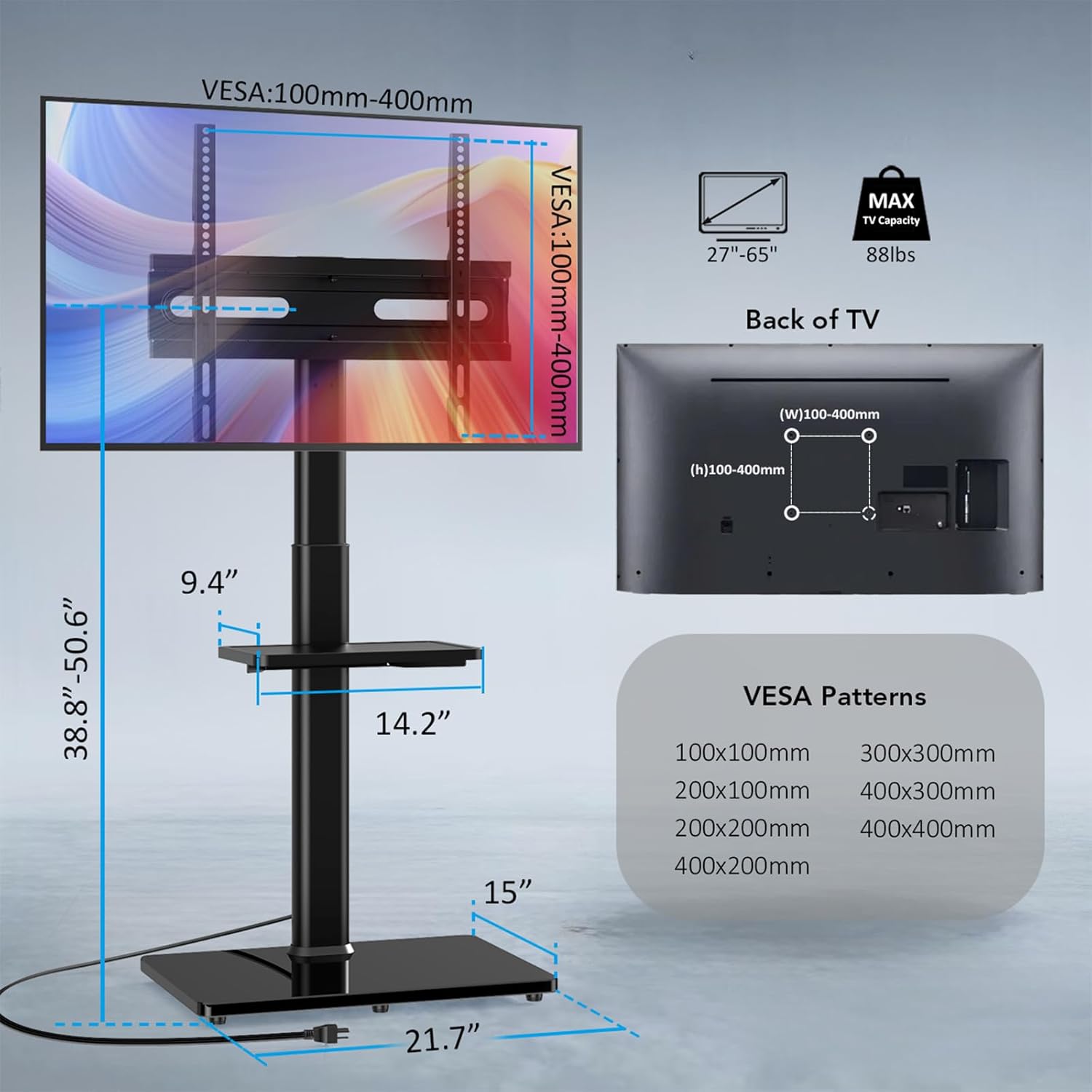
Image: TV compatibility details including screen size, weight, and VESA patterns.


Images: Maximum TV size and weight capacity.
4.2. Base and Column Assembly
- Attach the main support column to the tempered glass base plate using the provided screws and tools. Ensure all connections are tight and secure.
4.3. TV Bracket Installation
- Attach the vertical TV brackets to the back of your television using the appropriate screws, washers, and spacers from the hardware kit. Ensure the brackets are centered and securely fastened to your TV's VESA mounting holes.
- Carefully lift the TV and hook the attached brackets onto the main TV mounting plate on the stand.
- Secure the TV to the mounting plate using the safety lock mechanism. This prevents accidental dislodgement.

Image: Detail of the safety lock mechanism for secure TV attachment.
4.4. Media Shelf Installation
- Attach the adjustable media shelf to the main support column at your desired height. Use the provided screws and tools to secure it firmly.

Image: The adjustable media shelf provides additional storage space for devices like game controllers, remotes, or small electronics.
4.5. Power Outlet Connection
- Plug the integrated power outlet strip's cord into a wall socket.
- Connect your TV and other devices to the available AC outlets and USB ports on the stand.

Image: The integrated power strip offers convenient access to power for your devices.
4.6. Cable Management
- Use the provided cable management clips and ties to route and secure all cables along the main support column. This helps maintain a tidy appearance and prevents cable clutter.

Image: Cable management features help keep your setup organized and free from clutter.
Video: An overview of the AX WABER floor TV stand, demonstrating its features such as the integrated power strip, swivel, height adjustment, and ease of installation. This video highlights the product's design and functionality.
5. Operating Instructions
5.1. Height Adjustment
The TV stand offers 9 levels of height adjustment. To adjust the height:
- Loosen the locking mechanism on the main support column.
- Carefully raise or lower the TV to your desired viewing height.
- Tighten the locking mechanism securely to fix the TV in place.

Image: The TV stand offers 9 levels of height adjustment for optimal viewing.
5.2. Swivel Function
The TV mount allows for a ±35 degree swivel, providing a wide viewing angle.
- Gently grasp the sides of your television.
- Rotate the TV left or right to achieve your preferred viewing angle.

Image: The TV stand allows for a 70-degree ultra-wide viewing angle through its swivel function.
5.3. Using the Power Outlet
The integrated power outlet provides convenient access to power for your devices.
- AC Outlets: Use the three 120V/15A AC outlets for your television, soundbar, gaming console, or other AC-powered electronics.
- USB Ports: Use the two 5V/2A USB ports to charge smartphones, tablets, or other USB-powered devices.
Caution: Do not exceed the maximum electrical load for the power strip.
6. Maintenance
- Cleaning: Wipe the stand with a soft, dry cloth. For stubborn marks, use a slightly damp cloth with mild soap, then dry thoroughly. Avoid abrasive cleaners or solvents.
- Check Connections: Periodically check all screws and bolts to ensure they remain tight and secure. Retighten if necessary.
- Cable Inspection: Regularly inspect power cords and cables for any signs of wear or damage. Replace damaged cables immediately.
7. Troubleshooting
| Problem | Possible Cause | Solution |
|---|---|---|
| TV is wobbly or unstable. | Loose connections; uneven surface; TV weight exceeds capacity. | Ensure all screws are tightened. Place stand on a level surface. Verify TV weight is within limits. |
| Power outlets not working. | Power strip not plugged in; circuit breaker tripped; overloaded. | Check if the power strip is plugged into a live wall outlet. Reset the circuit breaker if tripped. Reduce the number of connected devices. |
| TV cannot swivel smoothly. | Obstruction; mechanism needs lubrication. | Check for any cables or objects obstructing movement. Apply a small amount of silicone-based lubricant if necessary. |
| Media shelf is not secure. | Loose attachment screws. | Tighten the screws that secure the media shelf to the column. |
8. Specifications
| Feature | Detail |
|---|---|
| Brand | AX WABER |
| Model | AX2010TB |
| Compatible TV Sizes | 27-65 inches |
| Maximum TV Weight | 88 lbs (40 kg) |
| VESA Compatibility | 100x100mm to 400x400mm |
| Height Adjustment | 9 levels (38.8" - 50.6" TV height) |
| Swivel Angle | ±35 degrees (70 degrees total) |
| Integrated Power Outlet | 3 AC outlets (120V/15A), 2 USB ports (5V/2A) |
| Power Cord Length | 6.5 ft |
| Material | Alloy Steel, Tempered Glass Base |
| Item Weight | 20.4 pounds |
| Color | Black |
9. Warranty and Support
For warranty information or technical support, please refer to the contact details provided with your purchase or visit the official AX WABER website. Keep your purchase receipt as proof of purchase.