
SODI T13W
SODI Qi2 25W Wireless Charger, 3-in-1 Charging Station with Cooling Fan (Model T13W) - Instruction Manual
Comprehensive guide for setup, operation, and maintenance.
1. Product Overview
The SODI Qi2 25W Wireless Charger is a versatile 3-in-1 charging station designed to power your iPhone, Apple Watch, and AirPods simultaneously. It features advanced Qi2.2 certification for fast and safe charging, a built-in cooling fan to prevent overheating, and a 36° adjustable viewing angle for optimal device interaction.

Image 1: The SODI Qi2 25W Wireless Charger, a 3-in-1 charging station, shown with an iPhone, Apple Watch, and AirPods charging simultaneously. A 45W GaN adapter and USB-C cable are also visible.
2. What's in the Box
Verify that all items are present upon unboxing:
- 1 × 3-in-1 Charging Station
- 1 × GaN Adapter (45W)
- 1 × USB-C to C Cable (≈3.28 ft)
- 1 × User Manual
3. Setup Guide
- Connect the Power Adapter: Insert the USB-C to C cable into the 45W GaN adapter. Plug the adapter into a power outlet.
- Connect to Charging Station: Insert the other end of the USB-C to C cable into the USB-C port on the back of the charging station.
- Power On: The LED indicator on the base will flash for 5 seconds, then stay on, indicating the station is powered and in standby mode.
Video 1: Official product video demonstrating the setup and use of the SODI Qi2.2 25W Charging Station with Cooling Fan, showing how to connect the power and place devices.
4. Operating Instructions
4.1 Charging Devices
- iPhone: Place your MagSafe-compatible iPhone (iPhone 12 series or newer) onto the magnetic charging pad. Ensure it snaps securely into place. The phone can be charged vertically or horizontally.
- Apple Watch: Place your Apple Watch onto the dedicated charging puck.
- AirPods/Qi-enabled Earbuds: Place your AirPods (with wireless charging case) or other Qi-enabled earbuds onto the flat charging pad at the base.
When charging begins, the LED light on the base will breathe for 5 seconds, then stay on. The cooling fan will also activate automatically for the iPhone charging pad.
4.2 Cooling Fan Operation
The charging station is equipped with a quiet, built-in cooling fan that activates automatically when an iPhone is placed on the magnetic charging pad. This fan helps reduce the device's temperature by up to 10°F during charging, preserving battery health and maintaining fast charging efficiency.
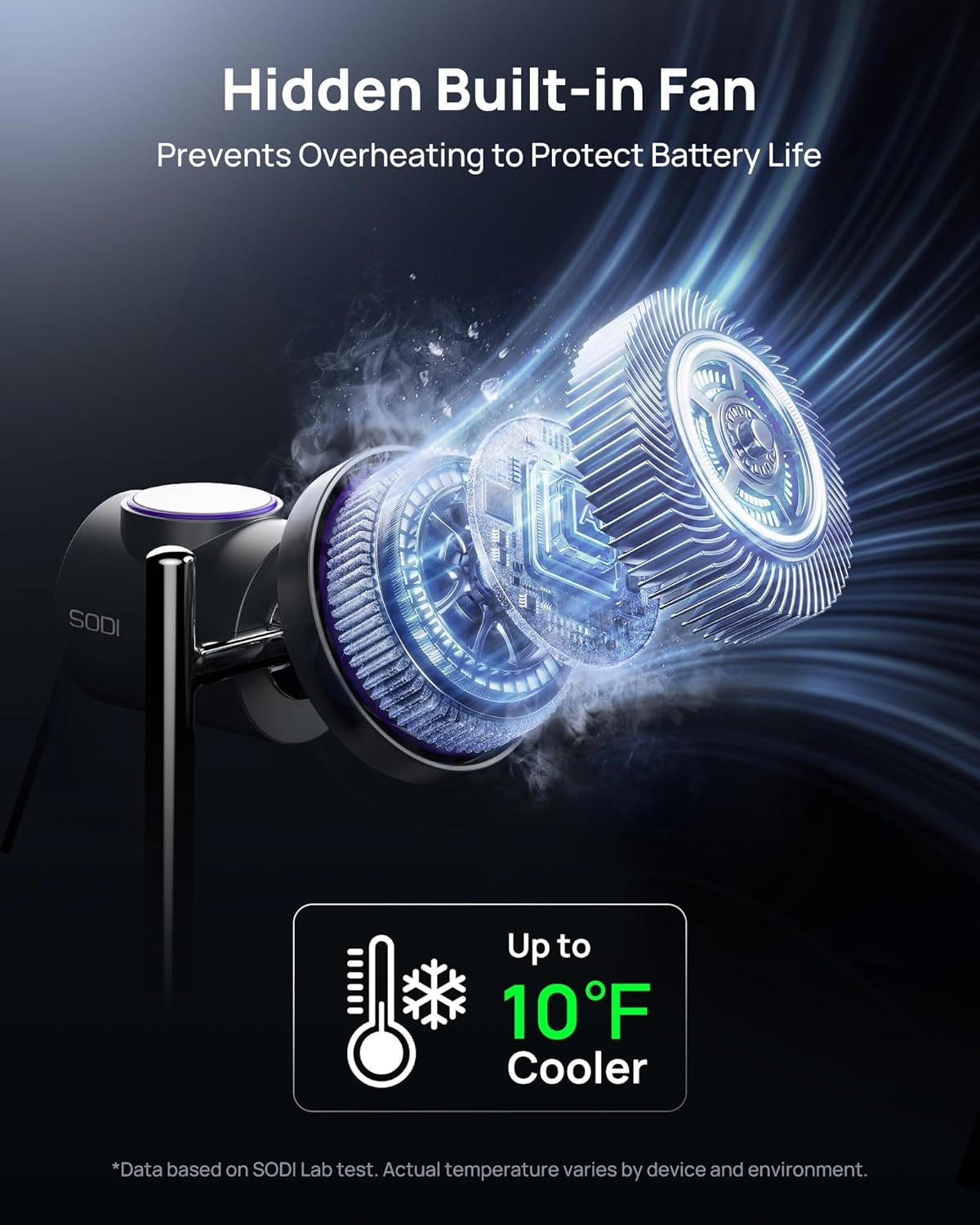
Image 2: An exploded view illustrating the internal cooling fan mechanism within the SODI Qi2 25W Wireless Charger, highlighting its function in temperature reduction.
4.3 Adjustable Viewing Angle
The magnetic charging pad for the iPhone can be adjusted up to 36° to provide an optimal viewing angle for various uses, such as watching videos or using StandBy mode.
Video 2: A demonstration of the 360° rotation and 36° adjustable viewing angle of the iPhone charging pad on the SODI Qi2.2 25W Wireless Charger, showing both vertical and horizontal charging orientations.
5. Compatibility
- Qi2.2 25W: iPhone 17/16 Series (iOS 26+ required).
- Qi2 20W: iPhone 17 Air (iOS 26+ required).
- Qi2 15W: iPhone 15/14/13/12 Series (Except SE, mini series, 16e).
- Apple Watch: All models (2.5W).
- AirPods: AirPods 4(ANC)/3/2/Pro/Pro 2 and other Qi-enabled earbuds (5W).

Image 3: A visual guide detailing the compatibility of the SODI Qi2 25W Wireless Charger with various iPhone models, Apple Watch models, and AirPods, along with their respective charging wattages.
6. Safety Information
The SODI Qi2 25W Wireless Charger is Qi2.2 certified and engineered with a GaN adapter, incorporating integrated protection features to ensure safe charging:
- Over-voltage Protection: Safeguards against excessive voltage input.
- Over-current Protection: Prevents damage from current surges.
- Overheating Protection: The built-in cooling fan and GaN technology manage heat effectively.
- Foreign Object Detection (FOD): The LED indicator will flash if a foreign object is detected on the charging pad.

Image 4: An illustration of the 4-layer safety protection within the GaN charger, detailing multiple circuit protection, heat dissipation, PC flame retardancy, and UL certification.
7. Troubleshooting
7.1 If Your Apple Watch Won't Charge
If you don't see the lightning bolt icon on your Apple Watch after placing it on the charging pad, follow these steps:
- Adjust the placement: Reposition the back of the watch on the charging pad. The magnets should align properly, and you'll see a lightning bolt icon on the watch face.
- Keep it clean: Make sure both the back of your watch and the charging pad are clean.
- Give it time: If your watch's battery is completely dead, it might take up to 30 minutes for the lightning bolt icon to appear.
- Force restart: If it still won't charge, force restart your watch by pressing and holding both the side button and the Digital Crown for at least 10 seconds, or until you see the Apple logo.
- Check for updates: On your watch, open the Settings app. Tap General > Software Update. If an update is available, tap Install and follow the on-screen instructions. Keep your Apple Watch on the charger during the update and don't restart it. It will restart on its own once the update is complete.
7.2 LED Smart Indicator Status
| Mode | Indicator Status |
|---|---|
| Power Connected | LED flashes for 5 seconds, then stays on. |
| Standby | LED light stays on. |
| Charging | LED breathes for 5 seconds, then stays on. The fan operates. (No indicator for earbud/watch charging) |
| Fully Charged | LED turns off, and the fan stops working. |
| Foreign Object Detected | LED flashes. (No indicator for foreign objects near the earphone/watch area). |
8. Specifications
- Model Number: T13W
- Brand: SODI
- Input Voltage: 15 Volts
- Wattage: 25 watts (Max)
- Package Dimensions: 6.85 x 4.84 x 4.8 inches
- Item Weight: 1.28 pounds
- Connector Type: Wireless
- Special Features: 3-in-1 Charging, Strong Magnetic Force (1.76 lb), Quiet & On/Off Built-in Cooling Fan (10°F Cooler), Qi2.2 Certified, 45W GaN adapter & USB-C to C Cable (3.28 ft) Included.
9. Warranty and Support
The SODI Qi2 25W Wireless Charger comes with a 24-month warranty. For professional customer support, please refer to the contact information provided in the included user manual or visit the official SODI website.
Related documentsT13W


Ask a question about this manual
Ask about setup, troubleshooting, compatibility, parts, safety, or missing instructions. Manuals+ will review the question and use this page’s manual context to help answer it.