
1. Product Overview
The NPET 3L Automatic Cat Feeder is designed to provide convenient and reliable feeding for your cats and small dogs. This feeder features a new big wheel design for efficient food dispensing and programmable portion control to ensure your pet eats healthily and regularly.
- Scheduled Feeding: Set up to 3-4 meals per day with 1-10 portions per meal.
- Dual Power Supply: Can be powered by a wall adapter for daily use or 3-D cell batteries (not included) for emergency backup.
- 3L Food Tank: Sufficient capacity to keep most cats comfortably fed for extended periods.
- Fresh Food Storage: Features a unique food inner road and lid design to maintain food freshness and prevent tampering.
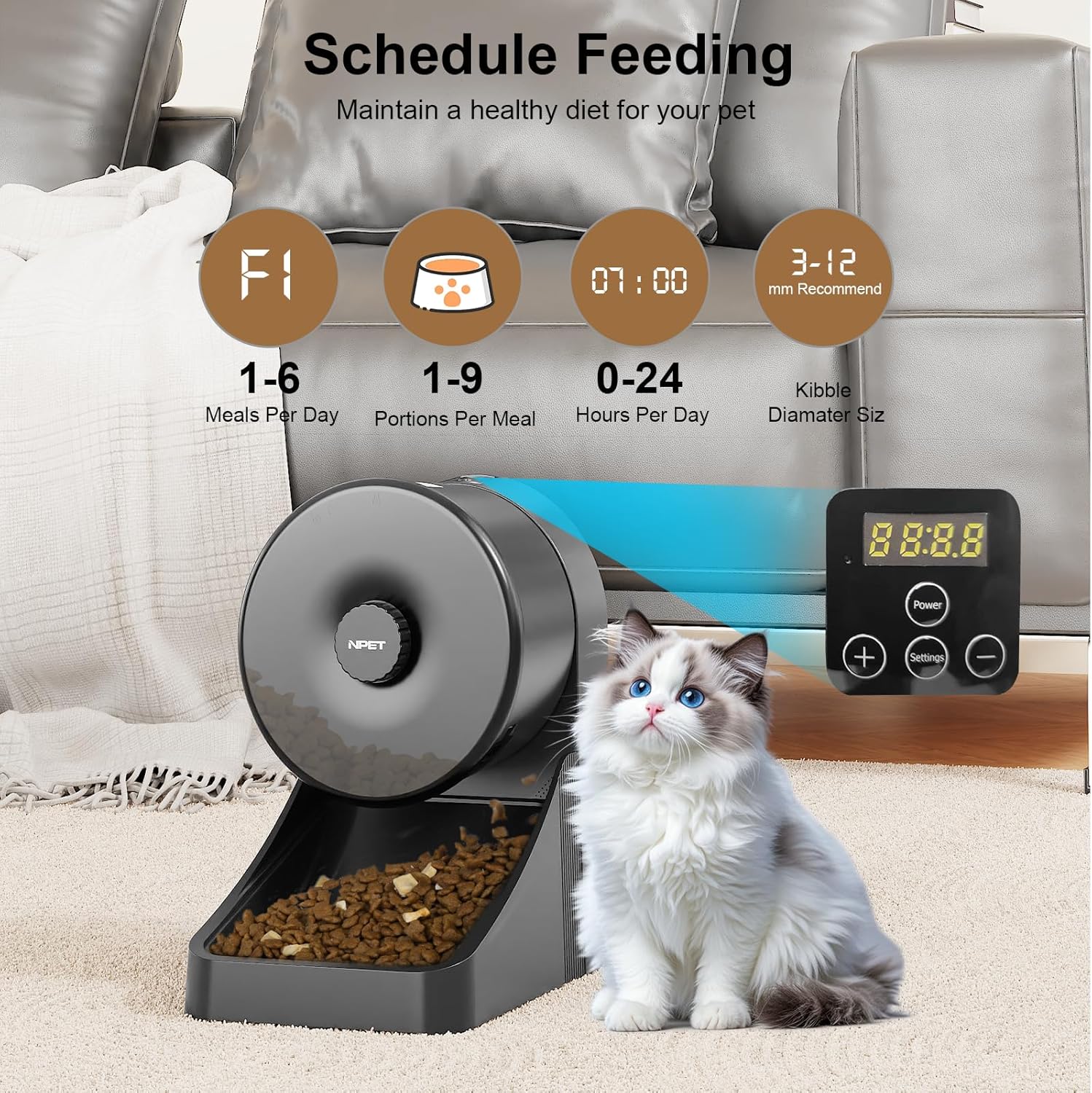
Image: The NPET 3L Automatic Cat Feeder in black, displaying its control panel with options for meals per day, portions per meal, and kibble size. A cat is visible next to the feeder, illustrating its use.
2. Setup Instructions
2.1 Unpacking and Component Check
Carefully remove all components from the packaging. Ensure you have the main feeder unit, food bowl, power adapter, and user manual. Batteries (3-D cell) are not included and must be purchased separately for backup power.
2.2 Power Supply
The feeder supports dual power options:
- AC Adapter (Recommended): Connect the provided power adapter to the feeder's power port and plug it into a wall outlet for continuous power.
- Battery Backup: For emergency use during power outages, install three (3) D-cell batteries (not included) into the battery compartment located at the bottom of the unit. Ensure correct polarity.

Image: A visual representation of the feeder's dual power capabilities, highlighting the battery compartment for 3 D-cell batteries (not included) and the USB Type-C port for plug-in power. This ensures continuous operation even during power outages.
2.3 Food Loading and Freshness
- Open the top lid of the feeder.
- Place the desiccant bag (if included) into the designated compartment under the lid to help keep the food fresh. Replace the desiccant bag regularly (e.g., monthly).
- Fill the food tank with dry pet food. Ensure the kibble size is appropriate for the feeder (typically 3-12mm recommended).
- Close the lid securely to maintain freshness.
2.4 Bowl Installation
Attach the food bowl to the main unit. Ensure it is securely fitted to prevent accidental detachment during feeding.
3. Operating Instructions
3.1 Setting the Feeding Schedule
The NPET feeder allows you to program automatic feeding times and portion sizes:
- Unlock the Panel: Press and hold the unlock button (often a lock icon) for a few seconds until the display indicates it's unlocked.
- Set Meals: Use the 'Settings' button to cycle through meal settings. Use the '+' and '-' buttons to set the number of meals per day (3-4 meals).
- Set Time: For each meal, set the desired feeding time using the '+' and '-' buttons to adjust hours and minutes.
- Set Portions: For each meal, set the portion size (1-10 portions) using the '+' and '-' buttons.
- Confirm Settings: Press the 'Settings' button again to confirm and save your schedule.
3.2 Manual Feeding
To dispense food manually, press the manual feed button (often a food bowl icon). This will dispense one portion of food immediately without affecting the programmed schedule.

Image: The internal anti-clog design of the NPET feeder, featuring a large wheel mechanism that ensures smooth and consistent food delivery, preventing jams.
4. Maintenance
4.1 Cleaning
Regular cleaning is essential for hygiene and proper functioning. The feeder is designed with detachable parts for easy cleaning:
- Unplug the feeder and remove any remaining food.
- Detach the food tank and food bowl from the main unit.
- Wash the food tank and bowl with mild soap and water. Rinse thoroughly and dry completely before reassembling.
- Wipe the main unit with a damp cloth. Do not submerge the main unit in water.

Image: The feeder's detachable parts, including the food tank, lid, and dispensing mechanism, are shown being washed, emphasizing the ease of cleaning to maintain hygiene.
4.2 Desiccant Bag Replacement
Replace the desiccant bag in the lid compartment approximately once a month to ensure optimal food freshness.
5. Troubleshooting
- Feeder not dispensing food: Check if the food tank is empty, if the dispensing mechanism is clogged, or if the power supply is interrupted. Ensure the feeder is unlocked if manual feeding is attempted.
- Incorrect feeding times/portions: Re-check your programmed schedule settings as per section 3.1.
- Power indicator off: Verify the power adapter connection or check the D-cell batteries if using backup power.
6. Specifications
| Feature | Detail |
|---|---|
| Model Number | PETAF050 |
| Capacity | 3 Liters |
| Product Dimensions | 23.5 x 19.51 x 29.59 cm |
| Item Weight | 1.47 kg |
| Material | Plastic |
| Color | Black |
| Power Supply | AC Adapter (included), 3 x D-cell batteries (not included) |
| Target Species | Cat, Small Dog |

Image: The NPET Automatic Cat Feeder with its dimensions labeled, showing its compact size and 3-liter (0.8 gallon) capacity, suitable for holding pet food for several weeks.
7. Warranty and Support
For warranty information, technical support, or any inquiries regarding your NPET 3L Automatic Cat Feeder, please refer to the contact details provided in the product packaging or visit the official NPET website. Keep your purchase receipt for warranty claims.