1. Introduction
This manual provides essential information for the safe and effective operation of your Warmdance 250W Moving Head DJ Light (Model ZQ06142). This professional stage lighting unit combines 36 RGBW LEDs and 96 RGB bead wall washer lights, offering a wide range of dynamic effects and versatile control options. Please read this manual thoroughly before use and retain it for future reference.

Image 1.1: The Warmdance 250W Moving Head DJ Light is suitable for diverse applications, including weddings, concerts, and architectural lighting.
2. Safety Information
To ensure safe operation, please observe the following precautions:
- Electrical Safety: Always connect the unit to a grounded power outlet. Ensure the power supply voltage matches the unit's requirements. Disconnect power before cleaning or servicing.
- Placement: Install the light in a well-ventilated area, away from heat sources, flammable materials, and moisture. Maintain adequate clearance around the unit for airflow.
- Eye Protection: Do not stare directly into the light source. The intense light output can cause eye damage.
- Handling: Avoid dropping or subjecting the unit to severe impact. Do not attempt to modify or repair the unit yourself. Refer all servicing to qualified personnel.
- Environmental Conditions: The unit is rated IP20, meaning it is protected against solid objects larger than 12.5mm but has no protection against liquids. Operate within the specified temperature range of -20°C to 40°C.
3. Package Contents
Verify that all items listed below are included in your package:
- Washer Light *1
- Power Cord *1
- Quick-Lock Hook Mounts *2
- Instruction Manual *1

Image 3.1: Contents of the Warmdance 250W Moving Head DJ Light package.
4. Product Overview
The Warmdance 250W Moving Head DJ Light is designed for dynamic stage and event lighting. It features a combination of powerful RGBW LEDs for the main beam and RGB LEDs for peripheral wall washing effects, all housed in a robust metal and plastic casing.
Key Features:
- Light Source: 36x10W RGBW LEDs for the main beam and 96x0.2W RGB LEDs for wall washing.
- Dynamic Effects: Over 104 built-in auto-running programs, including a full-cycle showcase mode, with diverse peripheral RGB accents.
- 9-Zone Control: The 96 RGB LEDs are divided into 9 individually programmable zones (4 LEDs each) for enhanced flexibility.
- Beam Angle: Main beam offers a 40° angle.
- Movement: Intelligent 180° Y-axis tilt movement with auto-reset function.
- Dimming & Strobe: 0-100% linear dimming and 1-30Hz precise strobe effects.
- Construction: Durable metal frame and plastic housing with an IP20 rating.

Image 4.1: The light features 36 RGBW LEDs for the main beam and 96 RGB fill LEDs with 9-zone independent control for dynamic accent lighting.

Image 4.2: The unit features a hybrid metal-plastic housing with an IP20 rating and integrated cooling for reliable performance.

Image 4.3: The light offers 180° Y-axis tilt movement with auto-reset, 0-100% dimming, and 1-30Hz strobe effects.
5. Setup
Follow these steps for initial setup:
- Unpacking: Carefully remove the light from its packaging and inspect for any damage.
- Placement/Mounting: Position the light on a stable, flat surface or securely mount it using the provided quick-lock hook mounts to a suitable truss or stand. Ensure the mounting surface can support the unit's weight (21.6 pounds).
- Power Connection: Connect the included power cord to the 'POWER IN' port on the unit and then to a grounded electrical outlet.
- DMX Connection (Optional): If using DMX control, connect a DMX cable from your DMX controller's output to the 'DMX IN' port on the light. For multiple units, daisy-chain them by connecting the 'DMX OUT' of the first unit to the 'DMX IN' of the next.
- Initial Power On: Once connected, power on the unit. The 4-digit display will illuminate, indicating the current mode or address.
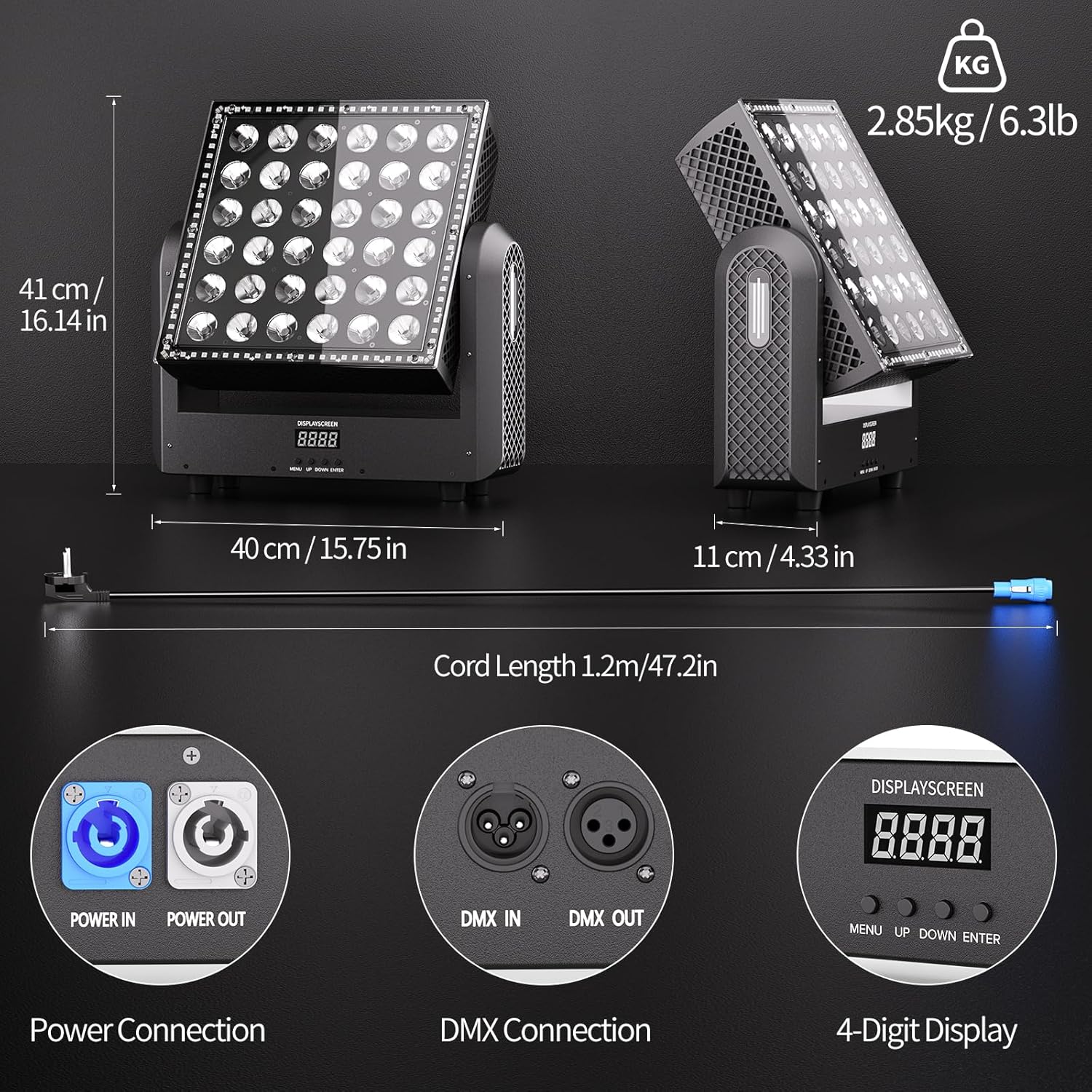
Image 5.1: Rear panel connections including Power In/Out, DMX In/Out, and the control display.
6. Operating Modes
The Warmdance 250W Moving Head DJ Light offers multiple operating modes:
- Auto-Run Mode: The light cycles through its 104+ built-in programs automatically. Speed can be adjusted via the control panel.
- Sound-Active Mode: The light reacts to ambient sound, changing patterns and colors in sync with music. Sensitivity can be adjusted.
- Master/Slave Mode: Connect multiple units via DMX cables. Set one unit as 'Master' and others as 'Slave' to synchronize their operation without a DMX controller.
- DMX Control Mode: For professional control, connect the unit to a DMX512 controller. This allows precise control over individual parameters such as color, movement, dimming, and strobe. The unit supports 9, 19, or 110 DMX channels.
Use the 'MENU', 'UP', 'DOWN', and 'ENTER' buttons on the 4-digit display to navigate and select operating modes and settings.

Image 6.1: Examples of the 104+ RGBW auto-changing effects, showcasing vibrant RGB fill LEDs and seamless blending.

Image 6.2: The light supports Auto, Master/Slave, Sound-activated, and DMX-512 control modes.
7. DMX Control
The unit supports standard DMX512 and RDM protocols, offering advanced control capabilities. Refer to the DMX channel chart (typically found in a separate DMX manual or appendix) for specific parameter assignments for the 9, 19, or 110 channel modes. Ensure your DMX controller is properly configured to match the light's DMX address and channel mode.
- DMX Addressing: Set the DMX start address using the unit's control panel. Each fixture in a DMX chain requires a unique start address.
- Channel Modes: Select the desired DMX channel mode (9, 19, or 110 channels) based on the level of control required and your controller's capabilities.
- RDM Support: Remote Device Management (RDM) allows for two-way communication between the DMX controller and the fixture, enabling remote addressing and monitoring.
8. Maintenance
Regular maintenance ensures optimal performance and longevity of your light:
- Cleaning: Periodically clean the lenses and exterior housing with a soft, lint-free cloth. Do not use abrasive cleaners or solvents. Ensure the unit is powered off and unplugged before cleaning.
- Fan & Vents: Keep the cooling fan and ventilation openings clear of dust and debris to prevent overheating. Use compressed air to gently clear dust if necessary.
- Inspection: Regularly check power cables, DMX cables, and mounting hardware for any signs of wear or damage. Replace damaged components immediately.
- Storage: When not in use for extended periods, store the light in a dry, dust-free environment, preferably in its original packaging or a protective case.
9. Troubleshooting
If you encounter issues, refer to the following common problems and solutions:
| Problem | Possible Cause | Solution |
|---|---|---|
| No power / Unit does not turn on | Power cable disconnected; Faulty outlet; Blown fuse | Check power connections; Test outlet; Replace fuse (if accessible and safe to do so) |
| No light output | Incorrect mode selected; Dimmer at 0%; DMX signal issue | Verify operating mode; Increase dimmer level; Check DMX connections and address |
| Erratic movement or no movement | DMX signal interference; Mechanical obstruction; Motor issue | Check DMX cable and termination; Ensure no physical obstructions; Perform a factory reset or contact support |
| Light not responding to DMX controller | Incorrect DMX address; Wrong channel mode; Faulty DMX cable | Verify DMX address and channel mode settings; Test DMX cable; Ensure DMX termination is used for long chains |
If the problem persists after attempting these solutions, please contact customer support.
10. Specifications
Detailed technical specifications for the Warmdance 250W Moving Head DJ Light (Model ZQ06142):
| Feature | Specification |
|---|---|
| Model Number | ZQ06142 |
| Brand | Warmdance |
| Light Source Type | LED (36x10W RGBW, 96x0.2W RGB) |
| Wattage | 250 Watts |
| Power Source | Corded Electric |
| Beam Angle | 40 Degrees |
| Movement | 180° Y-axis Tilt (Auto-Reset) |
| Dimming | 0-100% Linear |
| Strobe Rate | 1-30Hz |
| Control Modes | Auto-Run, Sound-Active, Master/Slave, DMX512, RDM |
| DMX Channels | 9/19/110 Channels |
| Material | Aluminum, Plastic |
| Finish Type | Metallic |
| Color | Black |
| IP Rating | IP20 |
| Operating Temperature | -20°C to 40°C |
| Product Dimensions (L x W x H) | 15.74" x 4.33" x 16.14" (40cm x 11cm x 41cm) |
| Item Weight | 21.6 pounds (9.8 kg) |
Image 10.1: Product dimensions and connection interfaces.
11. Warranty and Support
Warranty Information: This product is covered by a standard manufacturer's warranty against defects in materials and workmanship. The warranty period typically begins from the date of purchase. Please retain your proof of purchase for warranty claims.
Customer Support: For technical assistance, troubleshooting not covered in this manual, or warranty inquiries, please contact Warmdance customer service. Contact details can usually be found on the product packaging or the official Warmdance website.