
ATK RS7 V2
ATK RS7 V2 75% Aluminum Hall Effect Gaming Keyboard User Manual
Model: RS7 V2 | Brand: ATK
1. Introduction
The ATK RS7 V2 is a high-performance, magnet-driven keyboard engineered for competitive gaming. It features a durable CNC aluminum chassis with a TOP/Core-Flex dual-structure, providing a balance of typing acoustics and stability. Utilizing third-generation Hall Effect technology, the RS7 V2 delivers an ultra-fast 0.28 ms Rapid Trigger response across its range of magnetic switches. This 75% / 81-key layout keyboard includes a 256K polling rate, full NKRO (N-Key Rollover), dynamic RGB lighting, and customizable key response, ensuring precision and an esports-grade experience.
2. Key Features
- T0 Performance / Low Latency: Powered by a third-generation Ultra Hall Effect system, achieving an ultra-fast 0.28ms full-chain Rapid Trigger response for professional esports gameplay.
- Aluminum Chassis & Dual-Structure: Features a rigid CNC aluminum chassis with an aluminum plate, complemented by flexible TOP / Core-Flex switching to balance typing acoustics and stability.
- Premium Magnetic Switch Options: Choose between Leviatan Ultra, Blazeblade, or Snowblade magnetic switches, each optimized for sound, feel, and precision.
- Compact 75% / 81-Key Design: A space-saving layout that provides more desk room for mouse movement while retaining essential keys. Includes aesthetic RGB side lighting and a PVD logo.
- Advanced Keycap & Scan Technology: Equipped with high-transparency or mist-finish keycaps, a 256K polling rate, full NKRO, and rapid scanning for split-second accuracy.

Image showing the internal components and performance metrics of the ATK RS7 V2 keyboard, highlighting the Blazing Wind Ultra system, dual structure, and 6-layer padding. It displays a 480MHz MCU, 0.001mm RT precision, 8K Hz polling rate, 256KHz scan rate, and 0.28ms end-to-end latency.

Image detailing the Mecha-Style Design of the ATK RS7 V2 keyboard, featuring a full aluminum CNC precision-machined case, Mecha Lightblade Aesthetic, RGB Flash Logo, and PVD Nameplate.

Image illustrating the ATK GEN-3 Blazing Wind Ultra Magnetic Switch Solution, showing the internal chip and latency measurements: Actuation Latency at 0.35ms and RT Release Latency at 0.28ms.

Image presenting the cutting-edge flagship switch options for the ATK RS7 V2: Leviatan Ultra (Pro Certified), Blazeblade (Annual flagship with full POM performance), and Snowblade (Self-developed Acoustic Switch). Each switch lists Total Travel, Actuation Force, Top Shell, Stem, and Bottom Shell materials.

Image showcasing the ATK RS7 V2 keyboard's 75% layout, emphasizing its compact design for function, space, and style. The keyboard is shown with clear keycaps and blue backlighting.

Image displaying three different sets of Five-Side Dye-Sub Themed Keycaps (Keytok Custom Edition), available with the RS7 V2 Ultra model, in pink, white, and black color schemes.
Product Overview Video
Official product video for the ATK RS7 V2 Gaming Keyboard, demonstrating its compact 75% layout, rapid trigger response, customizable function keys, dual-structure design for acoustic experience, and dynamic RGB lighting effects. The video highlights the keyboard's performance in gaming scenarios.
3. Setup Guide
3.1 Package Contents
Before proceeding, ensure all items are present in the package:
- ATK RS7 V2 Gaming Keyboard
- USB-C Cable
- Keycap Puller (if included)
- Switch Puller (if included)
- User Manual (this document)
3.2 Connecting the Keyboard
- Locate the USB-C port on the ATK RS7 V2 keyboard.
- Connect one end of the provided USB-C cable to the keyboard's USB-C port.
- Connect the other end of the USB-C cable to an available USB port on your computer (PC or Laptop).
- The keyboard will automatically be recognized by your operating system (Windows, macOS, Linux).
- For full customization and advanced features, download and install the ATK HUB 3.0 software from the official ATK website.
4. Operating Instructions
4.1 Basic Functions
- Typing: Use the standard QWERTY layout for typing.
- Function Keys (F1-F12): Access multimedia controls and other system functions by pressing the 'Fn' key in combination with the corresponding F-key. Refer to the keycap legends for specific functions.
4.2 Advanced Features (via ATK HUB 3.0 Software)
The ATK HUB 3.0 software unlocks the full potential of your RS7 V2 keyboard. Key features include:
- Adjustable Actuation Point: Customize the actuation distance of each magnetic switch from 0.001mm to 3.3mm for personalized responsiveness.
- Rapid Trigger (RT): Enable and configure Rapid Trigger for instant key resets, allowing for faster repeated inputs in gaming.
- Dynamic Reset (DR) / Stop on Release (SOR): Fine-tune the key release point for precise control.
- Mod-Tap (MT): Assign different functions to a key based on whether it's tapped or held.
- Key Remapping: Reassign any key to perform a different function or macro.
- RGB Lighting Customization: Personalize the keyboard's RGB backlighting with various effects, colors, and brightness levels.
- Champion Preset: Load pre-configured settings optimized for specific games or user preferences.
4.3 Dual-Structure Switching
The ATK RS7 V2 features a TOP/Core-Flex dual-structure design. This allows for a customizable typing feel and acoustic experience. While the physical switching mechanism is internal, the software may offer profiles optimized for each structure. Consult the ATK HUB 3.0 software for details on how to leverage this feature for your preferred typing experience.
5. Maintenance
5.1 Cleaning the Keyboard
- Disconnect the keyboard from your computer before cleaning.
- Use a soft, lint-free cloth lightly dampened with water or a mild cleaning solution to wipe down the keycaps and chassis.
- For dust and debris between keycaps, use compressed air.
- Avoid using harsh chemicals, abrasive cleaners, or excessive moisture, as these can damage the keyboard.
5.2 Switch and Keycap Replacement
The ATK RS7 V2 supports hot-swappable switches. If you wish to replace switches or keycaps:
- Use the provided keycap puller to carefully remove keycaps.
- Use the provided switch puller to gently remove switches.
- Align new switches carefully with the PCB sockets and press down until they click into place.
- Ensure switches are properly seated to avoid bent pins.
6. Troubleshooting
6.1 Keyboard Not Responding
- Ensure the USB-C cable is securely connected to both the keyboard and the computer.
- Try connecting the keyboard to a different USB port on your computer.
- Test the keyboard on another computer to determine if the issue is with the keyboard or the original computer.
- Restart your computer.
6.2 RGB Lighting Not Working or Incorrect
- Check the ATK HUB 3.0 software for lighting settings and ensure they are configured as desired.
- Ensure the software is up to date.
- Try resetting the keyboard's lighting profile to default within the software.
6.3 Keys Not Registering or Double-Typing
- Ensure the switches are fully seated in their sockets. Gently press down on the affected key's switch.
- Clean around the affected switch with compressed air.
- If the issue persists, consider replacing the affected switch.
- Check for any software conflicts or outdated drivers.
7. Specifications
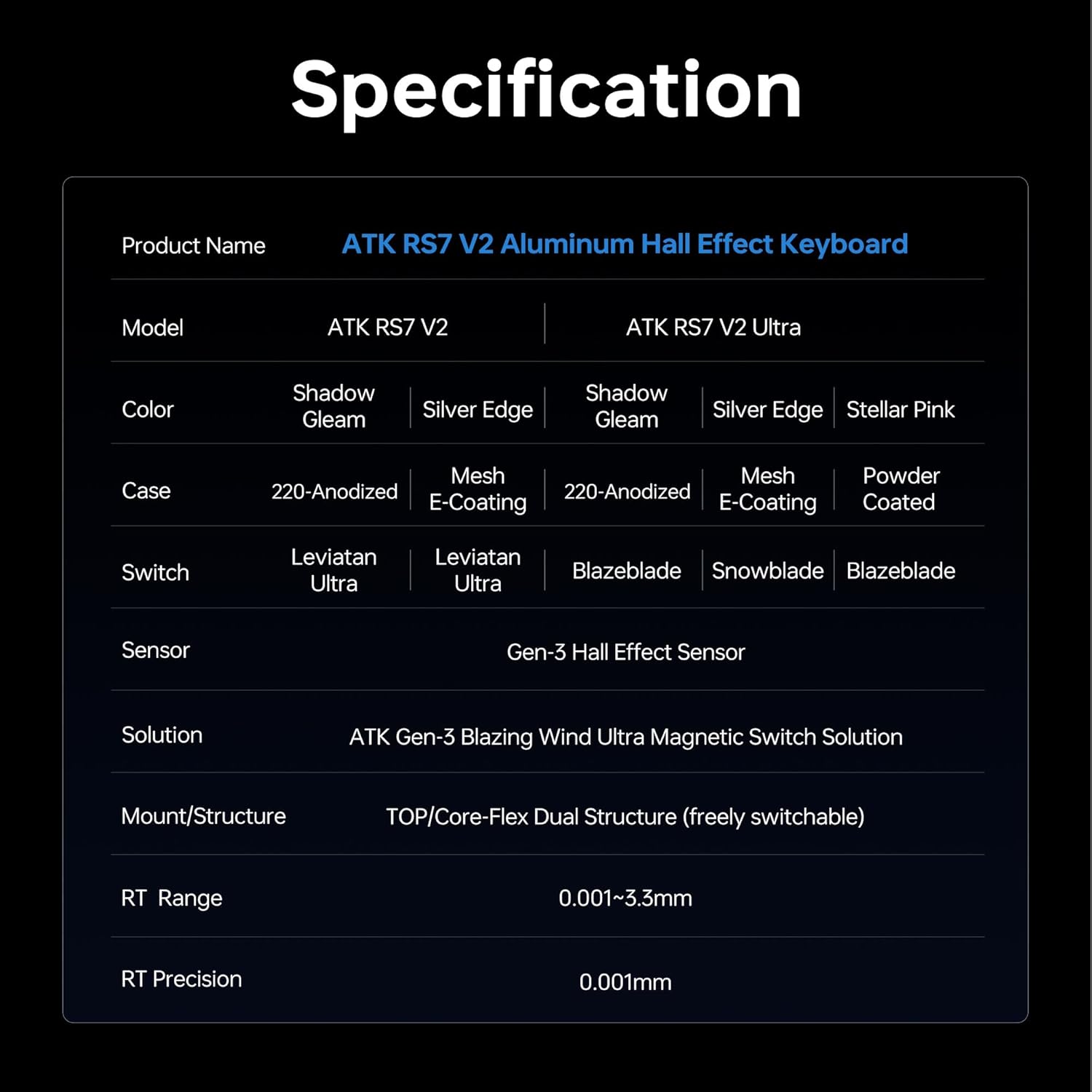
Part one of the detailed specifications table for the ATK RS7 V2 Aluminum Hall Effect Keyboard, covering Product Name, Model, Color, Case, Switch, Sensor, Solution, Mount/Structure, RT Range, and RT Precision.

Part two of the detailed specifications table for the ATK RS7 V2 Aluminum Hall Effect Keyboard, covering End-to-end Latency, Scan Rate, Connectivity, Latency, Keycaps, Padding, Positioning Plate, Polling Rate, System Compatibility, Driver, and Functions.
| Feature | Detail |
|---|---|
| Product Name | ATK RS7 V2 Aluminum Hall Effect Keyboard |
| Model Name | ATK RS7 V2 |
| ASIN | B0FMY1WCBW |
| Manufacturer | ATK |
| Compatible Devices | Laptop, PC |
| Connectivity Technology | USB-C (Wired) |
| Keyboard Description | Gaming |
| Recommended Uses | Gaming, Office |
| Special Features | Hot-Swappable, Programmable Keys |
| Keyboard Backlighting | RGB |
| Material | Aluminum |
| Power Source | Wired |
| End-to-end Latency | 0.28ms |
| Scan Rate | 256K Hz |
| Polling Rate | 8K Hz |
| System Compatibility | Windows / macOS / Linux |
| Driver Software | ATK HUB 3.0 |
8. Warranty and Support
8.1 Warranty Information
The ATK RS7 V2 Gaming Keyboard comes with a manufacturer's warranty. Please refer to the warranty card included in your product packaging or visit the official ATK website for detailed warranty terms and conditions. Keep your proof of purchase for warranty claims.
8.2 Customer Support
For technical assistance, troubleshooting, or any product-related inquiries, please contact ATK customer support through their official website or the contact information provided in your product documentation. You may also find helpful resources, FAQs, and software downloads on the ATK support page.
Related documentsRS7 V2


Ask a question about this manual
Ask about setup, troubleshooting, compatibility, parts, safety, or missing instructions. Manuals+ will review the question and use this page’s manual context to help answer it.