
1. Introduction
This manual provides detailed instructions for the installation, operation, and maintenance of your VECHTEL 8 CORE 6G+128G Car Radio. This advanced car stereo system is designed specifically for Toyota Sienna models from 2011 to 2014, offering a 9-inch Android 15 IPS touch screen with wireless CarPlay/Android Auto, Bluetooth, GPS, 5G WiFi, Steering Wheel Control (SWC), Digital Sound Processor (DSP), and an included backup camera. Please read this manual thoroughly before installation and use to ensure proper functionality and safety.
2. Vehicle Compatibility
This VECHTEL car radio is compatible with Toyota Sienna models manufactured between 2011 and 2014. It is important to verify your vehicle's center console design for proper fitment. Note: This unit is not suitable for all 2011-2014 Toyota Siennas. Please compare your original car stereo and center console with the images provided below.

Figure 2.1: VECHTEL Car Radio installed in a Toyota Sienna dashboard, showing before and after installation.

Figure 2.2: Example of an incompatible Toyota Sienna center console. If your console matches this shape, the unit will not fit.
If you are uncertain about compatibility, please send a picture of your vehicle's center console with the original car stereo to customer support for verification.
3. Package Contents
Please check the package for the following items:
- VECHTEL 9-inch Android Car Radio Unit
- HD Backup Camera
- Power Cable
- RCA Input/Output Cables
- Reversing Camera Input Cable
- USB Cables (2)
- GPS Antenna
- Radio Antenna
- Installation Tools
- User Manual (this document)
- Microphone (MIC)

Figure 3.1: Car radio dimensions and included accessories.
4. Setup and Installation
Professional installation is recommended for this car radio. Incorrect wiring can damage the unit or your vehicle's electrical system. Ensure the vehicle's power is disconnected before beginning installation.
4.1 Wiring Connections
- Power Cable: Connect the main power harness to your vehicle's wiring. Ensure all connections are secure and match the vehicle's electrical system.
- RCA Cables: Connect RCA input/output cables for external audio/video devices or amplifiers.
- USB Cables: Connect the provided USB cables for data transfer, charging, or connecting external devices.
- GPS Antenna: Mount the GPS antenna in a location with a clear view of the sky, typically on the dashboard or under the windshield, to ensure optimal signal reception.
- Radio Antenna: Connect your vehicle's radio antenna to the unit.
- Backup Camera: Connect the reversing camera input cable to the unit. Route the camera cable from the rear of the vehicle to the head unit. Connect the camera's power to the vehicle's reverse light circuit. Note: For larger vehicles like the Toyota Sienna, an extension cable for the backup camera may be required (not included).
- Steering Wheel Control (SWC): Connect the SWC wires according to your vehicle's wiring diagram to enable control from your steering wheel.
4.2 Initial Power-Up
After all connections are made, reconnect the vehicle's power. The unit should power on automatically. Follow any on-screen prompts for initial setup, such as language selection and time zone.
5. Operating Instructions
5.1 Touch Screen Interface
The unit features a 9-inch IPS HD touchscreen with 1280x720 resolution. Navigate through menus and applications by tapping, swiping, and dragging. The interface supports split-screen display, allowing two applications to run simultaneously.

Figure 5.1: HD IPS Touch Screen display.

Figure 5.2: Various UI Themes available.

Figure 5.3: Split-screen display functionality.
5.2 Wireless CarPlay and Android Auto
Connect your iPhone or Android smartphone wirelessly or via USB to access CarPlay or Android Auto. This feature allows seamless integration of your phone's navigation, music, calls, and messages directly on the car radio screen. Voice control through Siri or Google Assistant is supported.
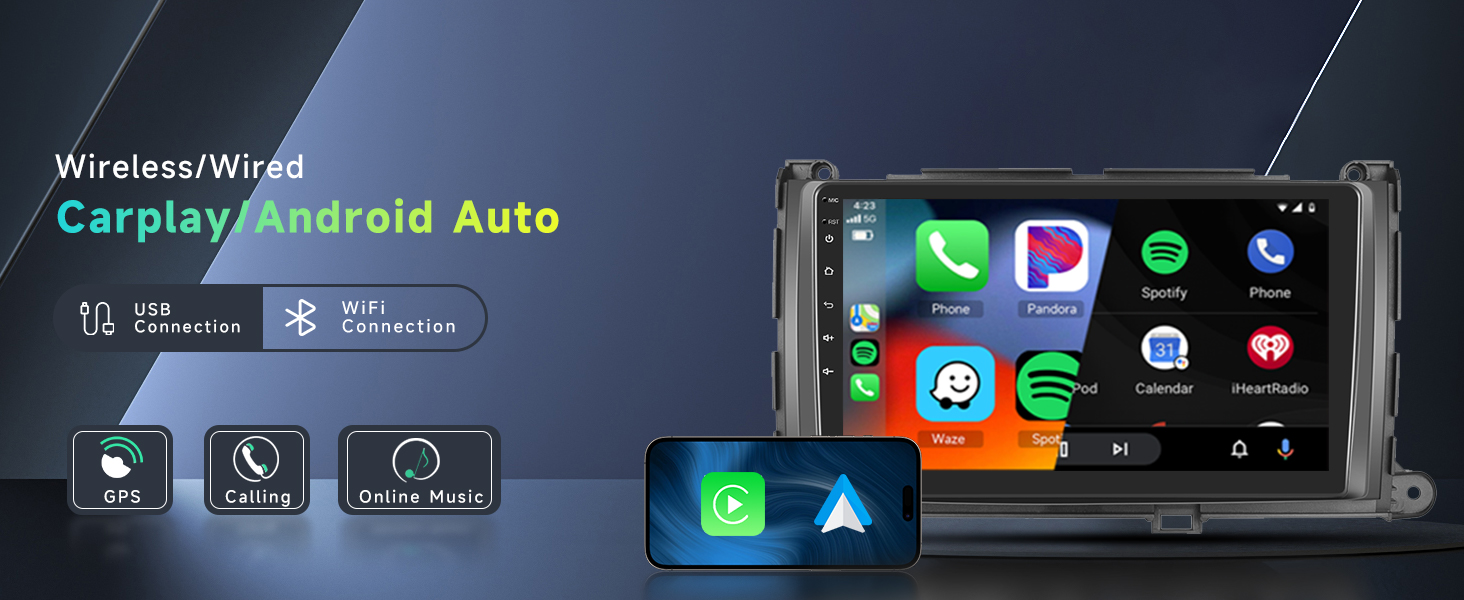
Figure 5.4: Wireless CarPlay and Android Auto interface.

Figure 5.5: Voice control via Siri or Google Assistant.
Video 5.1: Demonstration of the Fumgil Android 15 Car Radio for Toyota Sienna 2011-2014, showcasing its features and interface.
5.3 GPS Navigation & 5G WiFi
The unit supports both online and offline GPS navigation. Utilize 5G WiFi for fast and stable downloads of maps and other applications from the Play Store, including Waze, Spotify, and YouTube.

Figure 5.6: GPS Navigation and 5G WiFi connectivity.
5.4 Bluetooth 5.0
Connect your smartphone via Bluetooth 5.0 for hands-free calling and wireless audio streaming. The advanced Bluetooth version ensures a stable and high-quality connection.

Figure 5.7: Bluetooth 5.0 and FM/RDS Radio features.
5.5 FM/RDS Radio
Access FM radio stations with RDS (Radio Data System) functionality, which displays station information like song titles and artist names where available.
5.6 Digital Sound Processor (DSP) with 32-band EQ
Customize your audio experience with the integrated DSP and 32-band equalizer. Adjust sound frequencies to match your preferences and optimize audio output for your vehicle's acoustics. Subwoofer output is also supported.

Figure 5.8: DSP and 32-band EQ interface.
5.7 Steering Wheel Control (SWC)
Integrate with your vehicle's existing steering wheel controls for convenient and safe operation of the car radio, allowing you to adjust volume, change tracks, and answer calls without taking your hands off the wheel.
5.8 HD Backup Camera
The included waterproof night vision camera provides clear reversing images, assisting with parking maneuvers, especially in low-light conditions. Guide lines can be turned on or off via the Car Info > About > Custom Set menu by enabling "show dynamic trackline" and "show static trackline".

Figure 5.9: Backup camera view and Steering Wheel Control interface.
5.9 Mirror Link
Mirror your Android or iOS phone screen directly onto the car radio display, allowing you to view content from your phone on the larger screen.

Figure 5.10: Mirror Link functionality.
6. Customization
The Android 15 operating system allows for extensive customization. You can rearrange applications, delete unwanted apps, and choose from various UI themes to personalize your car radio's appearance.
Video 6.1: Instructions on how to customize the home page and change themes on the car radio.
7. Troubleshooting
If you encounter any issues with your VECHTEL car radio, please refer to the following common solutions:
- No Power: Check all power connections and vehicle fuses. Ensure the ACC wire is properly connected.
- No Sound: Verify speaker connections, volume levels, and audio settings (DSP). Check if the mute function is active.
- GPS Signal Issues: Ensure the GPS antenna is mounted in a clear location and is securely connected.
- Bluetooth Connectivity Problems: Ensure Bluetooth is enabled on both the car radio and your device. Try unpairing and re-pairing the devices.
- CarPlay/Android Auto Not Connecting: Check USB cable connection (if wired) or WiFi connection (if wireless). Ensure your phone's operating system is up to date.
- Backup Camera Not Displaying: Verify the camera's power and video signal connections. Check the reverse gear trigger wire connection.
- Screen Unresponsive: Try restarting the unit. If the issue persists, a factory reset may be necessary (note: this will erase all user data).
For complex issues or compatibility problems (e.g., mismatched wiring or shape), please contact customer support directly through Amazon. Provide your car model year and a picture of the center console for assistance.
8. Specifications
| Feature | Specification |
|---|---|
| Brand | VECHTEL |
| Model | 8 CORE 6G+128G |
| Operating System | Android 15.0 |
| Processor | 8 Core |
| RAM | 6GB |
| ROM | 128GB |
| Screen Size | 9 Inches |
| Display Type | IPS Touch Screen |
| Resolution | 1280 x 720 |
| Connectivity | Bluetooth 5.0, 5G WiFi, USB |
| Special Features | Wireless CarPlay, Wireless Android Auto, GPS, SWC, DSP (32-band EQ), Mirror Link, FM/RDS Radio, Subwoofer Output |
| Included Components | HD Backup Camera |
| Weight | 1.5 Kilograms |
9. Warranty and Support
9.1 Warranty Information
This VECHTEL car radio comes with a 2-year warranty from the date of purchase, covering manufacturing defects and malfunctions under normal use. Please retain your proof of purchase for warranty claims.
9.2 Customer Support
For any questions, technical assistance, or warranty claims, please contact VECHTEL customer support directly through Amazon. When contacting support, please provide your order number, car model year, and a detailed description of the issue, including any relevant pictures of your center console if the issue is related to fitment or installation.
