
1. Introduction
Thank you for choosing the CNAPES Electric Flosser. This device is designed to revolutionize your oral hygiene routine, offering an effective and comfortable alternative to traditional flossing. With its advanced technology, including 5 speed settings and a double-line floss design, it provides a deep clean while being gentle on your gums. This manual will guide you through the setup, operation, and maintenance of your new electric flosser to ensure optimal performance and a healthier smile.
2. Safety Information
- Always keep the flosser away from water to prevent electrical hazards.
- Do not use the flosser if the cord is damaged.
- Avoid using the flosser if you have any dental work that could be dislodged by high-speed vibrations.
- Always follow the instructions provided in this user manual for safe and effective use.
3. Product Features
- Effortless Flossing: Glides easily between teeth with up to 32,000 vibrations per minute, reaching back molars without strain.
- Deep Cleaning: 5 adjustable speed settings and ultrasonic vibrations effectively remove plaque and tartar.
- Double-Line Floss: Features a tough, shred-resistant, dual-strand design that is gentle on sensitive gums.
- Rechargeable & Portable: Sleek design with up to 60 days of battery life on a single charge, ideal for travel and on-the-go oral care.
- Easy Refill System: Comes with 54 easy-to-replace floss heads, reducing waste and simplifying your routine.
- Ergonomic Design: Comfortable handle for better control and maneuverability.
- 360° Rotation: Floss head rotates 360 degrees to reach any direction for comprehensive cleaning.
4. What's Included

Image: The CNAPES Electric Flosser kit laid out, showing the electric flosser handle, a box of 54 replacement floss heads, a storage base, and a USB-C charging cable.
- 1 x CNAPES Electric Flosser Handle
- 1 x Pack of 54 Replacement Floss Heads
- 1 x Storage Base
- 1 x USB-C Charging Cable
- 1 x User Manual (this document)
5. Setup
- Charge the Device: Before first use, fully charge your electric flosser using the provided USB-C cable and storage base. The battery indicator lights will show charging progress. A full charge provides up to 60 days of use.
- Attach a Floss Head: Gently snap a fresh floss head onto the metal pin at the top of the flosser handle until it clicks into place. Ensure it is securely attached.
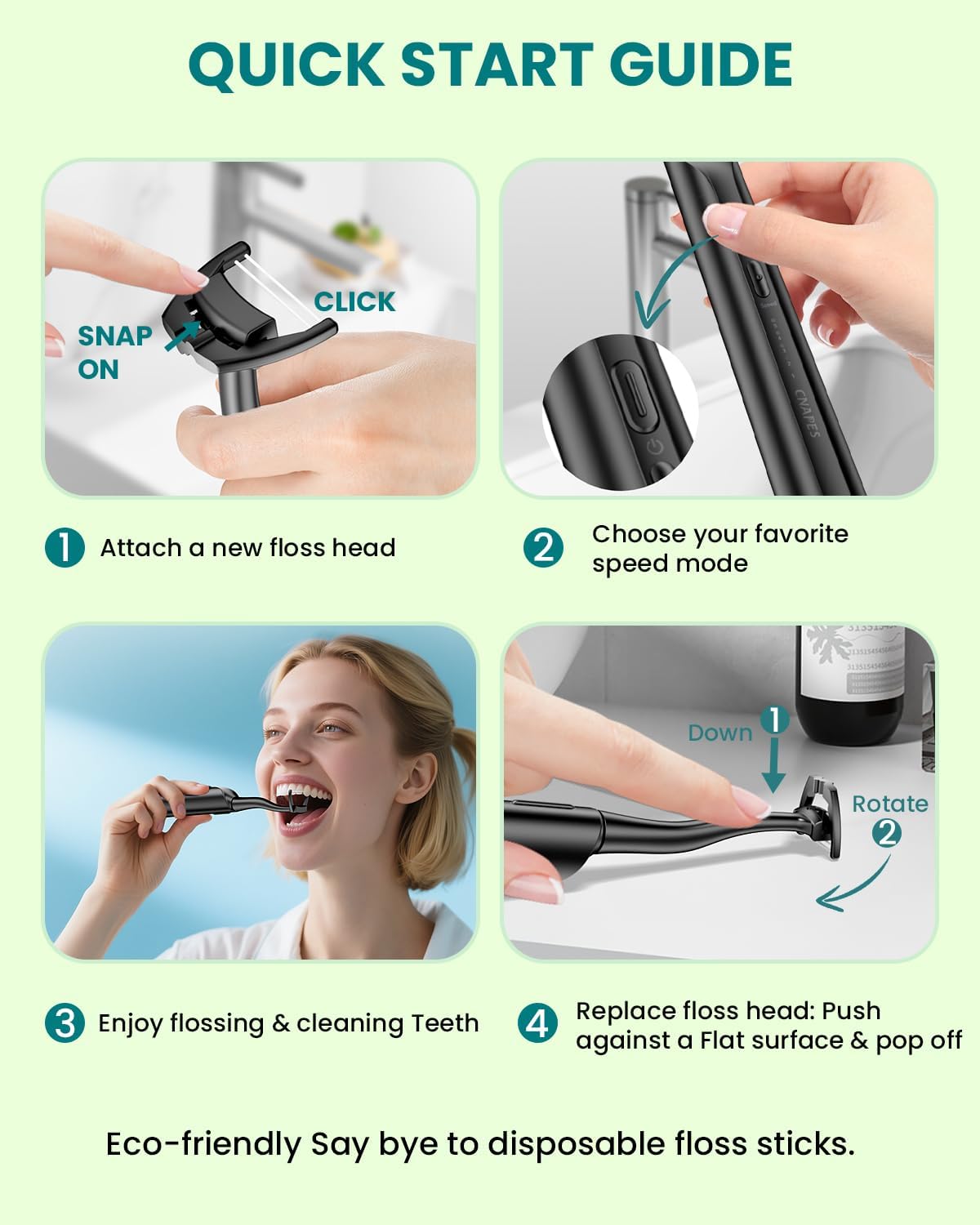
Image: A visual guide demonstrating how to attach a new floss head, select a speed mode, use the flosser, and replace the floss head.
6. Operating Instructions
- Power On: Press and hold the power button on the handle to turn on the device.
- Select Speed Mode: Tap the speed button to cycle through the 5 available speed settings (Gentle, Clean, Strong, Massage). Choose the intensity that feels most comfortable and effective for your teeth and gums.
- Flossing Technique: Position the floss between two teeth. Gently glide the floss along the gum line in a 'Y' and 'C' shape. Do not force it; let the 32,000 vibrations per minute do the work. The floss head can rotate 360 degrees to reach all areas of your mouth.
- Tongue Cleaning: The back of the floss head features a tongue scraper. Gently pass it over the surface of your tongue 3 to 5 times to remove bacteria and freshen breath.
- Power Off: Press and hold the power button to turn off the device after use.

Image: A step-by-step visual guide illustrating the process of attaching and removing floss heads, selecting a mode, and proper flossing technique.
7. Maintenance
- Cleaning the Floss Head: After each use, rinse the floss head under running water to remove any debris.
- Replacing Floss Heads: To remove a used floss head, place your finger on the neck of the handle and press down gently to release it. Snap on a new floss head as described in the Setup section.
- Charging: When the battery indicator lights are low, connect the USB-C charging cable to the port at the bottom of the handle and plug it into a power source. A full charge takes approximately 3 hours and provides up to 60 days of use.
- Storage: Store the flosser in its provided storage base in a dry place.
8. Troubleshooting
- Device not turning on: Ensure the device is fully charged. If the issue persists, check the charging cable and power source.
- Weak vibrations: This may indicate a low battery. Recharge the device.
- Floss head not staying on: Ensure the floss head is snapped securely into place. If it continues to detach, try a new floss head.
- Gum discomfort: If you experience discomfort, try using a lower speed setting (Gentle or Clean) or consult your dental professional.
9. Specifications
| Feature | Detail |
|---|---|
| Model Number | ABB992 |
| Vibrations per Minute | Up to 32,000 |
| Speed Settings | 5 (Gentle, Clean, Strong, Massage) |
| Battery Type | 1 Lithium Ion (included) |
| Battery Life | Up to 60 days on a single charge |
| Charging Time | Approx. 3 hours |
| Power Source | Battery Powered (USB-C charging) |
| Special Features | Prevents Bad Breath, Prevents Cavities, Removes Plaque, Gum Health, Double-Line Floss, 360° Rotating Head |
| Package Dimensions | 8.82 x 5.39 x 1.34 inches |
| Item Weight | 11.68 ounces |
10. Warranty and Support
For warranty information or product support, please refer to the manufacturer's official website or contact customer service through your purchase platform. Keep your proof of purchase for any warranty claims.