1. Introduction
Thank you for choosing the Roxicosly ROX-DE-CR1030DAB Emergency Radio. This multi-functional device is designed to provide reliable communication, illumination, and power in various situations, including outdoor activities and emergencies. It features DAB/DAB+/FM radio reception, multiple power sources (solar, hand crank, USB), a powerful 12000mAh battery, Bluetooth 5.0 connectivity, an LED flashlight, and a reading lamp.
Please read this manual thoroughly before using the product to ensure proper operation and to maximize its lifespan.
2. Safety Instructions
- Do not expose the device to extreme temperatures, direct sunlight for prolonged periods, or high humidity.
- Avoid dropping or subjecting the radio to strong impacts.
- Keep the device away from water and other liquids. If it gets wet, turn it off immediately and allow it to dry completely before reuse.
- Do not attempt to disassemble or modify the radio. This will void the warranty and may cause damage or injury.
- Use only approved charging cables and adapters.
- When using the hand crank, ensure it is rotated smoothly and at a consistent speed.
- The flashlight is powerful; avoid shining it directly into eyes.
- Dispose of batteries according to local regulations.
3. Package Contents
Verify that all items are present in your package:
- Roxicosly ROX-DE-CR1030DAB Emergency Radio
- USB Charging Cable
- User Manual (this document)
4. Product Overview
Familiarize yourself with the components of your emergency radio.
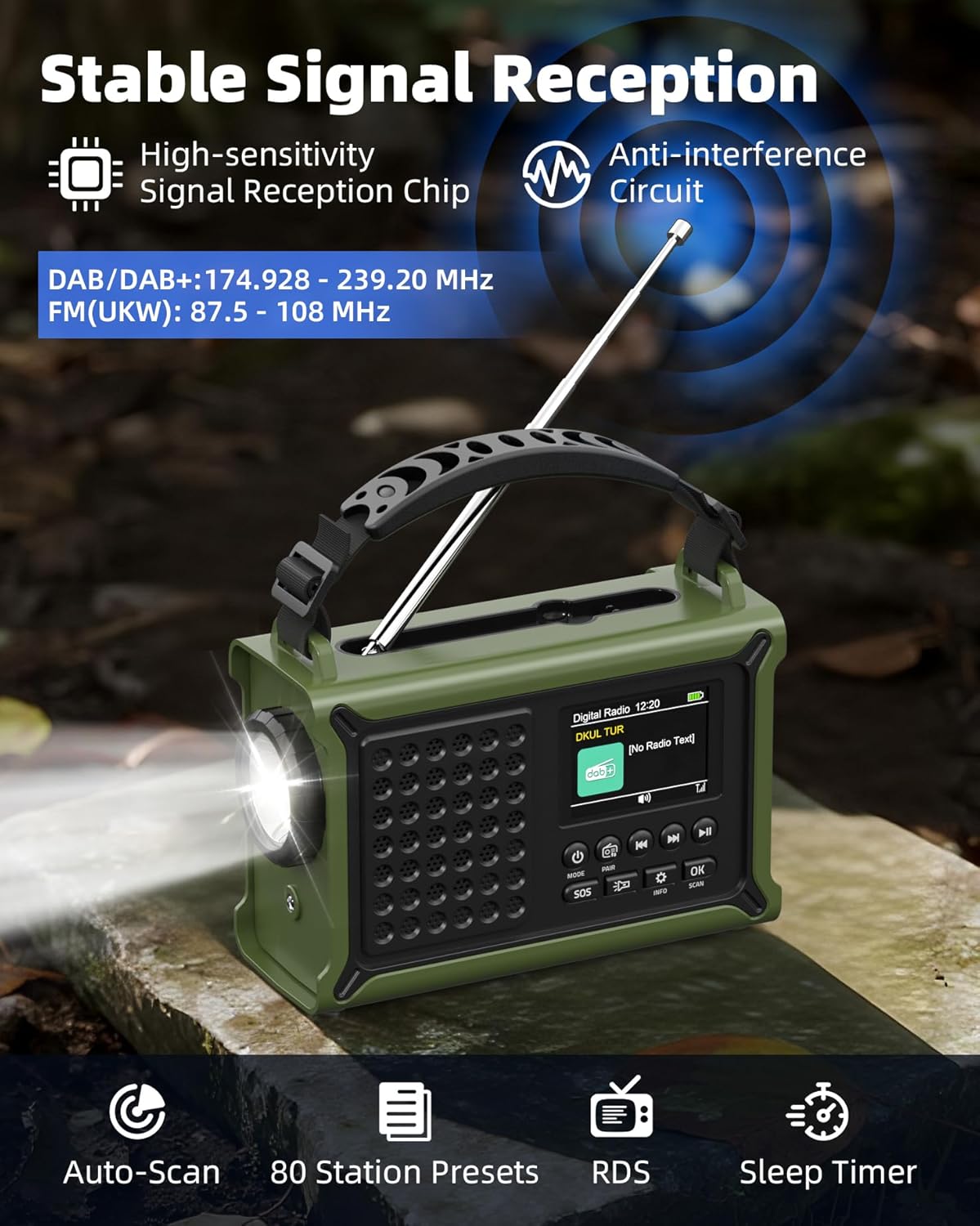
Figure 4.1: Front view of the Roxicosly ROX-DE-CR1030DAB Emergency Radio. This image highlights the telescopic antenna, digital display, control buttons, and the integrated flashlight.

Figure 4.2: Rear and side view illustrating the solar panel, hand crank, and the compartment for optional AAA batteries.
- Telescopic Antenna: For improved radio signal reception.
- Solar Panel: For charging the internal battery using sunlight.
- Hand Crank: For manual power generation.
- LED Flashlight: Powerful 5W light source.
- Reading Lamp: 2.5W LED panel for ambient lighting.
- Digital Display: Shows radio frequency, battery level, time, and other information.
- Control Buttons: Power, Mode, Tune, Volume, Scan, SOS, etc.
- USB Output Port: For charging external devices.
- Type-C Input Port: For charging the radio.
- 3.5mm Headphone Jack: For private listening.
- AAA Battery Compartment: For optional backup power (3x AAA batteries, not included).
5. Setup
5.1 Initial Charging
Before first use, fully charge the internal 12000mAh battery using the provided USB-C cable.
- Connect the USB-C end of the cable to the radio's Type-C input port.
- Connect the USB-A end to a standard USB power adapter (not included) or a computer USB port.
- The battery indicator on the display will show charging status. Charging is complete when the indicator shows full.
5.2 Optional AAA Battery Installation
For an additional power backup, you can install 3 AAA batteries (not included).
- Locate the AAA battery compartment on the side of the radio (refer to Figure 4.2).
- Open the compartment cover.
- Insert 3 AAA batteries, ensuring correct polarity (+/-).
- Close the compartment cover securely.
6. Operating Instructions
6.1 Power On/Off
- Press and hold the POWER button to turn the radio on or off.
6.2 Radio Operation (DAB/DAB+/FM)
Figure 6.1: The radio's telescopic antenna should be extended for optimal signal reception.
- Extend the telescopic antenna for best reception.
- Press the MODE button to switch between DAB/DAB+ and FM modes.
- In DAB/DAB+ mode, press the SCAN button to automatically scan for available stations. The radio can store up to 40 DAB+ stations.
- In FM mode, press the SCAN button to automatically scan for available stations. The radio can store up to 40 FM stations.
- Use the TUNE +/- buttons to manually adjust the frequency or navigate through stored stations.
- Adjust the volume using the VOLUME knob.
- To save a favorite station, tune to the desired station, then press and hold a preset number button (if available, otherwise refer to specific model instructions for saving presets).
6.3 Bluetooth 5.0 Connectivity

Figure 6.2: The radio features a 57mm full-range speaker and Bluetooth 5.0 for wireless audio streaming.
- Press the MODE button until "Bluetooth" appears on the display. The radio will enter pairing mode.
- On your smartphone or tablet, enable Bluetooth and search for available devices.
- Select "ROX-DE-CR1030DAB" (or similar name) from the list to pair.
- Once paired, you can stream audio from your device to the radio.
6.4 Flashlight and Reading Lamp

Figure 6.3: The radio's integrated 5W flashlight and 12-LED reading lamp provide versatile illumination.
- Flashlight: Press the FLASHLIGHT button (or designated button) once to turn on the 5W LED flashlight. Press again to turn off.
- Reading Lamp: Open the solar panel to reveal the reading lamp. Press the LAMP button (or designated button) to activate the 2.5W reading lamp. Press again to turn off.
6.5 Charging External Devices (Power Bank Function)
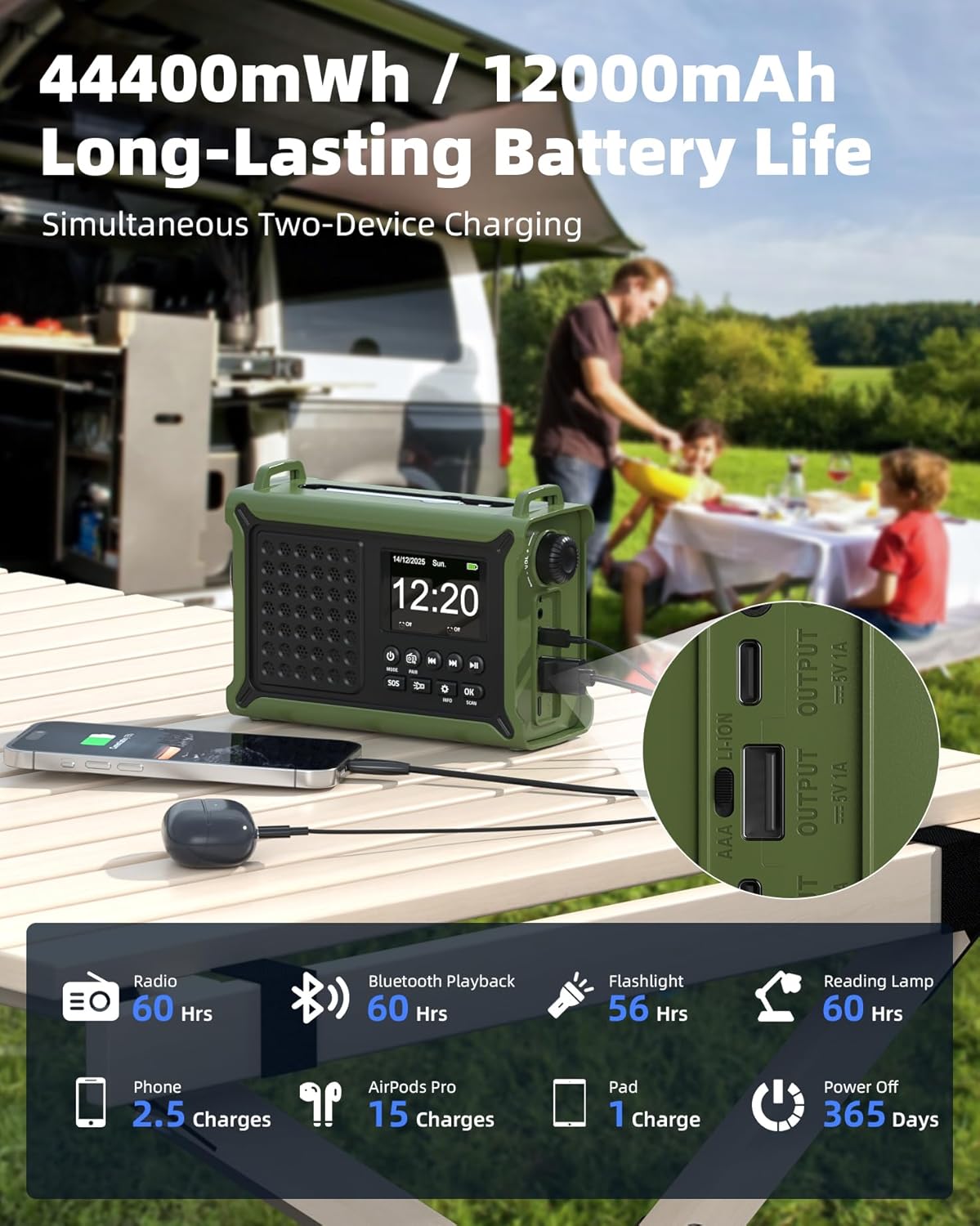
Figure 6.4: The radio's 12000mAh battery can charge external devices via its USB output ports.
- Connect your external device (e.g., smartphone, tablet) to the radio's USB output port using your device's charging cable.
- The radio's internal 12000mAh battery will begin charging your device.
- Monitor the charging status on your external device.
6.6 SOS Alarm Function
- In an emergency, press and hold the SOS button for 2 seconds to activate the loud siren and flashing red signal light.
- Press the SOS button again to deactivate the alarm.
6.7 Dual Alarm Clock
- Refer to the on-screen menu for setting the dual alarm clocks. Typically, this involves navigating to the "Alarm" setting using the MENU or SET button and adjusting time and alarm sound.
7. Powering Options
The Roxicosly ROX-DE-CR1030DAB offers multiple ways to power the device and recharge its internal battery.
7.1 Solar Charging
Figure 7.1: The 8500mm² monocrystalline solar panel charges the radio when exposed to direct sunlight.
- Place the radio with the solar panel facing direct sunlight.
- The solar charging indicator on the display will illuminate.
- Solar charging is most effective in strong, direct sunlight and is primarily intended for maintaining battery charge or for emergency power generation.
7.2 Hand Crank Charging
Figure 7.2: The robust hand crank provides manual power generation.
- Unfold the hand crank from the back of the radio.
- Rotate the hand crank clockwise or counter-clockwise at a steady speed (approximately 120-150 RPM) for 3-5 minutes to generate sufficient power for basic operation or a short charge.
- The charging indicator will show when power is being generated.
7.3 USB-C Charging
- Connect the provided USB-C cable to the radio's Type-C input port and a USB power source (e.g., wall adapter, power bank, computer). This is the fastest method for a full charge.
7.4 AAA Battery Power
- If the internal rechargeable battery is depleted, the radio can operate using 3 AAA batteries (not included) installed in the battery compartment.
8. Maintenance
- Clean the radio with a soft, dry cloth. Do not use abrasive cleaners or solvents.
- Keep the solar panel clean to ensure optimal charging efficiency.
- Store the radio in a cool, dry place when not in use.
- If storing for extended periods, charge the internal battery at least once every 3 months to maintain its health.
9. Troubleshooting
| Problem | Possible Cause | Solution |
|---|---|---|
| Radio does not turn on. | Battery is depleted. | Charge the radio using USB-C, solar, or hand crank. Ensure AAA batteries are correctly installed if using them. |
| Poor radio reception. | Antenna not extended, weak signal area, interference. | Fully extend the telescopic antenna. Reposition the radio for better signal. Avoid areas with strong electromagnetic interference. |
| Solar charging is slow or not working. | Insufficient sunlight, dirty solar panel. | Ensure the solar panel is exposed to direct, strong sunlight. Clean the solar panel surface. |
| Hand crank charging is ineffective. | Cranking too slowly or inconsistently. | Rotate the hand crank at a steady, moderate speed (120-150 RPM). |
| Bluetooth device cannot pair. | Radio not in pairing mode, device too far, interference. | Ensure the radio is in Bluetooth pairing mode. Move your device closer to the radio. Restart both devices. |
| External device not charging from radio. | Radio battery low, incorrect cable, device not compatible. | Ensure the radio's internal battery has sufficient charge. Use a functional charging cable. Verify device compatibility. |
10. Specifications
- Model: ROX-DE-CR1030DAB
- Dimensions: 17.27 x 7.32 x 12.08 cm (6.8 x 2.88 x 4.76 inches)
- Weight: 820 g (1.81 lbs)
- Material: Acrylonitrile Butadiene Styrene (ABS)
- Radio Bands: DAB/DAB+, FM (87.5 - 108 MHz)
- Battery Capacity: 12000 mAh (internal rechargeable)
- Solar Panel: 8500 mm² monocrystalline
- Hand Crank Output: 650 mA
- Bluetooth Version: 5.0
- Flashlight: 5W LED
- Reading Lamp: 2.5W LED
- Charging Input: USB Type-C
- Power Output: USB-A (for charging external devices)
- Display: 2.4-inch TFT Color Display
- Speaker: 57mm full-range speaker
- Headphone Jack: 3.5mm
- Additional Power: 3x AAA batteries (not included)

Figure 10.1: Detailed specifications and feature comparison for the ROX-DE-CR1030DAB.
11. Warranty and Support
Roxicosly products are designed for reliability and performance. For warranty information, technical support, or customer service inquiries, please refer to the contact information provided at the point of purchase or visit the official Roxicosly website.
Please retain your proof of purchase for warranty claims.


