
1. Product Overview
This manual provides instructions for the Junsun 4Core 64GB Car Radio Stereo, designed for Dodge RAM models from 2002 to 2005. This unit operates on Android 13 and integrates features such as Wireless CarPlay, Android Auto, Bluetooth, WiFi, GPS navigation, and support for a backup camera. It offers a high-definition visual experience with a 1280x720 resolution display.
2. Package Contents
Verify that all items listed below are included in your package. If any items are missing or damaged, please contact customer support.
- Junsun 9-inch Car Radio Stereo Unit
- RCA Cable
- Power Cable
- Screwdriver
- Can Bus Decoder
- Crowbar (Pry Tool)
- Reversing Line (for backup camera)
- Antenna
- Antenna Adapter Cable
- USB Cables (x2)
- Speaker
- Microphone
- GPS Module
- Backup Camera (if included in your specific package)

Figure 2.1: Included components in the Junsun car radio stereo package.
3. Installation Guide
3.1 Applicable Vehicles
This car radio stereo is specifically designed for Dodge RAM models manufactured between 2002 and 2005.

Figure 3.1: Junsun car radio stereo installed in a Dodge RAM 2002-2005 dashboard.
3.2 General Installation Notes
- Professional installation is recommended due to the complexity of vehicle wiring.
- Ensure the vehicle's battery is disconnected before beginning installation to prevent electrical damage.
- Refer to your vehicle's service manual for specific dashboard disassembly instructions.
3.3 Wiring Considerations
Careful attention to wiring is crucial for proper function. The provided wiring harness is designed for compatibility, but some vehicle-specific adjustments may be necessary, especially for older models.
- Power Up Issues: If the unit does not power on after installation, check the ACC (Accessory) wire. This wire (often red) needs to receive 12V power when the ignition is on. You may need to locate the ACC wire on your truck's stereo harness and splice it into the appropriate wire on the unit's harness.
- No Sound: If there is no sound after installation and your car's plug matches the example shown in Figure 3.2, an additional power harness may be required. Contact customer support for assistance.
- Reverse Camera Activation: For the reverse camera to activate automatically, the 'Reverse' wire on the unit's harness must be correctly connected to your vehicle's reverse light circuit.

Figure 3.2: Example of a car plug. If your plug matches and there is no sound, an additional power harness may be needed.

Figure 3.3: Comprehensive wiring diagram for the unit.
4. Basic Operation
4.1 Power On/Off
The unit will typically power on automatically with the vehicle's ignition. To manually power off or restart, press and hold the power button on the unit's front panel.
4.2 Touchscreen Interface
Navigate the system using the capacitive touchscreen. Swipe, tap, and pinch gestures are supported for various functions, similar to a smartphone or tablet.
4.3 Steering Wheel Control
If your vehicle supports steering wheel controls, connect the appropriate wires (KEY1, KEY2) as per the wiring diagram (Figure 3.3). Access the system settings to configure and map your steering wheel buttons to control functions like volume, track skipping, and mode selection.
5. Features and Functions
5.1 Android 13 Operating System
The unit runs on the Android 13 operating system, providing a familiar and intuitive interface. This allows for smooth operation and access to a wide range of applications from the Application Store, similar to a smartphone.
5.2 Wireless CarPlay & Android Auto
Connect your iPhone or Android phone wirelessly or via a wired connection to access CarPlay or Android Auto. This feature allows seamless integration of your phone's address book, notifications, messages, map navigation, and music directly on the stereo's display.
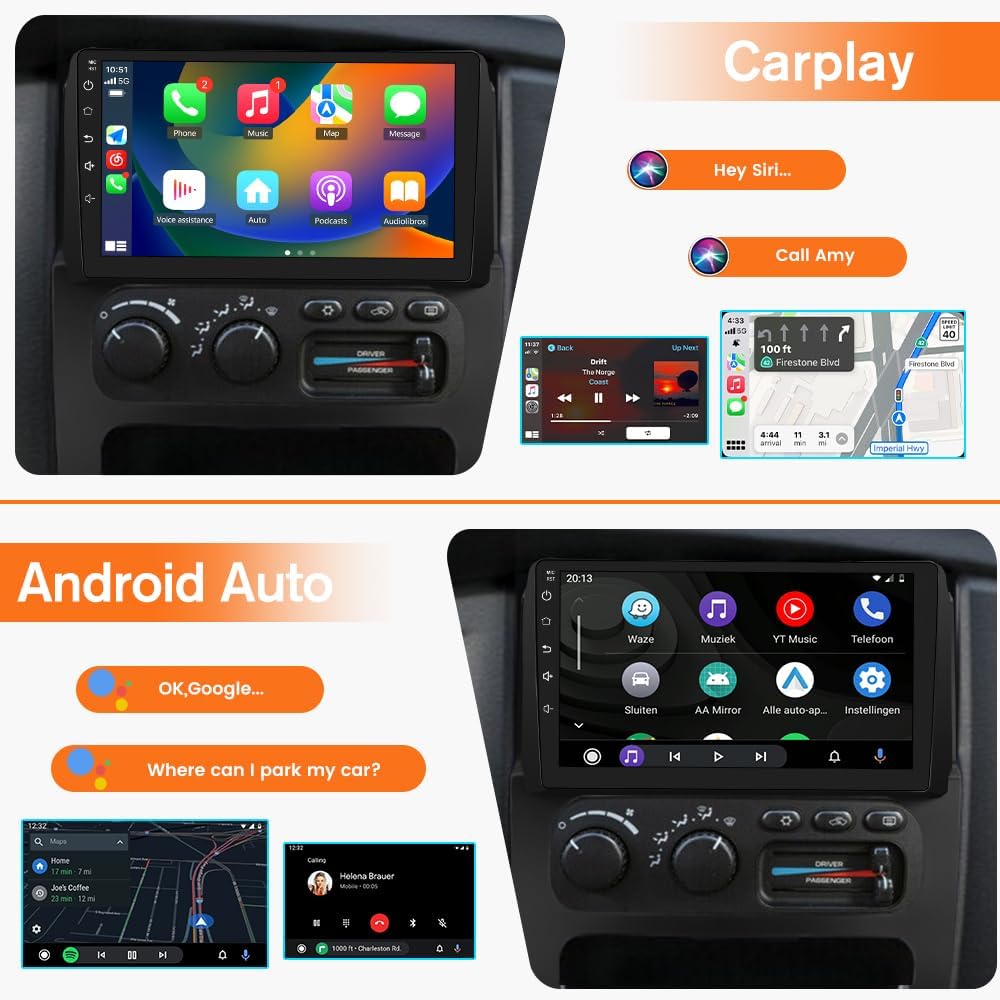
Figure 5.1: Wireless CarPlay and Android Auto interfaces.
5.3 GPS Navigation
The unit supports GPS navigation with built-in offline North America maps. After connecting to WiFi, you can also use online mapping services. The GPS module ensures accurate positioning and route guidance.

Figure 5.2: GPS Navigation interface with map and app icons.
5.4 WiFi Connectivity
Connect the unit to a WiFi network to install or delete Android applications from the Application Store, browse websites, and stream videos. This expands the entertainment and utility options of your car stereo.

Figure 5.3: WiFi connectivity for apps and online content.
5.5 Bluetooth Functionality
Pair your phone via Bluetooth for hands-free calling and audio streaming. The unit comes with an external microphone for clear voice pickup, and calls are routed through your car's speakers. Fast matching with your phone ensures quick connectivity.

Figure 5.4: Bluetooth interface for calls and music.
5.6 FM/AM Radio
The product features FM/AM radio functionality with a digital display for precise and easy tuning. It provides access to news, music, and live weather broadcasts.

Figure 5.5: FM Radio interface.
5.7 Reversing Camera Support
When the vehicle is shifted into reverse gear, the unit automatically displays the rearview image from the connected backup camera, providing parking assistance and enhancing safety.

Figure 5.6: Reversing camera display.
5.8 High-Definition Visual Experience
The 1280x720 resolution display delivers clear image quality with accurate colors, making navigation, entertainment, and rearview imagery immersive.
5.9 Built-in DSP
The integrated Digital Sound Processor (DSP) allows for advanced audio tuning and customization, enhancing the sound quality through your vehicle's speakers.

Figure 5.7: Built-in DSP for enhanced audio.
6. Maintenance
- Cleaning: Use a soft, dry cloth to clean the screen and unit exterior. Avoid abrasive cleaners or solvents.
- Software Updates: Periodically check for software updates through the system settings or Junsun's official website to ensure optimal performance and access to new features.
- Environmental Conditions: Avoid exposing the unit to extreme temperatures, direct sunlight for prolonged periods, or excessive moisture.
7. Troubleshooting
7.1 Common Issues and Solutions
| Issue | Possible Cause | Solution |
|---|---|---|
| Unit does not power on. | Incorrect ACC (Accessory) wire connection. | Ensure the red ACC wire on the unit's harness is connected to a 12V switched power source (e.g., vehicle's ACC wire). Refer to Figure 3.3. |
| No sound from speakers. | Incorrect speaker wiring; incompatible vehicle plug requiring additional harness. | Verify speaker wire connections. If your vehicle's plug matches Figure 3.2, an additional power harness may be needed. Contact support. |
| Backup camera does not display. | Incorrect 'Reverse' wire connection; camera not powered. | Connect the 'Reverse' wire on the unit's harness to the vehicle's reverse light circuit. Ensure the camera receives power. |
| Poor GPS signal. | GPS antenna improperly placed or obstructed. | Ensure the GPS antenna is mounted in a clear location, free from metal obstructions, typically on the dashboard or under the windshield. |
| Bluetooth connection issues. | Phone not in pairing mode; interference. | Ensure your phone's Bluetooth is on and discoverable. Restart both the unit and your phone. Clear previous pairings if necessary. |
8. Specifications
| Feature | Detail |
|---|---|
| Brand | Junsun |
| Model Name | SF20250921 |
| Operating System | Android 13 |
| Memory Storage Capacity | 64 GB |
| Screen Size | 9 Inches |
| Display Type | LCD, LED |
| Touch Screen Type | Capacitive |
| Resolution | 1280x720 |
| Connectivity Technology | Bluetooth, WiFi |
| Special Features | Wireless CarPlay, Android Auto, GPS Navigation, FM/AM Radio, Steering Wheel Control, Backup Camera Support, Built-in DSP |
| Map Type | North America (offline support) |
| Vehicle Service Type | Truck (Dodge RAM 2002-2005) |
| Mounting Type | Dashboard Mount |
| Item Weight | 2.09 Kilograms |
9. Warranty and Support
9.1 Manufacturer's Warranty
This Junsun car radio stereo unit is covered by a 1-year manufacturer's warranty from the date of purchase. This warranty covers defects in materials and workmanship under normal use. Please retain your proof of purchase for warranty claims.
9.2 Customer Support
For technical assistance, troubleshooting, or warranty inquiries, please contact Junsun customer support:
- Email: Junsun-US@outlook.com
- Please include your product model (SF20250921) and a detailed description of your issue when contacting support.

Figure 9.1: Junsun Customer Support.