
1. Introduction
Thank you for purchasing the Beautiful by Drew Barrymore 2-Slice Toaster. This manual provides essential information for the safe and efficient operation, maintenance, and care of your new appliance. Please read all instructions carefully before first use and retain for future reference.
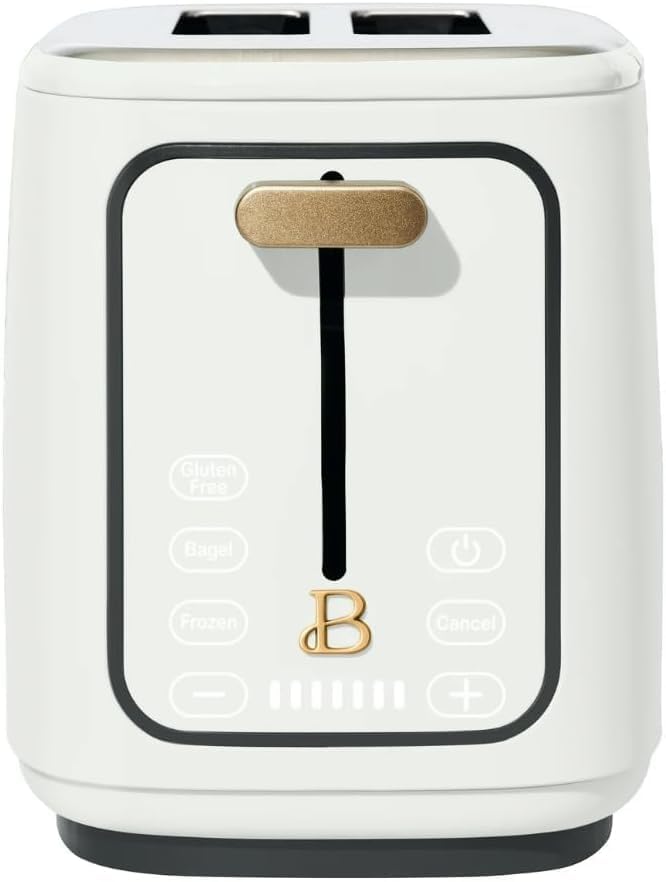
Image 1: The Beautiful by Drew Barrymore 2-Slice Toaster, showcasing its sleek design.
2. Important Safety Information
When using electrical appliances, basic safety precautions should always be followed, including the following:
- Read all instructions.
- Do not touch hot surfaces. Use handles or knobs.
- To protect against electrical shock, do not immerse cord, plugs, or appliance in water or other liquid.
- Close supervision is necessary when any appliance is used by or near children.
- Unplug from outlet when not in use and before cleaning. Allow to cool before putting on or taking off parts.
- Do not operate any appliance with a damaged cord or plug, or after the appliance malfunctions or has been damaged in any manner.
- The use of accessory attachments not recommended by the appliance manufacturer may cause injuries.
- Do not use outdoors.
- Do not let cord hang over edge of table or counter, or touch hot surfaces.
- Do not place on or near a hot gas or electric burner, or in a heated oven.
- Always attach plug to appliance first, then plug cord into the wall outlet. To disconnect, turn any control to “off,” then remove plug from wall outlet.
- Do not use appliance for other than intended use.
- Oversize foods, metal foil packages, or utensils must not be inserted in a toaster as they may involve a risk of fire or electric shock.
- A fire may occur if toasters are covered or touching flammable material, including curtains, draperies, walls, and the like, when in operation.
- Do not attempt to dislodge food when toaster is plugged in.
- Do not operate unattended.
3. Product Overview
The Beautiful by Drew Barrymore 2-Slice Toaster features a touch-activated display and extra-wide slots for versatile toasting. Key components include:
- Extra-Wide Slots: Accommodate various bread types, including bagels and thick slices.
- High-Lift Lever: For easy retrieval of smaller items.
- Touch-Activated Display: Illuminates upon touch, offering intuitive control.
- 7 Shade Browning Control: Allows precise customization of toast doneness.
- Versatile Functions: Includes Bagel, Frozen, Reheat, and Gluten-Free settings.
- Removable Crumb Tray: For easy cleaning.

Image 2: Front view of the toaster highlighting its extra-wide slots, touch-activated display, 7 shade browning control, and 4 versatile functions.
Product Video Overview
Video 1: A brief overview of the Beautiful 2-Slice Toaster by Drew Barrymore, demonstrating its sleek design and key features.
4. Setup
- Unpacking: Carefully remove the toaster and all packaging materials. Ensure all components are present and undamaged.
- Placement: Place the toaster on a stable, flat, heat-resistant surface, away from flammable materials such as curtains or walls. Ensure adequate ventilation around the appliance.
- Power Connection: Plug the power cord into a standard 120V AC electrical outlet. The cord can be wrapped and secured underneath the toaster for neat storage if a shorter length is desired.
- First Use (Initial Burn-Off): Before toasting food for the first time, operate the toaster without bread in a well-ventilated area. Select a medium shade setting (e.g., level 4) and run a toasting cycle. This will burn off any manufacturing residues and eliminate initial odors. A slight odor or smoke is normal during this process.
5. Operating Instructions
Follow these steps to operate your toaster:
- Power On: Touch the power symbol (⏻) on the display. The display will illuminate.
- Load Bread: Place slices of bread, bagels, or other items into the extra-wide slots.
- Select Shade Setting: Use the “+” and “-” buttons on the touch display to select your desired browning level from 1 (lightest) to 7 (darkest). The illuminated bars indicate the selected shade.
- Select Function (Optional): If toasting bagels, frozen items, or gluten-free bread, touch the corresponding button (Bagel, Frozen, Gluten Free). The selected function will illuminate.
- Start Toasting: Push down the high-lift lever until it locks into place. The toasting cycle will begin.
- Cancel Toasting: To stop the toasting cycle at any time, touch the “Cancel” button. The lever will automatically raise.
- Retrieve Toast: Once the toasting cycle is complete, the lever will automatically raise, lifting the toast for easy retrieval. Use the high-lift lever to further elevate smaller items if needed.

Image 3: The toaster's high-lift lever and touch-activated function buttons for gluten-free, bagel, and frozen bread.
6. Maintenance and Cleaning
Regular cleaning ensures optimal performance and longevity of your toaster.
- Always Unplug: Before cleaning, ensure the toaster is unplugged from the electrical outlet and completely cooled.
- Clean Crumb Tray: The removable crumb tray is located at the back of the toaster. Slide it out, discard crumbs, and wipe the tray clean with a damp cloth. Ensure it is completely dry before reinserting.
- Exterior Cleaning: Wipe the exterior of the toaster with a soft, damp cloth. Do not use abrasive cleaners or scouring pads, as they may scratch the surface.
- Interior Cleaning: Do not insert any objects into the toasting slots to clean. If food becomes lodged, unplug the toaster and carefully invert it to shake out the contents.

Image 4: Demonstrating the easy removal of the slide-out crumb tray for cleaning.
7. Troubleshooting
If you encounter issues with your toaster, refer to the following common problems and solutions:
- Toaster does not turn on:
- Ensure the power cord is securely plugged into a working electrical outlet.
- Check if the power button on the touch display has been activated.
- Bread is not toasting evenly:
- Ensure bread slices are centered in the slots.
- Adjust the browning setting to a higher or lower level as needed.
- Clean the crumb tray and check for any obstructions in the toasting slots.
- Smoke or burning smell:
- Immediately press the Cancel button and unplug the toaster.
- Remove any lodged food particles or excessive crumbs from the crumb tray and interior.
- Ensure the toaster is not covered or near flammable materials.
- Lever does not stay down:
- The toaster must be plugged in and powered on for the lever to engage.
- Ensure there are no obstructions preventing the lever from locking.
8. Specifications
- Model Number: 19039
- Brand: Beautiful by Drew Barrymore
- Color: White Icing
- Material: Stainless Steel
- Product Dimensions: 6.57"D x 11.06"W x 8.11"H
- Wattage: 900 watts
- Special Features: Digital Display, Removable Tray, Variable Heat Setting
- Specific Uses: Bagel, Reheat, Toast

Image 5: The toaster with its dimensions (depth, width, height) indicated.
9. Warranty and Support
For warranty information or customer support, please refer to the warranty card included with your purchase or visit the official Beautiful by Drew Barrymore website. Keep your proof of purchase for any warranty claims.


