
1. Product Overview
The WALFRONT NLQ3-125/2P Dual Power Automatic Transfer Switch (ATS) is designed to ensure a continuous and reliable power supply by automatically switching between a primary and backup power source. This 2-pole, 100A, AC110V controller provides immediate backup, ensuring continuity and safety when the normal power supply is interrupted. It is suitable for a wide range of applications including homes, shopping malls, factories, laboratories, and farms, offering interference-free technology. Constructed from flame-retardant PC materials and featuring silver contacts, this ATS offers insulation, high temperature resistance, and long-term reliability.
The device supports both automatic and manual operation modes, allowing for flexible control over your power supply system. Its integrated design and 35mm standard rail mounting make it suitable for PZ30 distribution boxes.
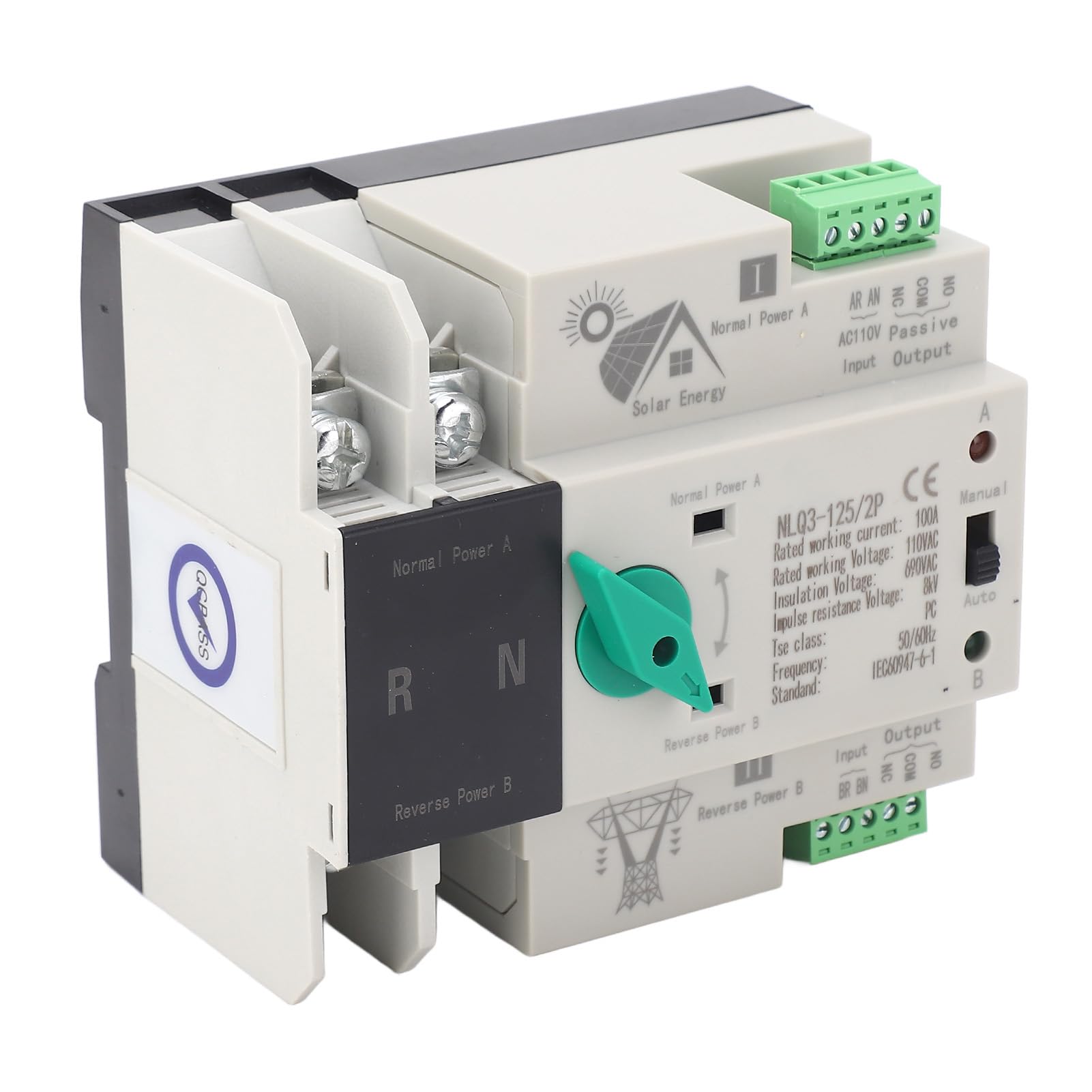
Figure 1: WALFRONT NLQ3-125/2P Dual Power Automatic Transfer Switch.
2. Specifications
| Specification | Value |
|---|---|
| Item Type | Dual Power Automatic Transfer Switch |
| Product Model | NLQ3-125/2P |
| Material | PC flame retardant + silver alloy |
| Switch Type | Secondary power distribution |
| Rated Current | 100A |
| Coil Voltage | 110V AC |
| Insulation Voltage | AC690V AC |
| Rated Voltage | AC400V AC |
| Rated Frequency | 50Hz/60Hz |
| Electrical Level | PC isolation type |
| Rated Impulse Withstand Voltage | 8KV |
| Control Circuit Rated Control Voltage Us | AC110V 85%-110% Us |
| Auxiliary Circuit Capacity | Two Relays, Each With Two Sets of AC110V50HZ le=5y |
| Mounting Type | Wall Mount (35mm standard rail mounting) |
| Product Dimensions | 4.72 x 3.93 x 3.54 inches (109mm x 97mm x 69mm) |
| Item Weight | 1.33 pounds |
| Operation Mode | ON-OFF (Automatic/Manual) |
| Specification Met | ISO 9001 |

Figure 2: Product dimensions (109mm/4.3in, 97mm/3.8in, 69mm/2.7in).
3. Safety Information and Environmental Conditions
Before installation and operation, please read and understand all safety warnings and environmental requirements.
3.1 Environmental Conditions
- The maximum ambient temperature should not exceed 40℃.
- The minimum ambient temperature should not be lower than -5℃.
- The average temperature within 24 hours should not be higher than 35℃.
- The altitude of the installation site should not be higher than 2000 meters.
- When the maximum temperature reaches 40℃, the relative humidity of the installation site should not exceed 50%.
- When the temperature is at its lowest (-5℃), the relative humidity may be higher. For example, at 25℃, the relative humidity can be 90%. Special measures should be taken to address occasional condensation on product surfaces due to temperature changes.
3.2 General Safety Precautions
- Ensure the integrity of the ATS before installation.
- All electrical work must be performed by qualified personnel in accordance with local electrical codes and regulations.
- Always disconnect power before performing any installation, maintenance, or inspection.
- Do not operate the switch if it appears damaged.
- Ensure proper grounding to prevent electrical shock.
4. Setup and Installation
The WALFRONT NLQ3-125/2P ATS is designed for 35mm standard rail mounting, typically within a PZ30 distribution box.
4.1 Pre-Installation Check
Before installation, carefully inspect the ATS for any signs of damage or defects. Use the operating handle to manually open or close the ATS to check the flexibility of the transmission device. Test the generation and disconnection conditions of the load for each phase of the primary and backup power sources to ensure proper functionality.
4.2 Wiring Instructions
Refer to the wiring diagram below for correct connection of the primary (Normal Power A) and backup (Reverse Power B) power sources, as well as the load output and control lines.

Figure 3: Wiring diagram showing connections for Normal Power A, Reverse Power B, Load Output, Common Feed, Common Control Line, and Stand-by Control Line.
- Normal Power A: Connect your primary power source to the designated terminals.
- Reverse Power B: Connect your backup power source (e.g., generator, solar inverter) to the designated terminals.
- Load Output: Connect the output terminals to your electrical load.
- Control Lines: Connect the common feed, common control line, and stand-by control line as indicated in the diagram for automatic operation.

Figure 4: Close-up view of the input and output terminals for wiring connections.

Figure 5: Example installation of the ATS within a waterproof plastic box for protection.
5. Operating Instructions
The WALFRONT NLQ3-125/2P ATS offers both automatic and manual operation modes.
5.1 Mode Selection
Locate the mode selection switch on the device. It typically has positions for "Auto" and "Manual".

Figure 6: The mode selection switch for automatic or manual operation.
5.2 Automatic Operation
Set the mode selection switch to "Auto". In this mode, the ATS will automatically detect the presence and stability of the primary power source (Normal Power A). If the primary power fails or becomes unstable, the switch will automatically transfer the load to the backup power source (Reverse Power B) within milliseconds, ensuring an uninterrupted power supply. When the primary power is restored, the ATS will automatically switch the load back to the primary source.
5.3 Manual Operation
Set the mode selection switch to "Manual". In this mode, the user can manually switch between the primary and backup power sources using the operating handle. This mode is useful for testing, maintenance, or specific scenarios where manual control is preferred. Always ensure power is disconnected or appropriate safety measures are taken during manual switching.
6. Maintenance
The WALFRONT NLQ3-125/2P ATS is designed for reliable, long-term operation with minimal maintenance. However, periodic inspection is recommended to ensure optimal performance and safety.
- Visual Inspection: Regularly check the device for any signs of physical damage, loose connections, or overheating.
- Cleaning: Keep the device free from dust and debris. Use a dry, soft cloth for cleaning. Do not use liquid cleaners.
- Terminal Check: Periodically verify that all wiring terminals are securely tightened.
- Functional Test: If safe to do so, periodically test the automatic transfer function by simulating a primary power failure to ensure the switch operates correctly.
Always disconnect power to the unit before performing any maintenance or inspection.
7. Troubleshooting
If the WALFRONT NLQ3-125/2P ATS is not functioning as expected, consider the following basic troubleshooting steps:
- No Power Transfer:
- Check if both primary and backup power sources are active and stable.
- Ensure the mode selection switch is set to "Auto" for automatic transfer.
- Verify all wiring connections are secure and correct according to the wiring diagram.
- Intermittent Operation:
- Check for loose wiring connections at the terminals.
- Ensure environmental conditions (temperature, humidity) are within specified limits.
- Device Not Responding:
- Confirm that the control circuit is receiving the correct voltage (AC110V).
- If the device is completely unresponsive, consult a qualified electrician.
For complex issues or if troubleshooting steps do not resolve the problem, it is recommended to contact a qualified electrician or the product manufacturer for assistance.
8. Application Area
The WALFRONT NLQ3-125/2P Dual Power Automatic Transfer Switch is versatile and designed for various environments where continuous power supply is critical. Its robust design ensures reliable operation in diverse settings.
- Residential: Ensuring uninterrupted power for homes, especially during outages.
- Commercial: Maintaining power in shopping malls, offices, and other commercial establishments.
- Industrial: Critical for factories and industrial facilities to prevent production downtime.
- Agricultural: Providing reliable power for farms and nurseries.
- Laboratories: Essential for maintaining power to sensitive equipment.

Figure 7: Examples of application areas: household electricity, shopping malls, company power consumption, and factory power.

Figure 8: Additional application examples: factories, shopping malls, and nurseries, highlighting its wide usability.