1. Introduction and Overview
The DJI Mavic 4 Pro is an advanced aerial photography and videography platform designed for professional and enthusiast use. It features a sophisticated triple-camera system, extended flight capabilities, and intelligent obstacle avoidance for enhanced safety and creative freedom.
Key features include:
- Advanced Triple-Camera System: A 100MP Hasselblad wide-angle lens, a 48MP medium telephoto lens, and a 50MP standard telephoto lens, all supporting high-resolution video and stills.
- Infinity Gimbal: Provides 360° rotation and 70° upward shots for dynamic camera movement.
- ActiveTrack 360: Enhanced subject tracking with autonomous navigation and improved low-light performance.
- Omnidirectional Obstacle Sensing: 0.1-lux sensitivity with six high-performance fisheye sensors and front LiDAR for comprehensive obstacle avoidance, even in low-light conditions.
- Extended Flight Time: Up to 51 minutes of flight duration on a single charge.
- O4+ Transmission: Delivers 10-bit HDR video feed up to 18.6 miles with improved stability.
- Night Flight and Low-Light RTH: Specialized features for safe operation and return in challenging lighting environments.
2. What's in the Box
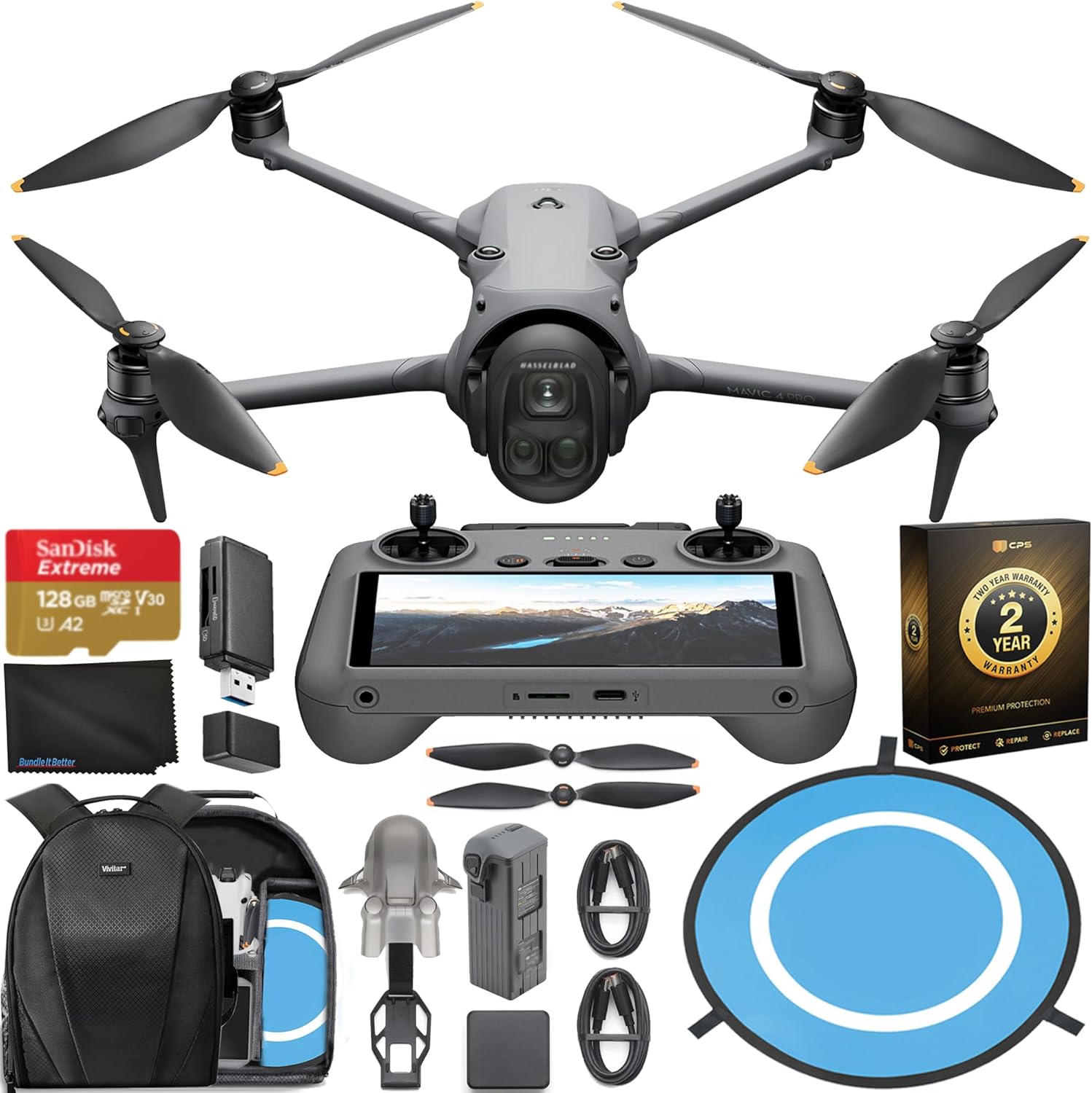
Verify that all components are present upon unboxing your DJI Mavic 4 Pro. The standard package includes:
- DJI Mavic 4 Pro Drone
- RC 2 Remote Controller
- Intelligent Flight Battery
- Pair of Spare Propellers
- Bundle It Better Lens Cloth
- 2x USB-C Data Cable
- 100W USB-C Power Adapter
Note: Additional accessories such as a Sandisk 128GB Extreme MicroSDXC Card, High Speed Card Reader, Drone Landing Pad, and Backpack for Drone and Accessories may be included depending on the specific bundle purchased.
3. Setup
3.1. Charging the Batteries
Before first use, fully charge the Intelligent Flight Battery and the RC 2 Remote Controller using the provided USB-C Power Adapter and cables.
- Connect the USB-C cable to the battery or remote controller and the power adapter.
- Plug the power adapter into a power outlet.
- Charging indicators will show the charging status. Disconnect once fully charged.
3.2. Propeller Installation
Attach the propellers to the motor shafts. Ensure that propellers with markings are installed on motors with markings, and unmarked propellers on unmarked motors. Press down and rotate the propeller in the locking direction until it is secure.

3.3. MicroSD Card Insertion
Insert a compatible MicroSD card (e.g., the included 128GB Sandisk Extreme) into the drone's MicroSD card slot for storing photos and videos.
3.4. Linking Drone and Remote Controller
Typically, the drone and remote controller are pre-linked. If re-linking is necessary, refer to the DJI Fly app instructions or the official DJI support website.
3.5. Pre-Flight Checks
- Ensure batteries are fully charged.
- Check propellers for damage and ensure they are securely attached.
- Verify the gimbal protector is removed.
- Confirm sufficient space on the MicroSD card.
- Perform a compass calibration if prompted by the DJI Fly app or if flying in a new location.
4. Operating Instructions
4.1. Basic Flight Controls
Use the joysticks on the RC 2 Remote Controller to control the drone's movement:
- Left Stick: Controls altitude (up/down) and yaw (rotate left/right).
- Right Stick: Controls forward/backward and left/right movement.
- Takeoff/Landing: Use the dedicated button in the DJI Fly app or the combination stick command.
4.2. Camera Operation
The Mavic 4 Pro features an advanced triple-camera system:

- Wide-Angle Hasselblad (100MP): Ideal for expansive landscapes and high-detail shots. Supports 6K60 HDR video.
- Medium Tele (48MP): Suitable for portraits and capturing subjects with a natural perspective.
- Standard Tele (50MP): Designed for sharp long-range shots and detailed close-ups from a distance.
Control the gimbal's rotation and tilt using the remote controller's scroll wheels. The Infinity Gimbal allows for 360° rotation and 70° upward shots.

4.3. Intelligent Flight Modes
- ActiveTrack 360: Select a subject in the DJI Fly app, and the drone will autonomously track it, making navigation decisions to maintain focus.
- QuickTransfer: Transfer photos and videos to your mobile device at up to 80 MB/s via Wi-Fi 6 without powering on the drone.
4.4. Obstacle Avoidance
The Mavic 4 Pro features omnidirectional obstacle sensing with 0.1-lux sensitivity, enabling safe flight even in low-light conditions. Front LiDAR assists in detecting obstacles for quick braking and collision avoidance when light levels are extremely low.

4.5. O4+ Transmission
The O4+ video transmission system provides a stable 10-bit HDR live feed from up to 18.6 miles away, reducing disconnections in high-interference areas.
4.6. Night Flight and Low-Light RTH
The drone's low-light capabilities extend to Night Flight, allowing for filming in challenging light conditions. Nighttime RTH (Return-to-Home) uses forward-facing LiDAR to detect and avoid obstacles, while Non-GPS RTH utilizes vision positioning for safe return even without satellite signals.
5. Maintenance
5.1. Cleaning
- Regularly clean the drone's body, propellers, and especially the camera lenses and vision sensors with a soft, dry, lint-free cloth.
- Avoid using liquid cleaners directly on the drone.
5.2. Propeller Inspection and Replacement
- Inspect propellers before each flight for cracks, bends, or other damage.
- Replace damaged propellers immediately using the provided spare propellers or genuine DJI replacements.
5.3. Battery Care and Storage
- Store Intelligent Flight Batteries in a cool, dry place, away from direct sunlight.
- For long-term storage, discharge batteries to approximately 50-60% capacity.
- Avoid fully discharging or overcharging batteries.
5.4. Firmware Updates
Periodically check for firmware updates via the DJI Fly app. Keeping your drone's firmware up-to-date ensures optimal performance, new features, and improved safety.
6. Troubleshooting
If you encounter issues with your DJI Mavic 4 Pro, consider the following common solutions:
- No GPS Signal: Ensure you are flying in an open area away from tall buildings or strong magnetic interference.
- Connection Loss: Move closer to the drone, ensure no obstructions between the remote controller and drone, and check for strong Wi-Fi interference.
- Obstacle Avoidance Warnings: These are normal when the drone detects objects. Adjust your flight path or switch to a flight mode that allows closer proximity if safe.
- Gimbal Malfunction: Ensure the gimbal protector is removed and there are no obstructions. Restart the drone and remote controller.
- App Crashes/Freezes: Close and restart the DJI Fly app. Ensure your mobile device meets the app's system requirements.
For persistent issues or technical support, please visit the official DJI support website or contact their customer service.
7. Specifications
| Feature | Detail |
|---|---|
| Brand | DJI |
| Model Name | DJI Mavic 4 Drone with RC2 |
| Video Capture Resolution | 4K60, 6K60 HDR |
| Effective Still Resolution | 100 MP |
| Max Flight Time | Up to 51 minutes |
| Max Transmission Range | 18.6 miles (O4+) |
| Obstacle Avoidance | Omnidirectional, 0.1-lux sensitivity, Front LiDAR |
| Connectivity Technology | Bluetooth, Wi-Fi (Wi-Fi 6 for QuickTransfer) |
| Item Weight | 958 Grams (2.11 pounds) |
| Product Dimensions | 13.68"L x 11.44"W x 4.24"H |
| Battery Cell Composition | Lithium Ion |
| UPC | 739252608688 |
| Manufacturer Part Number | CP.MA.00000849.01_K4 |
8. Warranty and Support
8.1. Warranty Information
This DJI Mavic 4 Pro Drone bundle includes a 2-Year CPS Warranty. Please refer to the warranty documentation provided with your purchase for specific terms and conditions regarding coverage and claims.
8.2. Customer Support
For additional support, detailed tutorials, firmware downloads, or to contact customer service, please visit the official DJI website:


