1. Introduction
Thank you for choosing the WERHY H0 Electric Scooter. This manual provides essential information for the safe operation, maintenance, and troubleshooting of your scooter. Please read it thoroughly before your first ride and keep it for future reference.
The WERHY H0 Electric Scooter is designed for youth aged 10+ (recommended 12 years and older, height 4.0ft-5.5ft) and offers a convenient, efficient, and enjoyable riding experience. It features a 350W motor, a maximum speed of 19 MPH, and a range of up to 12 miles under specific conditions.

Image: The WERHY H0 Electric Scooter in use and folded for transport.
2. Important Safety Warnings
Riding an electric scooter carries inherent risks. Failure to follow these instructions may result in serious injury or death.
- Always wear a helmet and appropriate protective gear (knee pads, elbow pads) when riding.
- Ensure all components are securely fastened before each ride.
- Do not ride in wet conditions, on slippery surfaces, or in heavy traffic.
- Adhere to local laws and regulations regarding electric scooter usage.
- Maintain a safe distance from other vehicles and pedestrians.
- Avoid sudden turns, rapid acceleration, or abrupt braking.
- Do not exceed the maximum weight limit of 220 pounds.
- This scooter is recommended for users aged 12 years and older.
- Regularly inspect tires, brakes, and all moving parts for wear or damage.
- Do not attempt to modify the scooter.

Image: Two young riders demonstrating safe use of the WERHY H0 Electric Scooter, highlighting age, weight, and height recommendations.
3. Package Contents
Your WERHY H0 Electric Scooter package should include the following items:
- WERHY H0 Electric Scooter (main unit)
- Power Adapter/Charger
- User Manual (this document)
- Assembly Tools (if required for minor assembly)
Please inspect all items upon unboxing. If any components are missing or damaged, contact customer support immediately.
4. Setup and First Use
4.1 Unfolding the Scooter
- Place the scooter on a flat surface.
- Locate the folding mechanism latch near the base of the handlebar stem.
- Release the latch and carefully lift the handlebar stem until it locks into the upright position. Ensure it clicks securely.
- Tighten any quick-release clamps on the handlebars if present.

Image: The WERHY H0 Electric Scooter folded for easy carrying.
4.2 Initial Charging
Before your first ride, fully charge the scooter's battery.
- Ensure the scooter is powered off.
- Locate the charging port, usually on the side of the deck.
- Connect the charger to the charging port, then plug the charger into a standard wall outlet.
- The charging indicator light on the charger will typically turn red during charging and green when fully charged.
- Charging time is approximately 4 hours. Do not overcharge.
5. Operating Instructions
5.1 Controls and Display
The WERHY H0 features an intuitive control panel and digital display:
- Power Button: Press and hold to turn on/off. Short press to toggle headlight.
- Accelerator: Thumb throttle on the right handlebar to control speed.
- Brake Levers: Left lever for E-ABS front brake, right lever for rear drum brake.
- Digital Display: Shows current speed, battery level, and riding mode (ECO, D, S).
- Bell: Integrated bell for signaling.
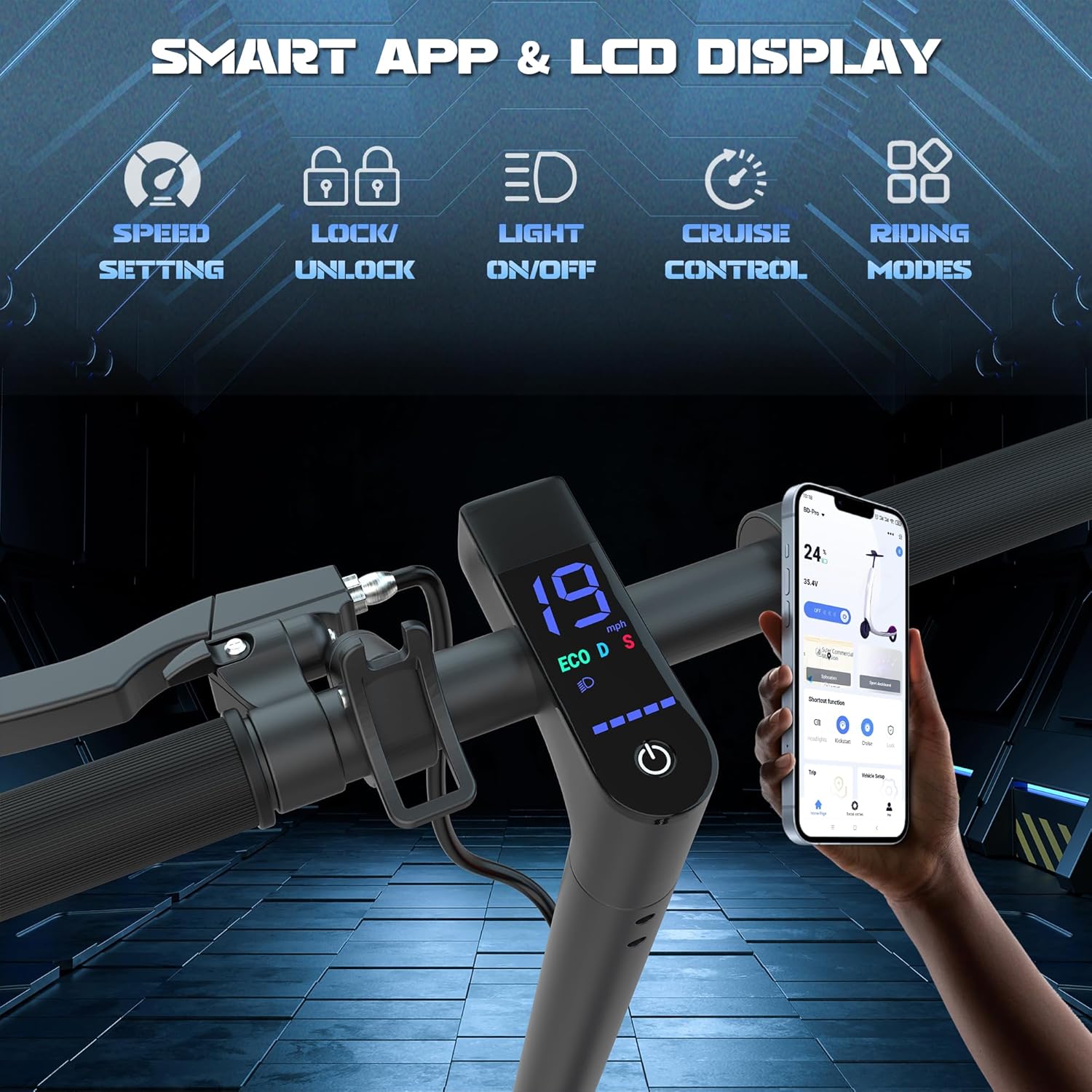
Image: Scooter handlebars with digital display and companion app interface.
5.2 Riding Modes
The scooter offers three speed modes:
- ECO Mode (E): Up to 7.5 mph (Energy-saving, suitable for beginners).
- Drive Mode (D): Up to 11 mph (Balanced speed and range).
- Sport Mode (S): Up to 19 mph (Maximum speed and performance).
Toggle between modes by double-pressing the power button.
5.3 Smart App Connectivity
Connect your scooter to the dedicated smartphone app via Bluetooth for enhanced control and monitoring:
- Download the WERHY app from your device's app store.
- Enable Bluetooth on your smartphone and open the app.
- Follow the in-app instructions to pair with your scooter.
- The app allows you to control riding modes, light settings, speed levels, cruise control, start mode, and view scooter status (battery, mileage).
5.4 Braking and Lighting System
The WERHY H0 is equipped with a dual braking system for safety:
- E-ABS Front Brake: Provides efficient electronic braking.
- Rear Drum Brake: Offers reliable mechanical stopping power.
Always use both brakes simultaneously for optimal stopping performance. The scooter also features a bright headlight and a rear light for visibility during day and night riding.

Image: Safety features of the WERHY H0 Electric Scooter, including dual braking system.

Image: The scooter's bright lighting system for night riding.
6. Maintenance
Regular maintenance ensures the longevity and safe operation of your WERHY H0 Electric Scooter.
6.1 Cleaning
- Wipe the scooter with a damp cloth after each ride. Avoid using high-pressure water jets or harsh chemicals.
- Do not immerse the scooter in water.
6.2 Battery Care
- Charge the battery fully before long periods of storage.
- If storing for more than 30 days, charge the battery to 50-70% every 30 days to prevent deep discharge.
- Store the scooter in a cool, dry place away from direct sunlight and extreme temperatures.
6.3 General Inspection
- Before each ride, check tire pressure (if applicable, though H0 has solid tires) and inspect for any damage.
- Verify that the brakes are functioning correctly.
- Ensure all screws and bolts are tight.
- Check the folding mechanism for secure locking.
7. Troubleshooting
This section addresses common issues you might encounter with your WERHY H0 Electric Scooter.
| Problem | Possible Cause | Solution |
|---|---|---|
| Scooter does not turn on | Low battery; Power button not pressed correctly; Loose connection. | Charge the battery; Press and hold the power button for 3 seconds; Check all visible connections. |
| Reduced range or speed | Low battery; Riding uphill; Heavy load; Cold weather; Improper riding mode. | Fully charge battery; Ride on flat terrain; Reduce load; Use appropriate riding mode. |
| Brakes not effective | Brake cables loose; Brake pads worn. | Adjust brake cables; Inspect and replace brake pads if necessary (contact support). |
| App not connecting via Bluetooth | Bluetooth off on phone; Scooter not powered on; App issue. | Ensure phone Bluetooth is on; Turn scooter on; Restart app and scooter; Re-pair device. |
If you encounter issues not listed here or require further assistance, please contact WERHY customer support.
8. Specifications
| Feature | Detail |
|---|---|
| Model Name | H0 (12Miles-Kidscooter) |
| Motor Power | 350W |
| Battery Capacity | 36V 162WH |
| Max Speed | 19 MPH |
| Max Range | Up to 12 Miles (under specific conditions) |
| Wheel Size | 8.5 Inches |
| Wheel Type | Solid Rubber |
| Braking System | Dual Braking (E-ABS Front, Rear Drum) |
| Net Weight | 22 lbs |
| Max Load | 220 Pounds |
| Charging Time | Approx. 4 Hours |
| Material | Aluminum |
| Recommended Age | 12+ Years |
| Special Features | Foldable, Digital Display, Cruise Control, Smart App Connectivity |

Image: Key performance specifications of the WERHY H0 Electric Scooter.

Image: Motor and tire specifications of the WERHY H0 Electric Scooter.
9. Warranty and Support
9.1 Warranty Information
The WERHY H0 Electric Scooter comes with a limited warranty. Specific warranty periods apply to different parts:
- Main components: 12-month warranty.
- Other parts: 180-day warranty.
Please retain your proof of purchase for warranty claims. The warranty covers manufacturing defects but does not cover damage caused by misuse, accidents, or unauthorized modifications.
9.2 Customer Support
For any questions, technical assistance, or warranty claims, please contact WERHY customer support. Refer to the contact information provided with your purchase or visit the official WERHY website.
You can also visit the WERHY Store on Amazon for more information.