
1. Introduction
This manual provides essential information for the installation, operation, and maintenance of your ANNKE Solar Wireless Security Camera System. Please read this manual thoroughly before using the product to ensure proper setup and functionality. Keep this manual for future reference.
2. Product Overview
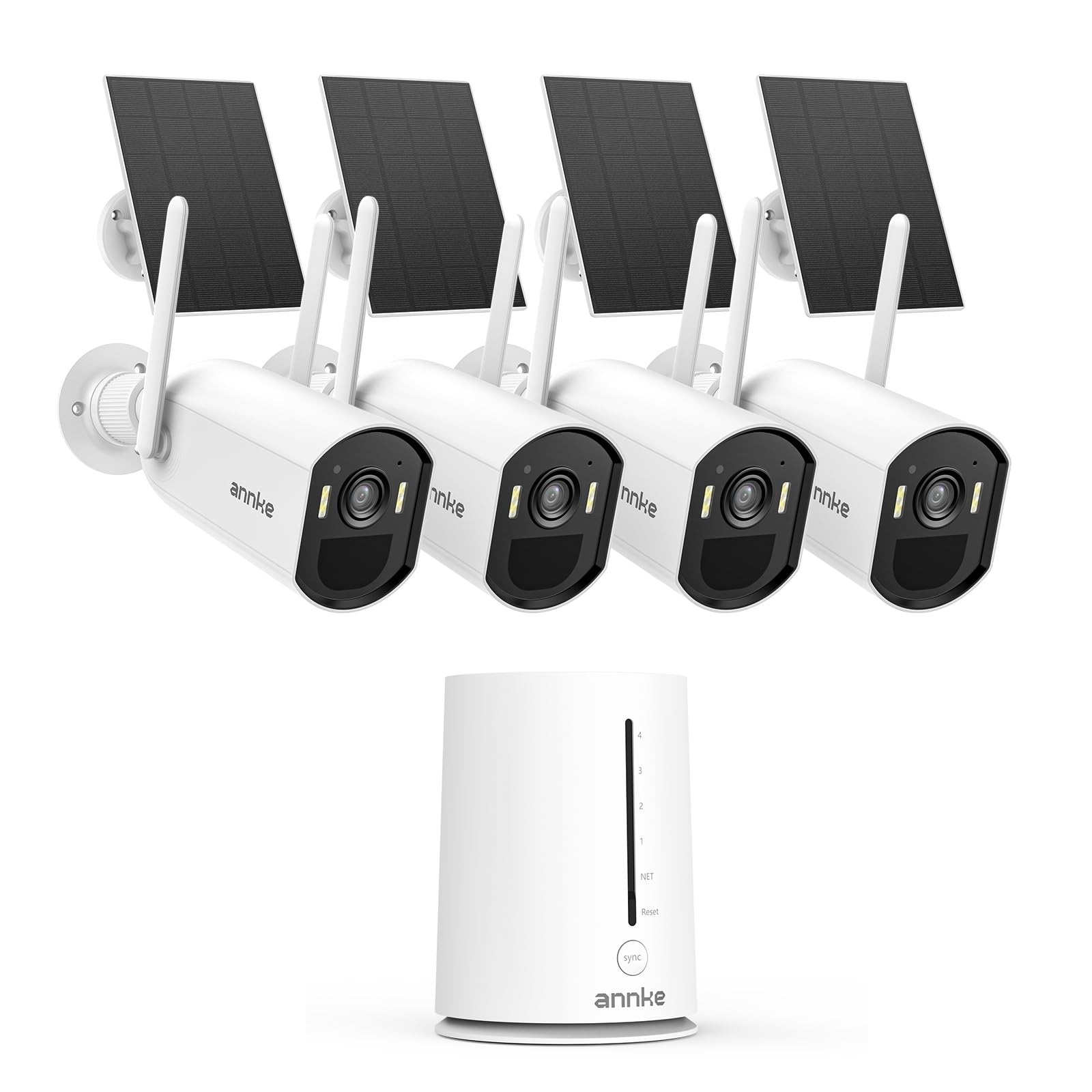
The ANNKE Solar Wireless Security Camera System is designed for comprehensive outdoor surveillance, offering a wire-free solution powered by solar energy. Key features include:
- 5MP Home Hub: A 4-channel hub supporting up to 4 cameras for 24/7 monitoring.
- 4MP Wireless Cameras: Delivers Super HD resolution for clear footage.
- 100% Wire-Free Operation: Solar-powered for flexible installation without power cables.
- AI-Powered Human Detection: Advanced PIR sensor reduces false alarms by accurately identifying human figures.
- Two-Way Audio: Built-in microphone and speaker for remote communication.
- Color Night Vision: Enhanced visibility in low-light conditions.
- Local Storage: Includes a 64GB microSD card, expandable up to 512GB, with optional cloud storage.
- Weatherproof Design: IP65 rated for outdoor use.
- Dual-Band Wi-Fi: Supports 2.4G and 5.8G for stable wireless connection.
- Smart Home Integration: Compatible with Alexa for voice control.
3. Package Contents
Verify that all components are present in your package:
- 1 x 5MP Home Hub (4-channel)
- 2 x 4MP Solar Wireless Bullet Cameras
- 2 x Solar Panels (integrated with cameras)
- 1 x 64GB MicroSD Card (pre-installed in hub)
- Mounting Screws and Anchors
- Power Adapter for Home Hub
- Ethernet Cable
- User Manual (this document)
4. Setup Guide
4.1 Camera Installation
The cameras are 100% wire-free and powered by integrated solar panels. Choose a location that receives ample sunlight throughout the day for optimal charging.
- Select Mounting Location: Identify a spot with clear line of sight to the area you wish to monitor and sufficient direct sunlight for the solar panel.
- Mount the Camera: Use the provided screws and anchors to securely attach the camera bracket to the wall or desired surface. Ensure the solar panel is angled to maximize sun exposure.
- Adjust Angle: Position the camera to cover the desired surveillance area.

4.2 System Connection (Home Hub)
The Home Hub acts as the central receiver for your wireless cameras and connects to your home network.
- Power On Hub: Connect the provided power adapter to the Home Hub and plug it into a power outlet.
- Network Connection: Connect the Home Hub to your router using the supplied Ethernet cable, or configure it for Wi-Fi connection via the ANNKE Sight app. The hub supports 2.4GHz and 5.8GHz dual-band Wi-Fi for stable connectivity.
- Pair Cameras: Follow the instructions in the ANNKE Sight app to pair your wireless cameras with the Home Hub.

4.3 App Configuration
Download the ANNKE Sight app from your device's app store (iOS or Android) to manage your security system.
- Download App: Search for "ANNKE Sight" and install the application.
- Create Account: Register for a new account or log in if you already have one.
- Add Device: Follow the in-app prompts to add your Home Hub and paired cameras.
- Customize Settings: Configure motion detection zones, alert preferences, and recording schedules.
5. Operating Instructions
5.1 Live View & Playback
Access live camera feeds and review recorded footage through the ANNKE Sight app.
- Live View: Open the app and select a camera to view its real-time feed.
- Playback: Navigate to the playback section to review recordings stored on the microSD card or cloud.
5.2 Two-Way Audio
The cameras feature a built-in microphone and speaker for two-way communication.
- Activate Audio: While in live view, tap the microphone icon in the app to speak through the camera.
- Listen: Ensure the speaker icon is enabled to hear audio from the camera's location.

5.3 Motion Detection & Alerts
The system uses PIR and AI human detection to minimize false alarms and send instant notifications.
- PIR Sensor: Detects heat signatures for accurate motion sensing.
- AI Human Detection: Distinguishes human shapes from other moving objects.
- Instant Alerts: Receive push notifications on your smartphone when motion is detected.
- Smart Alarm: Cameras can activate a spotlight and siren upon detection.


5.4 Night Vision
The cameras provide clear visibility even in complete darkness.
- Infrared LEDs: For standard black and white night vision up to 15 meters.
- Color LEDs: Enable full-color night vision up to 8 meters in low-light conditions.

5.5 Storage Options
Your system offers flexible storage solutions for recorded footage.
- Local Storage: A 64GB microSD card is included, supporting up to 512GB for local video storage without monthly fees.
- Cloud Storage: An optional cloud storage service is available for off-site backup (subscription may be required).

5.6 Smart Home Integration
The system is compatible with Amazon Alexa for convenient voice control.
- Connect to Alexa: Enable the ANNKE skill in the Alexa app and link your ANNKE account.
- Voice Commands: Use commands like "Alexa, show me the front door camera" to view live feeds on compatible Alexa devices.
6. Maintenance
Regular maintenance ensures optimal performance and longevity of your security system.
- Cleaning: Periodically wipe the camera lens and solar panel with a soft, damp cloth to remove dust and debris. Ensure the solar panel is clean for efficient charging.
- Battery Management: The solar panel continuously charges the camera's built-in 5200mAh battery. In prolonged periods of low sunlight, the battery life may decrease. Monitor battery status via the app.
- Firmware Updates: Check the ANNKE Sight app regularly for firmware updates. Keeping your system updated ensures the latest features and security enhancements.
7. Troubleshooting
If you encounter issues with your ANNKE security system, refer to the following common problems and solutions:
| Problem | Possible Cause | Solution |
|---|---|---|
| Camera not connecting to Hub | Out of range; Wi-Fi interference; Hub not powered on. | Move camera closer to Hub; Check Wi-Fi signal strength; Ensure Hub is powered and connected to network. Re-pair camera via app. |
| Poor video quality | Dirty lens; Weak Wi-Fi signal; Insufficient light. | Clean camera lens; Improve Wi-Fi signal; Ensure adequate lighting or enable night vision. |
| False motion alerts | PIR sensitivity too high; Objects like trees or animals triggering sensor. | Adjust PIR sensitivity in app; Configure motion detection zones to exclude irrelevant areas. |
| Solar panel not charging | Insufficient sunlight; Dirty panel; Obstruction. | Relocate camera to a sunnier spot; Clean the solar panel; Remove any obstructions. |
| Two-way audio not working | Microphone/speaker disabled in app; Volume too low. | Check app settings to ensure microphone and speaker are enabled and volume is adequate. |
For further assistance, please contact ANNKE customer support.
8. Specifications
Detailed technical specifications for the ANNKE Solar Wireless Security Camera System:
| Component | Specification |
|---|---|
| Home Hub | |
| IP Video Input | 4CH Wireless IP |
| Max Recording Resolution | Up to 5M (2880x1620) |
| Max Playback Resolution | Up to 5M (2880x1620) |
| Max Playback Channel | 1CH |
| Micro SD Card Support | Up to 512GB (64GB included) |
| Wireless Antenna | Built-in, IEEE802.11b/g/n/ac/ax |
| Network Interface | Wireless + RJ45 (10/100M) |
| Wireless Standards | 2.4G & 5.8G dual-band, IEEE 802.11.ax |
| Operating Power | DC5V |
| Power Consumption | 5W |
| Working Temperature | 32 °F ~ 104 °F / 0 °C ~ 40 °C |
| Dimensions (W x H x D) | 95 × 95 × 130mm |
| Weight | 240g |
| Camera | |
| Video Resolution | 4MP (2560x1440@15fps) |
| Image Sensor | 1/3" Progressive Scan CMOS |
| Video Compression | H.264+ |
| Audio Compression | G.711A |
| Lens | 4mm |
| Angle of View | 70° |
| Infrared/Color LEDs | 4 (Infrared and Full Color) |
| Night Vision Distance | Infrared 15m / Color 8m |
| Built-in Battery | 3.7V/5200mAh (2pcs 18650) |
| PIR Sensor Range | 10 meters |
| Weatherproof Rating | IP65 |
9. Warranty and Support
ANNKE provides a limited warranty for its products. Please refer to the official ANNKE website for the most current warranty policy and terms of service.
For technical support, product inquiries, or warranty claims, please contact ANNKE customer service through their official website or the contact information provided in the ANNKE Sight app.
- Online Support: Visit the ANNKE official website for FAQs, troubleshooting guides, and support resources.
- Email Support: Contact the support team via email for detailed assistance.
- In-App Support: Access support features directly within the ANNKE Sight application.