
1. Product Overview
The ATK Edge 60/63 HE Ultimate Gaming Keyboard is engineered for high-performance gaming. This model, the LEV 60 Gateron Jade Gaming, features a compact 61-key layout, a durable CNC aluminum body, and advanced magnetic switches. Key functionalities include adjustable actuation, an 8 kHz polling rate, and a 256 kHz scan rate, designed to provide precise and rapid response times for competitive use.
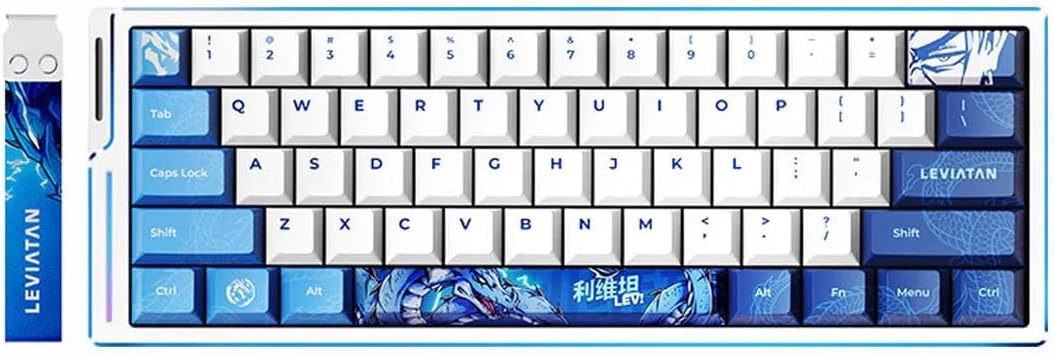
Image 1.1: ATK Edge 60 HE Ultimate Gaming Keyboard, Leviatan Edition. This image displays the compact 61-key layout keyboard with blue and white keycaps, featuring the Leviatan branding on the spacebar and a wrist strap.

Image 1.2: Key Features of ATK Edge 60/63 HE Keyboard. This graphic highlights features such as Pure Aluminum construction, PBT/Dye-Sub Keycaps, Cherry Profile, 8K Polling Rate, Ultra-low Latency, Programmable Keys, Hot-Swappable switches, and a Personalized Strap.
2. Setup Guide
2.1 Package Contents
- ATK Edge 60/63 HE Ultimate Gaming Keyboard
- USB-C to USB-A Cable
- Keycap Puller (if included)
- Switch Puller (if included)
- User Manual (this document)
2.2 Connecting the Keyboard
- Locate the USB-C port on the back or side of the keyboard.
- Connect the USB-C end of the provided cable to the keyboard.
- Connect the USB-A end of the cable to an available USB port on your PC.
- The keyboard will automatically power on and initiate driver installation.
2.3 Software Installation (ATK HUB)
For full customization and advanced features, download and install the ATK HUB software from the official ATK website. This software allows for key remapping, macro creation, RGB lighting customization, and actuation point adjustments.
3. Operating Instructions
3.1 Adjustable Actuation (Rapid Trigger)
The ATK Edge keyboard features adjustable actuation, also known as Rapid Trigger (RT). This allows you to set the keypress distance required to register an input and the reset point. The RT tuning range is from 0.001 mm to 3.3 mm, adjustable in 0.001 mm increments.
- Adjustment: Use the ATK HUB software to precisely configure the actuation and reset points for individual keys or groups of keys.
- Benefit: This feature enables faster repeated key presses and more responsive movement in games.

Image 3.1: Performance Metrics and Actuation Range. This image highlights the 8K Hz Polling Rate, 0.08 ms Ultra-Low Latency, 32K N-Key Scanning Rate, 256K Extreme Scanning Rate, and the 0.001 mm to 3.3 mm RT Range with 0.001 mm step precision.
3.2 Polling Rate and Scanning Rate
The keyboard operates with an 8 kHz (8000 Hz) polling rate and a 256 kHz scanning rate. These high rates ensure minimal latency and rapid communication between the keyboard and your PC.
- 8 kHz Polling Rate: The keyboard reports its status to the computer 8000 times per second, resulting in a minimum response time of 0.08 ms.
- 256 kHz Scanning Rate: This refers to how frequently the keyboard scans its switches for input, contributing to the overall responsiveness.

Image 3.2: 8K Hz Polling Rate and 0.08ms Latency. This graphic emphasizes the ultra-low latency of 0.08ms achieved with an 8K Hz polling rate, crucial for speed and stability in competitive gaming.

Image 3.3: 256K Hz Scanning Rate. This image illustrates the advanced 256K Hz extreme scanning rate and 32K N-Key scanning rate, indicating the keyboard's capability for rapid and accurate input detection.
3.3 RGB Backlighting
The keyboard features customizable RGB backlighting. Lighting effects and colors can be adjusted through the ATK HUB software. Some basic lighting modes may be accessible via keyboard shortcuts (refer to the ATK HUB software or manufacturer's website for specific key combinations).
3.4 Programmable Keys and Hot-Swappable Switches
- Programmable Keys: All keys can be remapped or assigned macros using the ATK HUB software. This allows for personalized layouts and complex command execution.
- Hot-Swappable Switches: The keyboard's magnetic switches are hot-swappable, meaning they can be removed and replaced without soldering. This allows for easy customization of typing feel and switch maintenance.
4. Maintenance
4.1 Cleaning the Keyboard
- Keycaps: Use a keycap puller to remove keycaps. Clean them with mild soap and water, then dry thoroughly before reattaching.
- Keyboard Body: Wipe the CNC aluminum body with a soft, damp cloth. Avoid abrasive cleaners or excessive moisture.
- Between Keys: Use compressed air to remove dust and debris from between the switches.
4.2 Switch Replacement
To replace a switch:
- Carefully remove the keycap using a keycap puller.
- Use a switch puller to gently grip and pull the switch straight up from the PCB.
- Align the pins of the new switch with the holes on the PCB.
- Press the new switch firmly into place until it clicks. Ensure it is seated correctly.
- Reattach the keycap.
5. Troubleshooting
| Issue | Possible Cause | Solution |
|---|---|---|
| Keyboard not responding | Loose USB connection, faulty cable, driver issue | Check USB cable connection. Try a different USB port. Restart your PC. Reinstall ATK HUB software. |
| Specific keys not working | Faulty switch, debris under keycap, software conflict | Remove keycap and clean around the switch. If hot-swappable, try replacing the switch. Check ATK HUB for key remapping conflicts. |
| RGB lighting not working or incorrect | Software settings, firmware issue | Ensure ATK HUB software is running and configured correctly. Check for firmware updates. |
| Actuation feels inconsistent | Software calibration, physical debris | Recalibrate actuation points in ATK HUB. Clean switches. |
6. Specifications
| Feature | Detail |
|---|---|
| Brand | ATK |
| Model Name | ATK EDGE 60/63 |
| Model Number (Current) | LEV 60 Gateron Jade Gaming |
| Connectivity Technology | USB-C (Wired) |
| Compatible Devices | PC |
| Keyboard Description | Gaming |
| Special Features | Hot-Swappable, Programmable Keys, Adjustable Actuation (0.001-3.3 mm) |
| Keyboard Backlighting | RGB |
| Material | CNC Aluminum (Enclosure) |
| Number of Keys | 61 |
| Switch Type | Magnetic (Gateron Jade Gaming) |
| Polling Rate | 8 kHz |
| Scanning Rate | 256 kHz |
| Minimum Latency | 0.08 ms |
| Keyboard Layout | QWERTY |
7. Warranty and Support
7.1 Warranty Information
This ATK Edge 60/63 HE Ultimate Gaming Keyboard comes with a 6-Month Warranty from the date of purchase. This warranty covers manufacturing defects and malfunctions under normal use. It does not cover damage caused by misuse, accidents, unauthorized modifications, or normal wear and tear.
7.2 Customer Support
For technical assistance, warranty claims, or further inquiries, please contact ATK customer support through the official ATK website or the retailer where the product was purchased. Please have your product model number and proof of purchase ready when contacting support.


