
1. Introduction
Thank you for choosing the AIMAPOW A20 6000A 12V Jump Starter. This device is designed to provide reliable emergency jump-starting for your vehicle, along with convenient mobile charging and powerful LED lighting functions. Please read this manual thoroughly before use to ensure safe and optimal operation.
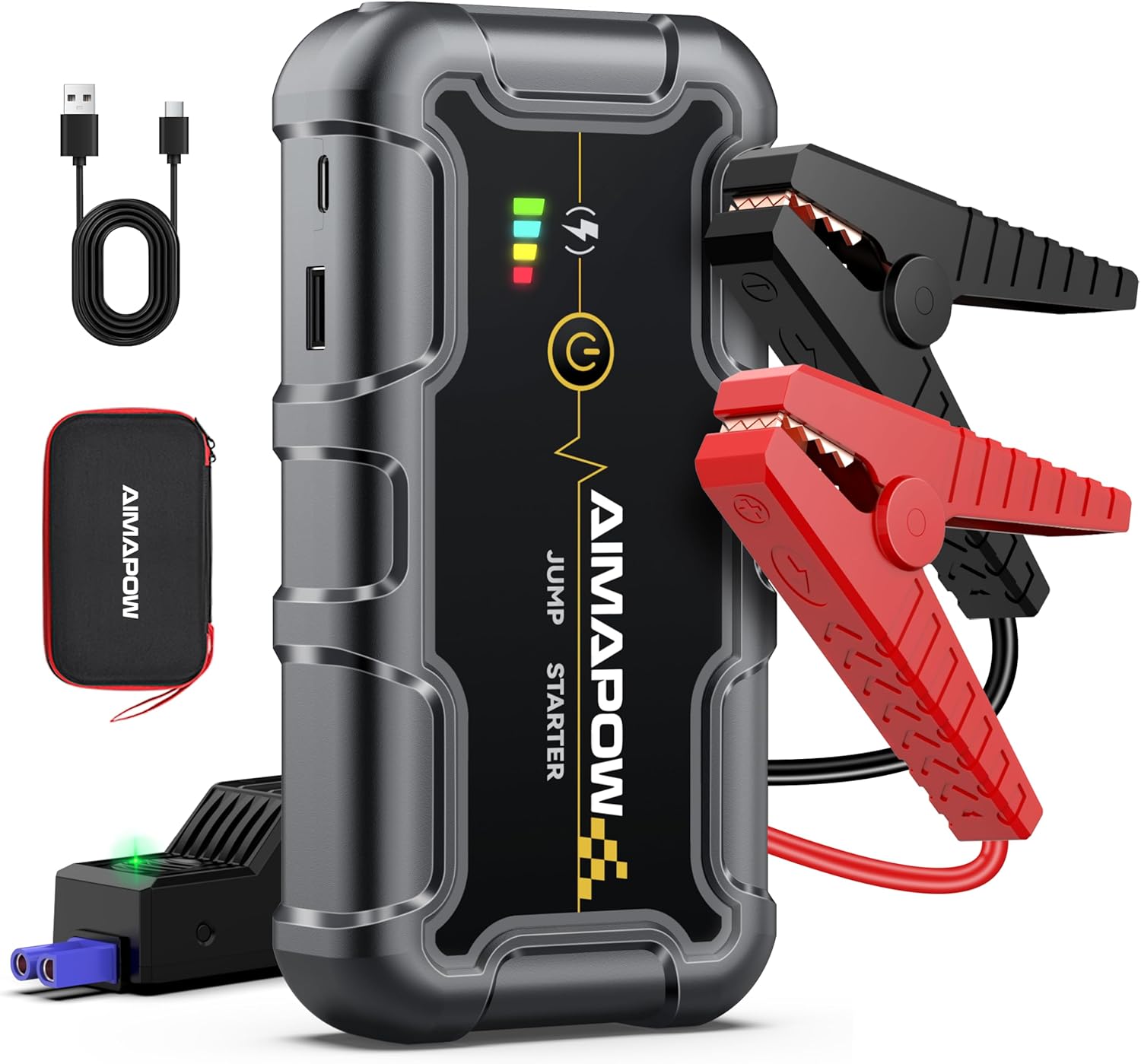
Image: The AIMAPOW A20 Jump Starter, showing its compact design, included smart jumper cables, USB-C charging cable, and a protective carrying case.
2. Safety Information
Always observe the following safety precautions to prevent electric shock, explosion, fire, or injury:
- Read all instructions carefully before using the jump starter.
- Do not operate the jump starter if it is damaged or modified.
- Ensure proper ventilation during use. Do not use in enclosed spaces.
- Connect the jumper cables correctly: Red clamp to the positive (+) terminal and Black clamp to the negative (-) terminal. Reverse polarity can cause damage or injury.
- Avoid touching the red and black clamps together to prevent short circuits.
- Keep the device away from children.
- Do not expose the jump starter to water, rain, or extreme temperatures.
- Disconnect the clamps from the vehicle battery within 30 seconds after the vehicle starts.
- This device contains a lithium polymer battery. Dispose of it properly according to local regulations.
3. Package Contents
Verify that all items are included in your package:
- AIMAPOW A20 Jump Starter Unit
- Smart Jumper Cables with Safety Protection
- USB-C Charging Cable
- User Manual
- Protective Carrying Case

Image: All components included in the AIMAPOW A20 Jump Starter package, neatly arranged.
4. Product Overview
The AIMAPOW A20 is a versatile device offering multiple functionalities:
- Jump Starter: Delivers 6000A peak current for 12V gasoline engines and diesel engines up to 10.0L.
- Power Bank: Equipped with two USB output ports (QC3.0 and 5V/2.4A) for fast charging mobile devices.
- LED Light: Features illumination, SOS, and strobe modes for various emergency and utility needs.
- Safety Protections: Built-in safeguards against overcurrent, overcharge, short circuit, reverse connection, and overheating.
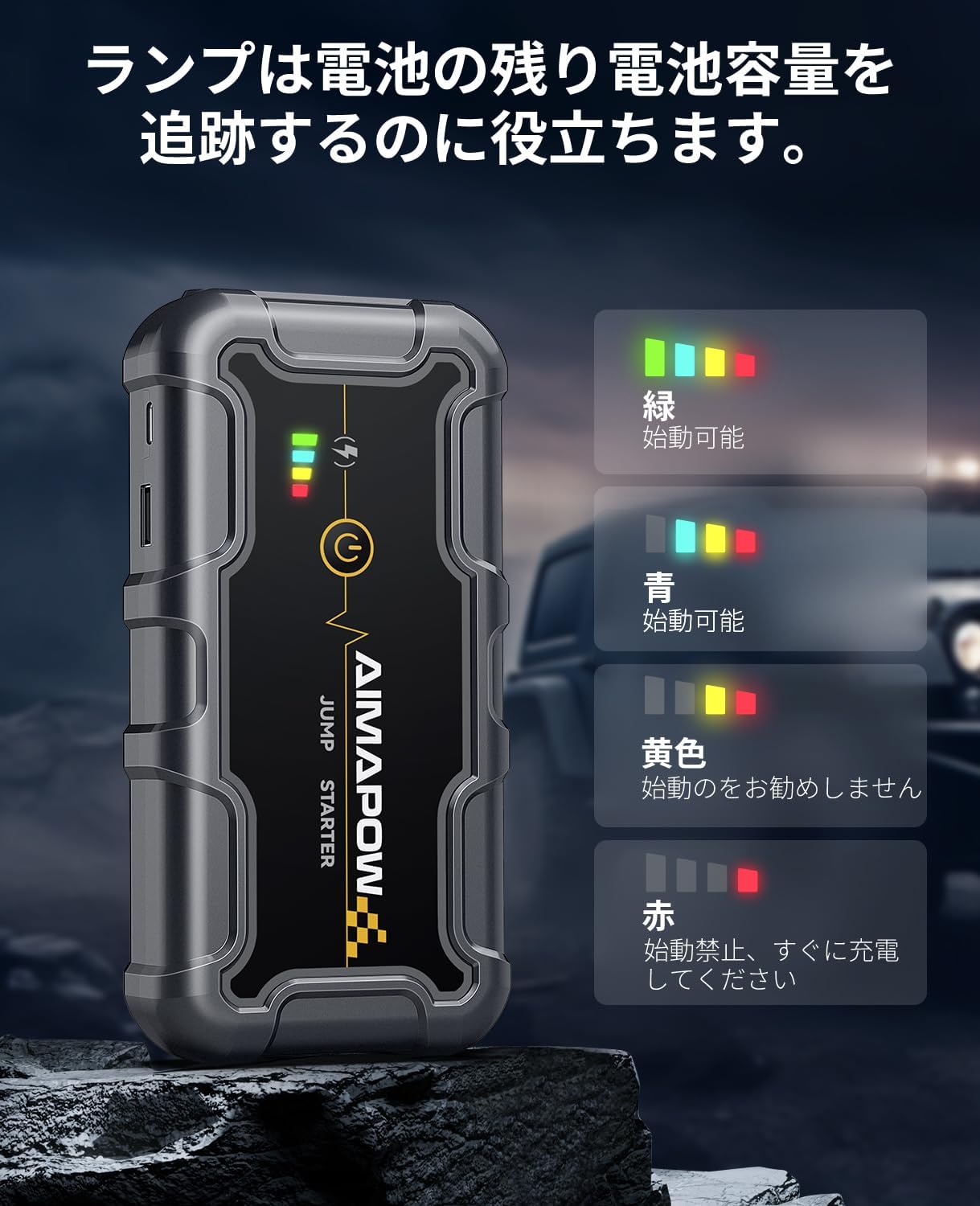
Image: The jump starter's LED indicators showing the current battery charge level and readiness for use.
5. Charging the Jump Starter
To ensure optimal performance, fully charge the jump starter before first use and after each jump-starting operation.
- Connect the provided USB-C charging cable to the input port on the jump starter.
- Connect the other end of the USB-C cable to a suitable USB wall adapter (not included) or car charger.
- The LED indicators will show the charging progress. All LEDs will be solid when fully charged.
6. Operating Instructions: Jump Starting a Vehicle
Follow these steps to safely jump-start your vehicle:
- Ensure the jump starter is sufficiently charged (at least 50% recommended).
- Connect the smart jumper cable plug into the jump starter's port. The indicator light on the smart cable will flash.
- Attach the red (+) clamp to the positive terminal of the vehicle's battery.
- Attach the black (-) clamp to the negative terminal of the vehicle's battery.
- Once connected correctly, the indicator light on the smart cable will turn solid green. If it's red or flashing, check connections or refer to troubleshooting.
- Start your vehicle's engine.
- Once the engine starts, immediately remove the jumper cables from the vehicle battery (black first, then red) and then disconnect the smart cable from the jump starter.
Forced Start Function:
If the vehicle battery is completely discharged or in extremely cold conditions, the jump starter may not detect the battery automatically. In such cases, press and hold the 'Boost' button on the smart cable for 3-5 seconds until the indicator light turns solid green. Then, proceed to start the vehicle. Use this function with caution and only when necessary.

Image: The jump starter with smart cables connected to a car battery, demonstrating the correct setup for jump-starting.
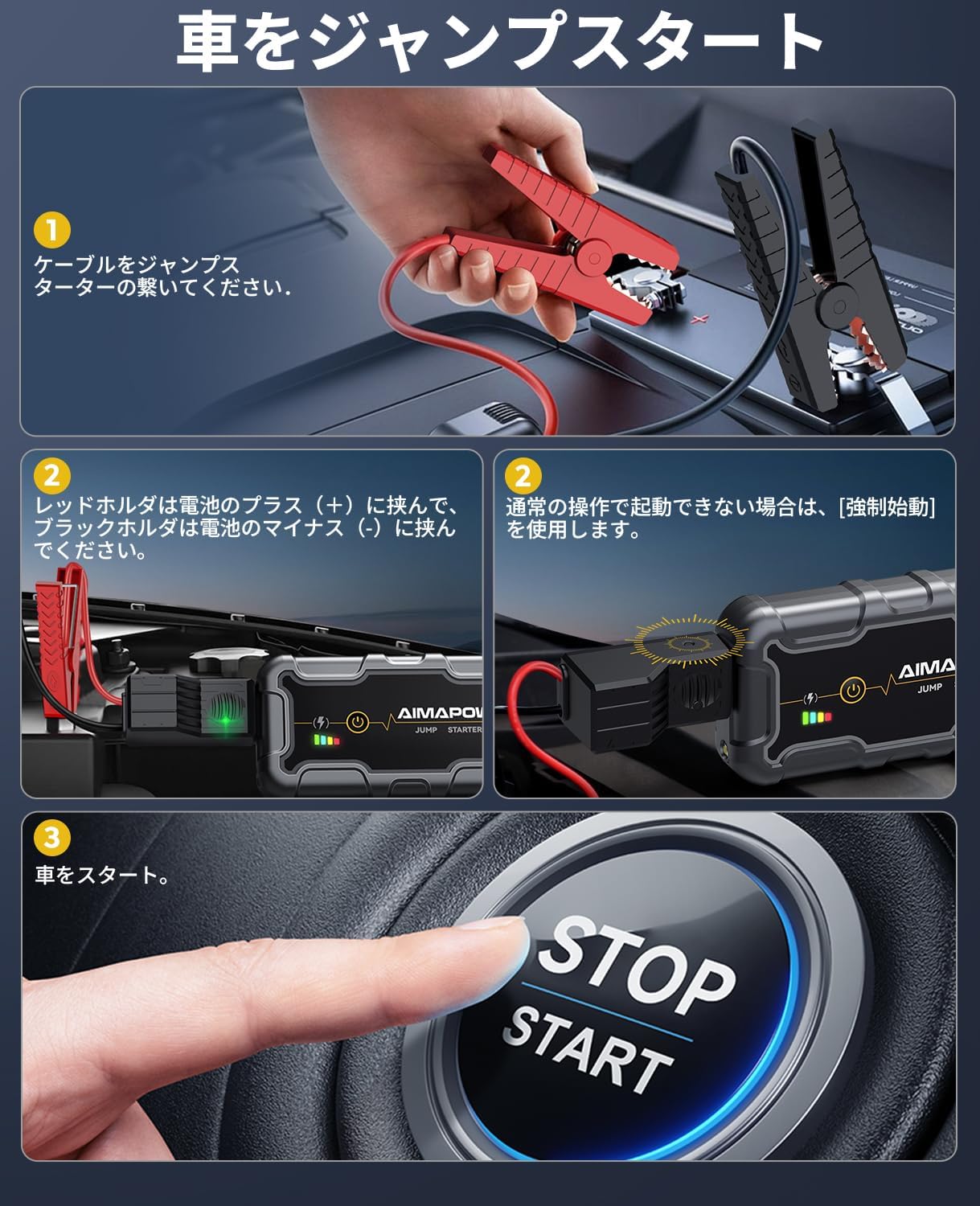
Image: A visual guide illustrating the three main steps for jump-starting a vehicle: connect cables, connect to battery, and start the car.
Video: A demonstration of connecting the jump starter to a car battery and successfully starting the engine.
7. Using as a Power Bank
The AIMAPOW A20 can also serve as a portable power bank to charge your electronic devices.
- Connect your device's USB charging cable to one of the jump starter's USB output ports (USB1-QC3.0 or USB2).
- The jump starter will automatically begin charging your device.
- The QC3.0 port offers faster charging for compatible devices.

Image: The jump starter connected via USB to a smartphone, illustrating its power bank functionality.
8. Using the LED Light
The built-in LED light provides illumination for various situations:
- Illumination Mode: Provides steady bright light for general use.
- SOS Mode: Flashes an SOS signal for emergency situations.
- Strobe Mode: Emits a rapid flashing light, useful as a warning signal.
To cycle through the modes, press the LED light button located on the jump starter.

Image: The jump starter's LED light illuminating an engine bay, demonstrating its utility in dark environments and highlighting its various light modes.
9. Specifications
| Feature | Specification |
|---|---|
| Brand | AIMAPOW |
| Model Name | A20 |
| Peak Current | 6000A |
| Engine Compatibility | All 12V Gasoline, up to 10.0L Diesel |
| Battery Capacity | 20000 mAh |
| Battery Type | Lithium Polymer |
| Voltage | 12 Volts |
| USB1 Output | QC3.0 (5V/3A, 9V/2A, 12V/1.5A) |
| USB2 Output | 5V/2.4A |
| Product Dimensions | 16.5 x 3 x 8 cm |
| Product Weight | 800 g |
10. Troubleshooting
If you encounter issues, try the following:
- Device not turning on: Ensure the jump starter is fully charged.
- Vehicle not starting: Check that the jumper cables are securely connected to the jump starter and the vehicle battery terminals. Ensure correct polarity. If the battery is completely dead, use the forced start function.
- Smart cable indicator is red/flashing: This indicates an incorrect connection or a problem with the vehicle battery. Recheck connections or use the forced start function if appropriate.
- Device not charging: Verify the USB-C cable and power adapter are working correctly.
For further assistance, please contact customer support.
11. Maintenance
To prolong the life of your AIMAPOW A20 Jump Starter:
- Store the device in a cool, dry place away from direct sunlight and moisture.
- Charge the jump starter at least once every three months, even if not in use, to maintain battery health.
- Clean the exterior with a soft, dry cloth. Do not use harsh chemicals or abrasives.
- Keep the jumper cable clamps clean and free of corrosion.
12. Warranty and Support
The AIMAPOW A20 Jump Starter comes with a 1-year warranty from the date of purchase, covering manufacturing defects.
For warranty claims, technical support, or any questions regarding your product, please contact our customer service team through the retailer where you purchased the item. Please have your purchase receipt and product model number (A20) ready.


