
Tecaki X3
Tecaki Mini Portable Projector X3 User Manual
Model: X3
Introduction
Thank you for choosing the Tecaki Mini Portable Projector X3. This manual provides essential information for setting up, operating, and maintaining your projector. Please read it thoroughly before use to ensure optimal performance and longevity of the device.
What's in the Box
Verify that all items are present in the package:
- Tecaki Mini Portable Projector X3
- HDMI Cable
- Power Cord
- Remote Control (batteries not included)
- Cleaning Kit
- User Manual (this document)
- Warranty Card
Setup
1. Placement
Position the projector on a stable, flat surface. The Tecaki X3 features a 180° rotatable stand, allowing for flexible projection angles, including ceiling or wall projection.
- Minimum Throw Distance: 3.2 feet (for a 30-inch image)
- Maximum Throw Distance: 16.4 feet (for a 200-inch image)

Image: The projector can project images from 30 inches (at 3.2 feet) up to 200 inches (at 16.4 feet).
2. Power Connection
Connect the provided power cord to the projector's power input and then to a power outlet.
3. Focus and Keystone Correction
The projector features automatic vertical keystone correction (up to ±35°) to ensure a rectangular image even when projected at an angle. For fine-tuning the image clarity, use the manual focus ring on the projector. The zoom function allows adjusting the screen size from 75% to 100% without moving the projector.

Image: Automatic keystone correction adjusts the image for perfect angles, and the zoom function allows screen size adjustment.
Operating Instructions
1. Connecting Devices
The Tecaki X3 offers multiple connectivity options:
- HDMI: Connect laptops, gaming consoles, or streaming devices (e.g., Fire TV Stick, Roku, Chromecast) using the included HDMI cable.
- USB: For direct media playback from USB drives.
- 3.5mm Audio Jack: For connecting external wired speakers or headphones.
- Bluetooth 5.2: For wireless audio transmission to external Bluetooth speakers or headphones. Note: The projector's Bluetooth connection supports audio transmission only.
Connecting Smartphones/Tablets:
Important: A USB to HDMI adapter/cable is not included with the projector.
- For iPhone/iPad Users: Different iPhone models require a Lightning or Type-C to USB cable (sold separately). An official cable is recommended for a stable connection.
- For Android Phones/Tablets: Check if your device supports video-out function (MHL). If yes, use a Micro USB/Type-C to HDMI adapter (not included). If not, use a streaming stick (like Roku/Fire Stick) for display.
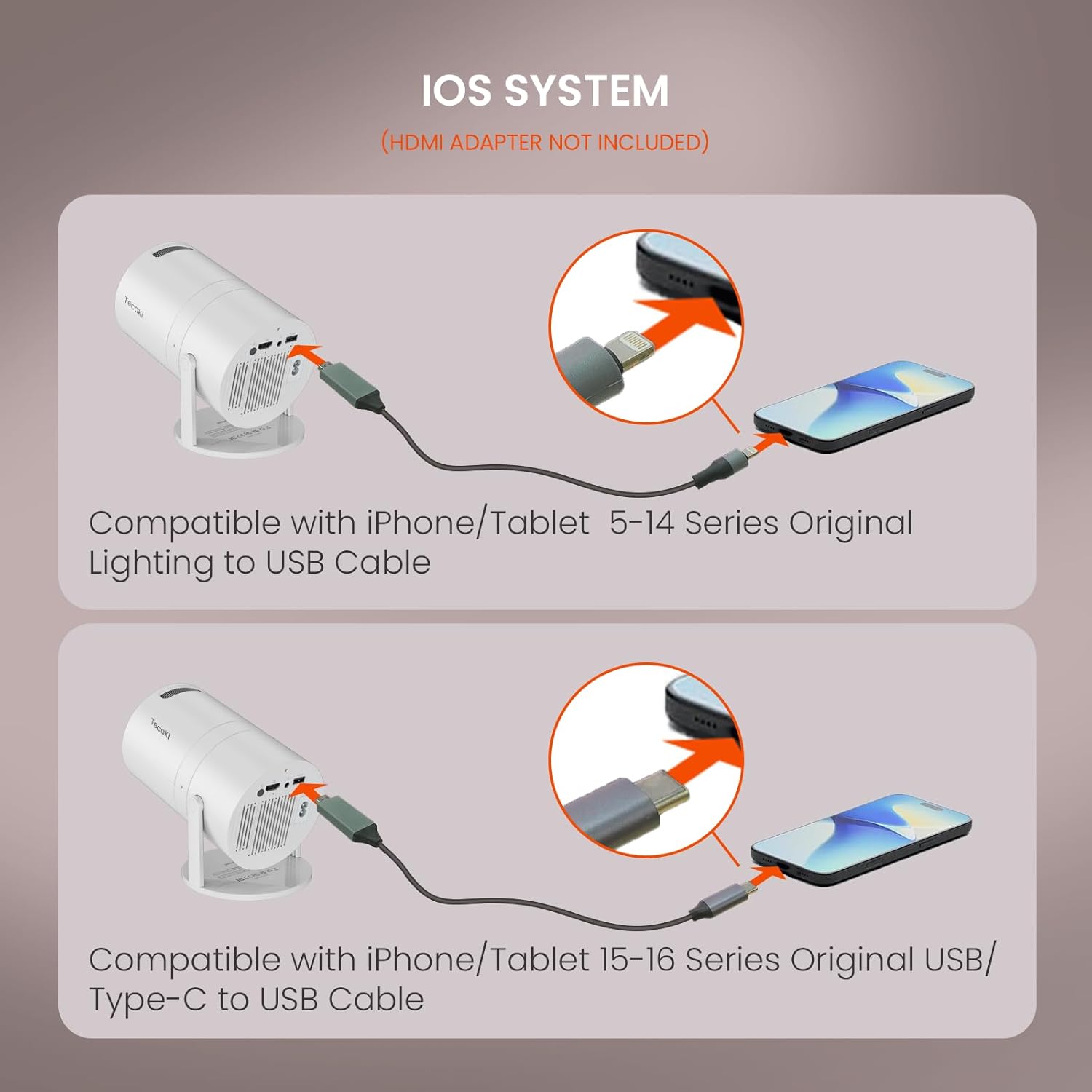
Image: Connection methods for iOS devices (iPhone/Tablet 5-14 Series with Lightning to USB, and 15-16 Series with USB/Type-C to USB).

Image: Detailed instructions for connecting various devices, highlighting the USB and HDMI ports on the projector.
2. Bluetooth Connectivity
The projector features advanced Bluetooth 5.2 technology for stable wireless audio transmission.
- Ensure your external Bluetooth speaker or headphones are in pairing mode.
- Navigate to the Bluetooth settings on the projector's interface.
- Select your device from the list to pair.
Note: The projector's internal audio quality is basic. For an enhanced audio experience, connecting an external Bluetooth speaker is recommended.

Image: The projector's two-way Bluetooth 5.2 allows connection to external audio devices.
3. Streaming Content
For streaming services like Amazon Prime Video, Hulu, Netflix, etc., due to content protection agreements (HDCP), screen mirroring from smartphones or tablets may not display video or audio.
To watch content from these platforms, connect a streaming device (such as a Fire TV Stick, Roku, or Chromecast) directly to the projector via HDMI, or use an HDMI cable from your laptop/computer.

Image: The projector is compatible with TV sticks for accessing streaming content. (TV Stick sold separately).
4. Timer Shutdown
The projector features a timer shutdown function, allowing it to automatically turn off after a set period (up to 4 hours). This feature helps save energy and ensures uninterrupted sleep if used before bed.

Image: The timer shutdown feature can be set for up to 4 hours.
5. Official Product Video
Video: Official product video demonstrating features of the Tecaki Mini Projector, including its two-way Bluetooth 5.2.
Maintenance
1. Cleaning
Regular cleaning helps maintain optimal image quality and extends the projector's lifespan.
- Use the provided cleaning kit, specifically the cotton swabs, to gently clean the projector lens.
- For the exterior, use a soft, dry cloth. Avoid abrasive cleaners or solvents.
- Ensure the projector is powered off and unplugged before cleaning.
2. Cooling System
The integrated cooling system prevents overheating. To ensure its efficiency:
- Do not block the ventilation openings on the projector.
- Operate the projector in a well-ventilated area.
- Avoid placing the projector on soft surfaces that might obstruct airflow.
Troubleshooting
If you encounter issues with your Tecaki Mini Portable Projector X3, refer to the following common solutions:
No Image / Black Screen
- Power: Ensure the projector is properly connected to power and turned on.
- Source: Verify the correct input source (HDMI, USB) is selected on the projector.
- Cables: Check all cables (HDMI, USB) for secure connections. Try a different cable if possible.
- Streaming Apps: If using screen mirroring for apps like Netflix or Hulu, a black screen is expected due to HDCP content protection. Connect a streaming stick (Fire TV Stick, Roku) or a laptop via HDMI instead.
Blurry Image
- Focus: Adjust the manual focus ring on the projector until the image is sharp.
- Keystone: The projector has auto keystone correction. If the image is still skewed, ensure the projector is placed as directly as possible to the projection surface.
- Distance: Ensure the projector is within the recommended throw distance (3.2 to 16.4 feet).
No Audio / Poor Audio Quality
- Volume: Check the volume settings on both the projector and the connected device.
- Bluetooth: Ensure your Bluetooth audio device is properly paired and connected. If issues persist, unpair and re-pair the device.
- External Speakers: If using a 3.5mm audio cable, ensure it is securely connected to both the projector and the external speaker.
- Source Audio: Verify the audio is working on the source device (e.g., laptop, streaming stick).
Persistent White Speck in Image
- This may indicate a dust particle on the internal optics. While the included cleaning swabs are for the lens, internal dust may require professional servicing if it significantly impacts viewing.
Specifications
| Feature | Detail |
|---|---|
| Brand | Tecaki |
| Model Number | X3 |
| Native Resolution | 1280 x 720 (720P HD) |
| Display Resolution Maximum | 1920 x 1080 (1080P Supported), 4K Supported |
| Brightness | 3000 Lumen |
| Contrast Ratio | 1000:1 |
| Connectivity Technology | Bluetooth 5.2, HDMI, USB, 3.5mm Audio |
| Special Features | 180° Rotatable Stand, Auto Keystone Correction, Manual Focus, Zoom Function (75%-100%), Eye-Comfort LED, Efficient Cooling System, Timer Shutdown |
| Minimum Throw Distance | 3.2 Feet |
| Maximum Throw Distance | 16.4 Feet |
| Maximum Image Size | 200 Inches |
| Item Dimensions (L x W x H) | 4.3"L x 4.3"W x 6.7"H |
| Item Weight | 0.9 Kilograms (1.98 lbs) |
| Wattage | 65 watts |
| Display Type | DLP |
Warranty Information
The Tecaki Mini Portable Projector X3 comes with a 1 Year Manufacturer Warranty. Please refer to the included Warranty Card for detailed terms and conditions. Keep your proof of purchase for warranty claims.
Customer Support
For further assistance, technical support, or warranty inquiries, please contact Tecaki customer service. Refer to the contact information provided on the Warranty Card or visit the official Tecaki website.
Online Support: Visit the Tecaki Store on Amazon
Ask a question about this manual
Ask about setup, troubleshooting, compatibility, parts, safety, or missing instructions. Manuals+ will review the question and use this page’s manual context to help answer it.