
1. Introduction
Thank you for choosing the MuGo Bluetooth Shower Speaker Model ZY-01. This device is designed to provide high-quality audio in various environments, including wet conditions, thanks to its IPX7 waterproof rating. It features 360° HD stereo sound, vibrant RGB lighting, a built-in microphone for hands-free calls, and a convenient suction cup for easy mounting. This manual provides essential information for setting up, operating, and maintaining your speaker.

Image 1.1: MuGo Bluetooth Shower Speaker Model ZY-01
2. Package Contents
Please verify that all items are present in your package:
- 1 x IPX7 Waterproof Bluetooth Shower Speaker (Model ZY-01)
- 1 x USB-C Cable
- 1 x Suction Cup
- 1 x Multi-language User Manual (this document)

Image 2.1: Package contents of the MuGo ZY-01 speaker.
3. Product Features
- IPX7 Waterproof Rating: Fully resistant to water splashes and submersion up to 1 meter for 35 minutes. The speaker floats for easy retrieval if dropped in water.
- 360° HD Stereo Sound: Advanced audio technology delivers clear, rich sound with deep bass for an immersive listening experience.
- RGB Colorful Light Show: Features three distinct light modes with dynamic multi-color lights that sync to music.
- Bluetooth 5.3 Connectivity: Provides faster, more stable pairing with smart devices within a 10-meter range, compatible with iOS, Android, smartphones, and tablets.
- Long Playtime: Up to 10 hours of continuous music playback at 50% volume on a single charge.
- Built-in Microphone: Enables hands-free calling, allowing you to answer calls directly from the speaker.
- Portable Design: Lightweight (6.4 oz) and compact (3.74” x 2.28” x 4.02”) with a detachable suction cup for easy mounting on smooth surfaces.

Image 3.1: Key features including IPX7 waterproof and hands-free function.

Image 3.2: Internal structure and core technologies of the speaker.
4. Controls and Functions
The MuGo ZY-01 speaker features intuitive controls for easy operation. Refer to the diagram below for button identification and their functions:
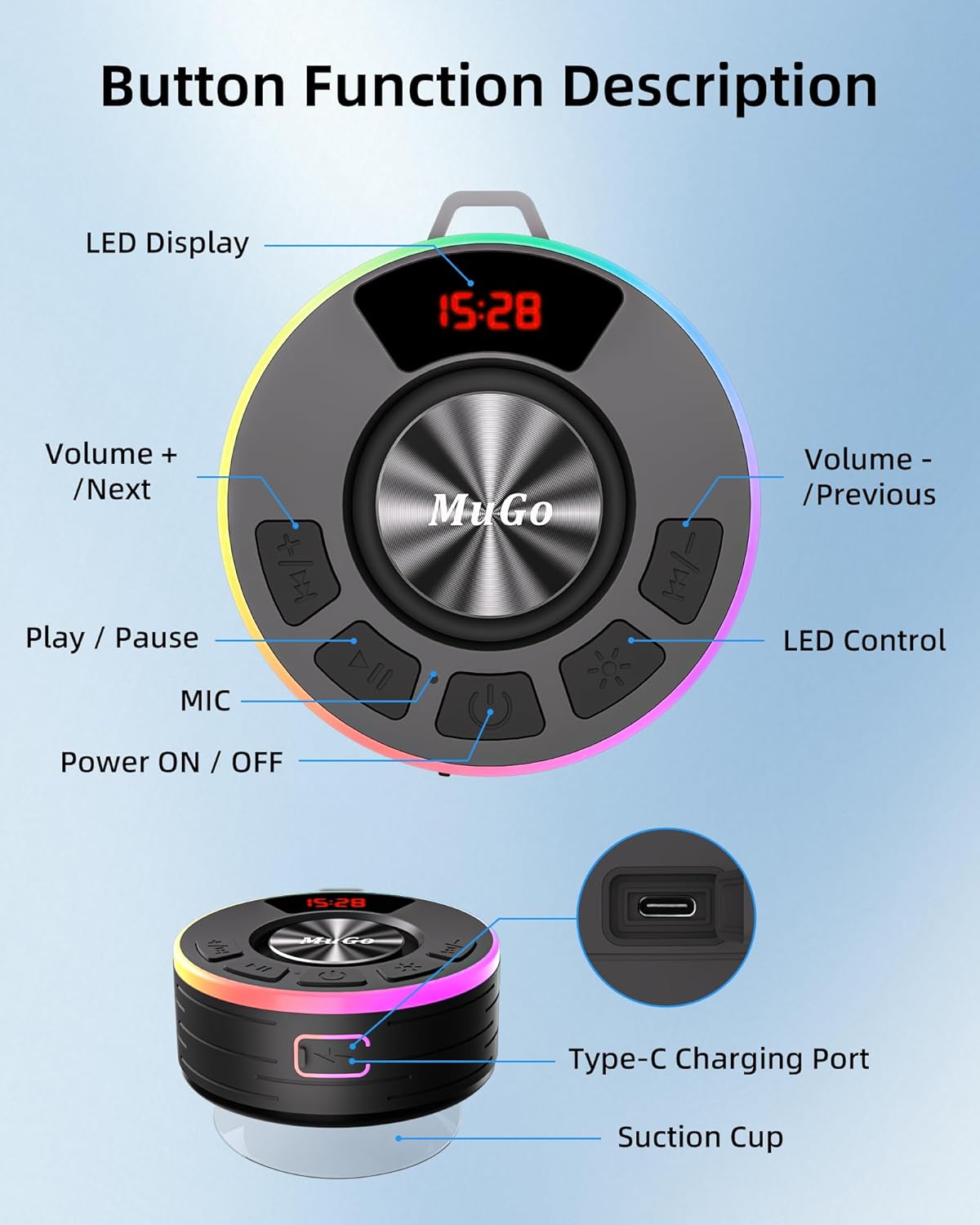
Image 4.1: Button Function Description.
| Button/Feature | Function |
|---|---|
| Power ON/OFF | Press and hold to power the speaker on or off. |
| Play/Pause | Press to play or pause audio. |
| Volume + / Next Track | Short press to increase volume. Long press to skip to the next track. |
| Volume - / Previous Track | Short press to decrease volume. Long press to go to the previous track. |
| LED Control | Press to cycle through RGB light modes or turn lights off. |
| MIC (Microphone) | Used for hands-free calling. Press to answer/end calls. |
| LED Display | Shows time, Bluetooth status ("BLUE"), volume level ("UXX"), etc. |
| Type-C Charging Port | Connect the provided USB-C cable for charging. |
| Suction Cup | Detachable suction cup for mounting on smooth, flat surfaces. |
5. Setup
5.1 Charging the Speaker
- Locate the Type-C charging port on the side of the speaker.
- Connect the provided USB-C cable to the speaker and the other end to a USB power adapter (not included) or a computer's USB port.
- The LED display will indicate charging status. A full charge typically takes about 3 hours.
5.2 Bluetooth Pairing
- Ensure the speaker is fully charged before first use.
- Press and hold the Power ON/OFF button to turn on the speaker. The LED display will show "BLUE" and the RGB lights will flash, indicating it's in pairing mode.
- On your smartphone or tablet, go to the Bluetooth settings.
- Search for available devices and select "ZY-01" from the list.
- Once paired, the speaker will emit a confirmation sound, and the "BLUE" indicator on the LED display will stop flashing.
- The speaker will automatically reconnect to the last paired device when powered on, if the device is within range and Bluetooth is enabled.
Image 5.1: Bluetooth 5.3 wide compatibility for easy pairing.
5.3 Attaching the Suction Cup
- Ensure the surface where you intend to mount the speaker is clean, dry, and smooth (e.g., tile, glass, mirror).
- Align the suction cup with the designated area on the back of the speaker and press firmly to attach.
- Press the speaker with the attached suction cup against the desired smooth surface until it creates a secure seal.
6. Operating Instructions
6.1 Power On/Off
- To turn on: Press and hold the Power ON/OFF button for approximately 3 seconds.
- To turn off: Press and hold the Power ON/OFF button for approximately 3 seconds.
6.2 Music Playback
- Play/Pause: Press the Play/Pause button once.
- Volume Up: Short press the "Volume + / Next Track" button.
- Volume Down: Short press the "Volume - / Previous Track" button.
- Next Track: Long press the "Volume + / Next Track" button.
- Previous Track: Long press the "Volume - / Previous Track" button.
6.3 Hands-Free Calling
- Answer Call: When a call comes in, press the MIC button once to answer.
- End Call: During a call, press the MIC button once to end the call.
- Reject Call: When a call comes in, press and hold the MIC button for 2 seconds to reject the call.
6.4 RGB Light Control
- Press the LED Control button to cycle through the available RGB light modes (e.g., dynamic multi-color, single color, off).
7. Maintenance
- Cleaning: Wipe the speaker with a soft, damp cloth. Do not use abrasive cleaners or solvents.
- Storage: Store the speaker in a cool, dry place when not in use. Avoid extreme temperatures.
- Water Exposure: While IPX7 waterproof, avoid prolonged submersion beyond specified limits (1 meter for 35 minutes). Ensure the charging port cover is securely closed before exposing to water.
- Battery Care: To prolong battery life, charge the speaker regularly and avoid fully depleting the battery frequently.
8. Troubleshooting
| Problem | Possible Solution |
|---|---|
| Speaker won't turn on. | Ensure the speaker is charged. Connect it to a power source using the USB-C cable. |
| Cannot pair via Bluetooth. |
|
| No sound or low volume. |
|
| Sound distortion. |
|
| RGB lights not working. | Press the LED Control button to cycle through light modes or turn them on. |
| Suction cup not holding. | Ensure the mounting surface is clean, dry, and smooth. Press firmly to create a vacuum seal. |
9. Specifications
| Feature | Detail |
|---|---|
| Model Name | ZY-01 |
| Brand | MuGo |
| Speaker Type | 3D |
| Connectivity Technology | Bluetooth |
| Bluetooth Version | 5.3 |
| Bluetooth Range | 10 Meters |
| Water Resistance Level | IPX7 (Waterproof) |
| Speaker Maximum Output Power | 8 Watts |
| Item Weight | 10.8 ounces |
| Product Dimensions | 2.28"D x 3.74"W x 4.02"H |
| Battery | 1 Nonstandard Battery (included) |
| Playtime | Up to 10 hours (at 50% volume) |
| Charging Time | Approximately 3 hours |
| Material | Plastic |
| Special Features | Built-in Microphone, LED Display, Lightweight, Portable, Waterproof, RGB Lights |
10. Official Product Video
Watch this official video for a visual overview of the MuGo Bluetooth Shower Speaker ZY-01's features and usage:
Video 10.1: MuGo Bluetooth Shower Speaker ZY-01 IPX7 Waterproof Wireless. This video demonstrates the speaker's waterproof capabilities, sound quality, RGB lighting, and portability.
11. Warranty and Support
For detailed warranty information and customer support, please refer to the warranty card included with your product or visit the official MuGo website. You can also visit the MuGo Store on Amazon for additional product information and contact options.