
1. Introduction
The ORICO X50 Pro is an advanced M.2 NVMe SSD enclosure designed for high-speed data transfer and storage expansion. It supports M-Key/B+M Key 2280 NVMe SSDs with capacities up to 4TB, offering exceptional performance for demanding tasks such as 4K/8K video editing, 3D rendering, and large data migration. This enclosure features a fanless, silent cooling design with an aluminum alloy body and innovative hydrogel heat dissipation coating to ensure stable operation under heavy loads. It is compatible with Thunderbolt 5/4/3 and USB4 interfaces, supporting macOS, Windows, and Linux systems.

Image 1.1: The ORICO X50 Pro 80Gbps M.2 NVMe SSD Enclosure.
2. Package Contents
Please verify that all items listed below are included in your package:
- 1 x 80Gbps M.2 NVMe SSD Enclosure
- 1 x 80Gbps USB-C to USB-C Cable (0.5m)
- 1 x User Manual
- 2 x Silicone Stoppers
- 2 x Thermal Pads
- 1 x Screwdriver

Image 2.1: Visual representation of the ORICO X50 Pro package contents.
3. Product Features
3.1. 80Gbps High-Speed Data Transfer
The ORICO X50 Pro supports M.2 NVMe M-Key/B+M Key SSDs (2280 form factor) with impressive read speeds up to 6,000 MB/s and write speeds up to 5,800 MB/s. This allows for the transfer of large files, such as a 6 GB file, in under a second. To achieve speeds exceeding 3,000 MB/s, it is recommended to use an SSD with PCIe 4.0 x4 and NVMe 1.4 or above. M.2 PCIe 5.0 SSDs are not supported.

Image 3.1: Illustration of the ORICO X50 Pro's high-speed data transfer capabilities.
3.2. Fanless Silent Cooling & Multiple Heat Dissipation
Constructed with an aluminum alloy body and a fin cooling structure, the enclosure ensures efficient heat dissipation without the need for a fan, resulting in silent operation. It also includes a CPU-grade thermal pad and an innovative hydrogel heat dissipation coating to maintain optimal temperatures and prevent thermal throttling during intensive use.
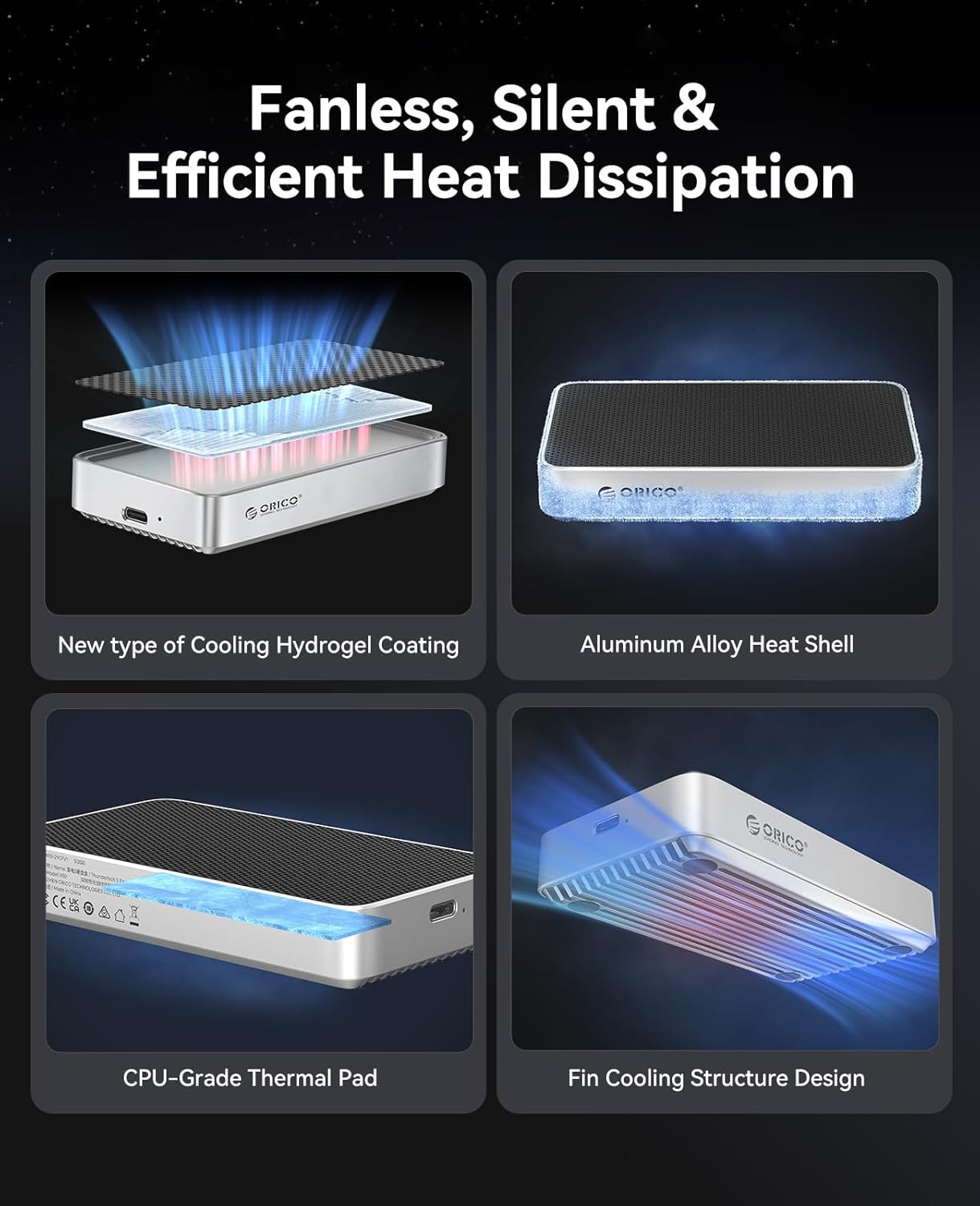
Image 3.2: Diagram showing the multi-layered heat dissipation design of the ORICO X50 Pro.
3.3. Advanced Intel JHL9480 Controller Chip
The ORICO X50 Pro is equipped with Intel's JHL9480 controller chip, enabling theoretical speeds up to 80 Gbps when connected to a Thunderbolt 5 compatible device. This advanced chip ensures stable and ultra-fast connectivity for professional workflows.

Image 3.3: Close-up of the Intel JHL9480 controller chip.
3.4. Broad Device Compatibility
This enclosure is compatible with Thunderbolt 5, Thunderbolt 4, Thunderbolt 3, and USB4 interfaces. It works seamlessly across various operating systems including macOS, Windows, and Linux. Supported devices include MacBook Pro (M4 Pro/M4 Max), Mac mini (M4 Pro), Mac Studio (M4 Max/M3 Ultra), Razer Blade 16 laptops, and other compatible devices.
Note on Thunderbolt 3 Compatibility:
Thunderbolt 3 equipment may not be fully compatible with 80Gbps SSD enclosures and might default to USB speeds, limiting performance to 10Gbps. For Thunderbolt 3 equipped interfaces, a 40Gbps SSD enclosure is recommended for faster speeds than a USB connection.

Image 3.4: Overview of supported operating systems and compatible devices.
3.5. Compact and Portable Design
The ORICO X50 Pro features a compact design, making it highly portable for users on the go. Its dimensions are 4.33 x 2.36 x 0.74 inches, and it weighs 8 ounces.
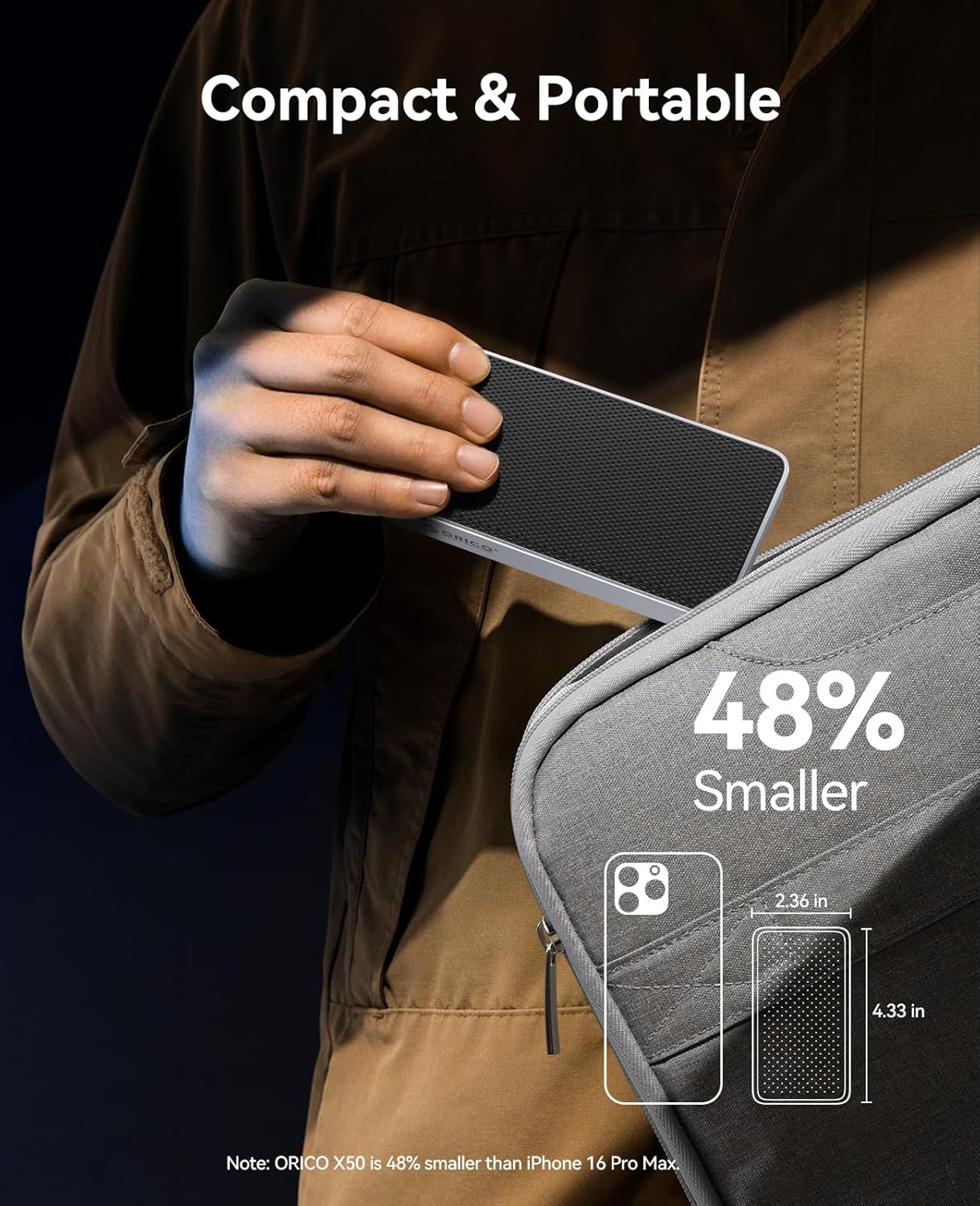
Image 3.5: The compact and portable design of the ORICO X50 Pro.
3.6. M.2 2280 NVMe SSD Support
The enclosure specifically supports M-Key/B+M Key 2280 form factor M.2 NVMe SSDs. It is important to note that M.2 PCIe 5.0 SSDs are not compatible.

Image 3.6: Visual guide to compatible M.2 NVMe SSD types.
3.7. Up to 4TB Capacity
The ORICO X50 Pro supports M.2 NVMe SSDs with capacities up to 4TB, providing ample storage for large files and extensive projects.

Image 3.7: The ORICO X50 Pro connected to a Mac setup, illustrating its 4TB capacity support.
3.8. Professional Content Creation Support
With its high-speed capabilities, the ORICO X50 Pro is ideal for professionals engaged in 4K/8K video editing, 3D modeling and rendering, and VR/AR content development, significantly boosting productivity by reducing transfer and processing times.

Image 3.8: Various professional content creation scenarios where the ORICO X50 Pro enhances workflow.
4. Setup Instructions
4.1. Installing the M.2 NVMe SSD
- Use the provided screwdriver to remove the screw(s) and open the back cover of the enclosure.
- Insert your M.2 NVMe SSD into the slot at a 30-degree angle and gently push it down to secure it with the screw.
- Apply the thermal pad to the SSD to ensure proper heat dissipation.
- Reinstall the back cover and tighten the screw(s).

Image 4.1: Step-by-step visual instructions for SSD installation.
4.2. Connecting to Your Device
After installing the SSD, connect the ORICO X50 Pro enclosure to your computer or compatible device using the provided 80Gbps USB-C cable. Ensure the connection is secure. The device should be recognized automatically by your operating system.
5. Operating Instructions
5.1. Basic Usage
Once connected, the SSD within the enclosure will appear as an external drive on your computer. You can drag and drop files, copy, paste, and manage data as you would with any other storage device. For optimal performance, ensure your operating system and drivers are up to date.
5.2. Performance Notes
- Actual transfer speeds may vary depending on the host device, operating system, SSD used, and file types.
- For maximum 80Gbps performance, connect to a Thunderbolt 5 compatible port using the included 80Gbps cable.
- Avoid disconnecting the enclosure during data transfer to prevent data corruption. Always safely eject the drive before unplugging.
6. Maintenance
- Keep the enclosure clean and free from dust. Use a soft, dry cloth for cleaning.
- Avoid exposing the device to extreme temperatures, humidity, or direct sunlight.
- Do not attempt to disassemble the enclosure beyond SSD installation, as this may void the warranty.
7. Troubleshooting
7.1. Device Not Recognized
- Ensure the USB-C cable is securely connected to both the enclosure and your computer.
- Try connecting to a different USB-C or Thunderbolt port on your computer.
- Verify that the M.2 NVMe SSD is correctly installed inside the enclosure.
- Check your computer's Disk Management (Windows) or Disk Utility (macOS) to see if the drive is detected but uninitialized or unformatted. If so, initialize and format the drive.
- Ensure your operating system is up to date.
7.2. Slow Transfer Speeds
- Confirm that your computer's port supports Thunderbolt 5/4/3 or USB4. Connecting to a lower-speed USB port will result in reduced performance.
- Ensure the M.2 NVMe SSD installed is a high-performance model (PCIe 4.0 x4, NVMe 1.4 or above recommended for top speeds).
- Check the cable. Use the provided 80Gbps cable or another certified high-speed cable.
- Close any unnecessary applications running in the background that might be consuming system resources.
7.3. Enclosure Gets Hot
The aluminum alloy body and fin cooling structure are designed to dissipate heat efficiently. It is normal for the enclosure to feel warm during heavy data transfer or prolonged use. If the enclosure becomes excessively hot and performance drops, ensure proper airflow around the device and that the thermal pad is correctly installed on the SSD.
8. Specifications
| Feature | Detail |
|---|---|
| Model Number | X50-Pro |
| Material | Aluminum Alloy |
| Interface | Thunderbolt 5/4/3, USB4 |
| Data Transfer Rate | Up to 80Gbps (Theoretical Max) |
| SSD Compatibility | M-Key/B+M Key 2280 NVMe SSDs (PCIe 5.0 not supported) |
| Max Capacity | 4 TB |
| Cooling System | Fanless, Aluminum Alloy Body, Fin Cooling Structure, Thermal Pad, Hydrogel Coating |
| Controller Chip | Intel JHL9480 |
| Compatible OS | macOS, Windows, Linux |
| Product Dimensions | 4.33 x 2.36 x 0.74 inches |
| Item Weight | 8 ounces |
9. Warranty and Support
The ORICO X50 Pro SSD Enclosure comes with a 3-year limited warranty. For technical support, warranty claims, or further assistance, please contact ORICO customer service through their official website or the retailer where the product was purchased.
Official Product Video:
Video 9.1: An official product video from ORICO showcasing the features and benefits of the 80Gbps M.2 NVMe SSD Enclosure.


