
1. Introduction
This manual provides essential instructions for the safe and efficient operation of your Luoran M4Pro MP3 Player. Please read thoroughly before use to ensure proper functionality and to maximize your device's potential. This device is designed to offer a versatile media experience with robust parental controls.
2. Safety Information
- Read all instructions before using the device.
- Keep the device away from water and moisture.
- Do not attempt to disassemble or repair the device yourself. Contact customer support for assistance.
- Use only approved chargers and accessories to prevent damage and ensure safety.
- Avoid prolonged exposure to high volume levels to prevent potential hearing damage.
- Keep the device out of reach of small children to prevent choking hazards from small parts.
3. What's in the Box
Your Luoran M4Pro MP3 Player package includes the following items:
- Luoran M4Pro MP3 Player
- 64GB memory card (pre-installed or included separately)
- Instruction of use (this manual)
- Silicone Case
- USB-C cable
- Wired earphone

Image: The Luoran M4Pro MP3 Player shown with its retail box and various accessories.
4. Setup
4.1. Charging the Device
Before first use, fully charge your M4Pro MP3 Player. Connect the provided USB-C cable to the device's charging port and the other end to a compatible USB power adapter (not included) or a computer's USB port. A full charge takes approximately 2 hours and provides up to 50 hours of continuous music playback.
4.2. Power On/Off
- To Power On: Press and hold the Power button on the side of the device until the Luoran logo appears.
- To Power Off: Press and hold the Power button until the power options appear on the screen, then select 'Power Off'.
4.3. Initial Setup (Android 14)
Upon first power-on, follow the on-screen prompts to select your language, connect to a Wi-Fi network, and complete basic Android setup. This ensures your device is ready for app downloads and updates.
4.4. Inserting/Removing Memory Card
The device comes with a 64GB memory card pre-installed or included. It supports up to 1TB external memory for extensive music and media libraries.
- To Insert: Locate the microSD card slot on the side of the device. Gently push the memory card into the slot until it clicks into place.
- To Remove: Gently push the memory card inward until it pops out slightly, then pull it out.

Image: The Luoran M4Pro MP3 Player highlighting its 96GB storage (32GB built-in + 64GB card) and support for up to 1TB expandable storage via microSD card.
4.5. Connecting Headphones
- Wired Earphones: Plug the included wired earphones into the 3.5mm audio jack at the bottom of the device.
- Bluetooth Headphones/Speakers: Enable Bluetooth on your M4Pro and your audio device. Go to Settings > Connected devices > Bluetooth, and pair with your desired device.

Image: The Luoran M4Pro MP3 Player demonstrating seamless wireless connection to Bluetooth headphones, speakers, and car audio systems.
5. Operating the Device
5.1. Touchscreen Navigation
The M4Pro features a responsive 4.0-inch IPS HD full touch screen. Navigate by tapping, swiping, and pinching gestures similar to a smartphone.
5.2. App Store Access (Google Play)
The device comes with the Google Play Store pre-installed. You can download and update a wide variety of applications, including streaming services like Spotify, Amazon Music, YouTube, Audible, and Libby.
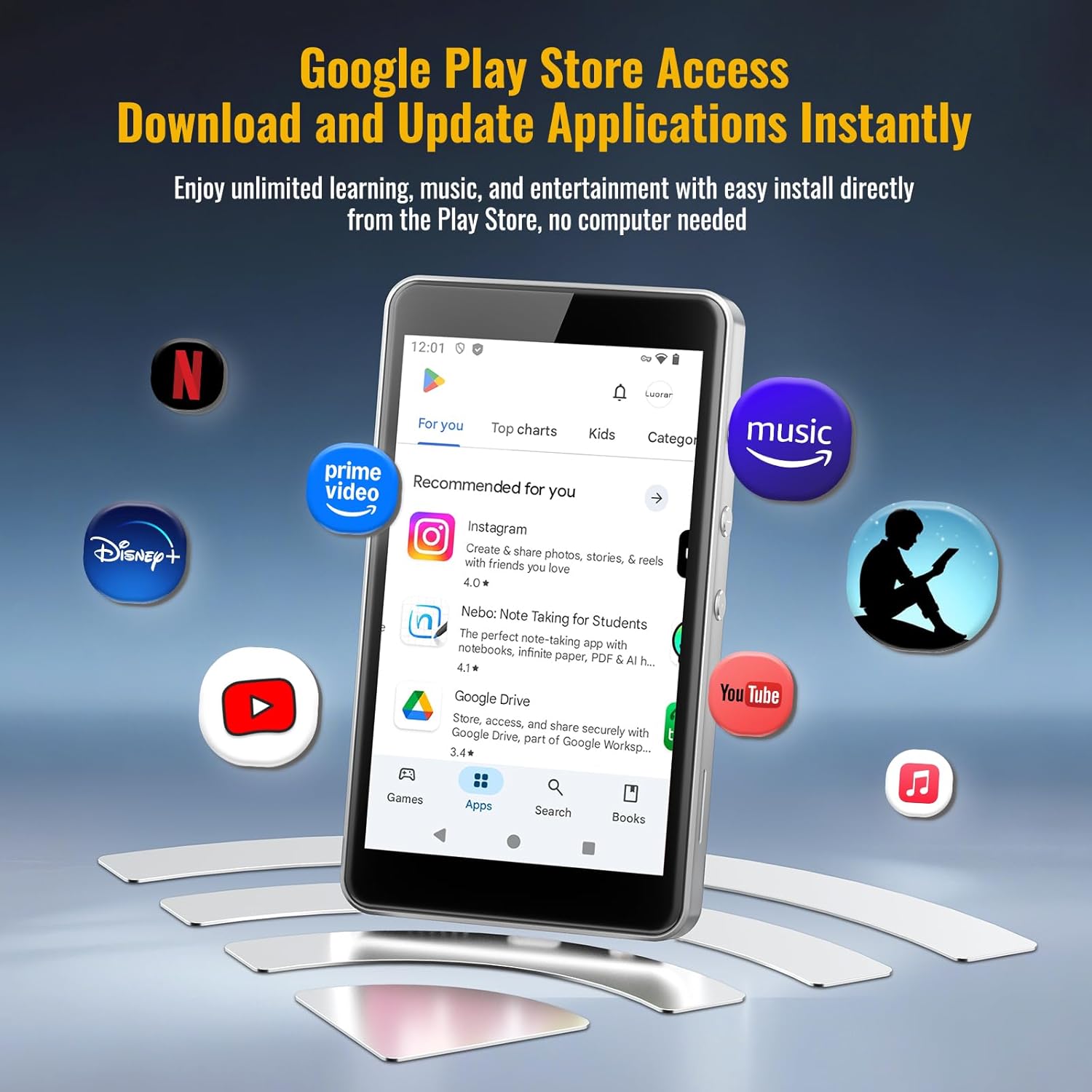
Image: The Luoran M4Pro MP3 Player screen showing the Google Play Store interface, allowing users to download and update applications.
Video: A seller-provided overview of the Luoran Player, highlighting its features and capabilities as a smart MP3 player.
5.3. Parental Controls
The M4Pro includes a comprehensive parental control system. You can block or unblock any installed application, including the app store, to customize the device for safe use by children. A parental PIN code is required for initial setup and management.

Image: The Luoran M4Pro MP3 Player demonstrating its parental control features, allowing apps to be blocked or unblocked for safer usage.
5.4. Music Playback
The device supports various audio formats including MP3, OGG, APE, FLAC, WAV, AAC-LC, ACELP, and M4A. Organize and play your music through pre-installed music apps or downloaded streaming services.
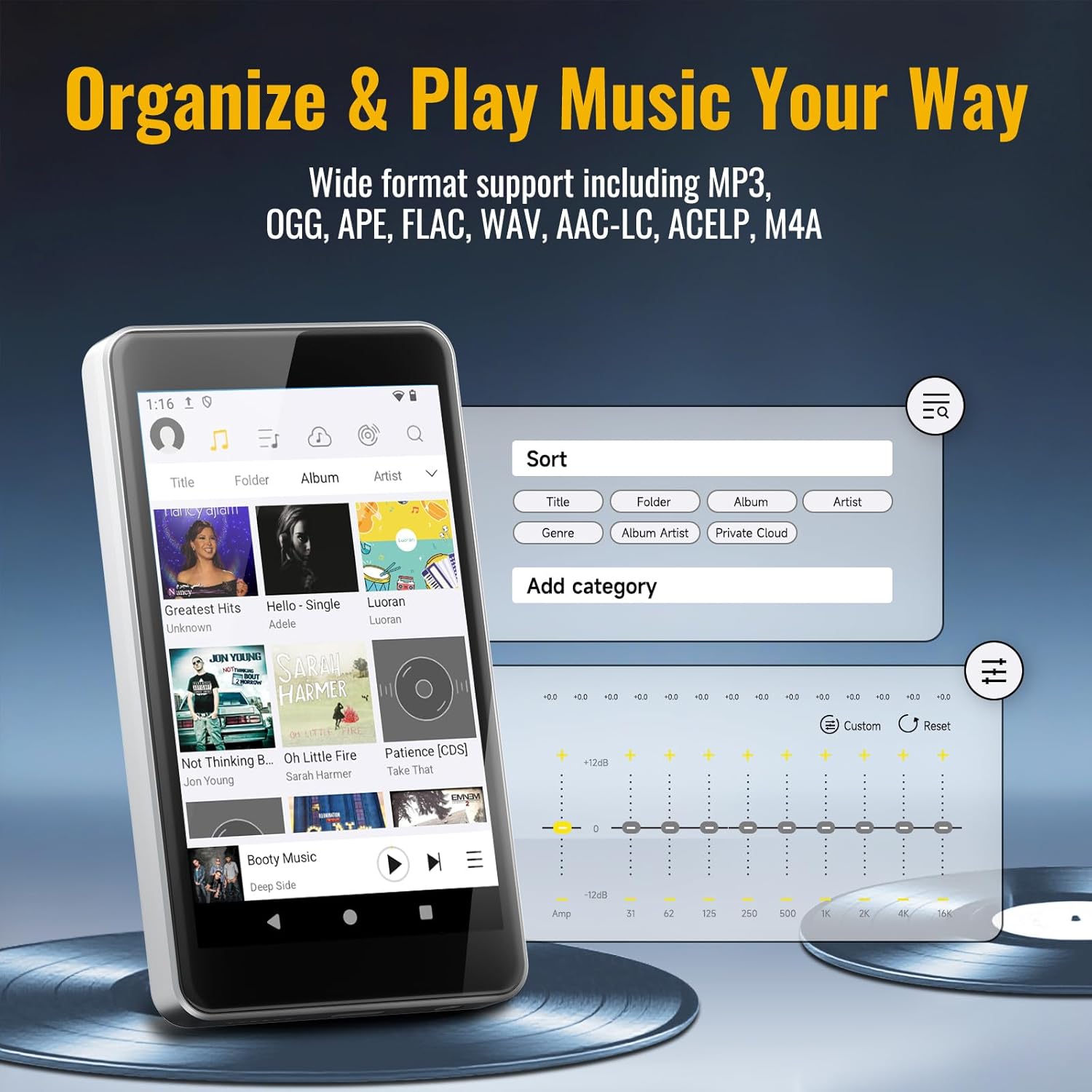
Image: The Luoran M4Pro MP3 Player screen showing options to organize music by title, folder, album, artist, genre, and custom categories, along with an equalizer.
5.5. Wi-Fi and Bluetooth Connectivity
Enjoy stable and fast connectivity with dual-band Wi-Fi (2.4GHz & 5.0GHz) for streaming and downloads. Bluetooth 5.0 allows effortless pairing with wireless headphones or speakers. The device features a fixed MAC address for reliable network recognition.
5.6. Night Light & Dark Theme
For eye comfort, especially in low light conditions, the M4Pro offers a Night Light mode and a Dark Theme. These features can be accessed and configured in the device's display settings.

Image: A user interacting with the Luoran M4Pro MP3 Player's display settings, showing options for Night Light and Dark Theme to protect eyes in low light.
6. Maintenance
6.1. Cleaning
Wipe the device with a soft, dry, lint-free cloth. Do not use liquid cleaners or aerosols directly on the device.
6.2. Software Updates
Ensure your device is connected to Wi-Fi to receive and install the latest Android 14 security and feature updates. Regular updates enhance performance and security.
6.3. Battery Care
To prolong battery life, avoid fully discharging the device frequently. Store the device in a cool, dry place when not in use for extended periods.
7. Troubleshooting
- Device not powering on: Ensure the device is fully charged. If the issue persists, try a hard reset by holding the power button for 10-15 seconds.
- Cannot connect to Wi-Fi/Bluetooth: Check if Wi-Fi/Bluetooth is enabled in settings. Ensure you are within range of the network/device. Try restarting the M4Pro and your router/Bluetooth device.
- Apps crashing/freezing: Close and reopen the app. If the problem continues, clear the app's cache (Settings > Apps > [App Name] > Storage > Clear cache) or uninstall and reinstall the app.
- Storage issues: Check available storage in Settings > Storage. Delete unnecessary files or apps, or consider upgrading your microSD card.
8. Specifications
| Product Dimensions | 4.25 x 2.4 x 0.39 inches |
| Item Weight | 4.9 ounces |
| Item Model Number | M4Pro-6762 |
| Batteries | 1 AAA batteries required (included) |
| Brand | Luoran |
| Special Feature | Android 14, App Store, Bluetooth & Dual-Band WiFi, Parental Controls |
| Connectivity Technology | Bluetooth, Wi-Fi |
| Memory Storage Capacity | 96 GB (32GB built-in + 64GB memory card) |
| Color | Platinum Silver |
| Screen Size | 4 Inches |
| Compatible Devices | Earphone, Headphone |
| Media Type | Memory Card, SDHC, SDXC |
9. Warranty and Support
For detailed warranty information, technical support, or to inquire about service, please visit the official Luoran website or contact their customer service department. Contact details can typically be found on the product packaging or the Luoran brand store on Amazon.