
Introduction
Thank you for choosing the SuperRC M23 Mini RC Drone. This manual provides essential information for the safe operation, setup, maintenance, and troubleshooting of your drone. Please read this manual thoroughly before operating the drone to ensure proper function and to avoid damage or injury. This drone is designed for adult beginners and features a lightweight, portable design with an HD camera and intelligent flight functions.
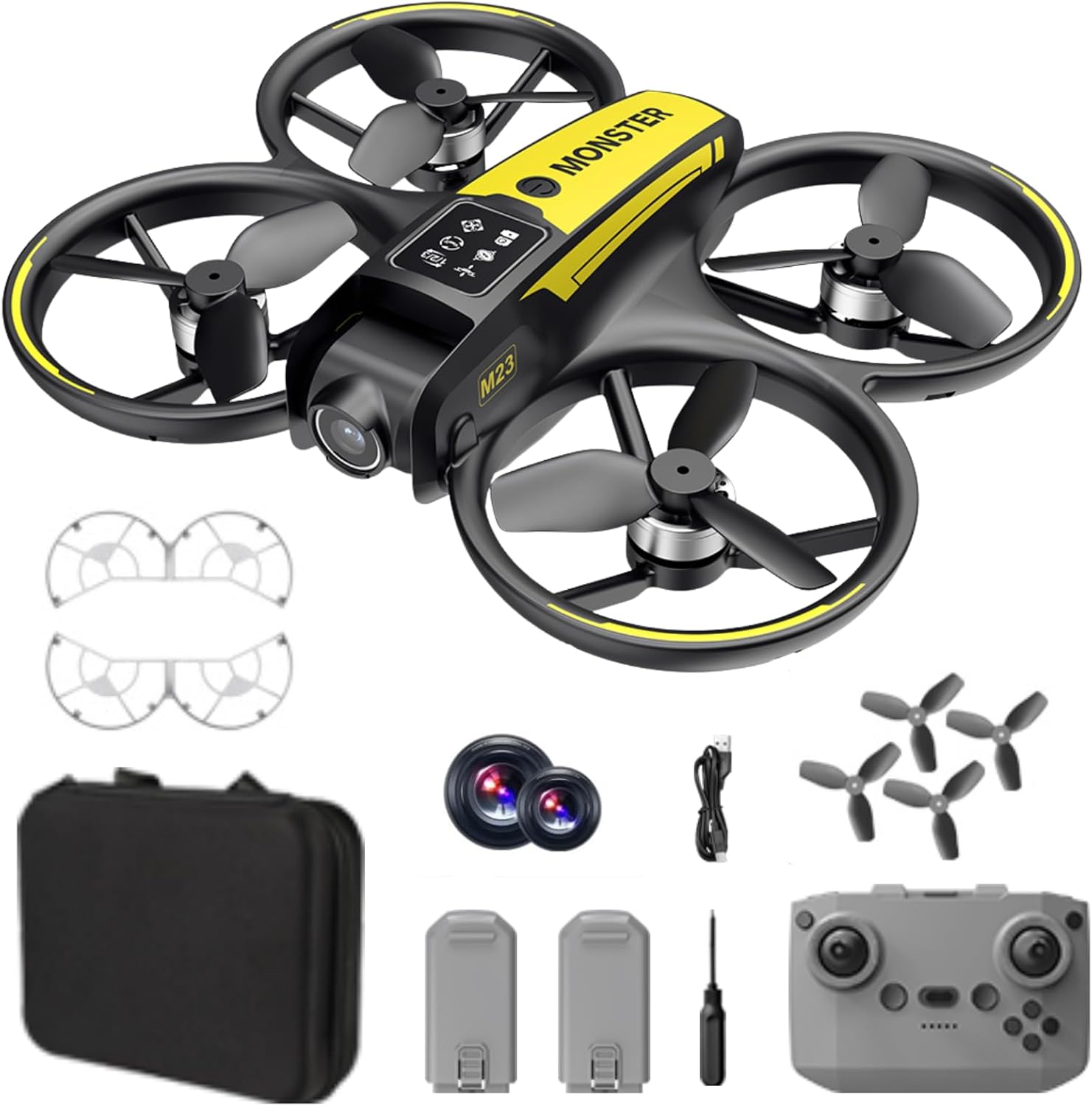
What's in the Box
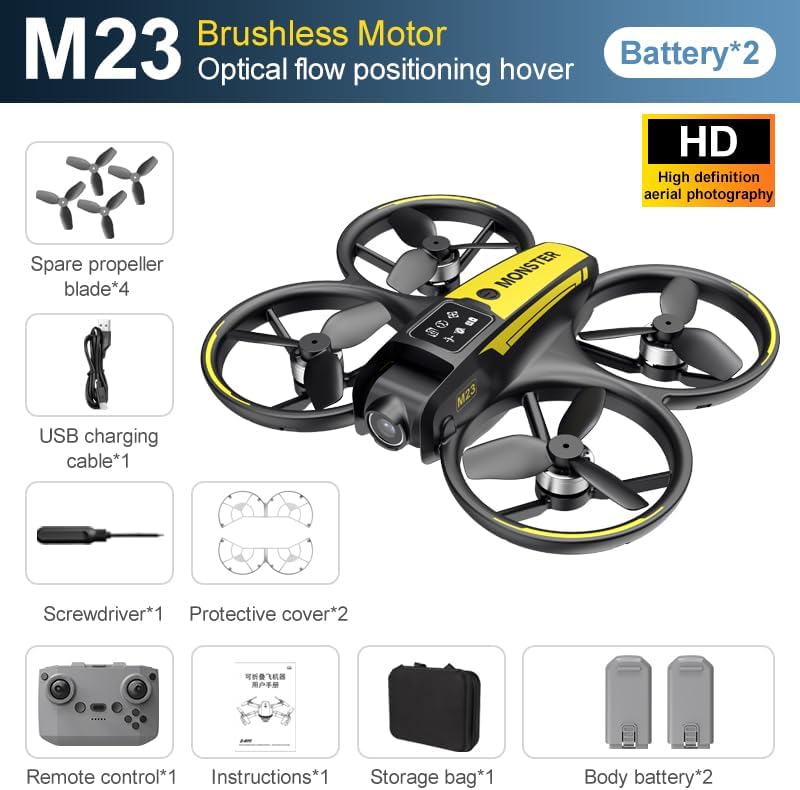
The SuperRC M23 drone package includes the following components:
- M23 Drone
- Remote Controller
- 2 x 3.7V 1050mAh Rechargeable Batteries
- 4 x Spare Propellers
- 2 x Propeller Guards
- Memory Card
- Card Reader
- Screwdriver
- USB Charging Cable
- Storage Bag
- User Manual (this document)

Product Overview
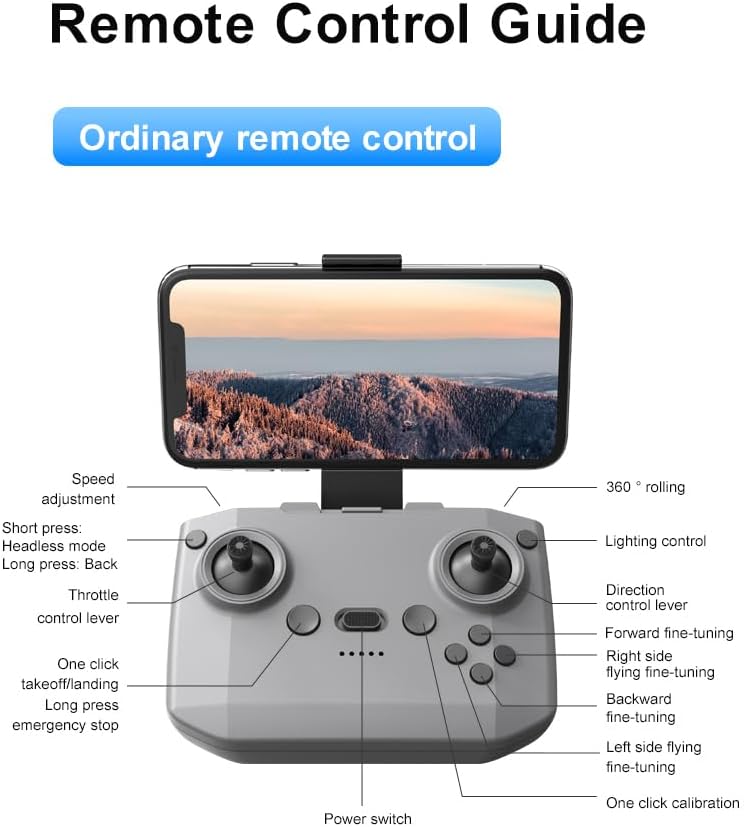
Remote Control Layout
Familiarize yourself with the remote control buttons and their functions before flight.
Setup
1. Battery Installation
- Ensure the drone and remote control are powered off.
- Locate the battery compartment on the drone.
- Insert a charged 3.7V 1050mAh battery into the compartment until it clicks securely into place.
- For the remote control, open the battery cover and insert the required batteries (not specified in product data, assume standard AA/AAA, user should refer to physical manual for exact type).
2. Propeller Installation
The drone comes with propellers pre-installed. If replacement is needed:
- Identify the 'A' and 'B' markings on the propellers and the corresponding motor arms.
- Attach 'A' propellers to 'A' motor shafts and 'B' propellers to 'B' motor shafts. Ensure they are firmly secured.
3. Propeller Guard Installation
For added safety, attach the propeller guards:
- Align each propeller guard with the designated slots on the drone's motor arms.
- Gently push until they snap into place.
4. Charging
Charge the drone batteries using the provided USB charging cable.
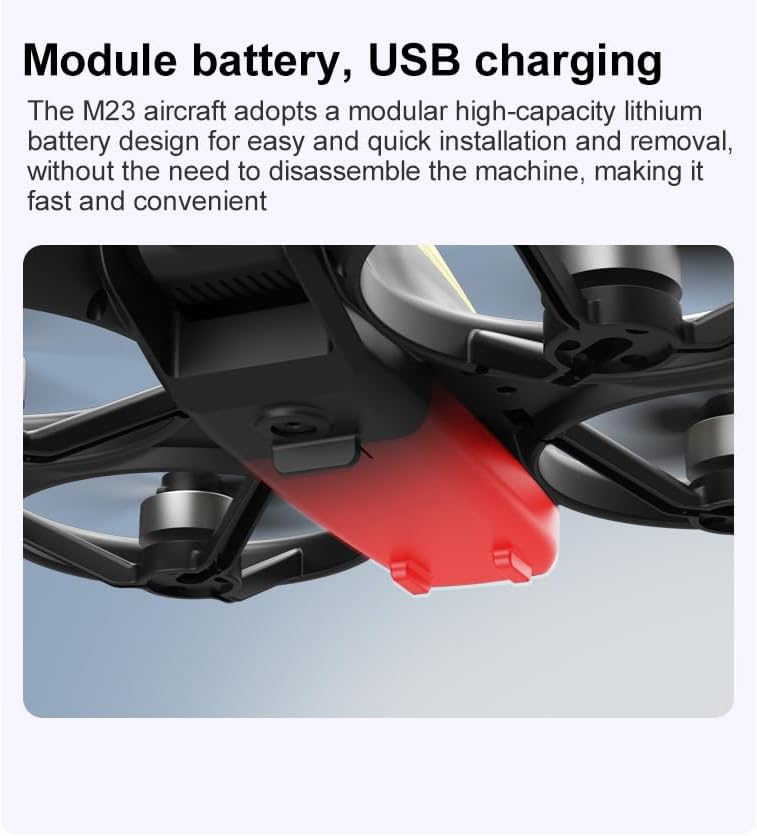
- Connect the USB charging cable to the drone battery.
- Plug the other end into a USB power source (e.g., computer, USB wall adapter).
- The indicator light on the cable will show charging status (refer to physical manual for specific light indications).
- Charging time is approximately 60-90 minutes for a full charge.
Operating Instructions
Pre-Flight Checklist
- Ensure drone and remote control batteries are fully charged.
- Propellers are correctly installed and secure.
- Propeller guards are attached (recommended for beginners).
- Choose an open, clear area free from obstacles, people, and animals.
- Check local drone regulations before flying.
Basic Flight Operations
The following video demonstrates key flight features including one-key takeoff, optical flow positioning, 360-degree roll, and speed switching.
One-Key Takeoff and Landing
- Takeoff: Place the drone on a flat surface. Press the One-Key Takeoff button on the remote control. The drone will automatically ascend and hover at a stable altitude.
- Landing: Press the One-Key Landing button. The drone will slowly descend and land automatically.
Flight Modes and Features
- Headless Mode: Press the Headless Mode button. In this mode, the drone's orientation is relative to the pilot, making it easier to control without worrying about the drone's front direction.
- Speed Adjustment: Use the speed adjustment button (or switch) on the remote control to cycle through low, medium, and high speeds. This allows for adaptable flight control based on skill level and environment.
- 360° Roll: Press the 360° Roll button and then move the right joystick in any direction to perform an aerial flip. Ensure sufficient altitude before attempting.
- Optical Flow Positioning: The drone utilizes a bottom camera for optical flow positioning, which helps maintain stable hovering, especially indoors or in areas with good ground texture. This feature assists in precise altitude hold.
- Trajectory Flight: Through the mobile application, you can draw a desired flight path on your screen. The drone will then follow this trajectory automatically.

Camera Operation
The M23 drone is equipped with an HD camera with a 90-degree adjustable lens for capturing photos and videos.

- Photo/Video Recording: Use the dedicated buttons on the remote control or the mobile app to start/stop video recording or take photos.
- Real-time Image Transmission: Connect your smartphone to the drone's Wi-Fi network to view real-time footage from the drone's camera on your device.
Maintenance
Cleaning
- Regularly clean the drone body with a soft, dry cloth.
- Ensure propellers are free from dust, dirt, or debris.
- Clean the camera lens gently with a microfiber cloth to maintain image quality.
Storage
- Store the drone and its components in the provided storage bag to protect them from dust and physical damage.
- Keep the drone in a cool, dry place, away from direct sunlight and extreme temperatures.
Battery Care
- Do not overcharge or over-discharge the batteries.
- If storing for extended periods, charge batteries to approximately 50-60% capacity.
- Avoid exposing batteries to high temperatures or direct sunlight.
Troubleshooting
If you encounter issues with your SuperRC M23 drone, refer to the following common problems and solutions:
| Problem | Possible Cause | Solution |
|---|---|---|
| Drone does not respond to remote control | Low battery on drone or remote; Not paired correctly; Interference | Charge batteries; Re-pair drone and remote (refer to physical manual for pairing steps); Move to an area with less interference |
| Drone drifts during flight | Not calibrated; Wind interference; Damaged propeller | Perform calibration (refer to physical manual); Fly in calm conditions; Replace damaged propellers |
| Poor camera image quality | Dirty lens; Low light conditions; Wi-Fi interference | Clean camera lens; Fly in well-lit areas; Ensure strong Wi-Fi connection |
| Short flight time | Battery not fully charged; Old battery; Aggressive flying | Ensure battery is fully charged; Consider replacing old batteries; Practice smoother flight maneuvers |
Specifications
Key technical specifications for the SuperRC M23 Mini RC Drone:
| Feature | Detail |
|---|---|
| Model Name | M23-Drone |
| Brand | SuperRC |
| Item Weight | 0.2 Kilograms (Under 250g) |
| Item Dimensions (L x W x H) | 7"L x 6"W x 2"H (approx. 18 x 15 x 5 cm) |
| Material | Plastic |
| Skill Level | Beginner |
| Age Range (Description) | Adult |
| Camera | HD Camera with 90° Adjustable Lens |
| Video Capture Resolution | 720p |
| Video Output Resolution | 720 pixels |
| Video Capture Format | MP4 |
| Supported Image Format | JPEG |
| Optical Sensor Technology | CMOS |
| Connectivity Technology | Wi-Fi, RF |
| Control Type | Remote Control |
| Battery Capacity | 1050mAh (per battery) |
| Battery Cell Composition | Lithium Ion |
| Special Features | Adjustable, One Button Return, One Key Rotation, Rechargeable, Speed Adjustment, Headless Mode, Optical Flow Positioning |
Warranty and Support
SuperRC provides a standard warranty for the M23 Mini RC Drone against manufacturing defects. Please retain your proof of purchase for warranty claims.
Warranty Information
- The warranty period typically covers defects in materials and workmanship under normal use.
- Damage resulting from misuse, accidents, unauthorized modifications, or improper maintenance is not covered.
- For specific warranty terms and conditions, please refer to the warranty card included in your product packaging or contact SuperRC customer service.
Customer Support
If you require further assistance, have questions, or need to report an issue, please contact SuperRC customer support through the following channels:
- Online Support: Visit the official SuperRC website for FAQs, support resources, and contact forms.
- Email Support: Refer to your product packaging or the SuperRC website for the customer service email address.
- Retailer Support: If purchased from a retailer, you may also contact their customer service for assistance.
When contacting support, please provide your product model (M23) and a detailed description of the issue.