1. Introduction and Overview
Thank you for choosing the DATOUBOSS 48V 100Ah LiFePO4 Lithium Battery. This manual provides essential information for the safe and efficient installation, operation, and maintenance of your battery. This high-performance 5.12kWh server rack battery is designed for various applications, including off-grid systems, solar energy storage, RV power, and home backup solutions. It features Bluetooth and APP control, CAN/RS485 communication ports, and a robust 100A Battery Management System (BMS).

Introductory image showcasing the DATOUBOSS 51.2V 100Ah LiFePO4 battery, emphasizing its 3U server rack design, robust communication features including Bluetooth and WiFi, and the use of A-grade cells.
2. Safety Information
Please read all safety instructions carefully before installation and operation. Failure to follow these instructions may result in electric shock, fire, serious injury, or property damage.
- Always wear appropriate personal protective equipment (PPE) including insulated gloves and eye protection during installation and maintenance.
- Do not short-circuit the battery terminals.
- Ensure proper ventilation around the battery to prevent heat buildup.
- Do not expose the battery to fire, water, or extreme temperatures.
- Keep the battery away from children and pets.
- Only use compatible chargers and inverters with the battery.
- Do not attempt to open or disassemble the battery pack. There are no user-serviceable parts inside.
- Observe correct polarity when connecting the battery. Reverse polarity can cause damage.
- Ensure all connections are tight and secure to prevent arcing and overheating.
3. Package Contents
Verify that all items listed below are included in your package. If any items are missing or damaged, please contact your supplier.
- DATOUBOSS 48V 100Ah LiFePO4 Lithium Battery
- Parallel Power Cables (Red and Black)
- Parallel Communication Cable
- Grounding Wire
- Terminal Screws
- User Manual (this document)

Image showing the detailed specifications of the DATOUBOSS battery in a table format, alongside a visual display of all included accessories such as parallel wires, communication cables, grounding wires, and terminal screws.
4. Product Features
The DATOUBOSS 48V 100Ah LiFePO4 battery is engineered with advanced features for reliable and efficient power storage.
- Real-time Monitoring and Protection: Supports CAN/RS485 for seamless communication with popular all-in-one solar inverters. Monitor battery status via a mobile app with Bluetooth connectivity.
- Top-Flight Performance: Manufactured with 16Pcs Automotive Grade A prismatic cells, offering higher energy density, stable performance, and greater power. Provides 5.12kWh of energy.
- Built-in 100A BMS & Low Temp Cutoff: Integrated 100A BMS protects against overcharge, over-discharge, over-current, and short circuits. Features high-temperature cutoff (over 149°F / 65°C) and low-temperature cutoff protection to prevent battery damage in cold environments. Includes a 125A air switch and a battery power switch for system safety.
- 3U Rack-Mount Design, Supports Up to 15P: Fully compatible with standard 3U racks and supports vertical installation for optimized space utilization. Weighing 94.8 pounds, it can be connected in parallel with up to 15 batteries for scalable energy storage.
- Ultra-Long Lifespan & Reliable Power: Delivers up to 15,000 cycles at 80% Depth of Discharge (DOD) and over 6,000 cycles at 100% DOD, ensuring a 10–15 year service life with stable voltage and cost-effective performance.

An X-ray style illustration revealing the internal structure of the DATOUBOSS battery, emphasizing the high-quality Grade A prismatic cells and the comprehensive 100A Battery Management System (BMS) that protects against various electrical and thermal issues.
5. Product Diagram and Components
Familiarize yourself with the various components and ports on the battery's front panel.

A comprehensive diagram of the DATOUBOSS battery's front panel, clearly labeling each component such as handles, grounding points, terminals, the 125A breaker, power switch, ON/OFF indicator, reset button, DIP switches for address/main contact, RUN/ALM indicators, and various communication ports (RS485, CAN, RS232).
- Handles
- Grounding Terminal
- Negative Terminal
- Positive Terminal
- 125A Breaker
- Power Switch
- ON/OFF Indicator
- Reset Button
- ADD (DIP Switch for parallel addressing)
- RUN Indicator
- ALM (Alarm) Indicator
- Dry Contact
- SOC (State of Charge) Indicator
- RS485-1 Port
- CAN Port
- RS232 Port
- RS485 IN / RS485 OUT Ports
- Mounting Ears
6. Setup and Installation
Proper installation is crucial for the battery's performance and safety. Ensure all steps are followed carefully.
6.1 Pre-installation Checks
- Inspect the battery for any visible damage. Do not install if damaged.
- Ensure the installation environment is dry, well-ventilated, and within the recommended operating temperature range.
- Gather all necessary tools: insulated wrenches, screwdrivers, multimeter, and PPE.
6.2 Mounting
The battery is designed for 3U rack-mount installation or vertical placement.
- For rack mounting, secure the battery using the mounting ears (R) to a standard 19-inch server rack.
- Ensure adequate space for ventilation and cable management.
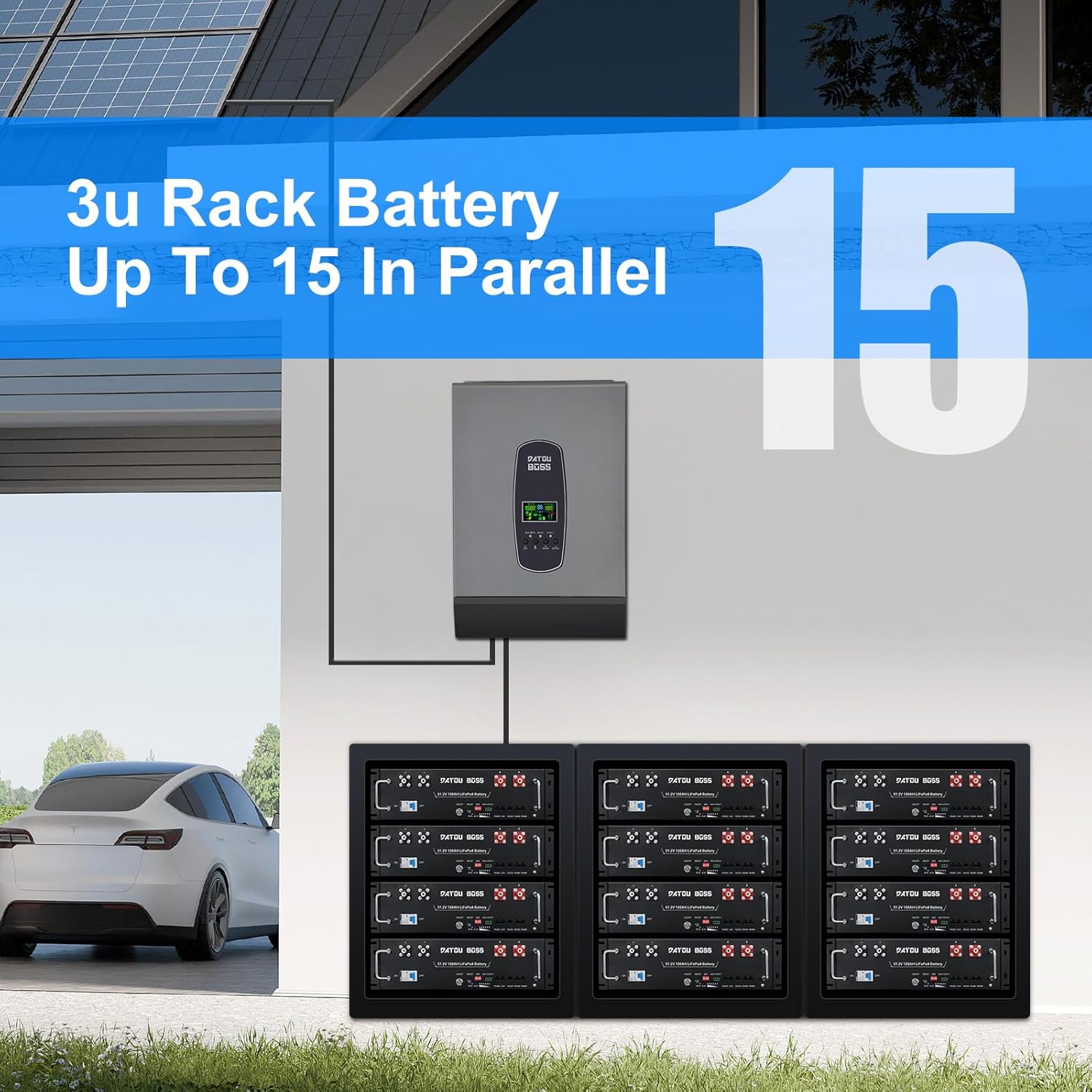
An image depicting a home equipped with solar panels and an inverter, showcasing how multiple DATOUBOSS 3U rack batteries can be connected in parallel (up to 15 units) to create a scalable and robust energy storage system.
6.3 Wiring Connections
Before making any connections, ensure the 125A breaker (E) and power switch (F) are in the OFF position.
- Grounding: Connect the grounding wire to the grounding terminal (B) on the battery and to a reliable ground point in your system.
- Power Terminals: Connect the negative cable to the negative terminal (C) and the positive cable to the positive terminal (D). Ensure connections are tight. The battery provides dual terminals for each pole for enhanced connectivity.
- Parallel Connection (Optional): If connecting multiple batteries in parallel (up to 15 units), use the provided parallel power cables to connect the positive terminals of all batteries together and the negative terminals of all batteries together. Ensure all batteries are at a similar State of Charge (SOC) before connecting in parallel.
- Communication Cables: For parallel operation, connect the parallel communication cable between the batteries. For inverter communication, connect the appropriate CAN or RS485 cable from the battery's communication ports (N, O, Q) to your inverter.
6.4 Initial Power-Up
Once all connections are secure, switch the 125A breaker (E) to the ON position, then switch the power switch (F) to the ON position. The ON/OFF indicator (G) should illuminate.
7. Operation
7.1 Powering On/Off
- To Power On: Ensure the 125A breaker is ON, then press the power switch to ON.
- To Power Off: Press the power switch to OFF, then switch the 125A breaker to OFF.
7.2 Charging
The battery should be charged using a compatible LiFePO4 charger or inverter with appropriate charging profiles. Refer to the specifications section for recommended charging parameters.
7.3 Discharging
The battery can be discharged up to 100% Depth of Discharge (DOD). The built-in BMS will protect the battery from over-discharge. For optimal lifespan, discharging to 80% DOD is recommended.
8. Communication
The DATOUBOSS battery offers multiple communication interfaces for monitoring and control.
8.1 Bluetooth & Mobile App
Download the DATOUBOSS mobile application from your smartphone's app store. Enable Bluetooth on your device and pair with the battery to monitor real-time status, voltage, current, temperature, and State of Charge (SOC).

Front view of the DATOUBOSS 48V 100Ah LiFePO4 battery, showcasing its rack-mount design and a smartphone displaying the real-time monitoring application.
8.2 CAN/RS485 Communication
The battery supports CAN and RS485 protocols for integration with compatible inverters and other energy management systems. Use the provided communication cables to connect the battery's CAN (O) or RS485 (N, Q) ports to your inverter.

An image illustrating the DATOUBOSS battery's seamless integration with a solar inverter, highlighting its compatibility with numerous popular inverter brands through both CAN and RS485 communication protocols.
For parallel battery configurations, ensure the DIP switches (I) are correctly set for addressing each battery in the system. Refer to the inverter's manual for specific communication settings.
9. Maintenance
Regular maintenance ensures the longevity and optimal performance of your battery.
- Regular Inspection: Periodically check the battery for any physical damage, loose connections, or corrosion on terminals.
- Cleaning: Keep the battery clean and free from dust and debris. Use a dry, soft cloth for cleaning. Do not use solvents or abrasive cleaners.
- Connection Checks: Ensure all power and communication cables are securely fastened.
- Storage: If storing the battery for an extended period, ensure it is charged to approximately 50% SOC and stored in a cool, dry place away from direct sunlight and extreme temperatures. Recharge every 3-6 months to prevent deep discharge.
10. Troubleshooting
This section addresses common issues you might encounter. For problems not listed here, please contact customer support.
| Problem | Possible Cause | Solution |
|---|---|---|
| Battery not powering on | 125A breaker or power switch is OFF; Battery is deeply discharged; Internal fault. | Ensure both switches are ON. Check battery voltage with a multimeter. If deeply discharged, attempt to charge with a compatible charger. If issue persists, contact support. |
| No communication with inverter/app | Loose communication cable; Incorrect DIP switch settings; Inverter communication settings mismatch; Bluetooth not enabled. | Check communication cable connections. Verify DIP switch settings for parallel operation. Consult inverter manual for correct communication parameters. Ensure Bluetooth is enabled on your device and the app is correctly configured. |
| Battery alarm (ALM indicator) | Over-voltage, under-voltage, over-current, over-temperature, or other BMS protection triggered. | Check battery voltage, current, and temperature via the app or inverter. Identify the specific alarm condition and address it (e.g., reduce load, stop charging, allow cooling). The BMS will typically reset once conditions return to normal. |
| Reduced capacity or runtime | Aging battery; High discharge rates; Low ambient temperature. | This is normal over the battery's lifespan. Ensure operating within recommended temperature ranges. Avoid consistently high discharge rates if possible. |
11. Specifications
Key technical specifications for the DATOUBOSS 48V 100Ah LiFePO4 Lithium Battery.
| Parameter | Value |
|---|---|
| Rated Voltage | 51.2V |
| Max. Voltage Range | 40V – 58.4V |
| Charge Voltage | 58.4V |
| Low Voltage Cut-off | 40.0V |
| Nominal Energy | 5.12kWh |
| Usable Energy | 5.12kWh |
| Nominal Capacity | 100Ah |
| Dimension (L x W x H) | 22.09 x 19.02 x 5.24 inches (56.1 x 48.3 x 13.3 cm) |
| Item Weight | 94.8 pounds (43 kg) |
| Standard Charge Current | ≤50A |
| Max. Charge Current | 100A |
| Communication Ports | RS485 / CAN / RS232 |
| Cycle Life (80% DOD) | 15,000+ cycles |
| Cycle Life (100% DOD) | 6,000+ cycles |
| Operating Temperature (Charge) | 32°F to 149°F (0°C to 65°C) with low temp cutoff |
| Operating Temperature (Discharge) | -4°F to 149°F (-20°C to 65°C) |

A clear diagram providing the exact dimensions of the DATOUBOSS 48V 100Ah LiFePO4 battery, indicating its length (521mm/20in), width (483mm/19in), and height (110mm/4.3in) for installation planning.
12. Warranty and Support
The DATOUBOSS 48V 100Ah LiFePO4 Lithium Battery comes with a manufacturer's warranty. Please refer to the warranty card included with your product or contact your point of purchase for specific warranty terms and conditions.
For technical support, troubleshooting assistance, or warranty claims, please contact DATOUBOSS customer service or your authorized dealer. Have your model number (DT-3U-48V 100A) and purchase information ready when contacting support.


