
1. Introduction
This manual provides essential information for the safe and efficient operation of your DATOUBOSS 48V 100Ah LiFePO4 Lithium Battery. This battery is designed for various applications including off-grid systems, solar energy storage, RVs, marine use, and home backup power. Please read this manual thoroughly before installation and use to ensure proper functionality and longevity of the product.

Image: DATOUBOSS 48V 100Ah LiFePO4 Lithium Battery in a server rack, demonstrating real-time monitoring via a mobile application.
2. Safety Information
Always adhere to the following safety guidelines to prevent injury, damage, or malfunction:
- Do not disassemble, modify, or attempt to repair the battery.
- Keep the battery away from fire, heat sources, and direct sunlight.
- Avoid short-circuiting the terminals.
- Ensure proper ventilation during operation and charging.
- Use appropriate personal protective equipment (PPE) during installation and handling.
- Do not immerse the battery in water or other liquids.
- Dispose of the battery according to local regulations.
3. Product Overview
3.1 Key Features
- Real-time Monitoring: Supports CAN/RS485 communication for seamless integration with solar inverters and a mobile app for Bluetooth monitoring.
- High Performance: Constructed with 16 automotive-grade A prismatic cells, offering stable performance and 5.12kWh energy capacity per unit.
- Integrated BMS: Built-in 100A Battery Management System protects against overcharge, over-discharge, over-current, short circuit, and includes low/high temperature cutoff.
- Rack-Mount Design: 3U rack-mount compatible for efficient space utilization. Supports vertical installation.
- Scalability: Up to 15 units can be connected in parallel for increased capacity.
- Long Lifespan: Offers up to 15,000 cycles at 80% Depth of Discharge (DOD) and over 6,000 cycles at 100% DOD.
3.2 Components and Controls

Image: Front panel diagram illustrating the various components and control interfaces of the battery unit.
- Handles: For easy transport and installation.
- Grounding Terminal: For safety grounding connection.
- Negative Terminal (-): Battery output negative connection.
- Positive Terminal (+): Battery output positive connection.
- 125A Breaker: Main circuit breaker for protection.
- Power Switch: Controls the main power to the battery.
- ON/OFF Indicator: Shows the power status.
- Reset Button: Resets the BMS.
- ADD (Address) DIP Switches: For setting unique addresses in parallel configurations.
- RUN Indicator: Indicates normal operation.
- ALM (Alarm) Indicator: Indicates a fault or warning condition.
- Dry Contact: For external control or status signaling.
- SOC (State of Charge) Indicator: Displays approximate battery charge level.
- RS485-1 Port: Communication interface.
- CAN Port: Communication interface for inverters.
- RS232 Port: Communication interface.
- RS485 IN / RS485 OUT Ports: For daisy-chaining RS485 communication in parallel systems.
- Mounting Ear: For securing the battery in a rack.
4. Setup and Installation
4.1 Unpacking and Inspection
Upon receiving your battery, carefully unpack it and inspect for any visible damage. Verify that all included accessories are present:
- DATOUBOSS 48V 100Ah LiFePO4 Battery Unit(s)
- Parallel Wires
- Communication Cables (CAN/RS485)
- Grounding Wires
- Terminal Screws
- User Manual

Image: Overview of the DATOUBOSS battery unit and its complete set of included accessories, ready for installation.
4.2 Mounting
The battery is designed for 3U rack-mount installation. It can also be installed vertically. Ensure the installation location is dry, well-ventilated, and within the specified operating temperature range.
4.3 Parallel Connection (Optional)
For increased capacity, up to 15 DATOUBOSS 48V 100Ah batteries can be connected in parallel. Use the provided parallel power cables and communication cables for proper integration. Ensure all batteries have unique addresses set via the ADD DIP switches if required by your system configuration.
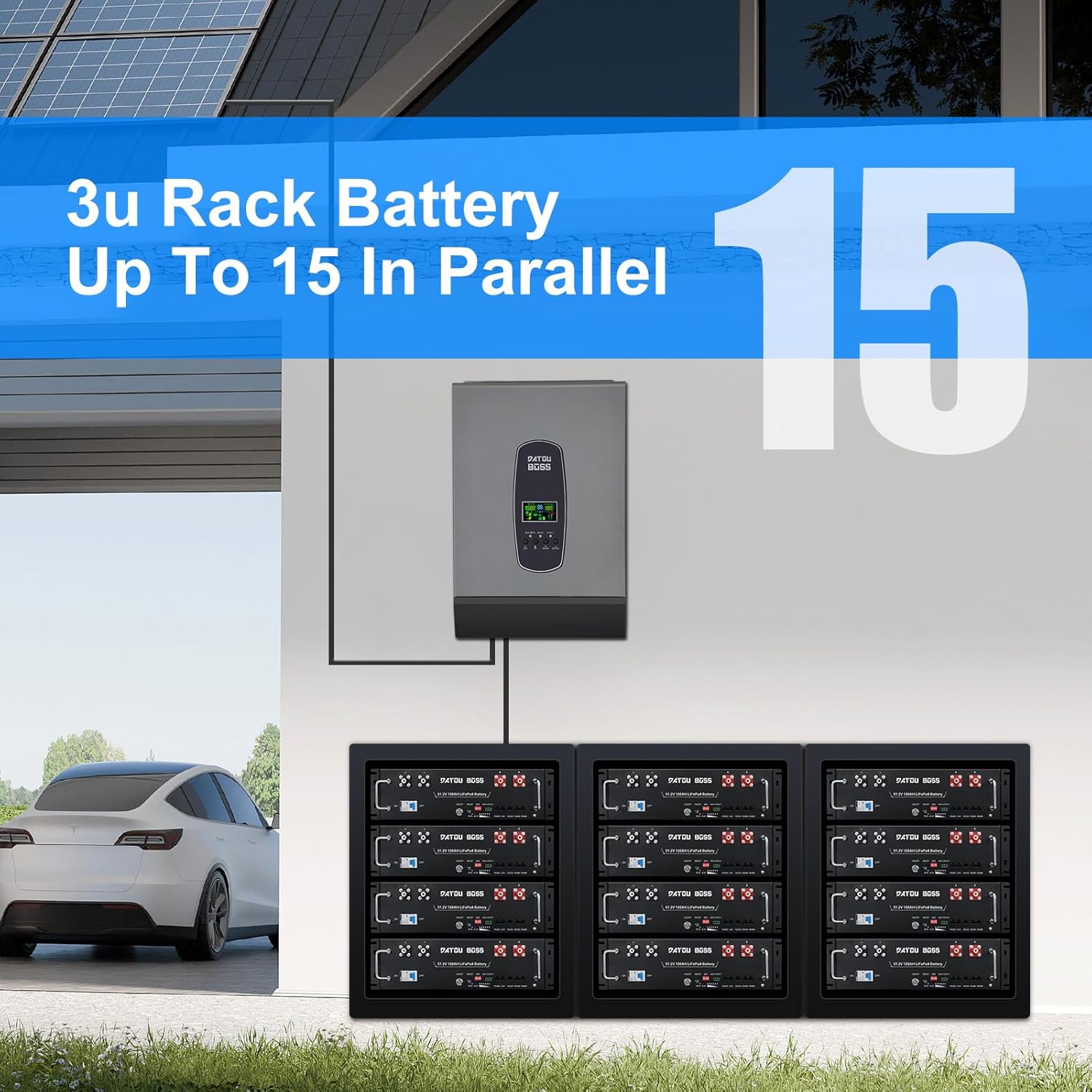
Image: Multiple DATOUBOSS 3U rack batteries configured in parallel, demonstrating scalability for larger energy storage requirements.
4.4 Electrical Connections
- Connect the positive (+) and negative (-) terminals to your inverter or load using appropriate gauge cables.
- Ensure all connections are secure and tight to prevent arcing or overheating.
- Connect the grounding wire to a proper earth ground.
- Utilize the CAN or RS485 ports for communication with compatible inverters.

Image: The DATOUBOSS battery connected to an inverter, illustrating the use of CAN and RS485 communication protocols for system integration.
5. Operating Instructions
5.1 Powering On/Off
To power on the battery, ensure all connections are correct, then switch the main power switch (F) to the 'ON' position. The ON/OFF indicator (G) and RUN indicator (J) should illuminate. To power off, switch the main power switch to 'OFF'.
5.2 Monitoring
The battery status can be monitored via a mobile application using Bluetooth or through connected inverters/PCs via CAN/RS485 ports. The mobile app provides real-time data such as voltage, current, State of Charge (SOC), and protection status.

Image: Illustration of smart communication and real-time monitoring features, including RS485, CAN, and Bluetooth/WiFi connectivity for comprehensive system oversight.
5.3 BMS Protection
The built-in 100A BMS actively protects the battery from various conditions:
- Overcharge Protection: Prevents charging beyond safe voltage limits.
- Over-discharge Protection: Prevents discharging below safe voltage limits.
- Over-current Protection: Safeguards against excessive current draw.
- Short Circuit Protection: Automatically disconnects in case of a short circuit.
- Low/High Temperature Cutoff: Prevents charging or discharging outside safe temperature ranges (e.g., charging cutoff above 149°F / 65°C, low temperature discharge cutoff).

Image: Internal view highlighting Grade A prismatic cells and the 100A BMS, detailing its comprehensive protection mechanisms.
6. Maintenance
The DATOUBOSS LiFePO4 battery requires minimal maintenance. Follow these guidelines to ensure optimal performance and lifespan:
- Regularly inspect terminals for corrosion and ensure connections are tight.
- Keep the battery clean and free from dust and debris.
- Ensure adequate ventilation around the battery.
- Avoid operating the battery outside its specified temperature range. The BMS will provide protection, but consistent extreme conditions can reduce lifespan.
- For long-term storage, store the battery at approximately 50% State of Charge (SOC) in a cool, dry place.
7. Troubleshooting
If you encounter issues with your DATOUBOSS battery, refer to the following common troubleshooting steps:
| Problem | Possible Cause | Solution |
|---|---|---|
| Battery not powering on | Power switch off, 125A breaker tripped, loose connections, deeply discharged battery. | Check power switch (F) and 125A breaker (E). Verify all cable connections. If deeply discharged, attempt to charge with a compatible charger. |
| ALM indicator (K) is lit | BMS protection activated (e.g., over-voltage, under-voltage, over-current, temperature). | Check battery status via the mobile app or connected inverter for specific fault codes. Address the underlying cause (e.g., reduce load, adjust charging parameters, allow battery to cool/warm). Press the Reset button (H) if safe to do so after resolving the issue. |
| No communication with inverter/app | Incorrect cable connection, wrong communication settings, app not paired. | Verify communication cable connections (CAN, RS485, RS232). Ensure correct communication protocols and settings are configured on both the battery and the inverter. For Bluetooth, ensure the app is correctly paired. |
| Reduced capacity or runtime | Aging battery, consistent deep cycling, operating in extreme temperatures. | While LiFePO4 batteries have a long lifespan, capacity naturally degrades over many cycles. Ensure proper charging/discharging practices and avoid prolonged exposure to extreme temperatures. |
If the problem persists after following these steps, please contact DATOUBOSS customer support for further assistance.
8. Specifications
The following table outlines the technical specifications for the DATOUBOSS 48V 100Ah LiFePO4 Lithium Battery:

Image: Dimensional drawing of the DATOUBOSS 48V 100Ah LiFePO4 Lithium Battery, indicating length, width, and height.
| Specification | Value |
|---|---|
| Rated Voltage | 51.2V |
| Max. Voltage Range | 40-58.4V |
| Charge Voltage | 58.4V |
| Low Voltage Cut-off | 40.0V |
| Nominal Energy | 5.12kWh |
| Usable Energy | 5.12kWh |
| Nominal Capacity | 100Ah |
| Dimensions (L x W x H) | 22.09 x 19.02 x 5.24 inches (56.1 x 48.3 x 13.3 cm) |
| Item Weight | 94.8 pounds (43 kg) |
| Standard Charge Current | ≤50A |
| Max. Charge Current | 100A |
| Communication Ports | RS485 / CAN / RS232 |
| Battery Cell Composition | Lithium Iron Phosphate (LiFePO4) |
| Recommended Uses | RV, Solar System, Off-Grid, Marine, Backup Power, Camping, Home Energy Storage |
9. Warranty and Support
For warranty information and technical support, please refer to the documentation included with your purchase or visit the official DATOUBOSS website. Keep your purchase receipt as proof of purchase for warranty claims.
Manufacturer: DATOUBOSS


