
PONNOR KSW550-2
Contents
PONNOR Coin Counter Machine Sorter KSW550-2 User Manual
Model: KSW550-2
1. Introduction
The PONNOR KSW550-2 Coin Counter Machine Sorter is designed for efficient and accurate sorting and counting of US coin denominations: pennies, nickels, dimes, quarters, and dollar coins. This machine features automatic sorting, real-time totaling, and various operating modes to streamline coin management for homes, offices, and retail environments.

Image: The PONNOR Coin Counter Machine sorting pennies, nickels, dimes, quarters, and dollar coins into their respective bins.
2. Safety Information
- Read all instructions thoroughly before operating the machine.
- Keep the machine away from water or any liquids to prevent electrical hazards.
- Do not attempt to disassemble or repair the machine yourself. Refer to qualified service personnel.
- Use only the specified power supply for this device.
- Ensure the machine is placed on a stable, flat surface during operation.
- Keep hands and foreign objects away from moving parts during operation.
3. Package Contents
Verify that all items listed below are included in your package:
- Coin Counter Machine (x1)
- Product Box (x1)
- User Manual (x1)
- Industrial Coin Bins (x5)
- Standard Coin Tubes (x5)

Image: An illustration showing the coin counter machine, its packaging box, the user manual, five industrial coin bins, and five standard coin tubes.
4. Product Overview
Familiarize yourself with the components and controls of your PONNOR Coin Counter Machine.
4.1. Components
- Hopper: Top compartment where coins are loaded.
- LCD Screen: Displays total value, coin quantities, and operational modes.
- Control Panel: Buttons for various functions and settings.
- Collapsible Handle: For easy transport.
- Standard Coin Tubes: Used for collecting coins into wrappers.
- Industrial Coin Bins: Larger bins for collecting sorted coins in bulk.
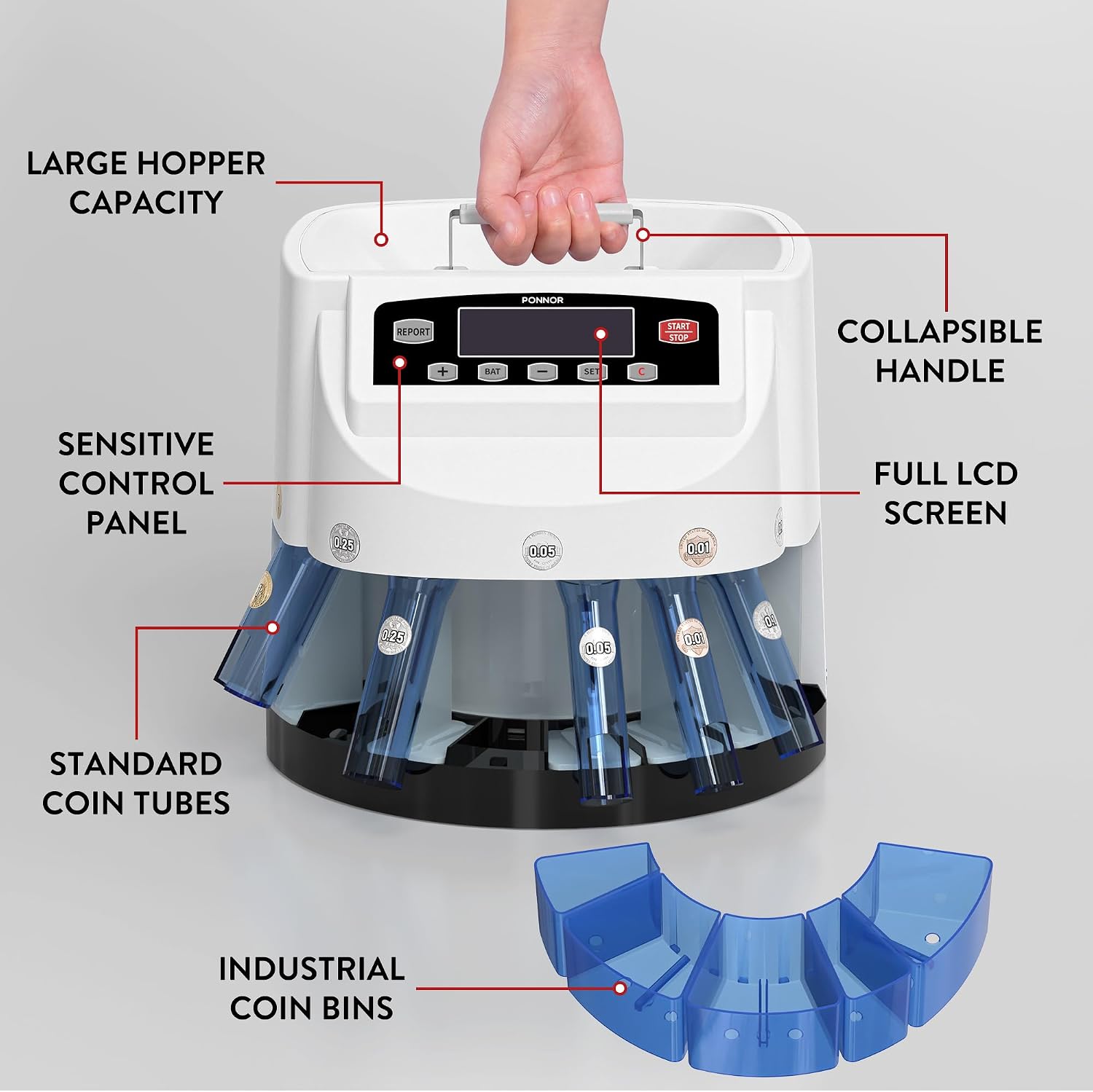
Image: A detailed diagram labeling the key components of the coin counter machine, including the hopper, handle, control panel, LCD screen, coin tubes, and industrial bins.
4.2. Control Panel Buttons
- REPORT: Press to view the counting results for each coin denomination.
- +: Increases the batch quantity in batch mode.
- BAT (Batch): Activates batch counting mode.
- -: Decreases the batch quantity in batch mode.
- SET: Selects the coin channel or confirms settings.
- C (Clear): Clears the current count or error messages.
- START/STOP: Initiates or pauses/stops the counting process.

Image: A close-up of the control panel, illustrating the LCD screen displaying total value and coin counts, and labeling each button with its corresponding function.

Image: A detailed view of the machine's enlarged 3.54-inch LCD screen and the clear function buttons below it.
5. Setup
- Unpack: Carefully remove all components from the packaging.
- Placement: Place the coin counter machine on a stable, level, and dry surface.
- Attach Coin Bins: Securely attach the five industrial coin bins to the designated slots around the base of the machine. Ensure they are properly seated to catch sorted coins.
- Power Connection: Connect the power cord to the machine and then plug it into a suitable electrical outlet.
- Power On: Turn on the machine using the power switch (if present, otherwise it powers on automatically upon plugging in). The machine will perform a brief self-check.
6. Operating Instructions
6.1. Basic Counting and Sorting
- Ensure the machine has completed its startup self-check.
- Pour mixed coins into the hopper. Avoid overfilling the hopper.
- Press the START/STOP button to begin the counting and sorting process.
- The machine will automatically sort coins into their respective bins and display the real-time total value and quantity breakdown on the LCD screen.
- To pause or stop counting, press the START/STOP button again.
- To clear the current count, press the C button.
6.2. Operating Modes
The KSW550-2 offers several modes for flexible coin management:
- Automatic Total Value Calculation: This is the default mode. The machine instantly sums the total amount of all coins, providing fast and accurate results.
- Smart Batch Counting Mode:
- Press the BAT button to enter batch mode.
- Use the + and - buttons to set your desired batch quantity for a specific coin denomination.
- Press the SET button to select the coin denomination you wish to batch.
- Press START/STOP. The machine will count and stop automatically once the set batch quantity is reached for that denomination.
- Detailed Value & Quantity Breakdown: The LCD clearly displays the amount and count for each coin type, facilitating easy tracking and reporting.
- Report Mode: Press the REPORT button to review the counting results for each individual coin channel.

Image: An overview of the machine's key operational features: automatic total value calculation, smart batch counting, and detailed value/quantity breakdown.
6.3. Coin Output Modes
The machine supports two output methods for collected coins:
- Tube Mode: Utilize the provided standard coin tubes to fill coin wrappers for individually packed rolls.
- Tray Mode: Use the industrial coin bins for collecting and storing large quantities of sorted coins.

Image: A visual comparison of the Tube Mode, showing coin tubes in place for wrapping, and the Tray Mode, showing coins collected in the industrial bins.
7. Maintenance
Regular maintenance ensures optimal performance and longevity of your coin counter.
- Cleaning: Always unplug the machine before cleaning. Use a soft, dry cloth to wipe the exterior. Do not use abrasive cleaners or solvents.
- Coin Jams: If a coin jam occurs, turn off and unplug the machine. Carefully remove any jammed coins from the hopper or sorting mechanism. Do not force coins out.
- Empty Bins: Regularly empty the coin collection bins to prevent overflow and ensure continuous operation.
- Storage: When not in use, store the machine in a clean, dry environment.
8. Troubleshooting
Refer to the following table for common issues and their solutions:
| Problem | Possible Cause | Solution |
|---|---|---|
| Machine does not power on. | Power cord not connected; power outlet issue. | Ensure power cord is securely plugged into both the machine and a working electrical outlet. |
| Coins are not sorting or counting accurately. | Hopper overfilled; foreign objects; dirty/damaged coins; coin jam. | Do not overfill the hopper. Remove any foreign objects. Use clean, dry coins. Check for and clear any coin jams. |
| Machine stops unexpectedly. | Coin jam; batch quantity reached (in batch mode); coin bins full. | Clear any coin jams. If in batch mode, reset for next batch. Empty coin bins. |
| Display shows an error code. | Internal malfunction or specific issue. | Press the 'C' button to clear. If the error persists, contact customer support. |
9. Specifications
- Item Model Number: KSW550-2
- Product Weight: 11.33 pounds (5.14 kg)
- Voltage: AC110V 60Hz
- Power: 45W
- Sorting Rate: Max. 300 coins/minute
- Hopper Capacity: 500 coins
- Total Coin Capacity: 2,000 coins (across all bins)
- Product Dimensions: 13.6 x 10.8 x 10.2 inches (345 x 275 x 260 mm)
- Supported Denominations: Pennies, Nickels, Dimes, Quarters, Dollar Coins (US currency)

Image: A diagram illustrating the physical dimensions of the coin counter machine.
10. Warranty Information
For detailed warranty information regarding your PONNOR Coin Counter Machine Sorter KSW550-2, please refer to the warranty card included in your product packaging or visit the official PONNOR website. Warranty terms and conditions may vary by region and retailer.
11. Customer Support
If you encounter any issues or have questions not covered in this manual, please contact PONNOR customer support through their official website or reach out to your retailer for assistance. Please have your model number (KSW550-2) and purchase date available when contacting support.
Ask a question about this manual
Ask about setup, troubleshooting, compatibility, parts, safety, or missing instructions. Manuals+ will review the question and use this page’s manual context to help answer it.