
1. Introduction
The DOOGEE Fire 5 Ultra is a rugged smartphone designed for durability and extended use in challenging environments. It features a large battery, a powerful camping light, and advanced camera capabilities, all running on Android 15 with AI enhancements.
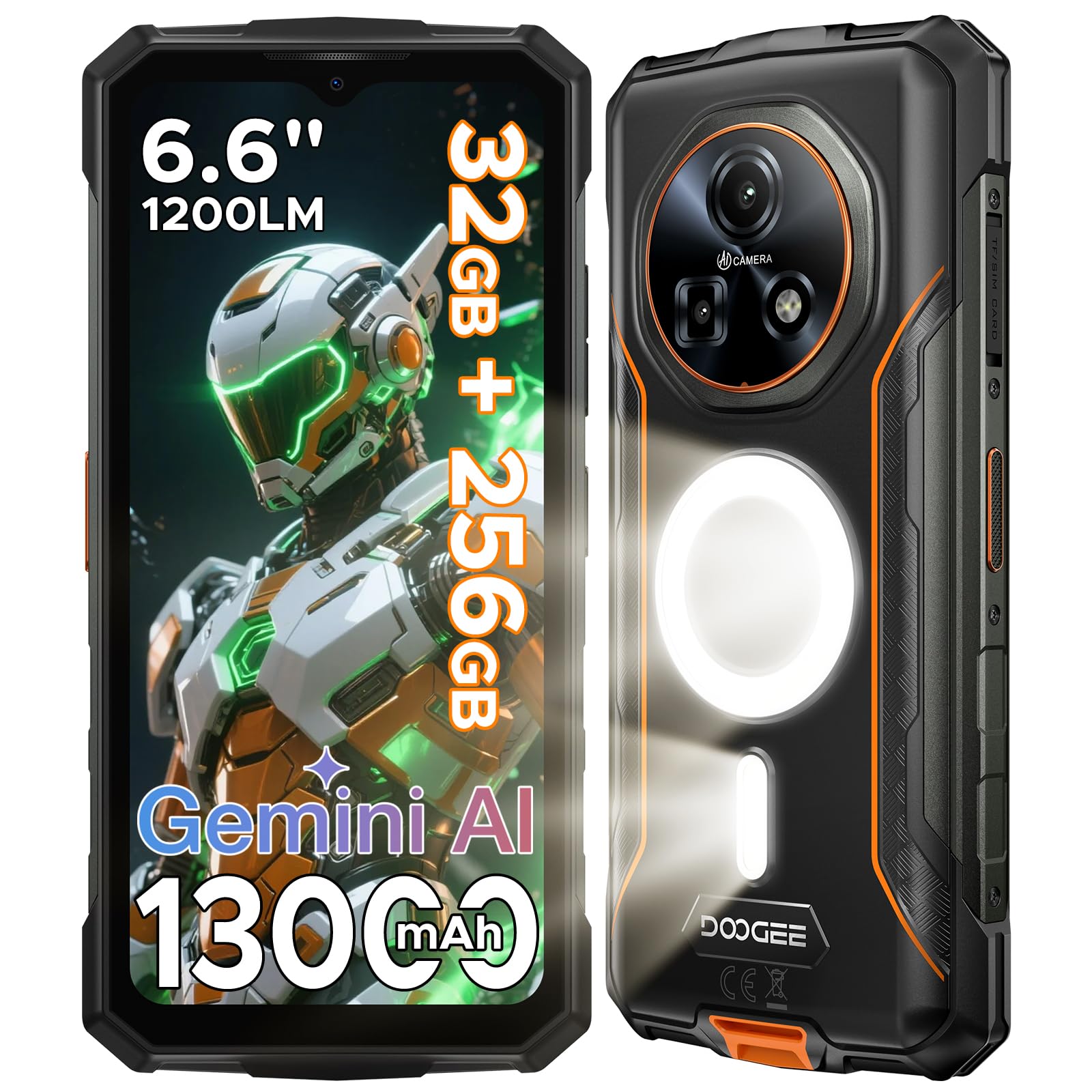
Figure 1: DOOGEE Fire 5 Ultra Rugged Smartphone
2. Setup
2.1 SIM Card and TF Card Installation
- Locate the SIM/TF card tray on the side of the device.
- Use the provided SIM ejector tool to open the tray.
- Carefully place your Nano-SIM cards and/or TF card into the designated slots. Ensure correct orientation.
- Gently push the tray back into the device until it is flush with the body.
2.2 Initial Power On and Setup
- Press and hold the Power button (located on the side) until the DOOGEE logo appears.
- Follow the on-screen instructions to complete the initial setup, including language selection, Wi-Fi connection, and Google account setup.
2.3 Charging the Device
Connect the provided adapter to the charging port at the bottom of the device. The device supports 18W fast charging. The 13000mAh battery also supports OTG reverse charging to power other devices.

Figure 2: 13000mAh Battery Capacity
3. Operating Instructions
3.1 Basic Functions
- Power Button: Press and hold to power on/off or restart. Short press to lock/unlock the screen.
- Volume Buttons: Adjust media volume, call volume, or notification volume.
- Side Fingerprint Sensor: Unlock the device quickly and securely by placing your registered finger on the sensor.
3.2 Display
The device features a 6.6-inch IPS HD+ display with a 90Hz refresh rate, providing smooth visuals and vibrant colors. The resolution is 720x1612 with 400 nits brightness.

Figure 3: 6.6-inch IPS HD+ 90Hz Display
3.3 Camera Usage
The DOOGEE Fire 5 Ultra is equipped with a 48MP main camera and an 8MP front camera. It supports various photography modes including AI scene recognition, Night Mode, Beauty Mode, HDR, and Pro Mode.
- To take a photo: Open the Camera app and tap the shutter button.
- Switch modes: Swipe left or right on the camera interface to select different modes.

Figure 4: 48MP Main Camera in use

Figure 5: 8MP Front Camera for selfies

Figure 6: Multiple Photo Functions
3.4 Camping Light
The device features a powerful 1200LM camping light with three modes: Illumination, Dazzling, and SOS. It can illuminate up to 8 meters. Caution: Avoid directing the light beam directly into eyes.

Figure 7: 1200LM Dual Camping Light
3.5 Performance and Storage
Powered by an MTK G81 Octa-Core processor, the Fire 5 Ultra offers smooth performance. It comes with 32GB RAM (8GB physical + 24GB virtual) and 256GB internal storage, expandable up to 2TB via a TF card.

Figure 8: RAM and Storage Configuration

Figure 9: MediaTek Helio G81 Chipset
3.6 Operating System and AI Features
The smartphone runs on Android 15 and integrates Google Gemini AI for intelligent assistance, including smart translation, text/image comprehension, creative writing, and smart route planning.

Figure 10: Android 15 Operating System

Figure 11: Integrated Gemini AI
3.7 Connectivity and Security
The device supports 4G Dual SIM, NFC for Google Pay, and precise navigation with GPS, GLONASS, Beidou, and Galileo. Security features include a side fingerprint reader and facial recognition for quick unlocking.

Figure 12: Connectivity and Security Features
4. Maintenance
4.1 Cleaning
To clean your device, use a soft, lint-free cloth. Avoid using harsh chemicals or abrasive materials. For rugged features, ensure all port covers are securely closed before exposure to water or dust.
4.2 Software Updates
Regularly check for and install software updates to ensure optimal performance and security. Navigate to Settings > System > System update.
4.3 Battery Care
To prolong battery life, avoid extreme temperatures. Charge the device using the original charger and cable. The battery protection system allows reliable operation from -40°C to 70°C.

Figure 13: Extended Battery Life for Outdoor Use
4.4 Durability Features
The DOOGEE Fire 5 Ultra is IP68, IP69K, and MIL-STD-810H certified, making it resistant to water, dust, and drops.

Figure 14: IP68, IP69K, MIL-STD-810H Durability
5. Troubleshooting
- Device not powering on: Ensure the battery is charged. Press and hold the power button for at least 10 seconds.
- Poor network signal: Check SIM card insertion. Move to an area with better network coverage.
- Camera not working: Restart the device. Clear the cache of the Camera app (Settings > Apps > Camera > Storage > Clear cache).
- Storage full: Delete unnecessary files or apps. Transfer data to a computer or external storage. Consider installing a TF card.
- Camping light not working: Check if the feature is enabled in the quick settings or dedicated app. Ensure the battery level is sufficient.
6. Specifications
| Feature | Specification |
|---|---|
| Brand | DOOGEE |
| Model Name | Fire 5 Ultra |
| Operating System | Android 15 |
| Processor | MediaTek Helio G81 Octa-Core |
| RAM | 32 GB (8GB physical + 24GB virtual) |
| Internal Storage | 256 GB |
| Expandable Storage | Up to 2 TB (TF Card) |
| Display Size | 6.6 Inches |
| Display Type | IPS HD+ |
| Display Refresh Rate | 90 Hz |
| Main Camera | 48 MP |
| Front Camera | 8 MP |
| Battery Capacity | 13000 mAh (Lithium Ion) |
| Charging | 18W Fast Charging, 5W OTG Reverse Charging |
| Cellular Technology | 4G |
| Connectivity | NFC, Bluetooth 5.0, GPS/GLONASS/Beidou/Galileo |
| Durability | IP68, IP69K, MIL-STD-810H |
| Camping Light | 1200 LM (3 modes) |
| Weight | 600 g |
| Included Components | Adapter |

Figure 15: Parameter Comparison Table (Fire 5 Ultra highlighted)
7. Warranty and Support
For warranty information and technical support, please refer to the official DOOGEE website or contact your retailer. Keep your proof of purchase for warranty claims.


