
1. Setup
Carefully unpack the dehumidifier and all accessories from the packaging. Ensure all components are present and undamaged. The package includes the dehumidifier unit and a drain hose.
1.1 Placement
Place the dehumidifier on a flat, stable surface. For optimal performance, ensure there is adequate space around the unit for proper airflow. Keep windows and doors closed in the area where the dehumidifier is operating to maximize efficiency.

Image: The dehumidifier is suitable for various rooms, including living rooms, bedrooms, and bathrooms, providing whole-house dehumidification.
1.2 Power Connection
Connect the power cord to a grounded electrical outlet. The unit is designed for freestanding installation.
2. Operating Instructions
2.1 Control Panel Overview
The dehumidifier features a smart control panel with intuitive buttons for various functions. The display screen shows the current humidity level and settings.

Image: The control panel features buttons for Power, Mode, Humidity, Timer, Fan, Swing, Ion/Lock, and Sleep functions.
- POWER: To turn the machine on/off.
- MODE: Select from three adjustable dehumidification modes.
- HUM: Set desired humidity level.
- TIMER: Turn on/off timing function (24-hour timer).
- FAN: Adjust fan speed (Low/High).
- SWING: Turn on or off the swing function for airflow direction.
- ION/LOCK: Press and hold for 3 seconds to activate/deactivate Child Lock.
- SLEEP: Long press to activate sleep function.
2.2 Dehumidification Modes
The unit offers three smart modes for various needs:
- Drying Mode: Quickly removes moisture to assist in drying clothes faster.
- Sleep Mode: Turns off all indicator lights and operates at a quiet 41dB, ensuring peaceful rest.
- Auto Mode: Automatically stops or restarts when reaching your preset humidity level to maintain optimal conditions.

Image: The dehumidifier features Drying Mode, Sleep Mode, and Auto Mode for versatile operation.
2.3 Setting Humidity and Timer
Use the HUM button to set your desired humidity level. The unit will operate to maintain this level. The 24-hour timer allows you to schedule the unit to turn on or off automatically.

Image: The 24-hour timer function provides reliable humidity control.
2.4 Child Lock
To prevent accidental changes to settings, activate the Child Lock by pressing and holding the ION/LOCK button for 3 seconds. Repeat the action to deactivate.

Image: The child safety lock ensures safer home use.
3. Drainage Options
The HUMILABS dehumidifier offers two convenient drainage methods:
3.1 Manual Drainage (Water Tank)
The unit features a removable water tank. When the tank is full, the dehumidifier will automatically stop operation, and an indicator light will illuminate to remind you to empty it. Carefully remove the tank, empty the collected water, and reinsert it securely.
3.2 Continuous Drainage (Drain Hose)
For continuous operation without needing to empty the water tank, use the included 40-inch drain hose. Connect one end of the hose to the drainage outlet on the unit and direct the other end to a suitable drain or larger container. This allows for automatic water removal.
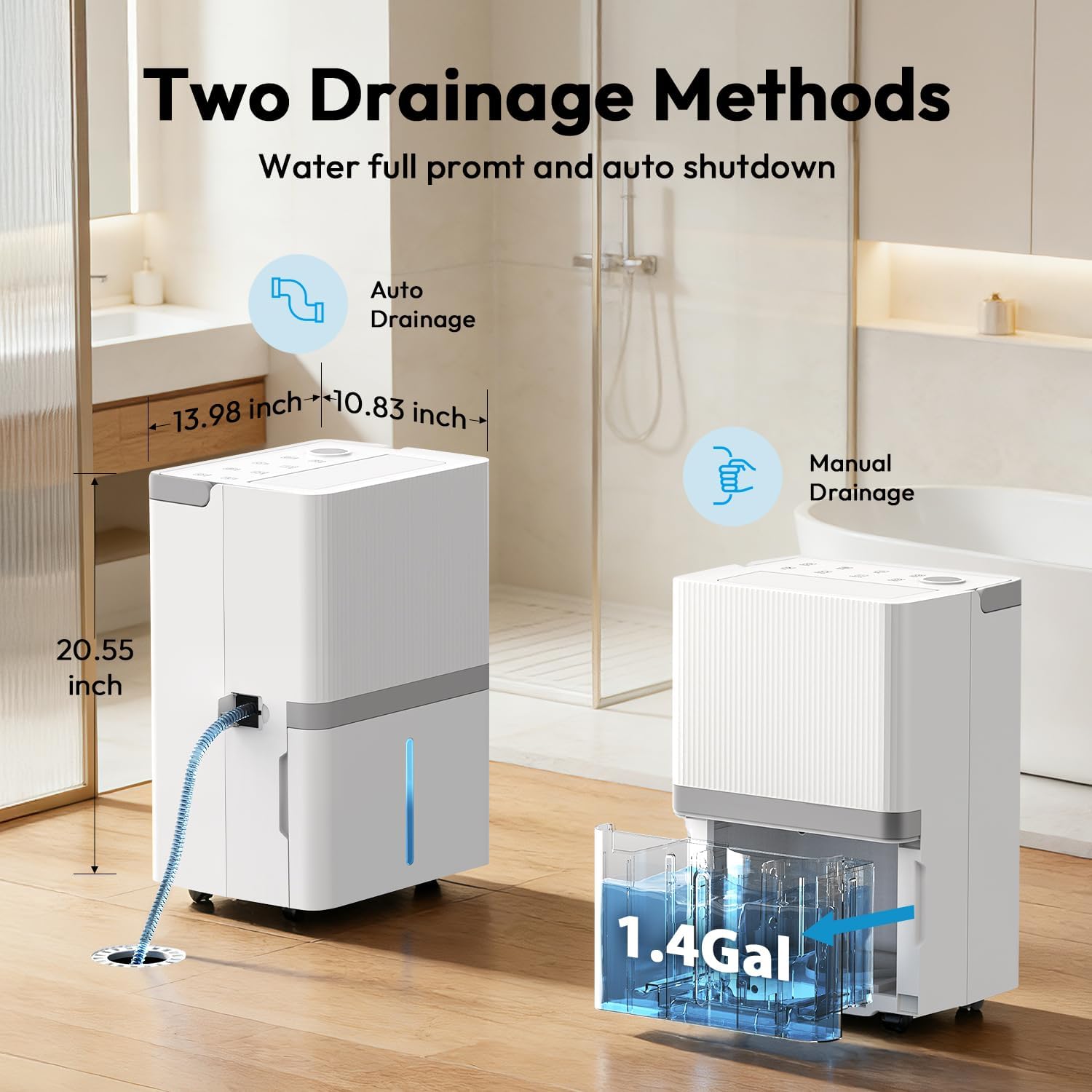
Image: Two drainage methods are available: manual tank emptying and continuous drainage via hose.

Image: The unit automatically stops when the water tank is full, or can be set for continuous drainage with the hose.
4. Maintenance
4.1 Filter Cleaning
The air filter is removable for easy cleaning. Regularly clean the filter to ensure consistent fresh and clean air output and maintain the unit's efficiency. Refer to the user manual for specific cleaning instructions and frequency.
4.2 Water Tank Cleaning
Periodically clean the water tank to prevent mold or mildew growth. Use mild soap and water, then rinse thoroughly before reinserting.
4.3 Automatic Defrost
The dehumidifier features an automatic defrost function, which helps prevent ice buildup on the coils, ensuring efficient operation in cooler environments.
5. Troubleshooting
If you encounter issues with your dehumidifier, please refer to the following common solutions:
- Unit not turning on: Ensure the power cord is securely plugged into a working outlet. Check if the power button has been pressed.
- No dehumidification: Verify that the desired humidity level is set lower than the current room humidity. Ensure the air filter is clean and not obstructed. Check if the water tank is full and needs emptying, or if the continuous drain hose is properly connected and not kinked.
- Water tank full indicator remains on after emptying: Ensure the water tank is correctly seated in the unit.
- Unusual noise: Check for any obstructions in the air intake or exhaust. Ensure the unit is on a stable, level surface.
For further assistance, please contact customer support.
6. Specifications
| Feature | Detail |
|---|---|
| Brand Name | HUMILABS |
| Model Number | OL22-D076E |
| Dehumidification Capacity | 75 Pints/Day (at 95°F, 90% RH) |
| Coverage Area | Up to 5,000 sq ft |
| Water Tank Capacity | 5.3 Liters (1.4 Gallons) |
| Item Weight | 34.5 pounds |
| Product Dimensions | 13.98 x 10.83 x 20.55 inches |
| Installation Type | Freestanding |
| Special Features | 24 Hour Timer, Quiet operation (41dB in Sleep Mode), Adjustable Humidity Control, Automatic Moisture Removal, Water Level Indicator, Continuous Draining, Removable Tank, Automatic Defrost, Child Lock, 360° wheels, Built-in handle |
| Color | White |
| Wattage | 250 watts |
| Refrigerant | R-290 |
| Included Components | Drain Hose |
7. Warranty & Support
7.1 Warranty
The HUMILABS OL22-D076E Dehumidifier comes with a 1-Year Guarantee. If any quality problem occurs within 12 months of purchase, warranty or replacement service is available.
7.2 Customer Support
HUMILABS provides timely customer support with a professional after-sales team on standby. Expect a response within 24 hours for inquiries.

Image: HUMILABS offers 24-hour support, a 1-year guarantee, and professional after-sales service.
For more information or to contact support, please visit the official HUMILABS Store.
