
1. Introduction
This manual provides essential information for the proper use and maintenance of your realme 15T 5G Smartphone. Please read this guide thoroughly before operating your device to ensure optimal performance and longevity. The realme 15T 5G features a 6.67-inch 120Hz display, a MediaTek Dimensity 6400 Max 5G chipset, dual 50MP cameras, a 7000mAh battery with 60W fast charging, and IP69 dust and water resistance.
2. Package Contents
Verify that all items are present in your product package:
- realme 15T 5G Smartphone
- Phone Case
- Power Adapter
- USB Cable
- SIM Tray Ejector
- Quick Start Guide (this document)
- Warranty Card
3. Device Overview
Familiarize yourself with the physical components of your realme 15T 5G Smartphone.

Image: Front and rear view of the realme 15T 5G Smartphone, highlighting its design and camera module.
- Front Camera: Located at the top center of the display.
- Display: 6.67-inch AMOLED screen.
- Volume Buttons: Typically on the left side for volume control.
- Power Button: Typically on the right side, also functions as a screen lock/unlock button.
- USB-C Port: For charging and data transfer, located at the bottom.
- Speaker: Located at the bottom.
- SIM Card Tray: Located on the side for inserting SIM and microSD cards.
- Rear Cameras: Multiple lenses located on the back panel.
4. Setup
4.1. SIM Card and Storage Card Installation
- Locate the SIM card tray on the side of your device.
- Insert the SIM tray ejector tool into the small hole next to the tray and press gently until the tray pops out.
- Place your Nano-SIM card(s) and/or microSD card into the designated slots on the tray. Ensure the gold contacts face downwards.
- Carefully reinsert the tray into the phone until it clicks into place.
4.2. Initial Power On and Basic Configuration
- Press and hold the Power button until the realme logo appears.
- Follow the on-screen prompts to select your language, region, and agree to the terms and conditions.
- Connect to a Wi-Fi network for initial setup and software updates.
- Sign in with your Google account or create a new one. This is essential for accessing the Google Play Store and other Google services.
- Set up a screen lock (PIN, pattern, password, fingerprint, or face unlock) for security.
- Complete the remaining setup steps as guided by the device.
5. Operating Your Device
5.1. Display and Navigation
The realme 15T 5G features a 6.67-inch 120Hz AMOLED display, providing smooth visuals and vibrant colors. Navigate your device using touch gestures:
- Tap: Select an item or open an app.
- Swipe: Scroll through screens or lists.
- Pinch: Zoom in or out on photos and web pages.
- Long Press: Access contextual menus or move icons.
5.2. Camera Usage
Your device is equipped with dual 50MP cameras (front and rear) for high-quality photography and videography.

Image: Close-up of the realme 15T 5G's rear camera module, highlighting the dual 50MP lenses.
- Open the Camera app from your home screen or app drawer.
- Switch between front and rear cameras using the camera flip icon.
- Select different modes such as Photo, Video, Portrait, Night, or Pro mode.
- Tap the shutter button to capture a photo or start/stop video recording.
- Access settings within the camera app to adjust resolution, filters, and other parameters.
5.3. Battery and Charging
The realme 15T 5G features a 7000mAh battery and supports 60W fast charging.

Image: Illustration of the realme 15T 5G's 7000mAh battery capacity and its estimated usage times for YouTube, Spotify, and gaming.
- Connect the provided USB cable to the phone's USB-C port and the power adapter.
- Plug the power adapter into a wall outlet.
- The device will indicate charging status on the screen.
- For optimal battery life, avoid extreme temperatures and use only realme-approved chargers and cables.
5.4. Connectivity
Your device supports 5G cellular networks, Wi-Fi, and Bluetooth.
- Wi-Fi: Go to Settings > Wi-Fi to connect to available networks.
- Bluetooth: Go to Settings > Bluetooth to pair with Bluetooth devices like headphones or speakers.
- Mobile Network: Ensure your SIM card is properly installed and your mobile data plan is active for 5G connectivity.
5.5. Mini Capsule Feature
The Mini Capsule feature provides quick access to important notifications and information directly around the front camera cutout.
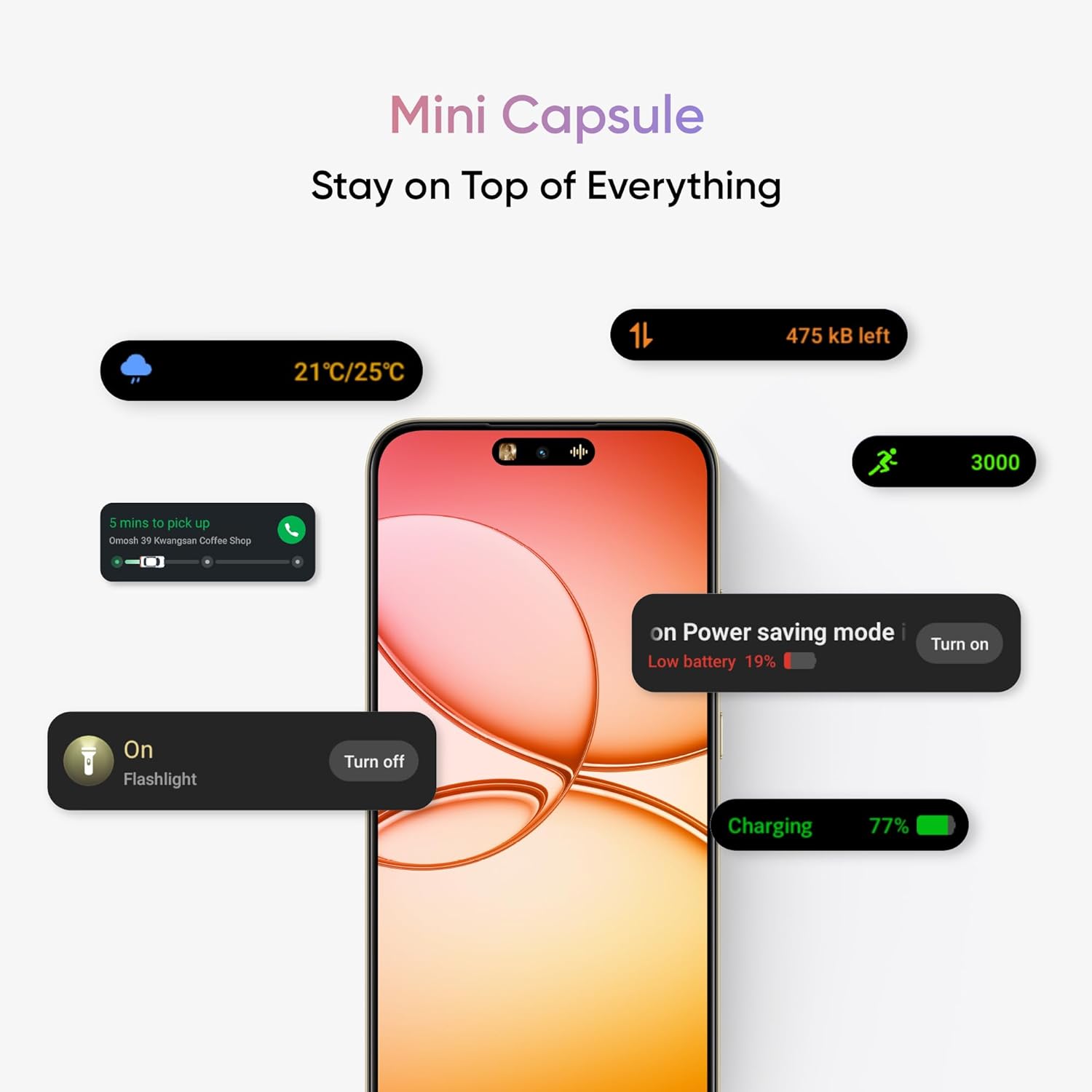
Image: The realme 15T 5G display showing the Mini Capsule feature with various notifications like weather, data usage, power saving mode, and flashlight status.
This dynamic notification area displays information such as charging status, power saving mode alerts, weather updates, data usage, and more, allowing you to stay informed without interrupting your current activity.
6. Maintenance
6.1. Software Updates
Regularly check for and install software updates to ensure your device has the latest features, security patches, and performance improvements.
- Go to Settings > About device > Up to date (or similar path depending on OS version).
- Tap on 'Check for updates' and follow the instructions to download and install any available updates.
- Ensure your device has sufficient battery charge and a stable internet connection before starting an update.
6.2. Cleaning Your Device
To keep your device clean and functional:
- Use a soft, lint-free cloth to wipe the screen and back panel.
- Avoid using harsh chemicals, abrasive materials, or aerosol sprays.
- For stubborn smudges, slightly dampen the cloth with water or a screen cleaner designed for electronics.
- Keep ports free of dust and debris.
6.3. IP69 Dust & Water Resistance
The realme 15T 5G is rated IP69 for dust and water resistance, meaning it offers protection against dust ingress and high-pressure, high-temperature water jets from any direction.

Image: The realme 15T 5G Smartphone being splashed with water, illustrating its IP69 dust and water resistance.
While resistant, it is not waterproof. Avoid intentional submersion, exposure to seawater, chlorinated water, or liquids other than fresh water. Damage caused by liquids is not covered under warranty.
7. Troubleshooting
If you encounter issues with your realme 15T 5G, try the following basic troubleshooting steps:
- Device not powering on: Ensure the battery is charged. Connect the charger and wait a few minutes before attempting to power on again.
- Screen unresponsive: Restart the device by pressing and holding the Power button for about 10-15 seconds until it reboots.
- Apps crashing or freezing: Close the problematic app and reopen it. If the issue persists, clear the app's cache (Settings > Apps > [App Name] > Storage > Clear cache).
- Network connectivity issues (Wi-Fi/Mobile Data): Toggle Wi-Fi or Mobile Data off and on. Restart your router for Wi-Fi issues. Check your SIM card installation and mobile plan status.
- Battery draining quickly: Check battery usage in Settings > Battery to identify power-hungry apps. Reduce screen brightness, disable unnecessary features like GPS or Bluetooth when not in use.
- Factory Reset: As a last resort, if software issues persist, you may perform a factory reset. Warning: This will erase all data on your device. Back up important data before proceeding. Go to Settings > System > Reset options > Erase all data (factory reset).
For persistent issues, contact realme customer support.
8. Specifications
| Feature | Specification |
|---|---|
| Operating System | Android 15 |
| Item Model Number | RMX5111 |
| Product Dimensions | 15.84 x 7.2 x 0.8 cm |
| Item Weight | 181 g |
| Display | 6.67-inch AMOLED, 120Hz Refresh Rate, 1080 x 2372 Resolution |
| Processor | MediaTek Dimensity 6400 Max 5G (CPU Speed: 2.3 GHz) |
| RAM Memory Installed Size | 8 GB |
| Internal Storage | 128 GB (as per current variant) |
| Rear Camera | 50MP |
| Front Camera | 50MP |
| Battery Power Rating | 7000 mAh (1 Lithium Ion battery included) |
| Charging | 60W Fast Charge |
| Connectivity Technologies | Bluetooth, USB, Wi-Fi, 5G |
| GPS | True |
| Water & Dust Resistance | IP69 Rated |
| Colour | Flowing Silver (as per current variant) |
| Manufacturer | DBG TECHNOLOGY (INDIA) PRIVATE LIMITED |
| Country of Origin | India |
9. Warranty and Support
9.1. Warranty Information
Your realme 15T 5G Smartphone comes with a limited manufacturer's warranty. Please refer to the warranty card included in your package for detailed terms, conditions, and coverage period. Keep your proof of purchase for warranty claims.
9.2. Customer Support
For technical assistance, service, or further inquiries, please contact realme customer support through their official website or authorized service centers. You can find more information and support resources on the realme Store on Amazon.