1. Introduction
Thank you for choosing the ECOWITT Rain Gauge Kit. This kit provides comprehensive rainfall monitoring capabilities for your backyard, garden, or farm. It includes the advanced GW3000 Wi-Fi & Ethernet Gateway and the high-precision WH40BH Rain Gauge Sensor.
The GW3000 gateway acts as the central hub, collecting data from the rain gauge and other compatible sensors (sold separately), and transmitting it to the Ecowitt platform via Wi-Fi or Ethernet. The WH40BH rain gauge features a heightened bucket and bird spikes for improved accuracy and reliability.

Image 1.1: Overview of the ECOWITT Rain Gauge Kit, showing the GW3000 gateway, WH40BH rain gauge, and mounting hardware.
2. Product Components
2.1 GW3000 Wi-Fi & Ethernet Gateway
The GW3000 is an upgraded weather station gateway designed for robust data collection and transmission. It features built-in 3-in-1 sensors for indoor temperature, humidity, and atmospheric pressure. It supports both Wi-Fi and Ethernet connectivity and includes an SD card port for local data storage.
- Connectivity: Wi-Fi (2.4GHz) and Ethernet port for stable network connection.
- Sensors: Integrated temperature, humidity, and atmospheric pressure sensors for indoor monitoring.
- SD Card Port: Allows for local data storage and transfer.
- Power: USB Type-C interface, includes a 0.9 m/2.95 ft. USB Power Extension Cord.

Image 2.1: Close-up view of the ECOWITT GW3000 Wi-Fi and Ethernet Gateway.

Image 2.2: Detailed view of the GW3000 Gateway, highlighting its Ethernet port, Type-C port, SD card slot, reset button, antenna, and status indicator lights (Wi-Fi, SD Card, RF).
2.2 WH40BH Rain Gauge Sensor
The WH40BH is a self-emptying rain collector sensor designed for accurate rainfall measurement. It features a heightened collection funnel and includes bird spikes to prevent obstructions and improve data integrity.
- Heightened Funnel: The rainfall collector funnel is 5cm/1.96in high, 3.5cm higher than traditional WH40 models, ensuring more accurate collection.
- Bird Spikes: Comes with 15 bird spikes to deter birds from nesting or interfering with the funnel.
- Measurement Resolution: Measures rainfall rate, daily, weekly, monthly, and yearly data with 0.1mm/0.01inch resolution.
- Wireless Transmission: Offers a wireless transmission range of up to 328ft/100m to the GW3000 gateway.

Image 2.3: Close-up view of the ECOWITT WH40BH Rain Gauge Sensor with its heightened bucket and bird spikes.

Image 2.4: Diagram of the WH40BH Rain Collector, labeling key components such as the bird spikes, rain collector, bubble level, battery compartment cover, screw hole, and U-Bolt Set.
3. Setup and Installation
3.1 GW3000 Gateway Wi-Fi Configuration
The GW3000 gateway offers multiple methods for Wi-Fi configuration to ensure a seamless setup process.
- Method A: Direct Connection (Web Page)
Connect your smartphone or computer to the GW3000's Wi-Fi hotspot (e.g., "GW3000-XXXX"). Open a web browser and enter "192.168.4.1" to access the embedded web page for configuration. - Method B: Ethernet Cable Connection
Plug an Ethernet cable (purchased separately) from the GW3000 to your Wi-Fi router. The gateway will obtain an IP address via DHCP. Find the assigned IP address through your router's interface or network scanning tools, then enter it into a web browser to access the embedded web page. - Method C: Ecowitt APP
Scan the QR code provided in the GW3000 manual or search for "Ecowitt" in your mobile app store (App Store for iOS, Google Play for Android). Download and install the Ecowitt APP. Follow the in-app instructions to complete the Wi-Fi configuration.

Image 3.1: Visual representation of the three Wi-Fi configuration methods for the GW3000 Gateway.
3.2 WH40BH Rain Gauge Installation
Proper placement and installation of the WH40BH rain gauge are crucial for accurate readings.
- Site Selection: Choose an open location free from obstructions (trees, buildings, fences) that could block rainfall or cause splash-in. Ensure the sensor is level.
- Mounting: Use the provided U-bolt set to securely mount the rain gauge to a pole or flat surface. Ensure the bubble level on the sensor indicates a perfectly level installation.
- Bird Spikes: Insert the 15 bird spikes into the designated holes around the funnel to prevent birds from perching and obstructing the collector.
- Battery Installation: Open the battery compartment (refer to Image 2.4) and insert the required batteries (type not specified in product details, typically AA or AAA for outdoor sensors). Ensure correct polarity.
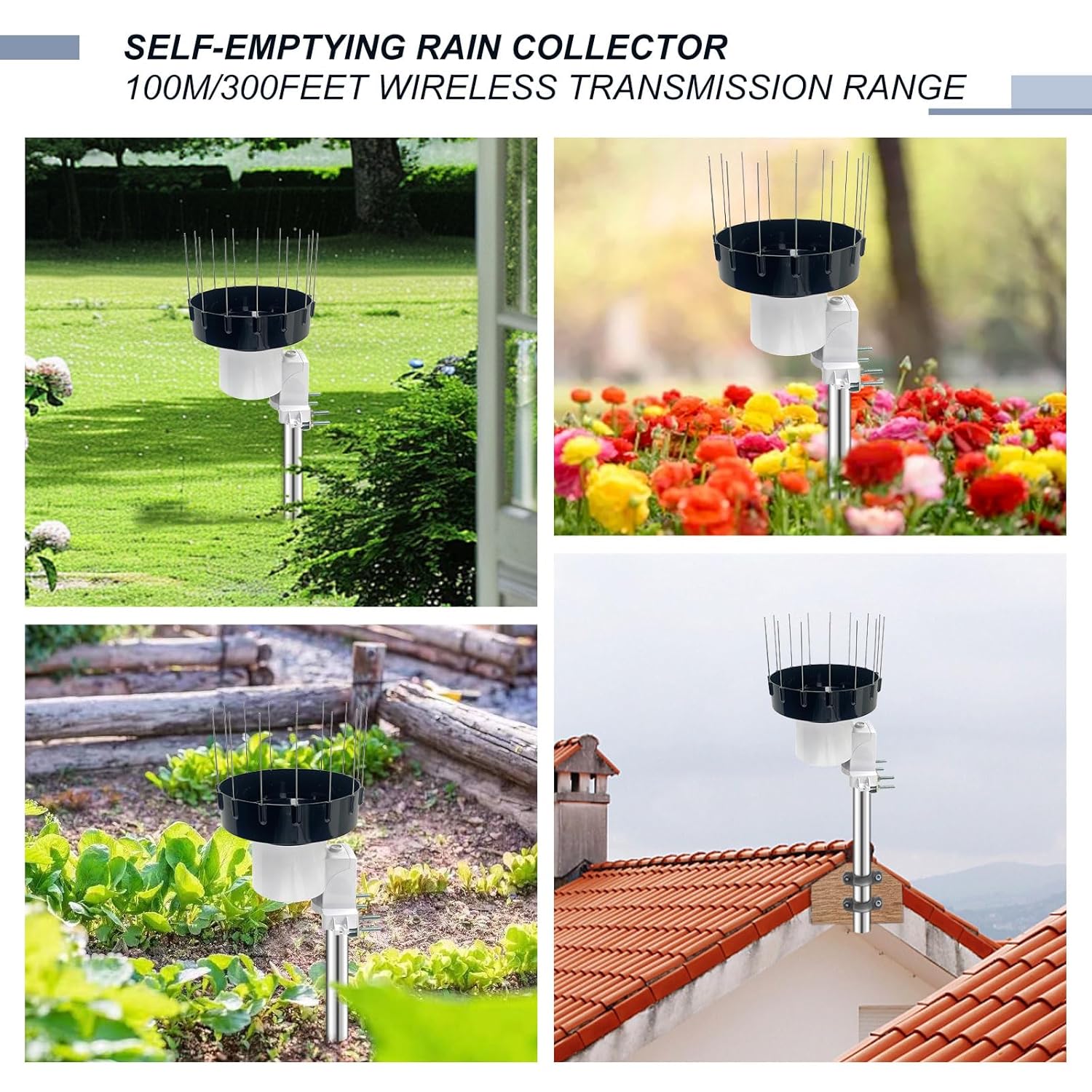
Image 3.2: Various examples of the WH40BH Rain Collector installed in different outdoor environments, demonstrating suitable placement.
4. Operation
Once the GW3000 gateway and WH40BH rain gauge are set up and connected, you can begin monitoring rainfall data.
- Data Monitoring: Access your rainfall data through the Ecowitt APP on your smartphone or via the Ecowitt web platform (ecowitt.net). The platform displays real-time data, historical records, and various metrics.
- Rainfall Metrics: The WH40BH measures and transmits rainfall rate, as well as daily, weekly, monthly, and yearly accumulated rainfall.
- Indoor Data: The GW3000 gateway's built-in sensors provide indoor temperature, humidity, and atmospheric pressure readings, which can also be viewed on the Ecowitt platform.
- SD Card Data: If an SD card is inserted into the GW3000, data will be logged locally. This data can be retrieved for offline analysis or backup.
Ensure your GW3000 gateway remains connected to your network for continuous data transmission to the Ecowitt platform.
5. Maintenance
Regular maintenance ensures the longevity and accuracy of your ECOWITT Rain Gauge Kit.
- Clean the Rain Gauge: Periodically inspect and clean the rain gauge funnel and tipping bucket mechanism to remove leaves, debris, or insect nests that could obstruct water flow and affect accuracy. Use a soft cloth and water; avoid abrasive cleaners.
- Check Bird Spikes: Ensure all bird spikes are securely in place and are not bent or broken. Replace any damaged spikes.
- Battery Replacement: Monitor the battery level of the WH40BH rain gauge sensor through the Ecowitt APP. Replace batteries promptly when indicated to ensure continuous operation.
- Gateway Placement: Keep the GW3000 gateway in a dry, stable indoor environment, away from extreme temperatures or direct sunlight. Ensure good ventilation.
- Firmware Updates: Check the Ecowitt APP or website for any available firmware updates for your GW3000 gateway. Keeping the firmware updated can improve performance and add new features.
6. Troubleshooting
If you encounter issues with your ECOWITT Rain Gauge Kit, refer to the following common troubleshooting steps:
- No Data/Inaccurate Readings from Rain Gauge:
- Check for obstructions in the rain gauge funnel (leaves, debris).
- Ensure the rain gauge is level.
- Verify the batteries in the WH40BH sensor are fresh and correctly installed.
- Check the wireless signal strength between the WH40BH and GW3000. Reduce distance or remove obstacles if necessary.
- GW3000 Gateway Offline/No Wi-Fi Connection:
- Ensure the gateway is powered on and the power adapter is securely connected.
- Check your Wi-Fi router and internet connection.
- If using Wi-Fi, try re-configuring the Wi-Fi connection using one of the methods described in Section 3.1.
- If using Ethernet, ensure the cable is properly connected and your router is assigning an IP address.
- Perform a factory reset on the GW3000 if connectivity issues persist (refer to the GW3000 manual for reset procedure).
- Data Not Uploading to Ecowitt.net:
- Confirm the GW3000 gateway has a stable internet connection.
- Check your Ecowitt APP or account settings to ensure the gateway is properly registered and configured for data upload.
For more detailed troubleshooting or persistent issues, please refer to the full GW3000 and WH40BH manuals available on the ECOWITT website or contact ECOWITT customer support.
7. Specifications
7.1 GW3000 Wi-Fi & Ethernet Gateway
- Indoor Temperature Range: (Built-in sensor)
- Indoor Humidity Range: (Built-in sensor)
- Atmospheric Pressure: (Built-in sensor)
- Wi-Fi Standard: 2.4 GHz
- Ethernet Port: Yes
- SD Card Port: Yes
- Power Supply: DC 5V (via USB Type-C)
- Dimensions: Refer to Image 7.1 for detailed dimensions.

Image 7.1: Detailed dimensions of the GW3000 Wi-Fi & Ethernet Gateway.
7.2 WH40BH Rain Gauge Sensor
- Rainfall Resolution: 0.1 mm / 0.01 inch
- Funnel Height: 5 cm / 1.96 inch (3.5 cm higher than WH40)
- Bird Spikes: 15 pcs included
- Wireless Transmission Frequency: 915 MHz
- Wireless Transmission Range: 100 m / 328 ft (in open air)
- Power Supply: (Battery type not specified, typically AA or AAA)
7.3 General Product Information
- ASIN: B0FMK65KQL
- Date First Available: January 16, 2025
8. Warranty and Support
ECOWITT products typically come with a manufacturer's warranty. Please refer to the warranty card included with your product or visit the official ECOWITT website for detailed warranty terms and conditions.
For technical support, product inquiries, or assistance with setup and troubleshooting, please contact ECOWITT customer service. You can usually find contact information on the ECOWITT website or within the Ecowitt APP.
ECOWITT Official Store: Visit the ECOWITT Store on Amazon


