1. Important Safety Information
Please read all instructions carefully before using the UREVO CyberPad Smart Walking Pad. Retain this manual for future reference.
- Placement: Place the walking pad on a flat, stable surface. Ensure adequate clear space (at least 2 feet) around the unit for safe operation.
- Electrical Safety: Use only with a grounded outlet. Do not use extension cords. Keep the power cord away from heated surfaces and water. Unplug the unit when not in use or before cleaning.
- User Weight Limit: Do not exceed the maximum user weight of 242 pounds (110 kg).
- Children and Pets: Keep children and pets away from the walking pad during operation. This appliance is not intended for use by persons with reduced physical, sensory or mental capabilities unless supervised.
- Emergency Stop: Familiarize yourself with the emergency stop procedure.
- Maintenance: Perform regular maintenance as described in this manual to ensure safe and optimal performance.
2. Product Overview
The UREVO CyberPad Smart Walking Pad is a compact, incline-capable treadmill designed for home and office use. It features an extended walking surface, LED remote control, speed-responsive lighting, and a quiet brushless motor, all controllable via the UREVO APP.

Figure 2.1: UREVO CyberPad Smart Walking Pad with a user at a standing desk.
Key Components:
- Walking Belt: The main surface for walking.
- LED Display: Shows speed, time, distance, calories, and incline.
- Remote Control: For adjusting speed, incline, and modes.
- Power Cord Port: For connecting the power supply.
- Transport Wheels: For easy movement and storage.
- Incline Adjustment Mechanism: Located at the rear for manual incline setting.
3. Setup
3.1 Unpacking
Carefully remove the walking pad from its packaging. Inspect all components for any damage. Keep packaging materials until you are satisfied with the product.

Figure 3.1: Included components: Hex Tool, Power Cord, LED SmartControl, and User Manual.
3.2 Placement
Choose a flat, stable surface for the walking pad. Ensure there is at least 2 feet (0.6 meters) of clear space behind and on both sides of the unit for safety. The compact design allows it to be stored under a desk or tucked into a corner when not in use.

Figure 3.2: Space-saving design for easy storage.
3.3 Power Connection
Connect the power cord to the walking pad's power port and then plug it into a standard grounded electrical outlet. Ensure the connection is secure.
4. Operating Instructions
4.1 Powering On/Off
- To power on, ensure the walking pad is plugged in and press the power button on the remote control.
- To power off, press and hold the power button on the remote control until the unit shuts down.
4.2 Using the Remote Control
The included LED SmartControl remote allows for easy adjustment of the walking pad's functions.
- Start/Stop: Press to begin or end a workout.
- Speed Adjustment: Use the '+' and '-' buttons to increase or decrease walking speed. The speed range is 0.5-6 km/h (approximately 0.3-3.7 mph).
- Incline Adjustment: Use the incline buttons to adjust the incline percentage. The CyberPad supports an auto incline from 0% to 14%.
- Mode Selection: Cycle through different display metrics (Distance, Incline, Speed, Time, Calories).
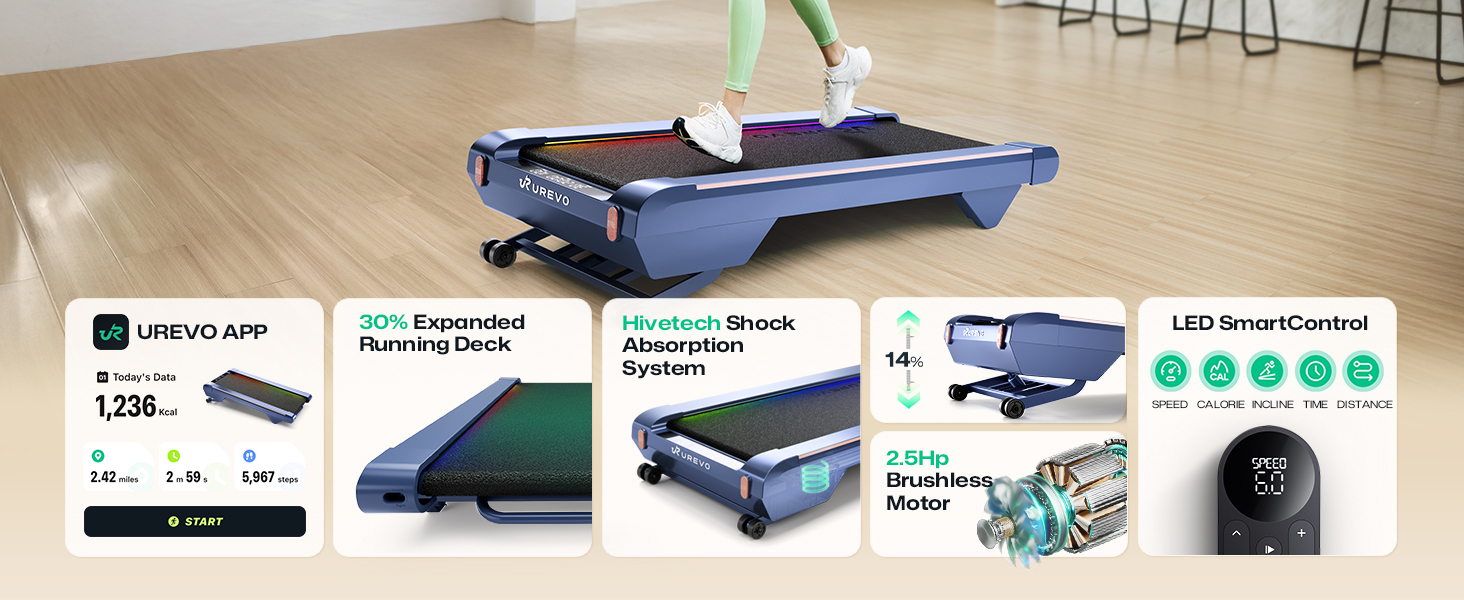
Figure 4.1: Overview of key features including the LED SmartControl remote.
4.3 Incline Functionality
The UREVO CyberPad features an auto-incline function up to 14%, allowing for varied workout intensity. This can be controlled via the remote or the UREVO APP.

Figure 4.2: Demonstrating the 14% maximum incline for enhanced calorie burn.
4.4 UREVO APP Integration
Download the UREVO APP to unlock advanced features and track your fitness progress. The app is available for both iOS and Android devices.
- SmartCoach App: Auto-generates personalized workout plans based on your fitness goals (e.g., weight loss, endurance).
- Outdoor Scene Mode: Immerse yourself in virtual global routes, transforming your indoor walks into engaging journeys.
- Smart Sports Assistant: Track and manage your fitness data effortlessly, including calories, distance, and time. Provides scientific guidance for optimizing workouts.
- Competitive Mode: Compete with friends or global users in real-time.
- Exercise Modes: Choose from Free Training, Goal Workout, Immersive Running, or Challenge Mode.

Figure 4.3: Outdoor Scene Mode within the UREVO APP.

Figure 4.4: UREVO Smart Sports Assistant for health management and scientific guidance.
4.5 Dynamic Lighting Effects
The CyberPad features adjustable dynamic lighting effects that change based on your speed, creating a personalized workout environment. These can be customized via the UREVO APP.

Figure 4.5: Speed-responsive lighting effects on the walking surface.
5. Maintenance
Regular maintenance ensures the longevity and optimal performance of your UREVO CyberPad.
5.1 Cleaning
- Wipe down the walking pad and display with a damp cloth after each use.
- Do not use abrasive cleaners or solvents, as they may damage the surfaces.
- Keep the area around the walking belt clean and free of dust and debris.
5.2 Lubrication
The walking belt requires periodic lubrication to reduce friction and extend its lifespan. Refer to the specific instructions in the included User Manual for the correct type and frequency of lubrication. Typically, silicone-based treadmill lubricant is applied under the belt.
5.3 Belt Adjustment
If the walking belt feels loose, slips, or drifts to one side, it may need adjustment. Use the hex tool provided to make small, incremental adjustments to the rear rollers. Consult the detailed instructions in the included User Manual for precise adjustment procedures.
6. Troubleshooting
If you encounter issues with your UREVO CyberPad, refer to the following common problems and solutions:
| Problem | Possible Cause | Solution |
|---|---|---|
| Walking pad does not power on. | Not plugged in; power switch off; faulty power cord/outlet. | Ensure power cord is securely plugged into the unit and a working outlet. Check if the main power switch (if present) is on. |
| Belt slips or hesitates. | Belt too loose; insufficient lubrication. | Adjust belt tension (refer to Maintenance section). Lubricate the walking belt. |
| Unusual noise during operation. | Loose components; motor issue; belt friction. | Check for loose screws. Lubricate the belt. If noise persists, contact customer support. Note that the brushless motor is designed for quiet operation (<45dB). |
| Remote control not responding. | Dead batteries; remote out of range; interference. | Replace remote batteries. Ensure you are within range. Remove any obstructions. |
| Incline not adjusting. | Obstruction; motor issue. | Check for any obstructions under the unit. If the issue persists, contact customer support. |
For issues not listed here, or if solutions do not resolve the problem, please contact UREVO customer support.
7. Specifications
| Feature | Detail |
|---|---|
| Brand | UREVO |
| Model Name | URTM038 |
| Product Dimensions (LxWxH) | 46.8"D x 19.3"W x 4.8"H (118.9 cm D x 49 cm W x 12.2 cm H) |
| Item Weight | 37.5 Pounds (17 kg) |
| Material | Alloy Steel |
| Maximum Speed | 4 Miles per Hour (approx. 6.4 km/h) |
| Maximum Incline Percentage | 14.0% |
| Maximum Horsepower | 2 Horsepower |
| Maximum Weight Recommendation | 242 Pounds (110 kg) |
| Display Type | LED |
| Connectivity Technology | Power Cord (App connectivity via Bluetooth) |
| Included Components | User Manual, Hex Tool, Power Cord, LED SmartControl Remote |
| Noise Level | Ultra quiet, typically <45dB |
8. Warranty and Support
8.1 Warranty Information
The UREVO CyberPad Smart Walking Pad comes with a 1-year limited warranty from the date of purchase. This warranty covers manufacturing defects and workmanship under normal use. Please retain your proof of purchase for warranty claims.
The warranty does not cover damage resulting from misuse, accident, unauthorized modification, or failure to follow the instructions in this manual.
8.2 Customer Support
For technical assistance, warranty claims, or any questions regarding your UREVO CyberPad, please contact UREVO customer support. Refer to the contact information provided on the official UREVO website or in the original product packaging.
You can also refer to the official User Manual PDF for more detailed information: Download User Manual PDF