
1. Introduction
The Bebird Earsight Plus E33R is an advanced visual ear cleaning tool designed for safe and effective ear wax removal and general ear, nose, and throat inspection. Featuring a high-definition camera and various interchangeable tips, this device allows users to monitor their ear canal and other areas with precision, providing a clear view directly on a connected smartphone.
Video 1: Overview of the Bebird Earsight Plus E33R Ear Wax Removal Tool Camera. This video demonstrates the product's features, including its flexible lens, high-definition camera, and various cleaning modes, highlighting its ease of use for both adults and children.
2. Safety Information
- Consult a Professional: Unless you are a trained medical professional familiar with ear anatomy, avoid inserting the device too deeply into the ear canal. Improper use can cause serious injury.
- Gentle Use: Always use the device gently and slowly, especially when first familiarizing yourself with its sensation in the ear canal.
- Children and Pets: It is not recommended to use the device on children or pets while they are in motion, as sudden movements can lead to injury. Adult supervision is required for children.
- Protective Plug: Utilize the ear canal protective plug to prevent over-insertion, ensuring safety for sensitive ear canals, children, and first-time users.
- Cleanliness: Ensure all tips and the camera lens are clean before and after each use to prevent infection.
- Discomfort: If you experience any discomfort or pain during use, immediately cease operation and consult a medical professional.
3. Package Contents
Please verify that all items are present in your package:
- Main Device (Bebird Earsight Plus E33R)
- Accessory Case
- Accessory Tray
- Tip of the tweezers
- Handle of the tweezers
- Lens Brush
- Ear Canal Protective Plug
- Ear Canal Speculum
- Nasal Speculum
- Tongue Depressor
- Type-C Charging Cable
- Various Ear Scoop Tips (Metal & Silicone wrapped, Double-color Annular, Sponge)
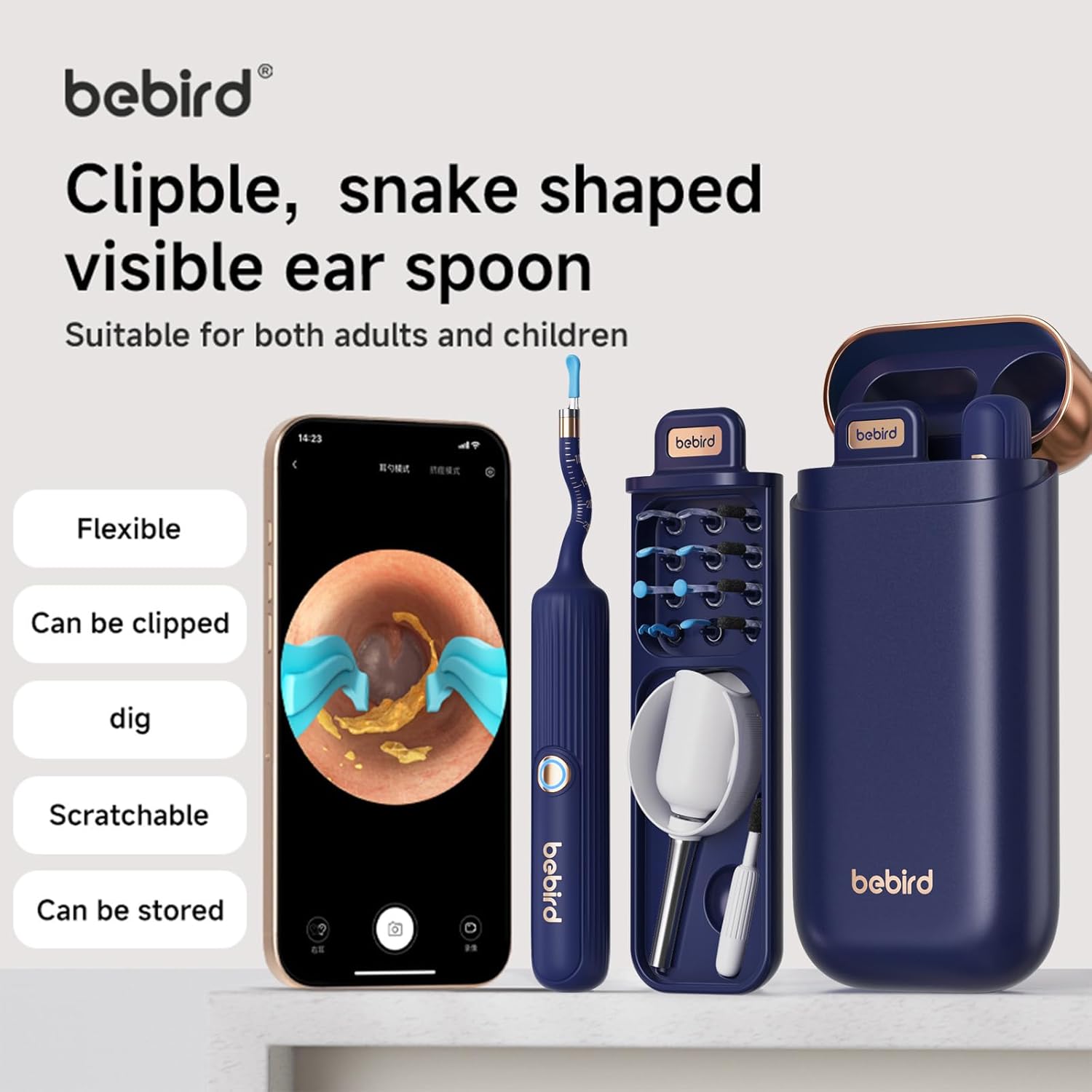
Image 1: The Bebird Earsight Plus E33R device, its charging case, and various interchangeable tips.
4. Setup
4.1 Charging the Device
Before first use, fully charge the device using the provided Type-C charging cable. Connect the cable to the charging port on the device and a compatible USB power source. A full charge typically takes a few hours. The device contains 1 Lithium Polymer battery.
4.2 App Download and Connection
- Download the App: Scan the QR code provided in the manual or on the packaging to download the official Bebird app from your smartphone's app store (compatible with Apple and Android devices).
- Power On: Press and hold the power button on the main device for 2-3 seconds until the indicator light illuminates.
- Connect via Wi-Fi: Open your smartphone's Wi-Fi settings. Locate and select the Wi-Fi network named 'bebird-XXXX' (where XXXX is a unique identifier for your device). No password is required.
- Open the App: Return to the Bebird app. The device should automatically connect. Click 'Connect Devices' or 'Go' to start the live view.
Video 2: Instruction video for the Bebird Earsight Plus E33R. This video guides users through unboxing, app connection, attaching different tips, and proper usage for ear, nasal, and oral inspections.
4.3 Attaching and Adjusting Tips
- Ear Spoons: Twist off the current tip in a counter-clockwise direction and replace it with the desired ear spoon tip (metal & silicone wrapped, double-color annular, or sponge). Ensure it is securely fastened.
- Tweezers: Install the handle of the tweezers onto the device first, then tighten the tweezers tip clockwise. Gently press the plastic handle to control the opening and closing of the tweezers.
- Speculums/Depressor: For ear canal, nasal, or tongue inspection, put on the respective speculum or tongue depressor tightly onto the device.
- Bending Angle: The flexible silicone tube lens allows for bending. When adjusting the bending angle, ensure the scale side is facing forward. Only bend left and right to avoid damage.
- Protective Plug: For ear cleaning, place the ear canal protective plug at the appropriate position on the lens to prevent over-insertion.
5. Operating Instructions
5.1 General Usage
Once connected to the app, you will see a live, high-definition view from the device's camera on your smartphone screen. This visual feedback allows for precise and controlled operation.

Image 2: A user demonstrating the ease of use by viewing their ear canal on a smartphone while operating the Bebird Earsight Plus E33R.
5.2 Ear Wax Removal
- Visual Guidance: Use the live camera feed to guide the chosen ear tip into the ear canal.
- Ear Spoons: For dry earwax, use the metal & silicone wrapped ear spoon to gently scoop out debris. For oily earwax, the sponge ear spoon can absorb and wipe away oil. The double-color annular ear spoon is effective for scraping ear debris.
- Tweezers: For stubborn earwax or debris, attach the precision tweezers. Use the plastic handle to control the tweezers, allowing for accurate removal without touching the ear canal walls.
- Safety Stopper: Always ensure the ear canal protective plug is in place to prevent accidental deep insertion.
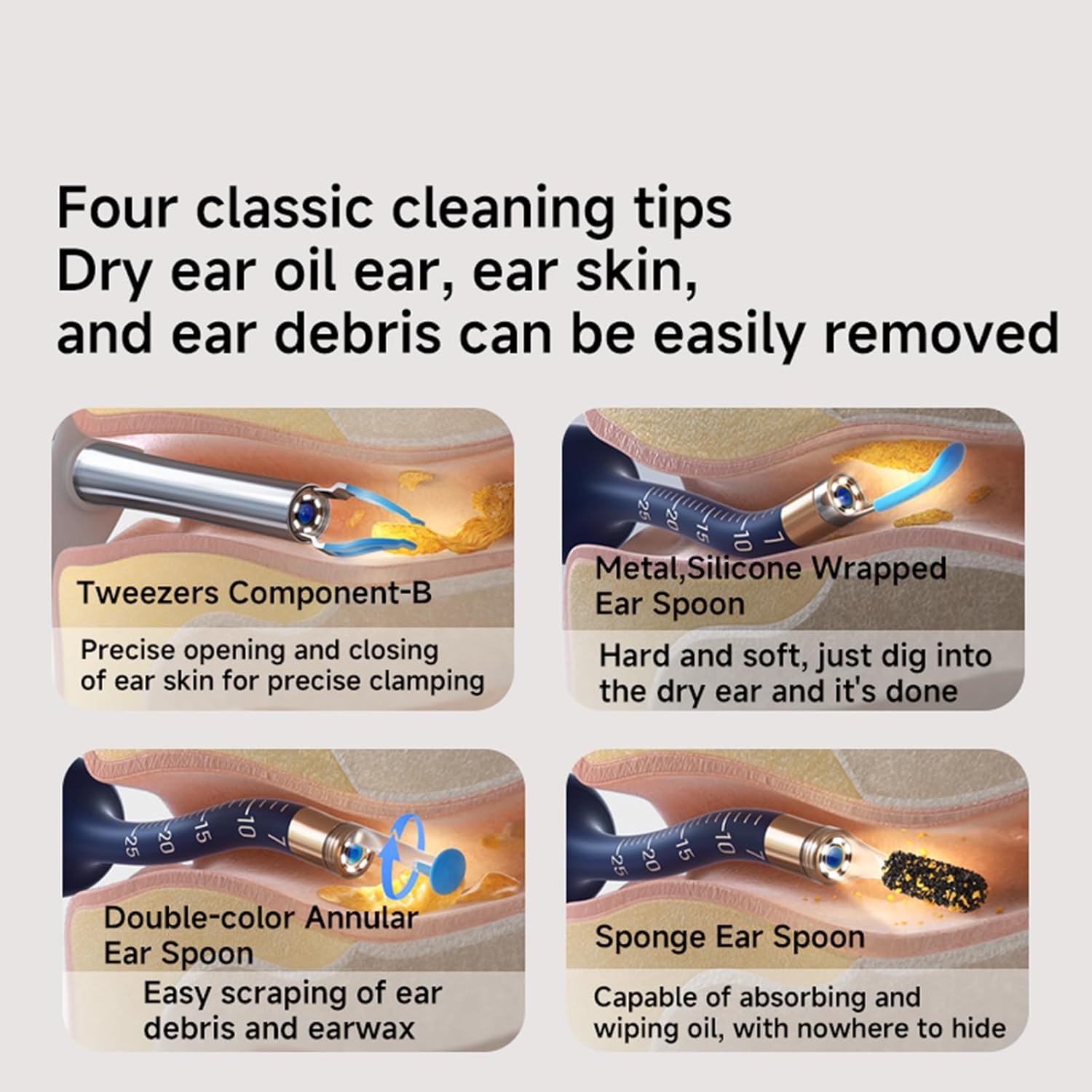
Image 3: A visual representation of the four classic cleaning tips (tweezers, metal/silicone wrapped spoon, double-color annular spoon, sponge spoon) and their application for removing various types of ear debris.
5.3 Multi-functional Inspection
The Bebird Earsight Plus E33R can also be used for inspecting other body parts:
- Nasal Passages: Attach the nasal speculum to inspect the nasal passages.
- Throat/Oral Cavity: Attach the tongue depressor to examine the throat and oral cavity. Insert slowly and stop if discomfort occurs.
- Other Areas: The device can also be used for inspecting teeth, scalp, and other body parts.

Image 4: The Bebird Earsight Plus E33R being used for various home check-ups, including ear, nasal, and oral examinations, demonstrating its versatility.
6. Maintenance
6.1 Cleaning the Device
Regular cleaning ensures optimal performance and hygiene:
- Lens: Use the provided lens brush, a cotton swab with water, or an alcohol swab to gently clean the camera lens after each use.
- Tips: All interchangeable tips should be thoroughly cleaned with water and mild soap or an alcohol wipe after each use. Ensure they are completely dry before storage.
- Device Body: Wipe the main device body with a clean, damp cloth. Do not submerge the device in water.
6.2 Storage
Store the device and all accessories in the provided accessory case to keep them organized and protected from dust and damage. If not used for a long time, charge the device at least every 3 months to maintain battery life.

Image 5: Close-up of the Bebird Earsight Plus E33R highlighting its full body silicone wrap for comfort and the scale adjustment protective plug for safe insertion.
7. Troubleshooting
- Device Not Powering On: Ensure the device is fully charged. Connect it to the Type-C charging cable and allow it to charge for at least 30 minutes before attempting to power it on again.
- No Image on App/Connection Issues:
- Verify the device is powered on and its indicator light is active.
- Check your phone's Wi-Fi settings to ensure it is connected to the 'bebird-XXXX' network.
- Restart both the device and the Bebird app.
- Ensure your phone's operating system is up to date.
- Image Quality Issues (Blurry/Lagging):
- Clean the camera lens thoroughly using the provided lens brush or an alcohol swab.
- Ensure a stable Wi-Fi connection between the device and your phone.
- Tips Not Staying On: Ensure the tips are twisted on clockwise and tightened securely. For tweezers, ensure the handle is installed first before tightening the tip.
If you encounter any other issues or the above steps do not resolve your problem, please refer to the Warranty and Support section for contact information.
8. Specifications
| Feature | Detail |
|---|---|
| Model | Earsight Plus E33R |
| Manufacturer | VILLA ART (Bebird) |
| Package Dimensions | 7.91 x 5.24 x 1.34 inches |
| Item Weight | 9.91 ounces |
| Battery | 1 Lithium Polymer battery (included) |
| Connectivity | Wi-Fi (connects phone and device, no internet access) |
| Lens Diameter | 4.1mm micro diameter (flexible shaping) |
| Camera | Professional 3P high-definition endoscope |
9. Warranty and Support
9.1 Warranty Information
The Bebird Earsight Plus E33R comes with a 1-year warranty from the date of purchase. This warranty covers manufacturing defects and malfunctions under normal use. Please retain your proof of purchase for warranty claims.
9.2 Customer Support
If you encounter any issues during use, have questions about the product, or require technical assistance, please do not hesitate to contact our customer support team. Contact details can typically be found on the product packaging, the official Bebird website, or through your purchase platform. Our team is dedicated to providing prompt and helpful solutions.


