
Introduction
This manual provides essential instructions for the proper setup, operation, and maintenance of your Invicta Activa Recon X Digital Watch, Model ACW423-012. Please read this guide thoroughly to ensure optimal performance and longevity of your timepiece.
Setup
1. Initial Inspection
Upon unboxing, carefully inspect the watch for any visible damage. Remove any protective films from the display and case back.
2. Activating the Watch
Your watch may be in a power-saving mode. Press any button to activate the display. If the display remains blank, the battery may need to be checked or replaced.
3. Setting Time and Date
Refer to the 'Operating Instructions' section for detailed steps on how to set the current time and date accurately.
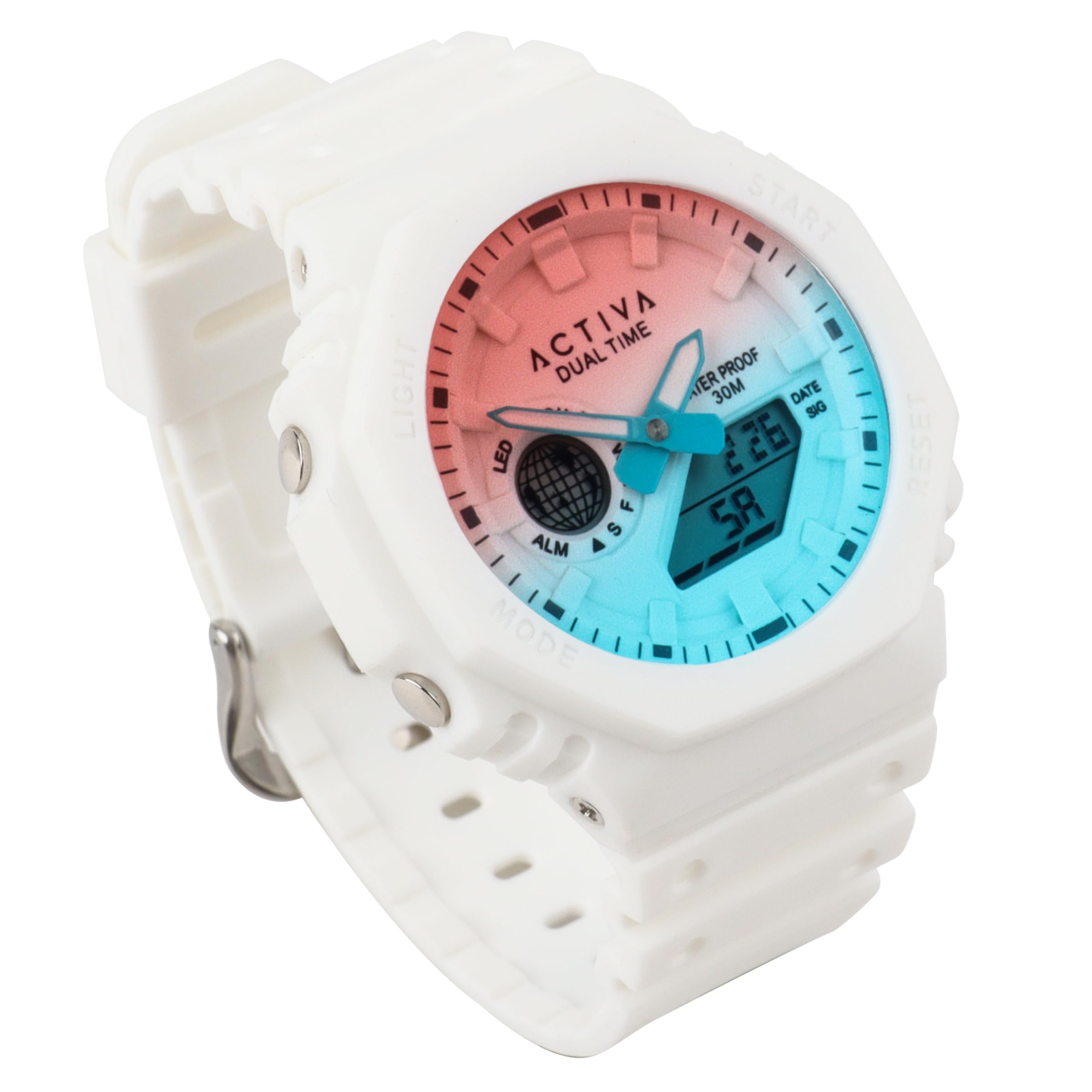
Image: Front view of the Invicta Activa Recon X Digital Watch. The watch features a round case, a digital display, and a white thermoplastic polyurethane (TPU) strap with a buckle clasp. The watch face shows the time and other digital indicators.
Operating Instructions
Button Functions
The Invicta Activa Recon X Digital Watch typically features multiple buttons for navigation and setting. While specific button labels may vary, common functions are:
- MODE Button: Cycles through different display modes (e.g., Time, Date, Alarm, Stopwatch).
- SET/ADJUST Button: Used to enter setting mode and confirm selections.
- START/STOP Button: Activates and deactivates functions like the stopwatch or alarm.
- LIGHT Button: Illuminates the display for visibility in low light conditions.
Setting Time and Date
- Press the MODE button until the time display is shown.
- Press and hold the SET/ADJUST button until the seconds begin to flash.
- Use the MODE button to cycle through the setting options (seconds, hours, minutes, year, month, day).
- Use the START/STOP button to adjust the flashing value.
- Once all settings are correct, press the SET/ADJUST button again to exit the setting mode.
Using the Alarm Function
- Press the MODE button until the alarm time is displayed (often indicated by 'AL').
- Press and hold the SET/ADJUST button until the alarm hours begin to flash.
- Use the START/STOP button to set the desired alarm hour.
- Press the MODE button to move to the minutes setting, then use START/STOP to adjust.
- Press SET/ADJUST to confirm and exit.
- To turn the alarm ON/OFF, press the START/STOP button while in alarm mode. An alarm icon will appear/disappear.
Using the Stopwatch Function
- Press the MODE button until the stopwatch display is shown (often indicated by 'ST' or 'CH').
- Press the START/STOP button to begin timing.
- Press START/STOP again to pause the timing.
- To resume, press START/STOP. To reset, press the SET/ADJUST button while the stopwatch is paused.
Maintenance
Cleaning Your Watch
To maintain the appearance of your watch, regularly wipe the case and strap with a soft, dry cloth. For stubborn dirt, a slightly damp cloth can be used, followed by immediate drying. Avoid using harsh chemicals or abrasive cleaners.
Water Resistance
This watch is rated for 30 meters (3 ATM) water resistance. This means it is suitable for everyday use and can withstand splashes or brief immersion in water. It is not suitable for swimming, showering, or diving. Do not operate buttons while the watch is wet or submerged.
Battery Replacement
The watch is powered by a battery. When the display becomes dim or functions become erratic, it may be time for a battery replacement. It is recommended to have the battery replaced by a qualified watch technician to ensure proper sealing and maintain water resistance.
Troubleshooting
| Problem | Possible Cause | Solution |
|---|---|---|
| Display is blank or dim. | Low or depleted battery. | Replace the battery. |
| Time is incorrect. | Time not set correctly or reset. | Refer to 'Setting Time and Date' in the Operating Instructions. |
| Buttons are unresponsive. | Watch may be in a locked mode or battery is low. | Try pressing the LIGHT button. If still unresponsive, check battery or consult support. |
| Condensation inside the watch. | Exposure to extreme temperature changes or compromised water resistance. | Seek professional service immediately to prevent damage. |
Specifications
- Model Number: ACW423-012
- Brand: Invicta
- Movement Type: Digital
- Case Diameter: 45.5 mm
- Strap Material: Thermoplastic Polyurethane (TPU)
- Strap Color: White
- Water Resistance: 30 Meters (3 ATM)
- Power Source: Battery
- Clasp Type: Buckle
- Strap Width: 18.5 mm
- Band Length: 200 mm
- Approximate Weight: 353.8 g (including packaging)
- UPC: 886678650545
Warranty and Support
Invicta watches are manufactured to high-quality standards. For specific warranty details, please refer to the warranty card included with your purchase or visit the official Invicta website. Keep your proof of purchase for any warranty claims.
For further assistance or technical support, please contact Invicta customer service or visit their official brand store: