Introduction
Thank you for choosing the AIRMSEN Wireless Meat Thermometer. This device is designed to provide accurate temperature monitoring for various cooking methods, including grilling, roasting, and smoking. It features dual sensors for both food and ambient temperatures, a long-range Bluetooth connection, a standalone LCD display, and a dedicated mobile application for enhanced control and monitoring. Please read this manual thoroughly before use to ensure proper operation and maintenance.
Package Contents
Verify that all items are present in your package:
- Base Station x1
- Temperature Probe x1
- Type-C Charging Cable x1
- User Manual x1
- Quick Start Guide x1

Figure 1: Package Contents. This image displays all components included in the AIRMSEN Wireless Meat Thermometer box, laid out neatly on a wooden surface.
Product Overview
Key Features:
- High-Precision Dual Sensors: Measures both internal food temperature (32°F-212°F) and ambient temperature (up to 572°F) with an accuracy of ±1.8°F.
- Extended Wireless Range: Bluetooth 5.4 connectivity allows stable transmission up to 200 feet from probe to base, and up to 300 feet from base to your mobile device, totaling 500 feet.
- Standalone LCD Display: The base unit features a large, high-definition LCD screen for real-time temperature, battery level, and cooking status, enabling use without a phone.
- Heat-Resistant Ceramic Handle: The probe is equipped with a Zirconia ceramic handle, capable of withstanding temperatures up to 572°F, providing durability and a comfortable grip.
- Dedicated Mobile Application: Connects to a mobile app for fast, stable Bluetooth connection, offering real-time temperature graphs, USDA recommended cooking temperatures, and customizable alarms.
- Magnetic Base: The base unit has a built-in magnet for convenient attachment to metal surfaces like refrigerators or grills.
- Long-Lasting Battery: The probe operates for over 72 hours on a full charge, and the base battery lasts up to 110 hours, both rechargeable via Type-C port.
- Waterproof Probe: Designed to be 100% waterproof, suitable for deep frying, sous vide, and dishwasher cleaning.

Figure 2: AIRMSEN Wireless Meat Thermometer. This image shows the complete thermometer system, including the probe and the base unit with its LCD display.

Figure 3: HD LCD Screen Backlight Base. This image highlights the base unit's clear LCD display and the probe's heat-resistant Zirconia ceramic handle, indicating internal and ambient temperature sensors.
Setup
1. Charging the Device:
Before first use, fully charge both the probe and the base unit using the provided Type-C charging cable. The base unit has a 1000mAh battery, offering up to 110 hours of use, while the probe provides over 72 hours on a full charge.

Figure 4: Charging the Base Unit. This image illustrates the Type-C charging port on the base unit and its large battery capacity.
2. App Download and Connection:
- Download the dedicated AIRMSEN app from your smartphone's app store.
- Ensure Bluetooth is enabled on your smartphone.
- Power on the thermometer base unit.
- Open the app and follow the on-screen instructions to pair your device. The app ensures a fast and stable Bluetooth connection.

Figure 5: Easy To Use Smart APP. This image displays the user interface of the mobile application, highlighting features like real-time temperature graphs, USDA recommended temperatures, and target temperature alarms.

Figure 6: Ultra-Long & Stable Links. This diagram visually represents the Bluetooth 5.4 connectivity, showing a maximum range of 200ft from probe to base and 300ft from base to phone.
Operating Instructions
1. Inserting the Probe:
Carefully insert the probe into the thickest part of the meat, avoiding bones. Ensure the probe is inserted past the safety notch line to accurately measure internal food temperature. The ceramic handle should remain outside the food.

Figure 7: Precision Temperature Control. This image demonstrates correct probe insertion into a steak, indicating the internal food temperature sensor and the ambient temperature sensor on the probe handle.
2. Using the Standalone Base:
The base unit features a large LCD screen and intuitive buttons for direct operation without a smartphone. You can view real-time temperatures, set target temperatures, and switch between Celsius and Fahrenheit.
- Upward/Downward Temp Buttons: Adjust target temperature.
- Setting Temp Button: Confirm target temperature or access settings.
- Temp Switch Button (°C/°F): Toggle between Celsius and Fahrenheit display.
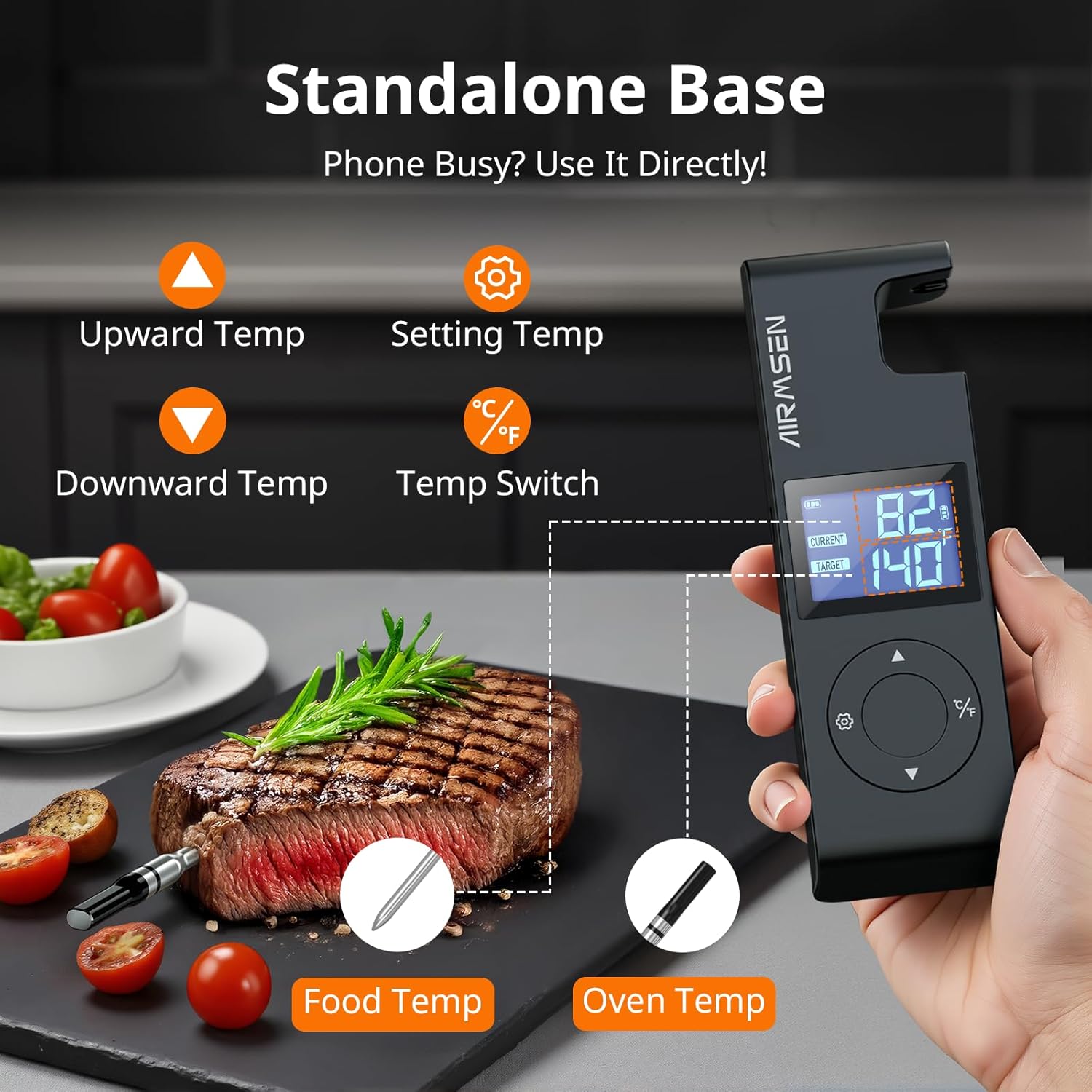
Figure 8: Standalone Base Operation. This diagram illustrates the buttons and display of the base unit, showing how to adjust settings and view temperatures directly.
3. Using the Mobile Application:
The dedicated app provides comprehensive control and monitoring features:
- Real-time Temperature Graph: Monitor temperature changes over time.
- USDA Recommended Temperatures: Access a library of optimal cooking temperatures for various ingredients.
- Target Temperature Alarms: Set custom alarms to notify you when your desired temperature is reached.
4. Cooking Scenarios:
The thermometer is suitable for a variety of indoor and outdoor cooking applications:
- Grill: Place the base unit near the grill, ensuring it's within range of the probe and your phone.
- Oven: The probe can be left inside the oven during cooking due to its heat-resistant handle.
- Rotisserie: Insert the probe into the rotating meat.
- Pan/Stove: Use for pan-searing or other stovetop cooking methods.
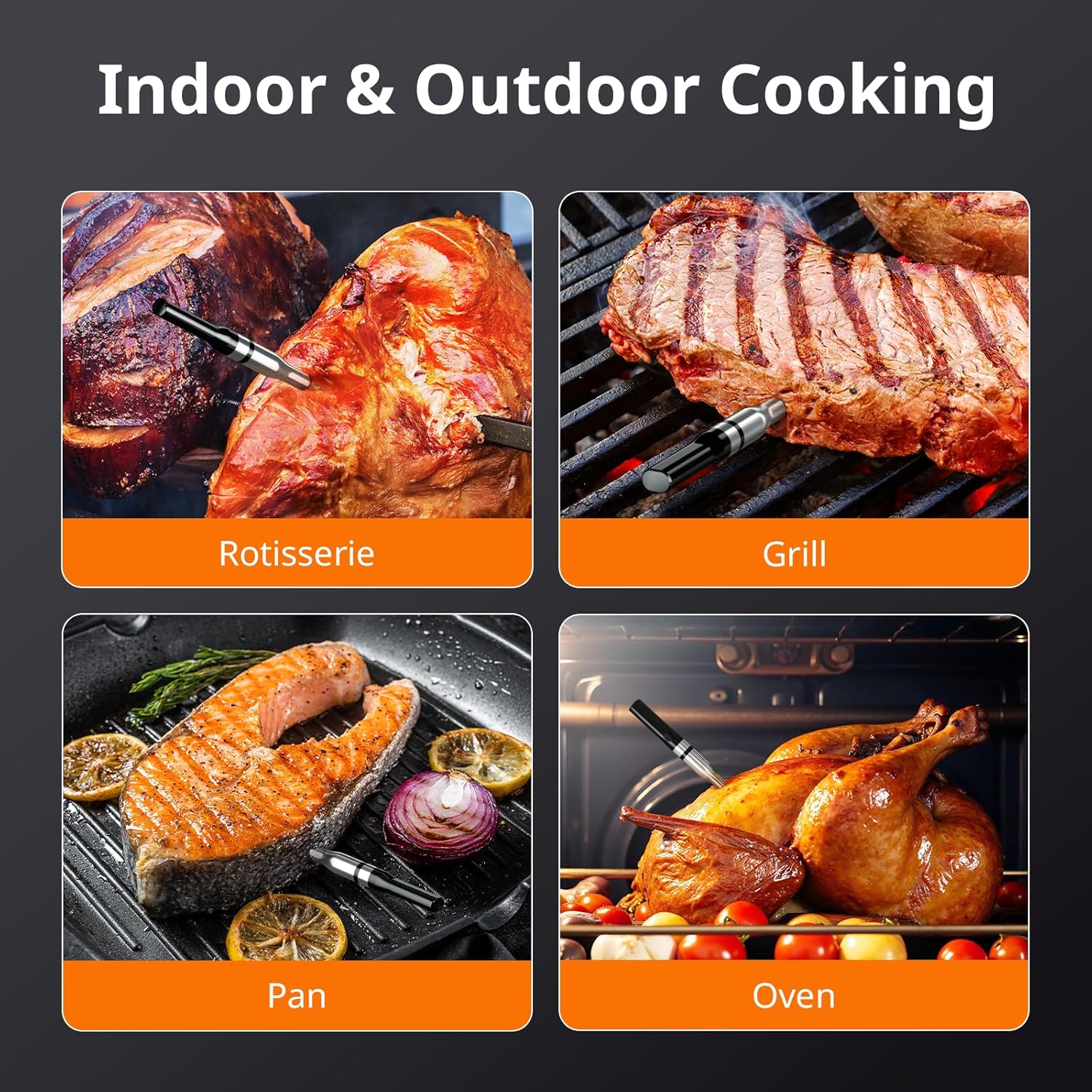
Figure 9: Indoor & Outdoor Cooking. This image demonstrates the versatility of the thermometer across different cooking methods and environments.
Video 1: Product Demonstration. This video provides a visual guide on how to use the AIRMSEN Wireless Meat Thermometer, showcasing its features and application in a cooking setting.
Maintenance
Cleaning Instructions:
- Probe: The probe is 100% waterproof and can be hand washed or placed in a dishwasher. Do not soak the entire probe, especially the ceramic handle, for extended periods.
- Base Unit: Wipe the base unit clean with a damp cloth. Do not submerge the base unit in water.
- General Care: Do not soak the entire device. Ensure all components are dry before storage.

Figure 10: 100% Waterproof Probe. This image highlights the probe's waterproof design, making it suitable for various cooking methods and easy to clean.
Storage:
The base unit features a built-in magnet, allowing for convenient storage on metal surfaces such as refrigerators or grills, keeping your kitchen tidy and the device easily accessible.

Figure 11: Built-in Magnet for Easy Access. This image shows the magnetic base of the thermometer attached to a refrigerator, demonstrating convenient storage.
Troubleshooting
If you encounter issues with your AIRMSEN Wireless Meat Thermometer, please refer to the following common problems and solutions:
- No Power/Device Not Turning On:
- Ensure both the probe and base unit are fully charged. Connect them to the Type-C charging cable and allow sufficient time for charging.
- Connection Issues (Probe to Base / Base to Phone):
- Verify that Bluetooth is enabled on your smartphone.
- Ensure the base unit and probe are within their respective operating ranges (200ft probe-base, 300ft base-phone). Obstacles like thick walls or metal objects can reduce range.
- Restart the base unit and the mobile application. Try re-pairing the device through the app settings.
- Inaccurate Temperature Readings:
- Ensure the probe is inserted correctly into the thickest part of the meat, avoiding bones, and past the safety notch line.
- Check if the probe tip is clean and free from debris.
- Compare readings with another calibrated thermometer if available to confirm accuracy.
- App Not Responding/Crashing:
- Close and reopen the app.
- Ensure your smartphone's operating system and the app are updated to the latest versions.
- Clear the app's cache or reinstall the app if issues persist.
Specifications
| Feature | Specification |
|---|---|
| Model Number | SJ-XT600-CA |
| Manufacturer | AIRMSEN |
| Item Weight | 220 g |
| Product Dimensions | 16.31 x 5.21 x 3.18 cm |
| Probe Temperature Range (Internal) | 32°F - 212°F (0°C - 100°C) |
| Ambient Temperature Range (External) | Up to 572°F (300°C) |
| Measurement Accuracy | ±1.8°F (±1°C) |
| Connectivity Technology | Bluetooth 5.4 |
| Wireless Range (Probe to Base) | Up to 200 feet |
| Wireless Range (Base to Phone) | Up to 300 feet |
| Display Type | LCD Screen |
| Probe Battery Life | Over 72 hours |
| Base Battery Life | Up to 110 hours (1000mAh) |
| Charging Port | Type-C |
| Probe Handle Material | Zirconia Ceramic |
| Waterproof Rating | 100% Waterproof Probe |
| Care Instructions | Do Not Soak, Hand Wash Only, Oven Safe, Wipe Clean |
Warranty and Support
AIRMSEN is committed to providing high-quality products and excellent customer service. If you encounter any problems or have questions regarding your Wireless Meat Thermometer, please do not hesitate to contact our customer support team. We are available to assist you at any time to ensure your satisfaction.
Please refer to the contact information provided in your Quick Start Guide or on the official AIRMSEN website for support.


