
1. Introduction
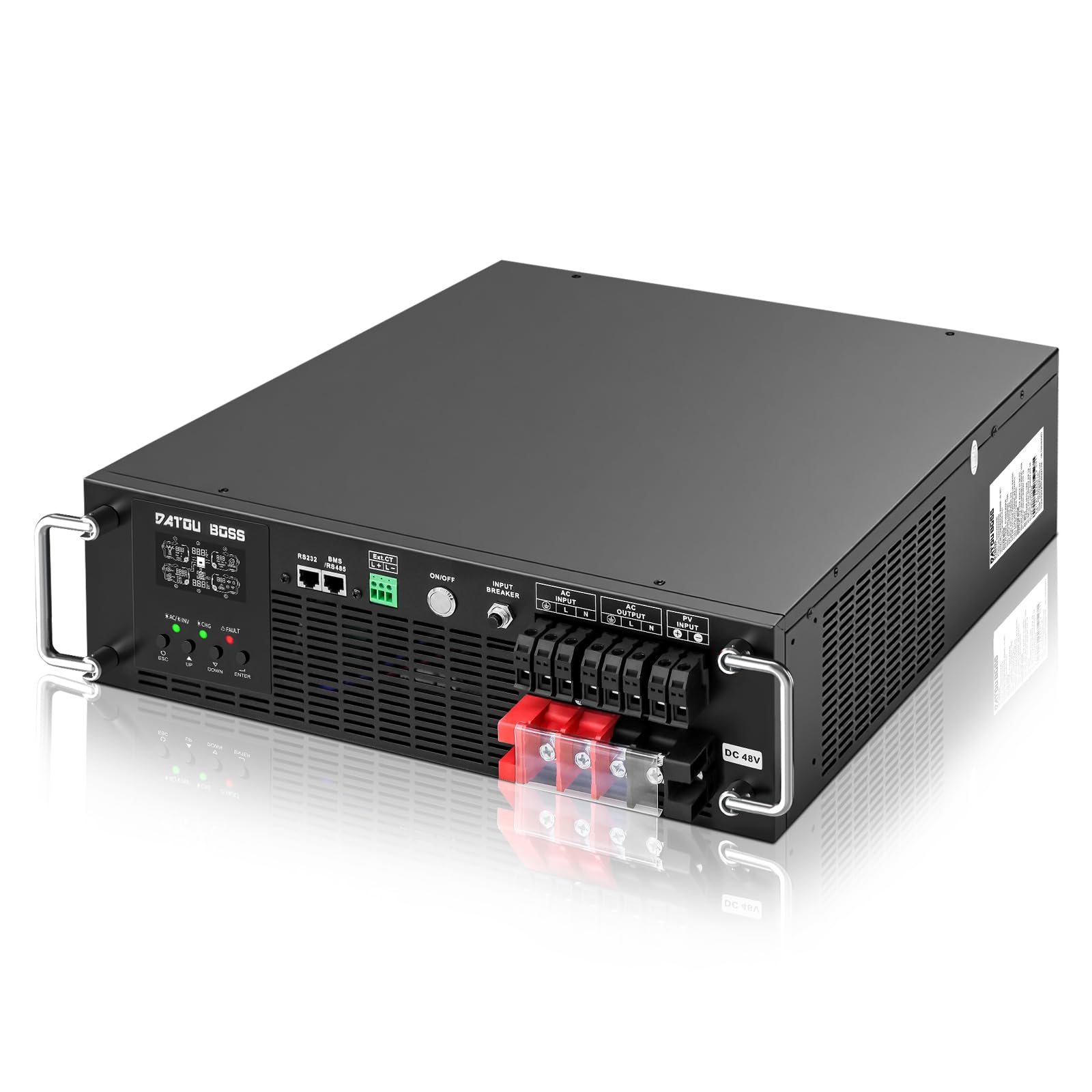
Thank you for choosing the DATOUBOSS 6200W 48V Rack 3U Hybrid Solar Inverter. This manual provides essential information for the safe and efficient operation of your inverter. Please read this manual thoroughly before installation and use, and keep it for future reference.
This hybrid inverter is designed to integrate solar power, utility power, and battery power to provide continuous power to your loads. It features a pure sine wave output, a high-efficiency MPPT charge controller, and an uninterruptible power supply (UPS) function, making it suitable for various applications including home, RV, and off-grid systems.
2. Important Safety Instructions
Please observe all warnings and instructions in this manual. Improper operation can cause serious damage to the unit, personal injury, or even death. Only qualified personnel should perform installation and maintenance.
- Ensure all wiring is performed by a qualified electrician and complies with local electrical codes.
- Do not disassemble the inverter. There are no user-serviceable parts inside.
- Keep the inverter away from flammable materials, moisture, and direct sunlight.
- Ensure proper ventilation around the unit to prevent overheating.
- Always disconnect all power sources (PV, battery, utility) before performing any maintenance or wiring.
3. Product Overview
3.1 Key Features
- Pure Sine Wave Output: Provides 6200W continuous power (12400VA peak) at 220/230/240V AC, suitable for sensitive electronics.
- High-Efficiency MPPT Charge Controller: Integrated 120A MPPT solar charge controller with up to 98% efficiency, supporting up to 8500W PV input. MPPT voltage range: 60-500V DC (optimal 360-430V).
- Battery Compatibility: Supports 48V Lithium (LiFePO4), AGM, Gel, and Lead-Acid batteries. Features adjustable charging parameters and up to 120A solar charge current, 100A AC charge current.
- UPS Functionality: Built-in UPS mode with a 10ms transfer time for critical loads.
- Smart Energy Management: Supports multiple operating modes including Solar Priority, Grid Priority, Hybrid Operation, and Battery-less Operation.
- LCD Display: Large LCD screen displays real-time operating status, PV power, battery data, input voltage, and load information.
- Communication: RS232 interface for advanced monitoring and control.
- Robust Design: Low noise (<50dB), operating temperature range of -10°C to 50°C, and operation up to 4000m altitude.
3.2 Pure Sine Wave Output

The inverter produces a high-quality pure sine wave output, which is crucial for the safe and efficient operation of sensitive electronic devices, computers, and appliances. This stable output protects your equipment and extends its lifespan.
3.3 Product Dimensions

The inverter measures approximately 44 cm in width, 45.17 cm in depth, and 13.25 cm in height, designed for rack mounting (3U).
3.4 Component Identification

- RS232 Communication Port: For PC monitoring and control.
- BMS/RS485 Communication Port: For Battery Management System communication.
- CT Signal Port: Current Transformer signal port.
- ON/OFF Switch: Main power switch for the inverter.
- AC Input: Connection for utility grid power.
- AC Output: Connection for household loads.
- PV Input: Connection for solar panel array.
- Battery Positive Terminal: Positive connection for the battery bank.
- Battery Negative Terminal: Negative connection for the battery bank.
- Input Breaker: Circuit breaker for input protection.
3.5 LCD Display and Control Panel

The intelligent LCD screen provides real-time data and allows for system parameter adjustments. The control panel includes:
- LCD Display: Shows operational status, power flow, battery levels, and error codes.
- Status Indicator: LEDs for AC, Inverter, Charge, and Fault.
- Control Buttons: ESC, UP, DOWN, ENTER for navigation and setting adjustments.
3.6 Applications

The DATOUBOSS hybrid solar inverter is versatile and suitable for a wide range of applications, including:
- Residential off-grid or grid-tied solar systems
- Recreational vehicles (RVs) and camping setups
- Marine applications (yachts)
- Agricultural power solutions
- Emergency backup power for homes and businesses
4. Setup and Installation
Before starting installation, ensure the inverter is turned off and all power sources are disconnected. Refer to local electrical codes for proper wiring and safety procedures.
4.1 Site Selection
- Install the inverter indoors, away from direct sunlight, rain, and dust.
- Ensure the ambient temperature is between -10°C and 50°C.
- Maintain adequate clearance around the inverter for proper ventilation (at least 20 cm on all sides).
- Mount the inverter on a sturdy, non-flammable surface.
4.2 Wiring Connections
Follow the wiring diagram carefully. All connections must be secure and properly insulated.

- Battery Connection: Connect the 48V battery bank to the Battery Positive and Negative terminals. Ensure correct polarity.
- PV Connection: Connect the solar panel array to the PV Input terminals. Verify that the PV voltage is within the MPPT range (60-500V DC).
- AC Input Connection: Connect the utility grid power to the AC Input terminals.
- AC Output Connection: Connect your household loads to the AC Output terminals.
- Grounding: Ensure the inverter is properly grounded according to local regulations.
After all connections are made, double-check for any loose wires or incorrect polarity before proceeding to power on.
5. Operating Instructions
5.1 Powering On/Off
- To Power On:
- Ensure all connections are secure.
- Turn on the battery breaker (if applicable).
- Turn on the PV input breaker (if applicable).
- Turn on the AC input breaker (if applicable).
- Flip the ON/OFF switch on the inverter to the "ON" position.
- To Power Off:
- Turn off the ON/OFF switch on the inverter.
- Turn off the AC input breaker.
- Turn off the PV input breaker.
- Turn off the battery breaker.
5.2 LCD Display Operation
Use the ESC, UP, DOWN, and ENTER buttons to navigate through the display menus and adjust settings. The LCD provides real-time information on:
- Input/Output Voltage and Frequency
- Battery Voltage and Charge/Discharge Current
- PV Input Power and Voltage
- Load Percentage and Power Output
- Operating Mode and System Status
- Error Codes and Warnings
5.3 Operating Modes
The inverter supports various operating modes to optimize energy usage. These can be configured via the LCD display.

- Solar Priority: Solar power is the primary source for loads and battery charging. Utility grid is used only when solar is insufficient.
- Grid Priority: Utility grid is the primary source. Solar power charges batteries or supplements grid power.
- Hybrid Operation: Intelligent management of solar, battery, and grid power based on user settings and availability.
- Battery-less Operation: Inverter operates directly from solar and/or grid without a battery bank.
Refer to the detailed settings menu on the LCD for specific configurations of each mode, including charge current, output voltage, and frequency.
6. Maintenance
Regular maintenance ensures the longevity and optimal performance of your inverter. Always power off the inverter and disconnect all power sources before performing any maintenance.
- Cleaning: Periodically clean the exterior of the inverter with a dry cloth. Ensure ventilation openings are free from dust and debris. Do not use liquid cleaners.
- Connections Check: Annually inspect all wiring connections for tightness and signs of corrosion. Re-tighten if necessary.
- Environmental Check: Ensure the installation environment remains within specified temperature and humidity ranges.
- Battery Inspection: If using lead-acid batteries, check electrolyte levels and terminal conditions as per battery manufacturer guidelines. For LiFePO4 batteries, monitor BMS data via the communication port.
7. Troubleshooting
This section provides solutions to common issues. If the problem persists, contact customer support.
| Problem | Possible Cause | Solution |
|---|---|---|
| Inverter does not power on. | No battery connection, battery voltage too low, ON/OFF switch off, input breaker tripped. | Check battery connections and voltage. Ensure ON/OFF switch is on. Reset input breaker. |
| No AC output. | Overload, short circuit, inverter fault, battery low. | Reduce load. Check for short circuits. Check battery voltage. Refer to LCD for error codes. |
| PV charging not working. | PV input voltage out of range, PV connection issue, solar panels shaded. | Check PV voltage on LCD. Inspect PV wiring. Clear any shading on solar panels. |
| Error code displayed on LCD. | Specific system fault. | Note the error code and refer to the full user manual (if available) for detailed explanations and solutions. |

The inverter is equipped with multiple protection features to ensure safe operation, including low voltage, overcurrent, short circuit, overload, overvoltage, over-discharge, over-temperature, and reverse charge protection. If any of these protections are triggered, the inverter may shut down or display an error.
8. Specifications
| Parameter | Value |
|---|---|
| Model Name | DT-3U-4862S |
| Brand | DATOUBOSS |
| Rated Power | 6200 W |
| Peak Power | 12400 VA |
| Output Waveform | Pure Sine Wave |
| AC Output Voltage | 230 V (AC) ±5% |
| AC Output Frequency | 50 Hz / 60 Hz (Auto-sensing) |
| Battery Voltage | 48 V (DC) |
| Max PV Input Power | 8500 W |
| Max PV Input Voltage | 500 V (DC) |
| MPPT Voltage Range | 60-500 V (DC) (Optimal 360-430 V) |
| Max Solar Charge Current | 120 A |
| Max AC Charge Current | 100 A |
| Transfer Time (UPS) | 10 ms |
| Operating Temperature | -10 °C to 50 °C |
| Noise Level | < 50 dB |
| Weight | 13.98 kg |
| Recommended Uses | Off-grid, Solar, RV, Home Emergency Power |

9. Warranty and Support
This DATOUBOSS inverter comes with a 2-year product warranty from the date of purchase. This warranty covers defects in materials and workmanship under normal use.
For technical support, warranty claims, or any questions regarding your product, please contact DATOUBOSS customer service through the retailer where you purchased the product or visit the official DATOUBOSS website for contact information.
Please have your model number (DT-3U-4862S) and purchase date ready when contacting support.


