
1. Introduction
The BAOFENG UV-5R M-5R is an advanced 8W multi-band handheld transceiver designed for reliable long-range communication. This device features a high-capacity 3800mAh battery with Type-C charging, frequency copy function, airband reception, and various other functionalities to support diverse communication needs. This manual provides detailed instructions to ensure optimal performance and user experience.

Image Description: A complete package of the BAOFENG UV-5R M-5R Ham Radio, showcasing two transceivers, two 3800mAh batteries, two charging docks, two tactical antennas, two standard antennas, two earpieces, two belt clips, two lanyards, and a programming cable. This image illustrates all components included in the 2-pack.
2. Setup and Assembly
2.1. Battery Installation and Charging
The BAOFENG UV-5R M-5R comes with a 3800mAh rechargeable battery. To install, align the battery with the back of the radio and slide it upwards until it clicks into place. To remove, press the release latch at the bottom of the battery and slide it downwards.
For charging, you have two options:
- Charging Dock: Place the radio with the battery installed into the provided charging dock. Ensure the charging indicator light illuminates.
- Type-C USB Charging: Connect the supplied Type-C USB cable directly to the port at the bottom of the battery. This allows charging via a USB wall adapter, vehicle charger, power bank, or PC.

Image Description: A BAOFENG UV-5R M-5R radio shown in its charging base, alongside illustrations of alternative charging methods including a USB wall adapter, vehicle charging port, power bank, and a laptop for PC charging. This highlights the versatility of the radio's charging options.
2.2. Antenna Attachment
Screw the desired antenna (either the standard rubber duck antenna or the 18.89-inch tactical antenna) clockwise onto the SMA female connector at the top of the radio until it is finger-tight. Do not overtighten.

Image Description: A BAOFENG UV-5R M-5R radio equipped with an extended 18.8-inch tactical antenna, illustrating its full and folded lengths. Accompanying icons highlight features such as long range, high gain, strong signal, and VHF/UHF band compatibility, emphasizing enhanced communication capabilities.
2.3. Accessories Attachment
- Belt Clip: Attach the belt clip to the designated slot on the back of the radio.
- Lanyard: Secure the lanyard through the loop at the top of the radio for convenient carrying.
- Earpiece: Plug the earpiece into the dual-pin jack on the side of the radio.
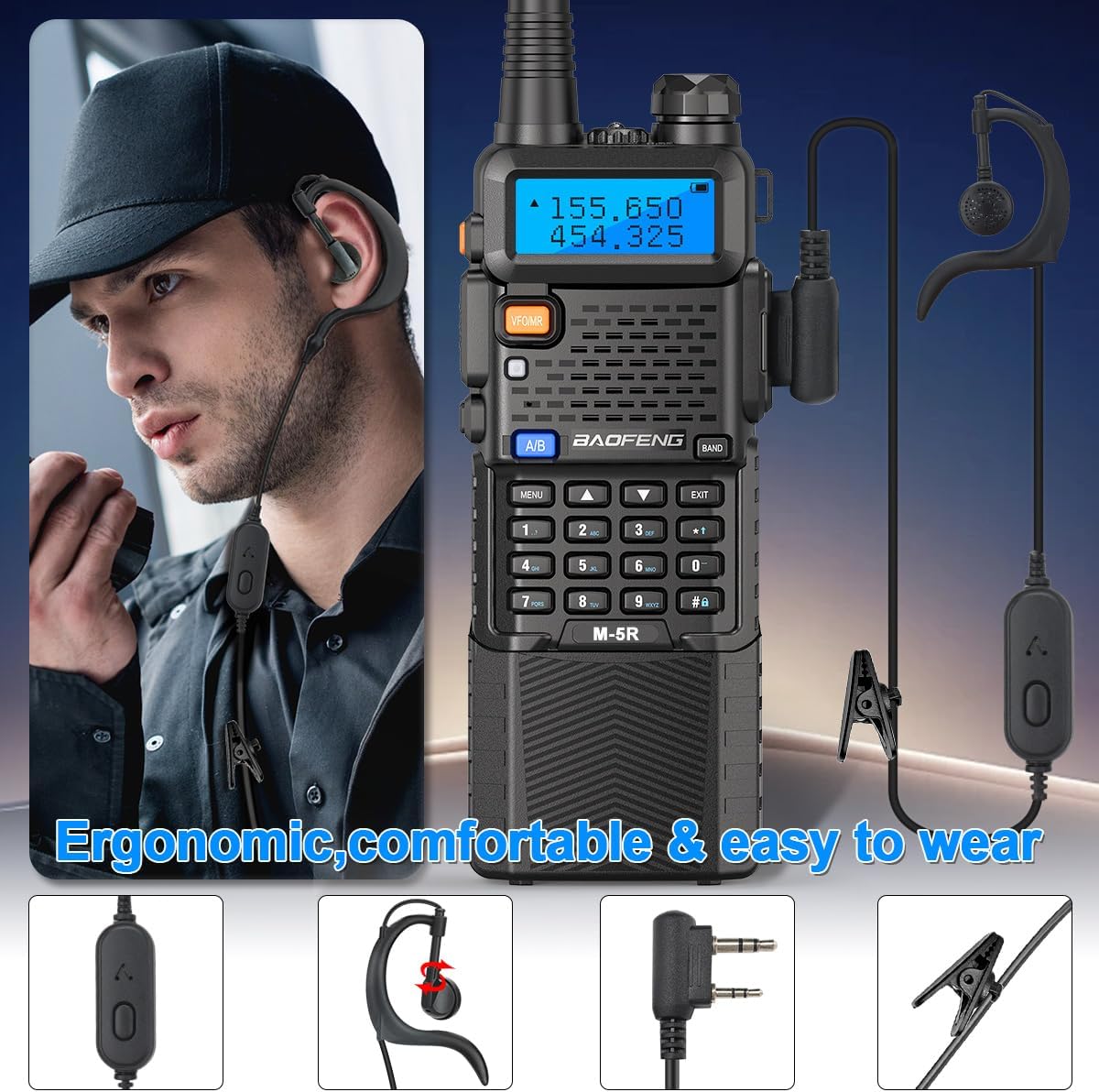
Image Description: A person wearing a BAOFENG UV-5R M-5R radio with an attached earpiece, demonstrating its ergonomic design and comfortable fit for extended use. Close-ups of the earpiece components, including the PTT button and dual-pin connector, are also shown.
2.4. Programming Cable
The included programming cable allows for advanced configuration of your radio using CHIRP software (model selection Baofeng 5RX). This facilitates batch frequency updates, CTCSS/DCS settings, and channel naming, significantly improving efficiency.
3. Operating Instructions
3.1. Power On/Off and Volume
- Power On: Rotate the volume knob clockwise until you hear a click and the display illuminates.
- Power Off: Rotate the volume knob counter-clockwise until you hear a click.
- Volume Adjustment: Rotate the volume knob to increase or decrease the audio level.
3.2. Mode Selection (VFO/MR)
Press the VFO/MR button to switch between Frequency Mode (VFO) and Channel Mode (MR). In Frequency Mode, you can manually input frequencies. In Channel Mode, you can select pre-programmed channels.
3.3. Transmitting and Receiving
- Receiving: The radio will automatically receive signals on the selected frequency or channel.
- Transmitting: Press and hold the PTT (Push-To-Talk) button on the side of the radio to transmit. Release to receive.
3.4. Keypad Lock
To lock the keypad, press and hold the # key. Repeat to unlock.
3.5. VOX Function (Hands-Free)
The Voice Operated Exchange (VOX) function allows for hands-free transmission. When activated, the radio will transmit automatically when it detects your voice. This is useful for activities like driving, climbing, or hunting.

Image Description: A BAOFENG UV-5R M-5R radio with a microphone icon and 'VOX Function' text, illustrating its hands-free communication capability. The background shows a person using the radio in a mountainous outdoor setting, emphasizing its utility for activities where hands are occupied.
3.6. FM Radio and Flashlight
- FM Radio: Press the BAND button to activate the FM radio function.
- Flashlight: Press the dedicated flashlight button on the side of the radio to turn the LED flashlight on/off. Some models may also offer a strobe light function.

Image Description: A close-up view of the top of the BAOFENG UV-5R M-5R radio, showing the integrated LED flashlight emitting light. This highlights a practical utility feature of the device.
3.7. Copy Frequency
The radio supports a fast replication frequency feature, allowing you to quickly copy frequencies from another radio for immediate communication. Refer to the radio's on-screen menu for specific steps to activate this function.

Image Description: Two BAOFENG UV-5R M-5R radios displayed side-by-side with arrows indicating a frequency transfer, illustrating the 'Fast Replication Frequency' feature for one-click decoding and quick frequency matching between devices.
4. Maintenance
4.1. Cleaning
Wipe the radio's surface with a soft, damp cloth. Avoid using harsh chemicals or abrasive cleaners. Ensure all ports are dry before charging or use.
4.2. Battery Care
To prolong battery life, avoid fully discharging the battery frequently. Charge the battery regularly, especially if the radio will be stored for an extended period.
4.3. Storage
Store the radio in a cool, dry place away from direct sunlight and extreme temperatures. Remove the battery if storing for more than a month.
5. Troubleshooting
- Radio does not power on: Ensure the battery is correctly installed and fully charged. Check the battery contacts for any obstruction.
- Poor reception/transmission: Verify the antenna is securely attached. Ensure you are within range of other radios or repeaters. Check for obstructions or interference.
- Unable to transmit: Confirm the PTT button is functioning. Check if the frequency is correctly set and if any transmit restrictions (e.g., busy channel lockout) are active.
- Speaker audio is distorted or muffled: Adjust the volume. Ensure the speaker grille is clear of debris.
6. Specifications
| Feature | Detail |
|---|---|
| Item Weight | 2.59 pounds |
| Package Dimensions | 10.2 x 8.43 x 2.87 inches |
| Item Model Number | M-5R 8W |
| Batteries | 2 x 9V batteries required (included) |
| Number of Channels | 128 |
| Special Features | Battery Saver Mode, Copy Frequency, Integrated Flashlight, Keypad Lock, Type-C Charger |
| Frequency Range | VHF UHF (Multi-band, Airband receive, 350-390MHz(RX), 480-520MHz(RX), 136-174MHz (TX/RX), 220-260MHz (TX/RX), 400-480MHz (TX/RX)) |
| Water Resistance Level | Not Water Resistant |
| Manufacturer | BAOFENG |
7. Warranty Information
Please note that this product does not include a manufacturer's warranty as per the provided specifications.
8. Support
For further assistance or inquiries regarding your BAOFENG UV-5R M-5R radio, please refer to the official BAOFENG website or contact their customer support channels. Additional resources, including software updates and community forums, may be available online.
You can visit the BAOFENG Store on Amazon for more product information.