
Introduction
This instruction manual provides detailed guidance for the assembly, operation, and maintenance of your BEISHI Arc-Shaped Art Mobile TV Stand. Please read this manual thoroughly before beginning assembly or use to ensure safe and correct operation.
Safety Information
- Always secure the TV stand to the wall using the provided safety straps to prevent tip-over.
- Do not exceed the maximum weight limit of 220 lbs (100 kg) for the TV.
- Be cautious of sharp edges during assembly and use.
- Ensure all screws and connections are tightened securely before placing a TV on the stand.
- Keep children and pets away from the assembly area.
Package Contents
Verify that all components are present before starting assembly. If any parts are missing or damaged, please contact customer support.
- TV Stand Components (Carbon Steel Frame, Wooden Shelves)
- Installation Accessories (Screws, bolts, washers, tools)
- Instruction Manual
Specifications
| Feature | Detail |
|---|---|
| Mounting Type | Floor Mount |
| Movement Type | Rotate (with wheels) |
| Material | Carbon Steel, Wood |
| Color | Black |
| Item Weight | 40 Pounds (approx. 18.1 kg) |
| TV Size Compatibility | Most 50-100 Inch TVs |
| Maximum Weight Capacity | 220 lbs (100 kg) |
| VESA Compatibility | From 100x100mm (4"x4") to 900x600mm (24"x35") |
| Shelves | 2-Tier Wooden Shelves |
| Height Adjustment | Adjustable TV mounting height (Min 48.6" to Max 56.5") |

Figure 1: Product Dimensions and VESA Compatibility
Setup and Assembly
The BEISHI Arc-Shaped Art Mobile TV Stand is designed for easy assembly. Please follow the step-by-step instructions and diagrams provided in the separate installation guide included in your package. Ensure you have all the necessary tools and components before starting.
Key Assembly Steps:
- Unpack all components and verify against the parts list.
- Attach the base and casters to the main support frame.
- Assemble the two-tier wooden shelves and secure them to the frame.
- Install the TV mounting brackets onto the main support frame.
- Attach the TV to the mounting brackets, ensuring VESA compatibility and secure fastening.
- Adjust the TV height to your preferred viewing level.
- Utilize the cable management features to organize wires.
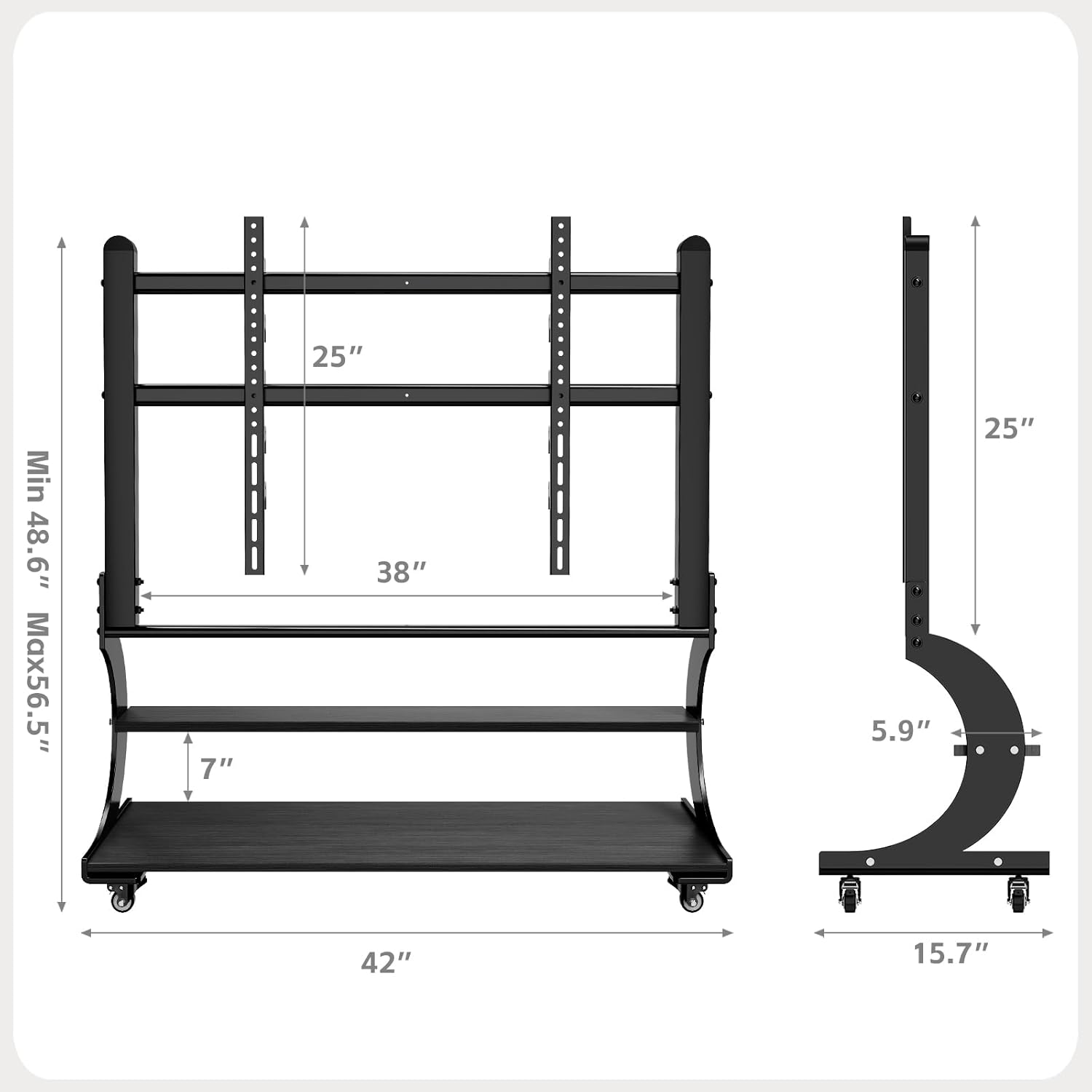
Figure 2: Assembly Overview Diagram

Figure 3: Sturdy Load Capacity of 220 lbs
Operating Instructions
Moving the TV Stand:
The mobile TV stand is equipped with wheels for easy relocation. To move the stand, ensure the TV is securely mounted and any cables are managed to prevent snagging. Unlock the caster wheels if they are locked, then gently push the stand to its desired location. Lock the wheels once the stand is in position to prevent accidental movement.

Figure 4: Mobile Caster Wheels
Adjusting TV Height:
The TV mounting brackets allow for height adjustment. Refer to your assembly guide for specific instructions on how to safely adjust the TV's vertical position. Always ensure the TV is balanced and securely fastened after any adjustments.
Utilizing Storage Shelves:
The two-tier wooden shelves provide ample space for media devices such as DVD players, gaming consoles (PS4, PS5, Xbox, Switch), soundbars, and other accessories. Distribute weight evenly on the shelves and do not exceed their individual weight capacity.

Figure 5: Two-Tier Wooden Storage Shelves
Maintenance
- Cleaning: Wipe the stand with a soft, dry cloth. For stubborn marks, use a slightly damp cloth and mild detergent, then dry immediately. Avoid abrasive cleaners or solvents.
- Inspections: Periodically check all screws and bolts to ensure they remain tight. Re-tighten if necessary.
- Caster Care: Keep the caster wheels free of debris to ensure smooth movement.
Troubleshooting
Problem: TV stand is unstable or wobbles.
- Solution: Ensure all assembly screws are fully tightened. Verify that the TV is centered and within the specified weight limit. Check if the floor surface is even.
Problem: Difficulty moving the stand.
- Solution: Check if the caster wheels are locked. Clear any obstructions or debris from the wheels. Ensure the stand is not overloaded.
Problem: TV does not fit the mounting brackets.
- Solution: Verify your TV's VESA pattern against the stand's compatibility (100x100mm to 900x600mm). Ensure your TV size is within the 50-100 inch range.
Warranty and Support
Warranty Information:
This BEISHI TV stand comes with a One Month Warranty from the date of purchase, covering manufacturing defects. Please retain your proof of purchase for warranty claims.
Customer Support:
For any questions, missing parts, or technical assistance, please contact BEISHI customer support through the retailer where you purchased the product or visit the official BEISHI website for contact details.