1. Product Overview
The Lian Li LANCOOL 217 INF is a mid-tower ATX PC case designed for optimal airflow and aesthetic appeal. It features a tempered glass infinity mirror front panel, pre-installed ARGB fans, and flexible component mounting options. This manual provides detailed instructions for setup, operation, and maintenance.
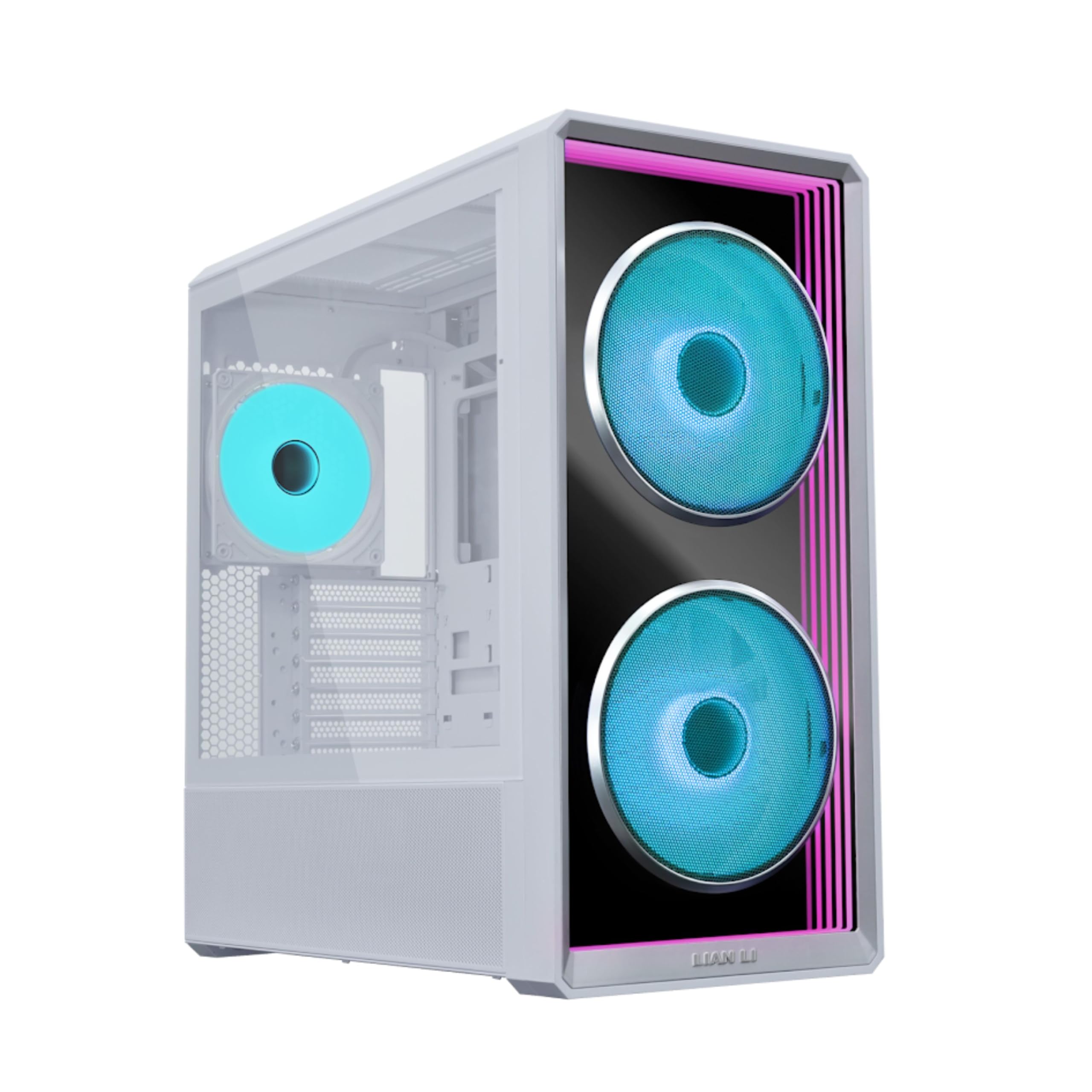
Figure 1: Lian Li LANCOOL 217 INF White PC Case with internal components and purple lighting.
2. Key Features
- Infinity Mirror Front Panel: Features a built-in tempered glass infinity mirror design, enhanced by two pre-installed 170mm ARGB front fans for visual effects and strong airflow.
- Three Pre-Installed Fans: Includes three ARGB fans (two 170mm at the front and one 140mm at the rear) for enhanced system cooling and dynamic lighting.
- Relocatable I/O Module: The I/O module can be installed at the top or bottom of the case for easy access, featuring an M1 button for front panel lighting and an M2 button for ARGB fan lighting.
- Two PSU Mounting Orientations: Offers flexibility with two PSU mounting options, supporting up to 220mm in length, allowing users to choose based on PSU size and cable management needs.
- Enhanced Airflow Design: Precision-cut intake openings ensure strong airflow while maintaining a sleek design, optimizing cooling performance.
- Effortless Lighting Control: Supports seamless synchronization via motherboard software or wireless control for a stunning display.
3. Setup Instructions
3.1 Unpacking and Initial Inspection
Carefully remove the case from its packaging. Inspect for any signs of damage during transit. Remove any protective films from glass panels.
Video 1: Demonstrates the removal of the side glass panel and protective film from the Lian Li 217 INF computer case.
3.2 Motherboard Installation
The LANCOOL 217 INF supports various motherboard sizes. Ensure your motherboard fits within the specified dimensions.

Figure 2: Motherboard compatibility diagram for ATX, Micro-ATX, Mini-ITX, E-ATX (max width 280mm), and SSI-EEB (max width 330mm). Back-connect motherboard support for ATX and Micro-ATX.
For E-ATX motherboards, the right-side bracket needs to be flipped. For SSI-EEB motherboards, remove the shielding plate on the right-side bracket and the rubber grommets for cable routing.

Figure 3: E-ATX and SSI-EEB Motherboard Support details.
3.3 Fan and Radiator Installation
The case comes with three pre-installed ARGB fans: two 170mm at the front and one 140mm at the rear. Additional fan and radiator configurations are supported.

Figure 4: Comprehensive Fan/Radiator Support. Supports up to 360mm radiator (max thickness 85mm).
The top radiator bracket is fully removable for easier hardware installation. Removing the bracket also removes the left-side frame bar, creating more space.

Figure 5: Removable top radiator bracket for fast and easy installation.
3.4 Power Supply Unit (PSU) Installation
The LANCOOL 217 INF offers two PSU mounting orientations for flexibility.
- Standard Mode: PSU connectors face the front, supporting ATX PSUs up to 220mm in length.
- Rotated Mode: PSU is turned 90 degrees with connectors facing the right side, supporting compact PSUs up to 180mm. This optimizes cable routing and allows for bottom fans to cool the GPU.

Figure 6: Dual PSU Mounting, Flexible Builds.
The case includes screws for 120mm fan installation, allowing fans to be mounted on the PSU shroud for additional airflow. Alternatively, two 120mm fans can be installed beneath the PSU cover.

Figure 7: Flexible Installation Options for additional fans.
3.5 Drive Support
The case provides ample storage options:
- Behind motherboard tray: 2 x 2.5" SSDs or 1 x 2.5" SSD (when using a rear-mounted Micro-ATX motherboard)
- HDD cage: 2 x 3.5" HDD + 2 x 2.5" SSD (or 2 x 3.5" HDD or 2 x 2.5" SSD)
- PSU shroud cover: 1 x 2.5" SSD

Figure 8: Drive Support locations. Note: The second HDD cage can only be installed when the PSU is in the rotated orientation. Installing two HDD cages in the standard layout will cause interference with the power supply.
3.6 GPU Compatibility
The LANCOOL 217 INF supports GPUs up to 380mm in length and includes an adjustable anti-sag bracket for secure fit.

Figure 9: Large GPU, Exceptional Compatibility.
The PCIe slot bracket can be turned 90 degrees to support vertical GPU mounting. This allows the bottom fan to be moved under the PSU shroud for a hidden look.

Figure 10: Flexible Design, Versatile Layouts for GPU mounting.
When rotating the bracket for vertical GPU mounting, it is recommended to remove the first and second PCIe slot covers to prevent interference with the motherboard.

Figure 11: Important note regarding PCIe slot covers during vertical GPU installation.
3.7 Relocatable I/O Panel
The I/O module can be installed at the top or bottom of the case to suit desktop or floor-standing setups.

Figure 12: Relocatable I/O Panel Top or Bottom.
4. Operating Instructions
4.1 Lighting Control
The top I/O panel integrates an M1 button for front panel lighting and an M2 button for fan lighting effects. Users can choose between three lighting control methods:
- Through L-Connect 3 (wireless controller required)
- Via the I/O buttons
- Using motherboard sync

Figure 13: Lighting Control, Made Simple. M1 controls front panel infinity mirror lighting, M2 controls front 170mm fan lighting.
The case features a built-in wireless receiver in the rear hub for seamless control through L-Connect 3 and L-Wireless technology. Note: The L-Wireless controller is sold separately. The built-in rear hub does not support external fan connections.

Figure 14: Infinity Mirror, Total Control with L-Connect 3.
4.2 Fan Speed Control
In default mode, both 170mm and 140mm fans run via PWM sync with the motherboard. In wireless mode, L-Connect 3 enables independent control of fan speed and lighting for a customized setup.

Figure 15: Customize Your Lighting & Fan Speed Wirelessly using L-Connect 3.

Figure 16: Fan control modes: PWM Sync with motherboard vs. independent wireless control.
Video 2: Official product video showcasing the Lian Li LANCOOL 217 INF case features, including lighting and fan capabilities.
5. Maintenance
The front fans come with a metal mesh dust filter that prevents dust intake. The filter can be easily detached for quick cleaning.

Figure 17: Front and Rear Fan Specifications and Dust Filter information.
6. Specifications
| Feature | Description |
|---|---|
| Product Name | LANCOOL 217 INF |
| Model | LAN217INFW (White), LAN217INFX (Black) |
| Type | Mid-tower chassis |
| Dimensions (D x W x H) | 482mm x 238mm x 503mm (19.8 x 9.37 x 18.98 inches) |
| Materials | Steel, Tempered Glass |
| Motherboard Support | SSI-EEB (width <330mm), E-ATX (width <280mm), ATX, Micro-ATX, Mini-ITX |
| Back-Connect Motherboard Support | ATX, Micro-ATX |
| PSU Length Limit | Standard orientation: Up to 220mm; Rotated orientation: Up to 180mm |
| Fan Support | Front: 2x170mm (pre-installed); Top: 3x120mm or 2x140mm; Rear: 1x140mm (pre-installed); Bottom (under PSU shroud): 3x120mm; PSU shroud cover: 1x120mm |
| Radiator Support | Top: 360/280mm (max thickness ≤85mm); Rear: 120/140mm |
| Drive Bays | Behind motherboard tray: 2x2.5" SSD or 1x2.5" SSD (with rear-mounted Micro-ATX); HDD cage: 2x3.5" HDD + 2x2.5" SSD; PSU shroud cover: 1x2.5" SSD |
| GPU Clearance | 380mm (max) |
| CPU Cooler Height | 170mm (max) |
| Expansion Slots | 7 |
| Front I/O | 1x Power button, 2x USB 3.0, 1x USB 3.2 Type-C, 1x Audio/Microphone Combo Jack |
| Dust Filters | Bottom x1, Front x1 (USB version only) |
| Integrated Hub | ARGB/FAN HUB (Sync Motherboard x3/ARGB Header x1) |
| Hardware Protection | 1 year (fans: 3 years) |
Figure 18: Detailed Specifications Table for LANCOOL 217 INF.
7. Troubleshooting
No specific troubleshooting information is provided in this manual. For common issues, please refer to the Lian Li support website or contact customer service.
8. Warranty and Support
The Lian Li LANCOOL 217 INF comes with a 1-year hardware warranty. Fans are covered by a 3-year warranty. For technical support, warranty claims, or additional information, please visit the official Lian Li website or contact your local distributor.


