
isinwheel U1 Mini Electric Bike for Adults and Teens
isinwheel U1 Mini Electric Bike User Manual
Model: U1 Mini Electric Bike for Adults and Teens

1. Introduction and Overview
The isinwheel U1 Mini Electric Bike is designed for adults and teens seeking a portable, efficient, and versatile electric bicycle. Featuring a powerful 500W motor and smart uphill technology, it offers a smooth and assisted riding experience. Its compact, foldable design makes it ideal for urban commuting, travel, and easy storage.

Image: The isinwheel U1 Mini Electric Bike, showcasing its compact and ready-to-ride form.
Key Features:
- Smart Uphill Technology: 500W motor with intelligent algorithms for effortless incline conquering and tailored assistance.
- Fast Charge Battery: 36V 7.8Ah replaceable battery, fully hidden within the frame, offering 25 miles range and 3-4 hour fast charging. UL2849 Certified.
- Excellent Portability: Foldable handlebars, pedals, and height-adjustable seat for minimal storage space (<0.15m³).
- Safe Riding: Dual disc brakes for all-weather stopping power, integrated front and rear lights for enhanced visibility.
- Variable Ride Modes: Choose between pure electric, pedal assist (3 levels), and normal bike mode.
2. Setup and Assembly
The isinwheel U1 Mini Electric Bike comes partially assembled. Follow these steps to complete the setup and prepare your bike for its first ride.
Unfolding the Bike:
- Carefully remove the bike from its packaging.
- Locate the main folding latch on the frame. Release the latch and unfold the main frame until it locks securely into place.
- Unfold the handlebars. Locate the handlebar folding mechanism, release it, and raise the handlebars until they lock upright. Ensure the safety latch is engaged.
- Unfold the pedals by pushing them outwards until they click into their riding position.
Adjusting the Seat:
- Loosen the quick-release lever located on the seat post.
- Adjust the seat height to a comfortable position where your feet can touch the ground while seated, or slightly bent when pedaling.
- Securely tighten the quick-release lever.
Initial Charge:
Before your first ride, fully charge the battery. Connect the charger to the bike's charging port and then to a power outlet. The indicator light on the charger will change when fully charged (typically 3-4 hours).

Image: Demonstrates the 10-second quick fold feature, highlighting the bike's portability for transport in a car or on public transit.
3. Operating Instructions
Familiarize yourself with the controls and riding modes of your isinwheel U1 Mini Electric Bike for an optimal experience.
Powering On/Off:
- To power on, press and hold the 'M' button on the display panel for a few seconds.
- To power off, press and hold the 'M' button again until the display turns off.
Display Panel:
The intelligent display shows key information such as speed, battery level, assist level, and distance. Use the '+' and '-' buttons to adjust settings and navigate through information.

Image: The intelligent display provides real-time riding data and allows for mode adjustments.
Riding Modes:
The U1 offers four distinct riding modes to suit your preference:
- Pure Electric Mode (Assist 1-3): Engage the throttle for full electric power without pedaling.
- Pedal Assist Mode (Assist 1-3): The motor provides assistance as you pedal. Adjust the assist level using the '+' and '-' buttons for more or less power.
- Normal Bike Mode (Assist 0): Ride the bike like a traditional bicycle with no electric assistance.
- Walk Assist Mode: Long press the '-' button to activate walk assist, which provides a low-speed boost for pushing the bike.
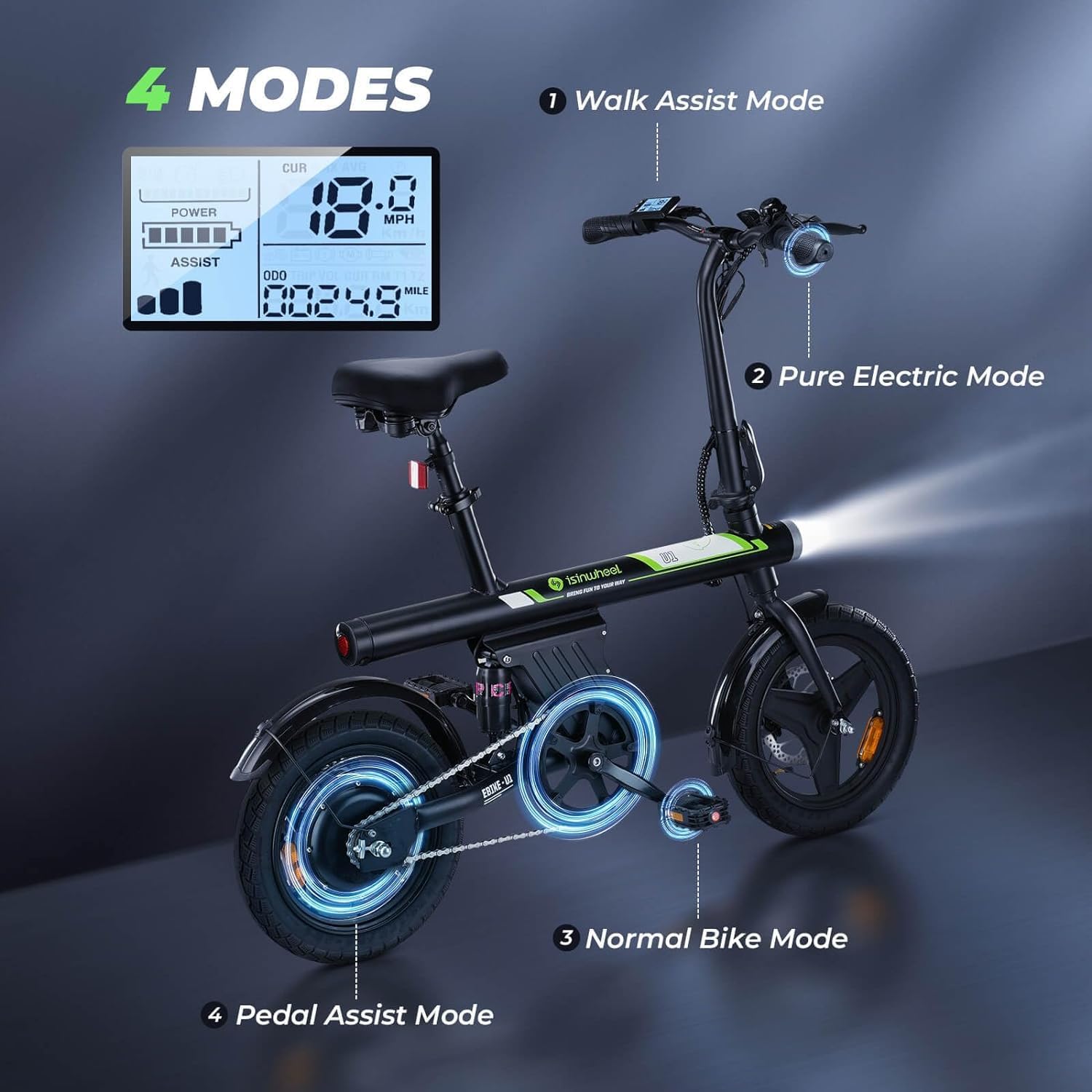
Image: Visual representation of the four available riding modes and how they are displayed on the control panel.
Throttle and Brakes:
- Throttle: Located on the handlebar, twist or press the throttle to engage pure electric power. The bike can reach speeds up to 20 mph.
- Brakes: The bike is equipped with dual disc brakes (front and rear) for reliable stopping power. Always use both brakes simultaneously for effective and safe braking.
4. Maintenance
Regular maintenance ensures the longevity and safe operation of your isinwheel U1 Mini Electric Bike.
Battery Care:
- Charge the battery regularly, even if not in frequent use, to maintain its health.
- Avoid completely draining the battery before recharging.
- Store the bike and battery in a cool, dry place away from direct sunlight and extreme temperatures.
Brake System:
- Regularly check the brake levers for proper tension and responsiveness.
- Inspect brake pads for wear and replace them if necessary.
- Ensure disc rotors are clean and free from oil or grease.

Image: Highlights the safety features including the dual disc brakes and integrated lighting system.
Tires and Chain:
- Check tire pressure before each ride and inflate to the recommended PSI.
- Keep the chain clean and lubricated to ensure smooth operation and prevent rust.
General Cleaning:
Wipe down the bike with a damp cloth after rides, especially if exposed to dirt or moisture. Avoid using high-pressure washers directly on electrical components.
5. Troubleshooting
This section addresses common issues you might encounter with your electric bike.
Bike Not Powering On:
- Ensure the battery is fully charged and properly seated in its compartment.
- Check all cable connections to ensure they are secure.
- Verify that the power button on the display is pressed and held correctly.
Motor Not Assisting / No Power:
- Check the battery level on the display. A low battery will reduce or eliminate assistance.
- Ensure you are in a pedal assist mode (Assist 1-3) or using the throttle correctly.
- Inspect the motor and wiring for any visible damage.
Brakes Squeaking or Rubbing:
- Squeaking can often be resolved by cleaning the brake rotors and pads with a specialized brake cleaner.
- If brakes are rubbing, the calipers may need adjustment. Loosen the caliper bolts slightly, center the caliper over the rotor, and re-tighten. If unsure, consult a professional bike mechanic.
Unusual Noises:
- Inspect the chain for proper lubrication and tension.
- Check all bolts and fasteners for tightness, especially on wheels, handlebars, and seat post.
- If the noise persists, discontinue use and contact customer support.
6. Specifications
Detailed technical specifications for the isinwheel U1 Mini Electric Bike.
| Specification | Value |
|---|---|
| Bike Type | Electric Bike |
| Model Name | U1 Mini Electric Bike for Adults and Teens |
| Motor Wattage | 500 watts |
| Top Speed | 20 mph |
| Battery | 36V 7.8Ah (280.8 Wh) replaceable |
| Range (Pedal Assist) | Up to 25 miles |
| Charge Time | 3-4 hours |
| Wheel Size | 14 Inches |
| Frame Material | Carbon Steel |
| Brake Style | Disc (Dual) |
| Item Weight | 52 Pounds |
| Maximum Weight Recommendation | 264 Pounds |
| Minimum User Height | 50 Inches |
| Electric Assist Type | Throttle-on-demand, Pedal-assist |
| Certifications | UL2849 Certified |

Image: Dimensions and weight specifications for user comfort and fit.
7. Warranty and Support
isinwheel is committed to providing quality products and excellent customer service.
Warranty Information:
The isinwheel U1 Mini Electric Bike comes with a limited warranty. For specific details regarding coverage and duration, please refer to the warranty card included with your product or contact customer support.
Returns:
This product is eligible for 30-day easy returns. Please refer to your purchase platform's return policy for detailed instructions.
Customer Support:
For any questions, technical assistance, or warranty claims, please contact isinwheel customer support:

Image: Contact information for isinwheel customer support.
- Call Center: 1(888) 293-5788
- Live Chat/Email: support@isinwheel.com
Our dedicated support team is available to assist you with any inquiries.
Ask a question about this manual
Ask about setup, troubleshooting, compatibility, parts, safety, or missing instructions. Manuals+ will review the question and use this page’s manual context to help answer it.