
Introduction
Thank you for choosing the Lamicall Vacuum Magnetic Car Phone Holder. This manual provides detailed instructions for the proper setup, operation, and maintenance of your device. Please read this manual thoroughly before use to ensure optimal performance and safety.
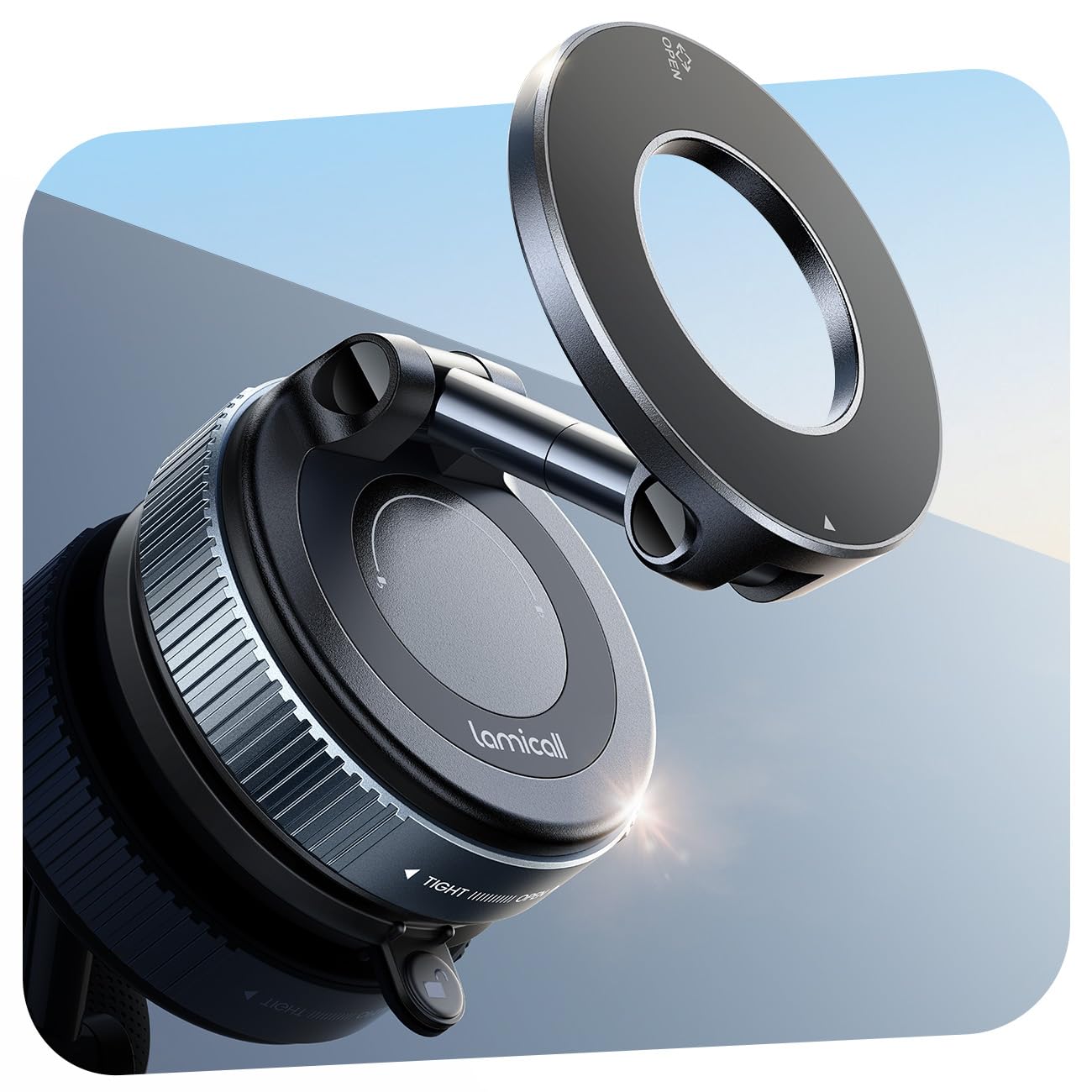
Image: Front view of the Lamicall Vacuum Magnetic Car Phone Holder. This image displays the holder's magnetic head, adjustable arm, and vacuum suction cup base.
Setup Instructions
Follow these steps to properly install your Lamicall Vacuum Magnetic Car Phone Holder:
1. Preparing the Mounting Surface
Ensure the chosen mounting surface (windshield, dashboard, or other smooth surface) is clean, dry, and free from dust or grease. Use a clean cloth to wipe the area.
2. Attaching the Vacuum Suction Cup
- Place the vacuum suction cup base firmly onto the prepared smooth surface.
- Twist the base clockwise until it locks securely. This action creates a strong vacuum seal.
Note: For optimal suction, the surface must be smooth and non-porous.
Image description: An image here would show the suction cup being placed on a smooth surface and the twisting mechanism being engaged.
3. Using the Upgraded PC Pad (for textured/porous surfaces)
If your dashboard or desired surface is textured or porous, use the included PC pad:
- Peel off the protective film from one side of the PC pad.
- Firmly stick the PC pad onto the desired textured or porous surface. Press down for a few seconds to ensure adhesion.
- Attach the vacuum suction cup base onto the smooth surface of the PC pad, following step 2.
Image description: An image here would illustrate the application of the PC pad to a textured dashboard, followed by the attachment of the suction cup to the pad.
4. Screen Back Installation (for central control screens)
For vehicles with central control screens (e.g., Tesla, Audi, Mercedes-Benz), the holder can be attached directly to the back of the screen:
- Clean the back of the central control screen thoroughly.
- Attach the vacuum suction cup to the clean, smooth back of the screen as described in step 2.
- After securing the base, rotate the extension rod of the holder to position the magnetic head clearly in front of the screen for optimal viewing.
Image description: An image here would show the holder mounted on the back of a car's central control screen, with the phone positioned for viewing.
Operating Instructions
1. Attaching Your Phone
- For iPhone 17/16/15/14/13/12 series or Magnetic Phone Cases: Simply bring your phone close to the magnetic head of the holder. The powerful N52 magnets will automatically align and secure your device.
- For Other Phone Models or Non-Magnetic Phone Cases: Use the included metal plate.
- Attach the metal plate to the back of your phone or phone case. Ensure it is centered for best magnetic connection.
- Once the metal plate is attached, bring your phone close to the magnetic head of the holder.
Note: The included metal plate is designed not to interfere with wireless charging or phone signals.
Image description: An image here would show a phone being attached to the magnetic head, demonstrating the strong magnetic connection. Another image could show the metal plate being applied to a non-magnetic phone case.
2. Adjusting the Viewing Angle
The holder features dual-foldable metal arms and a 360° full rotation capability for flexible positioning:
- Rotation: Gently rotate your phone or the magnetic head to achieve a horizontal or vertical viewing orientation.
- Tilt Adjustment: Use the dual-foldable metal arms to adjust the tilt and distance of your phone, ensuring it is at eye level and does not obstruct your view of the road.
Image description: An image here would demonstrate the 360° rotation and the articulation of the dual-foldable arms to adjust the phone's position.
Maintenance
To ensure the longevity and optimal performance of your Lamicall phone holder, follow these maintenance guidelines:
- Cleaning the Suction Cup: If the suction cup loses its stickiness, rinse it with warm water and let it air dry completely. Do not use harsh chemicals or abrasive materials. The base is washable and reusable.
- Cleaning the Holder: Wipe the holder's body and magnetic surface with a soft, damp cloth. Avoid excessive moisture.
- Storage: When not in use for extended periods, detach the holder and store it in a cool, dry place away from direct sunlight.
Image description: An image here could show the suction cup being rinsed under water.
Troubleshooting
| Problem | Possible Cause | Solution |
|---|---|---|
| Suction cup does not stick firmly. |
|
|
| Phone does not attach magnetically. |
|
|
| Holder feels loose after installation. |
|
|
Product Specifications
- Brand: Lamicall
- Model Name: BCSP20
- Model Number: STCD10-EU-B
- Color: Black
- Mounting Type: Windscreen, Dashboard, Any smooth surface
- Compatible Devices: iPhone 17/16/15/14/13/12 series or magnetic phone cases. Other phones or non-magnetic cases require included metal ring.
- Magnetic Strength: 20 x N52 powerful magnets
- Maximum Hold Weight: Up to 4.4 lbs (approximately 2 kg)
- Material: Zinc Acrylonitrile Butadiene Styrene
- Adjustability: 360° rotation, dual-foldable metal arms for tilt adjustment
- Water Resistance: Not Water Resistant
Warranty Information
Specific warranty details for the Lamicall Vacuum Magnetic Car Phone Holder are not provided in this document. For information regarding warranty coverage, terms, and conditions, please refer to the product packaging or visit the official Lamicall website.
Customer Support
If you encounter any issues or have questions not covered in this manual, please contact Lamicall customer support through their official website or the retailer from whom you purchased the product. Please have your model number (STCD10-EU-B) and purchase details ready when contacting support.
Instructional Videos
No official product videos from the seller were provided in the available data. Please check the Lamicall official website or product page for any instructional videos that may be available.

